
Yomitoki - Conversor de Artigos em Notas de Leitura
kkur0same/yomitoki
Converte papers em notas técnicas HTML com código executável e referências de implementação
Ver no GitHubSkill que transforma artigos de pesquisa (arXiv, PDF) em notas de leitura técnicas em HTML auto-contidas, com código executável, diagramas Mermaid e referências a linhas exatas de código-fonte. Produz documentos estruturados que respondem por que o artigo existe, qual é sua contribuição, por que funciona e como implementar.
Instalação
npx convez-ai kkur0same/yomitoki1 comando no terminal: detecta o formato do repositório (marketplace ou plugin avulso) e instala via Claude Code. Requer Node 18+ e o Claude Code instalado.
Métricas
Casos de uso
- Estudar artigos de machine learning com código verificado
- Documentar técnicas de pesquisa para equipes de IA
- Criar material de referência para implementação de papers
Veredito

Ferramenta especializada e bem pensada para quem estuda papers com profundidade. Exige trabalho manual (cobertura.md, seções HTML, referências de código), mas gera saída didática e verificável. Ideal para pesquisadores e engenheiros que precisam absorver e documentar técnicas complexas.
README
A tradução para o português deste README ainda está na fila.
yomitoki
Turn a research paper into a faithful, technical, code-augmented HTML reading note.
yomitoki (読み解き, "reading and interpreting") is an agent skill plus a small Python toolchain that converts a paper (arXiv link, arXiv ID, PDF path, or PDF URL) into a self-contained HTML study note. The note is written like a strong technical blog post: it leads with the contrast between the old approach and the paper's move, anchors figures to the prose they explain, and links claims to real source-code line ranges.
A finished note answers five questions:
- Why did this paper need to exist?
- What exactly is the move the paper makes?
- Why does that move work?
- Where does it win, by how much, and where does it stop winning?
- How would I start implementing or verifying it?
See it in action
An annotated tour of one rendered note (the online-softmax example):
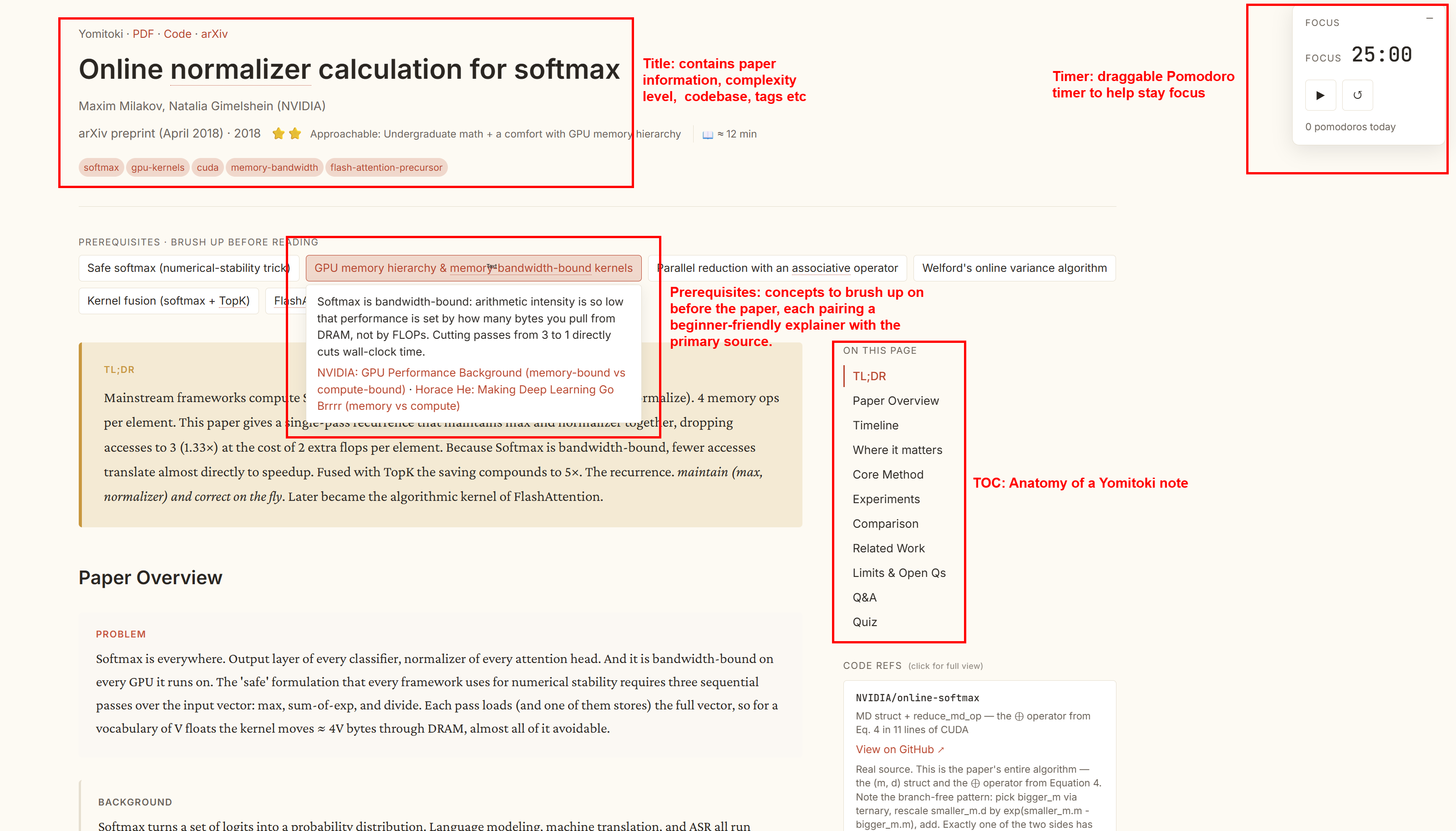
Anatomy: header metadata and tags, a draggable focus timer, prerequisites (a beginner intro plus the primary source per concept), the section map, and inline code refs.
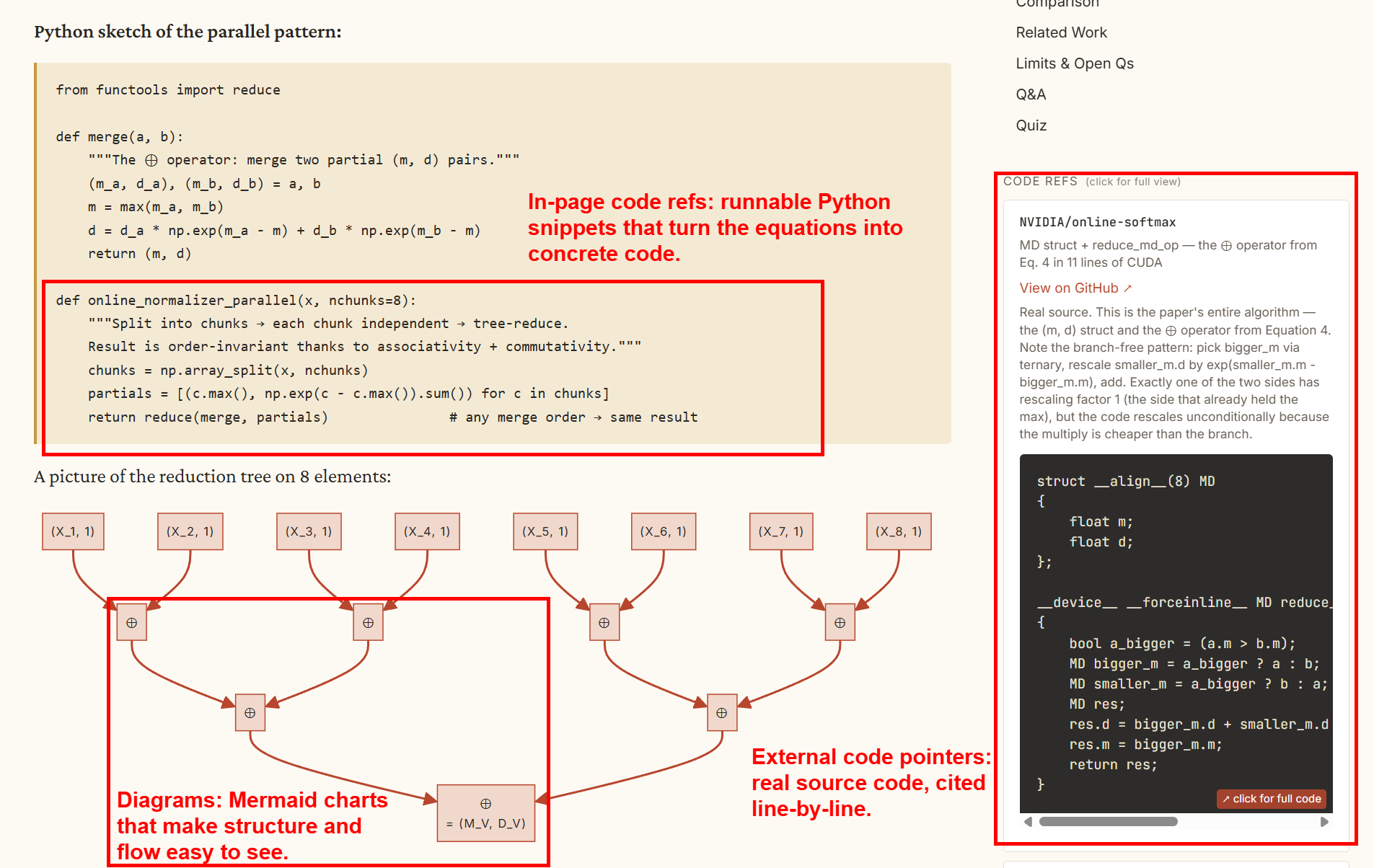
Method detail: runnable Python snippets that turn the equations into code, Mermaid schematics for structure and flow, and external pointers into the real implementation at exact line ranges.
▶ Check out the live demo: open the online-softmax note rendered.
What it produces
A single index.html (plus styles.css, main.js, and curated figures/) containing: header metadata, prerequisites, TL;DR, paper overview, a verified tech-lineage timeline, a code-augmented core-method section, experiments, a methods comparison, limitations, and a Q&A + quiz. KaTeX renders math; Mermaid renders schematics when the paper warrants one.
How it works
The pipeline is two scripts plus model-authored working files:
paper (arXiv / PDF)
   │   scripts/extract.py
   ▼
extracted.txt + figures/ + figures.json + skeleton analysis.json
   │   you (or an agent) author coverage.md, compact analysis.json,
   │   coderefs.json, and sections/*.html
   ▼
   │   scripts/assemble.py --check --strict
   ▼
index.html  (self-contained reading note)
extract.py pulls text and figures from the paper. A human or an agent then writes coverage.md as the section plan and coverage ledger, keeps analysis.json compact, puts long prose in sections/*.html, and records code pointers in coderefs.json. assemble.py renders everything to HTML and validates it with --check; use --check --strict before shipping to require real method anchors and author-repo code previews.
Use as a Claude Code skill
Clone into your Claude Code skills directory so the agent can invoke it:
git clone git@github.com:kkur0same/yomitoki.git ~/.claude/skills/yomitoki
Then in Claude Code:
/yomitoki <arxiv-url | pdf-path | paper-title>
The agent reads SKILL.md and drives the workflow end to end.
Use in a Codex session
Install as a user skill so Codex can invoke it from any repo:
git clone git@github.com:kkur0same/yomitoki.git ~/.agents/skills/yomitoki
Or install it for one repository:
mkdir -p .agents/skills
git clone git@github.com:kkur0same/yomitoki.git .agents/skills/yomitoki
Then start Codex in that repo and invoke the skill explicitly:
$yomitoki <arxiv-url | pdf-path | paper-title>
You can also open /skills in Codex CLI/IDE and select yomitoki. Codex reads SKILL.md when the skill is selected and uses the bundled references/scripts as needed. If the skill does not appear after installing, restart Codex.
For distribution beyond local installs, package Yomitoki as a Codex plugin; the repo currently works as a direct skill folder.
Use standalone
pip install -r requirements.txt          # pypdf, pymupdf; pandoc optional

# 1. Extract
python3 scripts/extract.py <arxiv-url|pdf-path|pdf-url> --out /tmp/yomitoki/my-paper/

# 2. Author coverage.md, compact analysis.json, sections/*.html, and coderefs.json
#    (see SKILL.md and references/renderer-contract.md)

# 3. Assemble + validate
python3 scripts/assemble.py \
  --analysis  /tmp/yomitoki/my-paper/analysis.json \
  --coderefs  /tmp/yomitoki/my-paper/coderefs.json \
  --figures   /tmp/yomitoki/my-paper/figures/ \
  --assets    assets \
  --out       ./yomitoki-out/my-paper/ \
  --check --strict
Open the resulting yomitoki-out/my-paper/index.html in a browser.
Repository layout
| Path | Purpose |
|---|---|
SKILL.md | Skill definition and authoring workflow the agent follows. |
scripts/extract.py | Paper extraction: text, figures, skeleton analysis.json. |
scripts/assemble.py | HTML rendering and --check validation (stdlib only). |
references/renderer-contract.md | Renderer schema, valid keys, code-ref shape, and assemble command. |
references/code-ref-waterfall.md | How to source and anchor code references. |
references/diagrams.md | Figure curation and Mermaid safety. |
references/method-example.md | How to structure core method section. |
assets/ | styles.css and main.js copied into each note. |
examples/ | Rendered sample notes (see examples/README.md). |
Examples
examples/ holds rendered reading notes as reference output. Start with examples/online-softmax/index.html (open in a browser).
Requirements
- Python 3.10+
pypdfandpymupdf(pip install -r requirements.txt)pandocoptional, for cleaner text extraction