
AIKD – Memória Instantânea para Agentes de IA
gelutjari/aikd
Memória híbrida BM25+vetorial para agentes de código com latência de 0,21ms
Ver no GitHubMCP Server ultrarrápido que oferece aos agentes de IA acesso instantâneo à memória semântica e BM25 do seu codebase em Rust. Funciona 100% localmente, sem envio de código para a nuvem, indexando 10 mil chunks em 0,21ms com setup em apenas 30 segundos.
Instalação
npx convez-ai gelutjari/aikd1 comando no terminal: detecta o formato do repositório (marketplace ou plugin avulso) e instala via Claude Code. Requer Node 18+ e o Claude Code instalado.
Métricas
Casos de uso
- Consultas semânticas em grandes codebases durante debugging e refatoração
- Manutenção de contexto persistente entre sessões do agente de IA
- Busca local de padrões arquiteturais sem exposição de código na nuvem
Veredito

Solução elegante e performática para o problema real de amnesia contextual em agentes de IA. A implementação em Rust com indexação híbrida (BM25+vetorial) e execução 100% local resolve limitações críticas de ferramentas existentes, sendo ideal para equipes que priorizam privacidade e latência baixa.
README
A tradução para o português deste README ainda está na fila.
🧠 AIKD
The Ultra-Fast Local Memory Layer for AI Coding Agents





Give Claude, Cursor, and Cline instant memory of your entire codebase. Written in Rust. Zero cloud dependency. Search 10,000 chunks in 0.21ms.
Install • Quick Start • Demo • Docs
🤔 Why AIKD?
The Problem: AI coding agents are powerful but forgetful. Every new conversation starts from zero — no memory of your codebase, your patterns, your architecture.
| Pain Point | Without AIKD | With AIKD |
|---|---|---|
| 😵 Context Amnesia | Agent asks "what does this file do?" every session | Instant recall of entire codebase |
| 🐌 Slow Search | Python-based RAG takes 500ms+ per query | Rust-powered BM25+Vector in 0.21ms |
| ☁️ Cloud Dependency | Your code sent to external servers | 100% local, zero data leaves your machine |
| 🔧 Complex Setup | Install Python, pip, CUDA, models... | Single binary, one command install |
How AIKD Compares
| Feature | grep | LlamaIndex | ai-devkit | AIKD |
|---|---|---|---|---|
| Speed | Fast | Slow | Medium | ⚡ 0.21ms |
| Semantic Search | ❌ | ✅ | ✅ | ✅ Hybrid |
| Local Only | ✅ | ❌ | ❌ | ✅ 100% |
| MCP Native | ❌ | ❌ | ❌ | ✅ Built-in |
| Memory Usage | Low | High (Python) | High | 📊 27% RAM |
| Setup Time | 0s | ~10min | ~5min | ⏱️ 30s |
✨ Key Features
🔍 Search Engine
- Hybrid Search: BM25 (Tantivy) + Vector (ONNX all-MiniLM-L6-v2, 384d)
- Reciprocal Rank Fusion: Combines keyword + semantic results intelligently
- Incremental Indexing: Blake3 hashing for zero-redundancy scans
- Resource Adaptive: Auto-detects CPU/GPU and adjusts batch sizes
🤖 AI Integration
- MCP Protocol: Native support for Model Context Protocol
- 7 Built-in Tools:
scan,query,embed,stats,remember,recall,status - Auto-Registration: Works with Claude Code, Cursor, Cline, Continue, Windsurf, MiMoCode
- Session Memory: Persistent conversation context across sessions
🛠️ Developer Experience
- Single Binary: No Python, no Node, no dependencies
- File Watcher: Auto-reindex on file changes
- REST API: HTTP endpoint on port 9090 for custom integrations
- CLI First: Full control from terminal
🎬 See It In Action
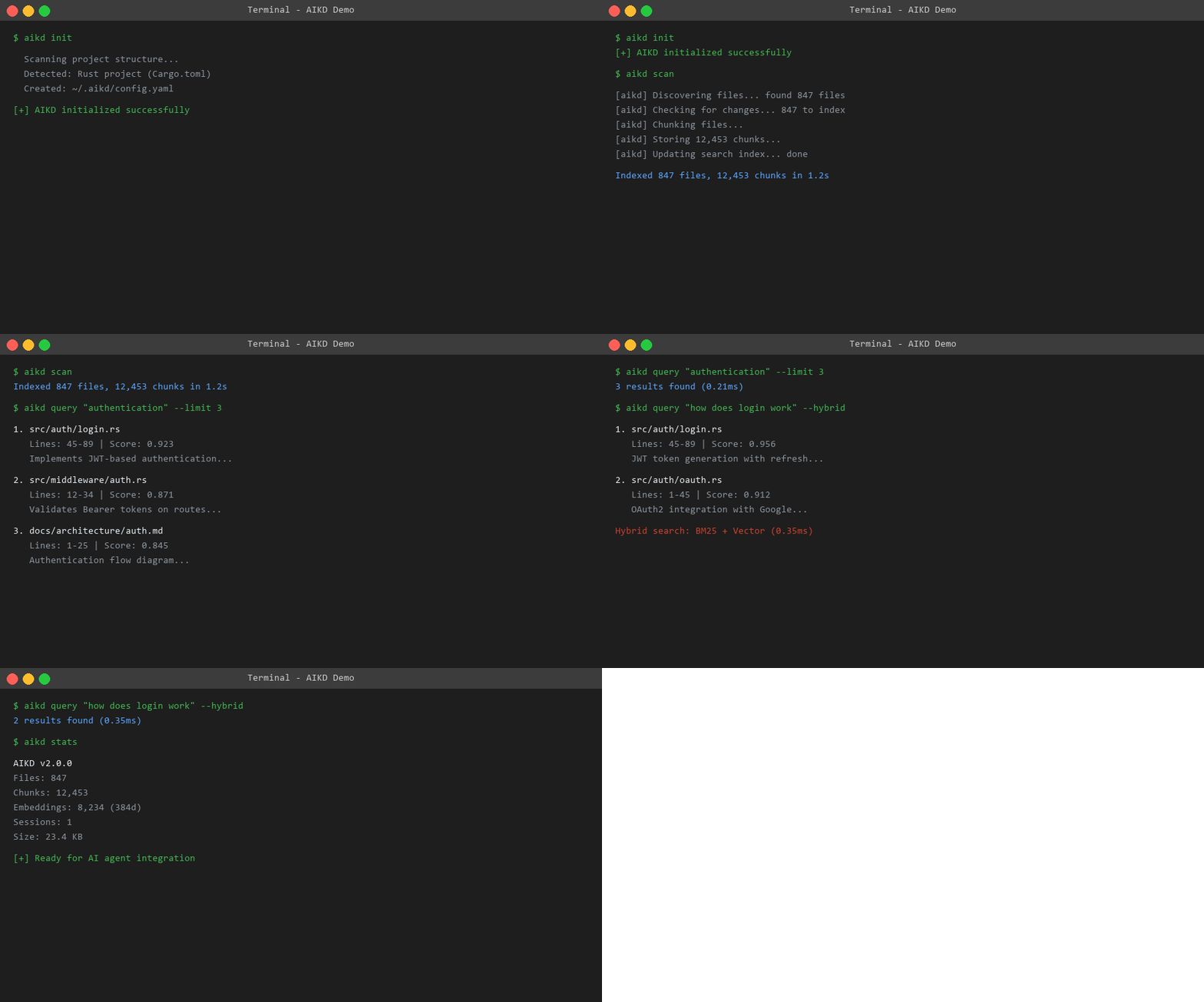
$ aikd init
✅ AIKD initialized for project

$ aikd scan
📊 Indexed 847 files, 12,453 chunks in 1.2s

$ aikd query "authentication flow"
1. src/auth/login.rs (Lines 45-89, Score: 0.923)
   Implements JWT-based authentication with refresh tokens...

2. src/middleware/auth.rs (Lines 12-34, Score: 0.871)
   Validates Bearer tokens on protected routes...

3. docs/architecture/auth.md (Lines 1-25, Score: 0.845)
   Authentication flow diagram and security considerations...
📦 Installation
Recommended (One-Line)
Linux / macOS:
curl -sSf https://raw.githubusercontent.com/gelutjari/aikd/main/install.sh | bash
Windows (PowerShell):
irm https://raw.githubusercontent.com/gelutjari/aikd/main/install.ps1 | iex
Alternatives
cargo install aikd
brew install gelutjari/tap/aikd
git clone https://github.com/gelutjari/aikd.git
cd aikd
cargo build --release
cp target/release/aikd ~/.local/bin/
docker run -v $(pwd):/workspace -p 9090:9090 ghcr.io/gelutjari/aikd:latest
⚡ Quick Start (3 minutes)
Step 1: Initialize
cd your-project
aikd init
Creates ~/.aikd/config.yaml with smart defaults based on your project type (Rust, Node, Python, Go). It detects .git, Cargo.toml, package.json, etc. and sets appropriate file filters.
Step 2: Scan Your Codebase
aikd scan
- Walks directory tree (skipping
node_modules,.git,target, etc.) - Chunks files by semantic boundaries (functions, headings)
- Generates BM25 index (Tantivy) and vector embeddings (ONNX)
- Stores everything in local SQLite database
Step 3: Search
# Keyword search (fast)
aikd query "error handling"

# Semantic search (smart)
aikd query "how does login work" --hybrid

# Get JSON output for scripting
aikd query "database connection" --json
Step 4: Connect to Your AI Agent
AIKD auto-registers via MCP. Just restart your AI agent after running aikd scan.
The MCP config is at ~/.aikd/mcp.json:
{
  "mcpServers": {
    "aikd": {
      "command": "aikd",
      "args": ["serve"]
    }
  }
}
# Start the daemon
aikd daemon

# Query via HTTP
curl "http://localhost:9090/api/query?q=authentication&limit=5"
🎛️ Usage Modes
                    ┌─────────────────┐
                    │   How to use    │
                    │     AIKD?       │
                    └────────┬────────┘
                             │
            ┌────────────────┼────────────────┐
            ▼                ▼                ▼
     ┌──────────┐     ┌──────────┐     ┌──────────┐
     │   CLI    │     │   MCP    │     │ REST API │
     │  Mode    │     │  Server  │     │  Daemon  │
     └──────────┘     └──────────┘     └──────────┘
     Best for:        Best for:        Best for:
     • Quick search   • AI agents      • Web apps
     • Scripts        • Claude Code    • Custom UIs
     • CI/CD          • Cursor         • Team shared
CLI Mode (default):
aikd query "rust error handling" --limit 5
aikd stats
aikd status
MCP Server (for AI agents):
aikd serve # Starts stdio MCP server
REST Daemon (background service):
aikd daemon              # Start in background
aikd daemon foreground   # Start in foreground
aikd daemon-stop         # Stop daemon
📊 Benchmark Results
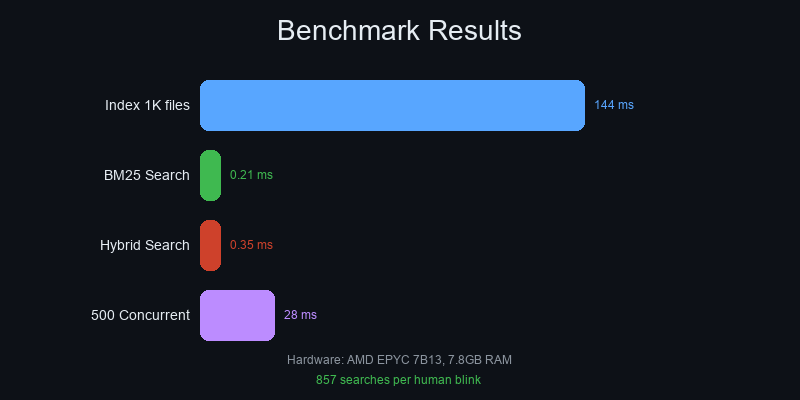
Hardware: AMD EPYC 7B13, 7.8GB RAM, NVMe SSD
| Operation | Time | Throughput |
|---|---|---|
| Index 1,000 files | 144ms | 6,934 files/s |
| BM25 Search | 0.21ms | 4,762 queries/s |
| Hybrid Search | 0.35ms | 2,857 queries/s |
| Concurrent (500) | 28ms | 17,669 queries/s |
| Embedding (batch) | 12ms/batch | ~800 chunks/s |
Resource Usage:
CPU: ████████░░░░░░░░░░░░ 22.9%
RAM: █████░░░░░░░░░░░░░░░ 27.4%
💡 Real-world context: A human eye blink takes ~300ms. In that time, AIKD can complete 857 hybrid searches across your entire codebase.
⚙️ Configuration
Default config (~/.aikd/config.yaml):
version: 2.0.0
scan:
  include_paths: ["."]
  exclude_paths: ["node_modules", ".git", "target"]
  include_extensions: ["rs", "ts", "py", "md", "json"]
  follow_symlinks: false
chunk:
  max_tokens: 1000
  min_tokens: 100
embedding:
  enabled: true
  model: all-MiniLM-L6-v2
  batch_size: auto
server:
  rest_port: 9090
  auth_token: null
  cors_origins: ["*"]
embedding:
  enabled: true
  batch_size: 8
  device: cpu
resource:
  mode: Low
embedding:
  enabled: true
  batch_size: 64
  device: gpu
resource:
  mode: Max
scan:
  include_extensions: ["md", "txt", "rst"]
  exclude_paths: [".git"]
filter:
  max_file_size: 524288  # 512KB
server:
  rest_port: 9090
  auth_token: "your-secret-token"
  cors_origins:
    - "https://your-team-app.com"
🏗️ Architecture
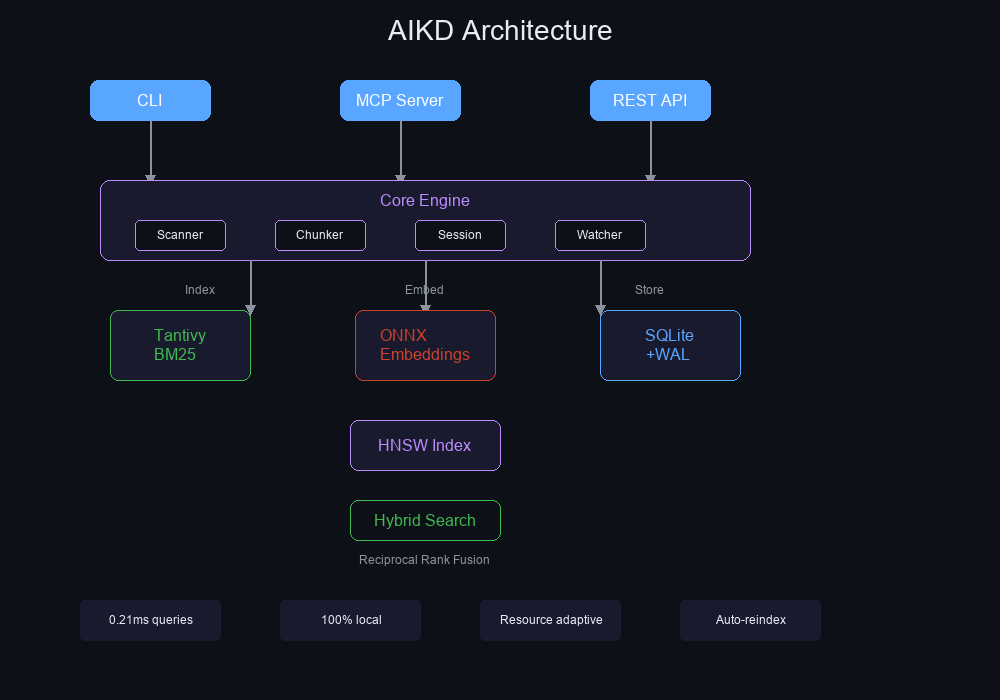
┌─────────────────────────────────────────────────────────────┐
│                        AIKD v2.0.0                          │
├─────────────────────────────────────────────────────────────┤
│                                                             │
│  ┌─────────┐  ┌─────────┐  ┌─────────┐  ┌─────────────┐  │
│  │  CLI    │  │  MCP    │  │  REST   │  │ File Watcher│  │
│  │ (clap)  │  │ (rmcp)  │  │ (axum)  │  │  (notify)   │  │
│  └────┬────┘  └────┬────┘  └────┬────┘  └──────┬──────┘  │
│       │            │            │               │          │
│       └────────────┴────────────┴───────────────┘          │
│                            │                                │
│  ┌─────────────────────────┴──────────────────────────┐    │
│  │                   Core Engine                       │    │
│  ├─────────────┬─────────────┬─────────────────────────┤    │
│  │  Scanner    │   Chunker   │      Session Manager    │    │
│  │ (walkdir)   │(pulldown-   │    (conversation DB)    │    │
│  │             │  cmark)     │                         │    │
│  └──────┬──────┴──────┬──────┴─────────────────────────┘    │
│         │             │                                      │
│  ┌──────┴──────┐ ┌────┴─────┐ ┌──────────────────────┐     │
│  │  Indexer    │ │ Embedder │ │     Storage           │     │
│  │  (Tantivy)  │ │ (ONNX)   │ │   (SQLite + WAL)     │     │
│  │  BM25 +     │ │ 384d     │ │   + r2d2 pool        │     │
│  │  HNSW ANN   │ │ MiniLM   │ │   + blake3 hashing   │     │
│  └─────────────┘ └──────────┘ └──────────────────────┘     │
│                                                             │
└─────────────────────────────────────────────────────────────┘
See docs/ARCHITECTURE.md for detailed breakdown.
🆘 Troubleshooting
Diagnostic Commands:
aikd status --json     # System info
aikd stats             # Index statistics
aikd daemon-pid        # Check if daemon running
- Run
aikd scanfirst - Check
aikd statsto verify files indexed - Try broader search terms
- Check
include_extensionsin config
aikd model download
This downloads ~90MB ONNX model to ~/.local/share/aikd/model/.
# Change port in config
# ~/.aikd/config.yaml
server:
  rest_port: 9091
Or stop existing process: aikd daemon-stop
Set resource mode to Low:
resource:
  mode: Low
  max_memory_mb: 512
- Check
~/.aikd/mcp.jsonexists - Restart your AI agent
- Verify
aikd serveworks:echo '{"jsonrpc":"2.0","method":"initialize","id":1}' | aikd serve
Install Visual C++ Redistributable.
🤝 Community
Get Help:
- 💬 GitHub Discussions — Ask questions
- 🐛 Issues — Report bugs
- 📧 Email: gelutjari@github.com
Contributors:
| Contribution | Who |
|---|---|
| 🏗️ Architecture & Core | @gelutjari |
| 🔒 Security Audit | AI-assisted (MiMo) |
| ⚡ Performance Optimization | Community |
| 📖 Documentation | Community |
See CONTRIBUTING.md for how to contribute.
📄 License
MIT License — see LICENSE for details.
⭐ Star this repo if AIKD helps your AI agents remember!