
Busca Unificada de Mídia Livre
connerkward/free-stock-media-search
Busque mídia livre de 9 fontes distintas em uma única command
Ver no GitHubScript Python que busca e baixa fotos, vídeos e GIFs em domínio público e código aberto de múltiplas fontes (NASA, Wikimedia, Internet Archive, LoC, Openverse, Pexels, Pixabay, GIPHY) via CLI. Retorna JSON unificado com atribuição, sem dependências externas.
Instalação
npx convez-ai connerkward/free-stock-media-search1 comando no terminal: detecta o formato do repositório (marketplace ou plugin avulso) e instala via Claude Code. Requer Node 18+ e o Claude Code instalado.
Métricas
Casos de uso
- Pesquisadores obtendo imagens de arquivo público (NASA, LoC, Internet Archive)
- Criadores de conteúdo buscando fotos e vídeos livres de royalty para projetos
- Automação de pipelines que precisam baixar mídia com atribuição correta
- Agentes Claude integrando busca de mídia em fluxos de trabalho
Veredito

Ferramenta prática e bem-arquitetada para quem precisa de mídia livre sem bloat de dependências. A saída JSON estruturada a torna ideal para integração com agents, e o suporte a múltiplas fontes públicas (sem chave) é um diferencial sólido.
README
A tradução para o português deste README ainda está na fila.
free-stock-media-search
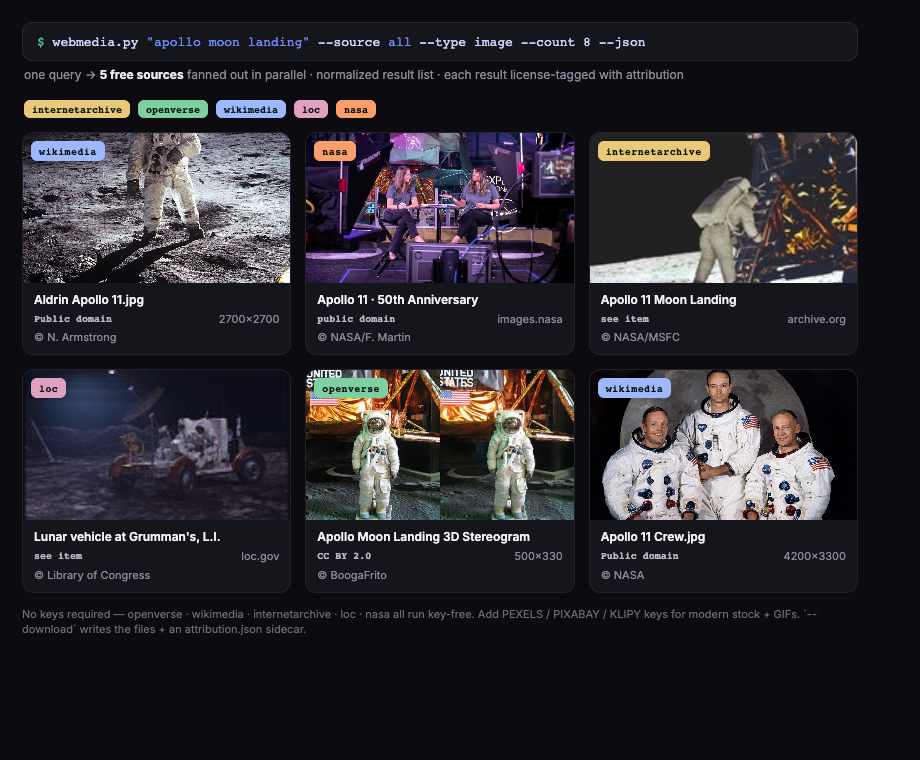
Search free stock photos, videos, and GIFs from the command line — one zero-dependency Python script that queries public-domain, archival, and free-stock APIs (NASA, Wikimedia Commons, Internet Archive, Library of Congress, Openverse, Pexels, Pixabay, GIPHY, KLIPY), returns unified JSON with attribution, and downloads results. No pip installs, no SDKs — Python 3 standard library only.
Sources
| Source | Type | API key | Get a free key | Env var |
|---|---|---|---|---|
| Openverse | images | none | — | — |
| Internet Archive | images, video | none | — | — |
| NASA Image Library | images, video | none | — | — |
| Wikimedia Commons | images | none | — | — |
| Library of Congress | images | none | — | — |
| Pexels | images, video | free | pexels.com/api | PEXELS_API_KEY |
| Pixabay | images, video | free | pixabay.com/api/docs | PIXABAY_API_KEY |
| GIPHY | GIFs | free | developers.giphy.com | GIPHY_API_KEY |
| KLIPY | GIFs | free | klipy.com/developers | KLIPY_API_KEY |
No-key sources work out of the box. Key-gated sources activate automatically when their environment variable is set — no configuration file.
Install
Stdlib only; nothing to install beyond Python 3.8+.
curl -O https://raw.githubusercontent.com/connerkward/free-stock-media-search/main/webmedia.py
python3 webmedia.py "your query"
or
git clone https://github.com/connerkward/free-stock-media-search
cd free-stock-media-search
python3 webmedia.py "your query"
Usage
webmedia.py QUERY [--type image|video|gif] [--count N] [--source LIST|all|nokey]
                  [--json] [--download] [--out DIR]
Search (human-readable)
python3 webmedia.py "apollo 11" --source nasa,wikimedia --count 3
  6 image results for 'apollo 11'  (sources: nasa,wikimedia)
  [wikimedia     ] Apollo 11 Crew.jpg                                Public domain
     https://upload.wikimedia.org/wikipedia/commons/3/3d/Apollo_11_Crew.jpg
  [wikimedia     ] Apollo 11 Launch2.jpg                             Public domain
     https://upload.wikimedia.org/wikipedia/commons/7/7d/Apollo_11_Launch2.jpg
  [nasa          ] Apollo 11 spacecraft pre-launch                   public domain (NASA)
     https://images-assets.nasa.gov/image/jsc2007e034221/collection.json
  ...
Search (JSON, for scripts and agents)
python3 webmedia.py "rocket launch" --type image --source nasa --count 3 --json
{
 "query": "rocket launch",
 "type": "image",
 "count": 3,
 "errors": {},
 "results": [
  {
   "source": "nasa",
   "title": "Rocket Lab PREFIRE-1 Launch",
   "url": "https://images-assets.nasa.gov/image/KSC-20240525-PH-RKL01_0001/collection.json",
   "thumb": "https://images-assets.nasa.gov/image/KSC-20240525-PH-RKL01_0001/KSC-20240525-PH-RKL01_0001~medium.jpg",
   "dl": "https://images-assets.nasa.gov/image/KSC-20240525-PH-RKL01_0001/KSC-20240525-PH-RKL01_0001~medium.jpg",
   "page_url": "https://images.nasa.gov/details/KSC-20240525-PH-RKL01_0001",
   "author": "Rocket Lab",
   "license": "public domain (NASA)",
   "type": "image",
   "w": null,
   "h": null
  }
 ]
}
Every record has the same shape regardless of source: source, title, url, thumb, dl (direct media URL, or null until resolved), page_url, author, license, w, h, type.
Download
python3 webmedia.py "saturn v" --source nasa --count 3 --download --out ./downloads
downloaded 3/3 image → ./downloads (attribution.json written)
Files are named NN_source.ext. An attribution.json with full records (title, author, license, source page) is always written alongside — keep it with the media.
More examples
# Historical footage from the Internet Archive
python3 webmedia.py "car factory 1930s" --type video --source internetarchive --count 5

# All no-key sources at once (fan-out runs in parallel)
python3 webmedia.py "1950s street scene" --source nokey --count 8 --json

# Free stock video (requires PEXELS_API_KEY)
PEXELS_API_KEY=... python3 webmedia.py "ocean waves" --type video --source pexels

# Reaction GIFs (requires GIPHY_API_KEY)
GIPHY_API_KEY=... python3 webmedia.py "thumbs up" --type gif
Attribution and licensing
The tool reports a license per result, but you are responsible for verifying license terms before use:
- NASA — public domain (NASA media is generally not copyrighted; check items featuring identifiable people or partner logos).
- Wikimedia Commons — per-file license (public domain, CC0, CC-BY, CC-BY-SA, ...); the record carries the short license name and author. CC-BY/CC-BY-SA require credit.
- Internet Archive / Library of Congress — license varies per item ("see item" in output); check the linked item page.
- Openverse — aggregates CC-licensed and public-domain images; the record includes the exact license and version.
- Pexels / Pixabay — free to use under their own licenses (no attribution required, some resale/redistribution restrictions).
- GIPHY / KLIPY — free for use within their API terms; attribution to the platform is expected in shipped products.
--download always writes attribution.json so provenance travels with the files.
Use as a Claude / agent skill
The unified JSON output and env-var-only configuration make this directly usable as an agent skill. Drop the script in a skill folder and add a SKILL.md, e.g. skills/web-media-search/SKILL.md:
---
name: web-media-search
description: Search FREE image / video / GIF APIs (stock + historical/archival + GIF engines) and download results with attribution. Use when a task needs a REAL or ARCHIVAL photo/clip or an animated GIF, rather than a generated one.
---

# web-media-search

Single script: `webmedia.py` (same directory). Stdlib-only, no install.

    python3 webmedia.py "QUERY" --type image|video|gif --count N --json
    python3 webmedia.py "QUERY" --download --out DIR   # writes media + attribution.json

- No-key sources (always available): openverse, internetarchive, nasa, wikimedia, loc.
- Key-gated sources activate when env vars are set: PEXELS_API_KEY, PIXABAY_API_KEY,
  GIPHY_API_KEY, KLIPY_API_KEY.
- `--source nokey` restricts to keyless sources; `--source nasa,wikimedia` selects explicitly.
- Parse the `--json` output; each record has source/title/url/dl/page_url/author/license.
- Always surface the license/author to the user when delivering media.
License
MIT. The tool itself is MIT; the media you fetch with it is licensed by its respective source — see Attribution and licensing.