
ReCall MCP
Ayush-s-dsouza/recall-mcp
Consulte seu corpus de URLs salvos dentro do Claude Desktop
Ver no GitHubServidor MCP que expõe a plataforma ReCall como ferramentas consultáveis diretamente no Claude Desktop. Permite buscar semanticamente, fazer perguntas com RAG e listar URLs salvos usando linguagem natural, integrando seu corpus de referências ao fluxo de trabalho.
Instalação
npx convez-ai Ayush-s-dsouza/recall-mcp1 comando no terminal: detecta o formato do repositório (marketplace ou plugin avulso) e instala via Claude Code. Requer Node 18+ e o Claude Code instalado.
Métricas
Casos de uso
- Pesquisa semântica em biblioteca pessoal de referências
- Perguntas com RAG sobre conteúdo salvo com citações automáticas
- Exploração de tags e tópicos em seu acervo de URLs
Veredito

Ferramenta focada e bem executada que resolve um problema específico real: acessar sua biblioteca de URLs diretamente no Claude Desktop. Excelente para pesquisadores e leitores que usam ReCall como sistema de referências pessoal.
README
A tradução para o português deste README ainda está na fila.
recall-mcp
Query your ReCall saved-URL corpus from inside Claude Desktop using natural language.
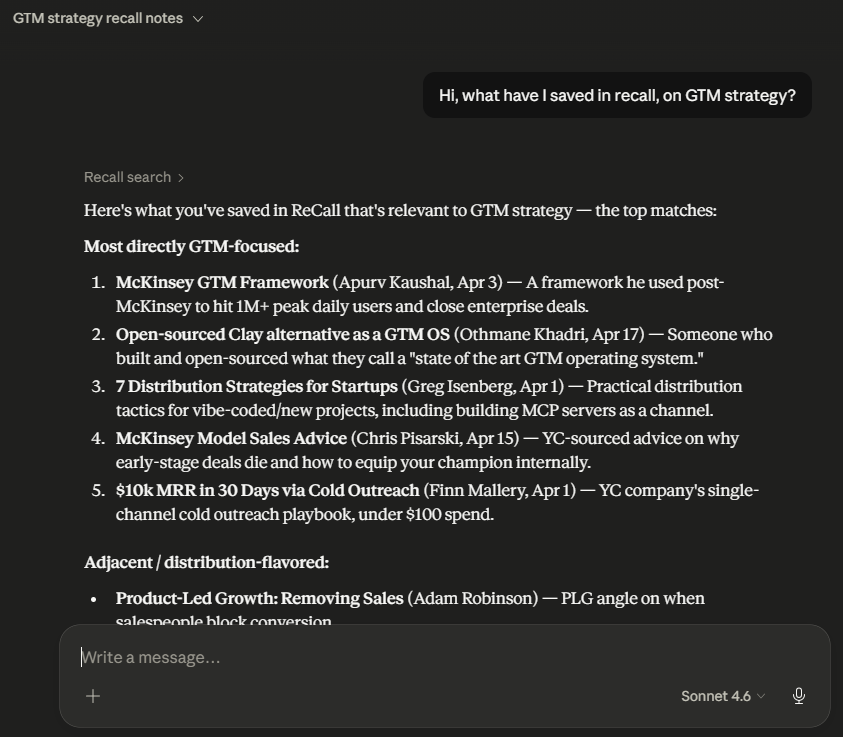
Tools
recall_search(query)— Semantic search over your saved URLs. Returns ranked matches with title, tag, date, similarity score, and excerpt.recall_ask(question)— RAG Q&A over your corpus. Ask a free-form question; get a Gemini-synthesised answer with inline citations and source links.recall_list_saved()— Library overview grouped by tag, with AI-generated summaries and sub-topic clusters per category.
Install
Option 1: One-click (recommended)
Requirements: uv installed, Claude Desktop.
- Download
recall-mcp.mcpbfrom the latest release. - Double-click the file (or drag it into Claude Desktop → Settings → Extensions) to install.
- When prompted for "ReCall refresh token", paste your token — get it from ReCall → Settings → Connect to other apps.
- After install, ReCall will appear under Settings → Extensions, disabled by default. Toggle it on — Claude Desktop will then make recall_search, recall_ask, and recall_list_saved available in your conversations.
Option 2: Manual install (for developers)
Requirements: Python 3.13+, uv, Claude Desktop.
git clone https://github.com/Ayush-s-dsouza/recall-mcp
cd recall-mcp
uv run mcp install server.py --name "ReCall" -v "RECALL_REFRESH_TOKEN=your_token"
Restart Claude Desktop. ReCall will appear under + → Connectors.
Windows Store Claude Desktop:
mcp installcan't find the app automatically. Edit the config file directly instead:%LOCALAPPDATA%\Packages\Claude_pzs8sxrjxfjjc\LocalCache\Roaming\Claude\claude_desktop_config.jsonand add the entry shown in Manual config below.
Configure
| Variable | Required | Default |
|---|---|---|
RECALL_REFRESH_TOKEN | Yes (preferred) | — |
RECALL_TOKEN | Fallback | — |
RECALL_BASE_URL | No | https://recall-production-9941.up.railway.app |
Use RECALL_REFRESH_TOKEN — it never needs updating. The server exchanges it for a fresh access token automatically whenever the hourly JWT expires.
Get it from ReCall → Settings → Connect to other apps.
RECALL_TOKEN (the short-lived JWT) still works as a fallback if you don't set a refresh token, but you'll need to update it every hour.
Manual config
Add this to claude_desktop_config.json (path varies by OS and install method):
{
  "mcpServers": {
    "ReCall": {
      "command": "uv",
      "args": ["run", "--directory", "/path/to/recall-mcp", "server.py"],
      "env": {
        "RECALL_REFRESH_TOKEN": "your_refresh_token_here"
      }
    }
  }
}
On Windows with a Store install, use the full path to uv.exe (e.g. C:\Users\you\.local\bin\uv.exe) and double-backslash all paths.
Why
I built ReCall to save URLs I want to think about later. The problem: I couldn't query it from Claude Desktop while actually working. Most public MCP servers are tutorials — this one runs in my Desktop daily, against my real corpus. The gap it fills is small and specific, which is why it works.
For generic file-reading or web-fetch MCP servers, see the official MCP server examples. This one is specifically a thin layer over ReCall.
License
MIT