
ACP Components
zvzuola/acp-components
Componentes React + core agnóstico para interfaces agentic com ACP
Ver no GitHubBiblioteca universal de componentes frontend para construir interfaces de agentes de IA baseadas no Agent Client Protocol (ACP). Fornece uma camada de dados agnóstica a frameworks (core em TypeScript) e componentes React prontos para produção, com suporte a multi-agente, multi-workspace, streaming em tempo real e integração desktop via Tauri.
Instalação
npx convez-ai zvzuola/acp-components1 comando no terminal: detecta o formato do repositório (marketplace ou plugin avulso) e instala via Claude Code. Requer Node 18+ e o Claude Code instalado.
Métricas
Casos de uso
- Construir IDEs ou coding assistants que se comunicam com agentes de IA (Claude Code, etc)
- Criar aplicações desktop com Tauri que integram múltiplos agentes IA simultaneamente
- Montar interfaces web ou nativas com suporte a sessões, workspaces e autenticação para agentes
Veredito

Solução madura e bem-arquitetada para quem precisa construir interfaces com agentes ACP. A separação core/react permite reutilização em qualquer framework, mas exige familiaridade com protokolo ACP e transports para aproveitar todo potencial.
README
A tradução para o português deste README ainda está na fila.
acp-components
A universal frontend component library for building AI Agent interfaces based on the Agent Client Protocol (ACP). Designed with a data-layer / UI-layer separation architecture:
@acp-components/core— Framework-agnostic TypeScript module: transport communication, state management, business logic@acp-components/react— React component library: UI rendering and user interaction
You can use the data layer alone to build UI component libraries with Vue, Svelte, or any other frontend framework.
Features
- Multi-Agent — Connect to multiple ACP agents simultaneously, each with independent transport, capabilities, and session management
- Multi-Workspace — Organize sessions by working directory (cwd); switch between workspaces seamlessly
- Framework-Agnostic Core — Zustand vanilla stores with zero React dependency; works with Vue, Svelte, Solid, or vanilla JS
- Multi-Transport — Stdio, HTTP, WebSocket, and custom transports per agent; ships with a Tauri IPC transport example
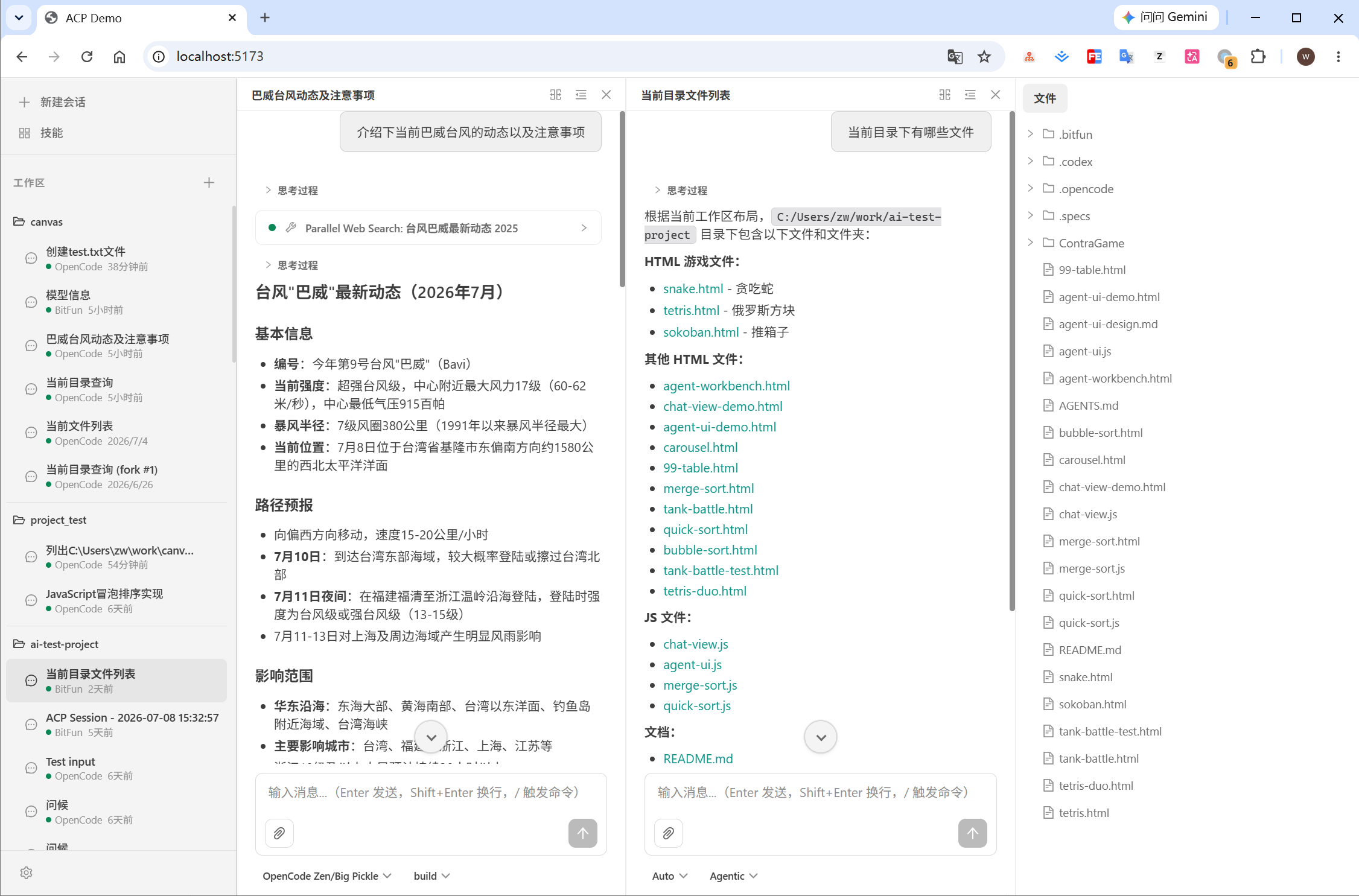
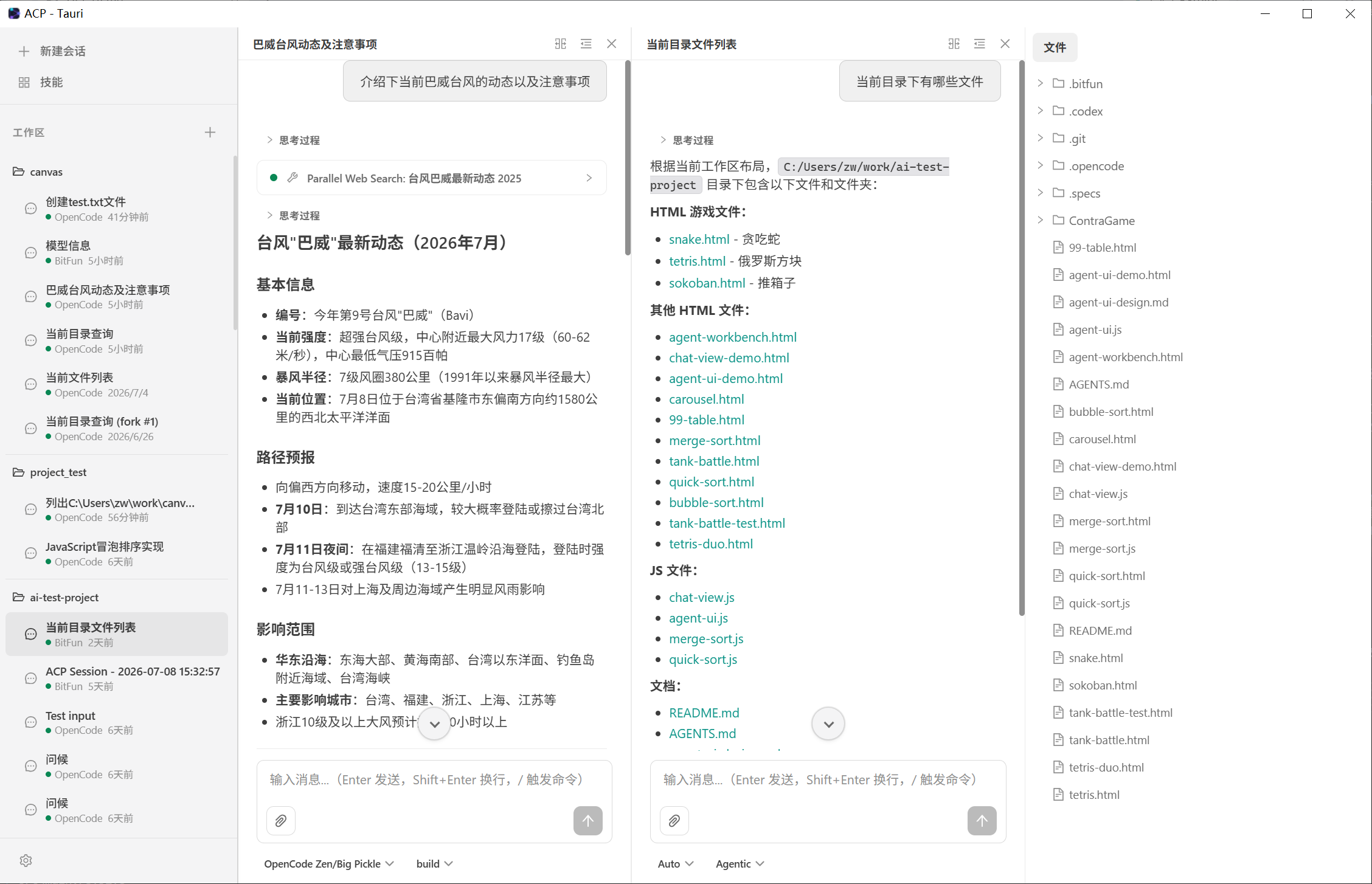
- Rich UI Components — Workspace & session list (grouped by directory then agent), chat view (with round grouping), diff view, terminal view, permission dialog, plan view, thought view, command palette, login dialog, and more — 15+ components
- Streaming UX — Real-time content and thought streaming with animated indicators, live tool call status, and token usage tracking
- Session Management — Full CRUD: create, load, switch, and close sessions scoped by workspace and agent
- Tool Call Visualization — Track agent tool invocations with status, input/output, file locations, and diffs
- Authentication — Built-in auth flow with
LoginDialogcomponent, env_var and terminal-based auth methods, and programmaticauthenticate/authenticateWithEnvactions - Permission Handling — Promise-based permission flow with built-in modal dialog for approving or rejecting tool call requests
- Terminal Integration — Embedded terminal output display with lifecycle management via
onTerminalhandler anduseTerminalshook - Theming — Dark and light themes via CSS custom properties (
--acp-*design tokens); extensible viadata-acp-themeattribute - Internationalization — Built-in i18n support (en-US, zh-CN) via i18next, with custom locale extension
- Desktop Ready — Includes Tauri and stdio transport examples for native desktop applications
Screenshots
Web Demo
Tauri Desktop
Packages
| Package | Description |
|---|---|
| @acp-components/core | Framework-agnostic: multi-agent transport layer, AcpClient, vanilla Zustand stores (workspace + agent + session), and imperative actions |
| @acp-components/react | React bindings: context provider, hooks (useSyncExternalStore), and 15+ UI components |
Installation
pnpm add @acp-components/core @acp-components/react
Peer dependencies: react (^18 || ^19), react-dom (^18 || ^19)
Quick Start
import ReactDOM from 'react-dom/client';
import {
  I18nProvider,
  AcpProvider,
  Workbench,
  SessionList,
  ChatView,
  PermissionDialog,
  LoginDialog,
} from '@acp-components/react';
import { useAcpStore } from '@acp-components/react';

function App() {
  const activeSessionId = useAcpStore((s) => s.activeSessionId);

  return (
    <I18nProvider>
      <AcpProvider
        agents={[
          {
            id: 'main',
            name: 'Main Agent',
            transport: { type: 'websocket', url: 'ws://127.0.0.1:3100' },
          },
        ]}
        theme="dark"
        defaultCwd="/path/to/project"
      >
        <Workbench
          sidebar={
            <>
              <SessionList onBrowse={async () => prompt('Enter workspace path:')} />
            </>
          }
          main={<ChatView sessionId={activeSessionId} />}
        />
        <PermissionDialog sessionId={activeSessionId} />
        <LoginDialog />
      </AcpProvider>
    </I18nProvider>
  );
}

ReactDOM.createRoot(document.getElementById('root')!).render(<App />);
Multi-Agent Example
Connect to multiple agents in different modes simultaneously:
<AcpProvider
  agents={[
    {
      id: 'craft',
      name: 'Craft Agent',
      transport: { type: 'websocket', url: 'ws://127.0.0.1:3100' },
      clientCapabilities: { fs: { readTextFile: true, writeTextFile: true } },
    },
    {
      id: 'ask',
      name: 'Ask Agent',
      transport: { type: 'stdio', command: 'opencode', args: ['acp', '--mode', 'ask'] },
    },
  ]}
  theme="dark"
>
  <App />
</AcpProvider>
Transport Options
Each agent in the agents array gets its own transport configuration:
// Stdio — spawn an agent process directly (Electron / Tauri / Node.js desktop)
{
  id: 'desktop-agent',
  name: 'Desktop',
  transport: { type: 'stdio', command: 'opencode', args: ['acp'] },
}

// HTTP — connect via HTTP POST
{
  id: 'http-agent',
  name: 'HTTP',
  transport: { type: 'http', url: 'http://localhost:8080/acp', headers: { 'Authorization': 'Bearer token' } },
}

// WebSocket — connect to a bridge server (browser environments)
{
  id: 'ws-agent',
  name: 'WebSocket',
  transport: { type: 'websocket', url: 'ws://127.0.0.1:3100' },
}

// Custom — provide your own AcpTransport implementation
{
  id: 'custom-agent',
  name: 'Custom',
  transport: { type: 'custom', transport: myCustomTransport },
}
Components
| Component | Description |
|---|---|
AcpProvider | Top-level provider: connects to multiple agents in parallel, manages agent lifecycle, wires session updates to stores, renders a loading spinner until all agents are ready. Props: agents, theme, defaultCwd, onFileRead, onFileWrite, onTerminal |
Workbench | Three-panel layout (sidebar, main, panel) using CSS Grid |
SessionList | Sidebar workspace & session list: workspaces grouped by directory, sessions grouped by agent within each workspace, with add workspace / create / select / delete actions |
ChatView | Main chat area: groups messages into user/agent rounds, renders plan, usage bar, and config panel. Props: sessionId, onNavigateFile |
MessageBubble | Renders message parts (content blocks, thought blocks, tool calls) with Markdown via react-markdown |
Markdown | Reusable Markdown renderer with syntax-highlighted code blocks and GFM support |
ChatComposer | Text input with slash-command palette integration and send / cancel controls |
StreamingIndicator | Animated typing indicator shown during agent streaming |
ToolCallCard | Displays tool call name, status, input/output, file locations |
ThoughtView | Collapsible view for agent reasoning / thinking content |
PlanView | Displays the agent's plan entries during streaming |
DiffView | Side-by-side diff viewer for file changes |
PermissionDialog | Modal for approving / rejecting tool permission requests |
LoginDialog | Modal for agent authentication: supports env_var and terminal-based auth methods, env var form input, 5-minute timeout |
TerminalView | Embedded terminal output display |
ConnectionStatus | Per-agent connection state indicator with agent name and version |
UsageBar | Token usage progress bar showing context window consumption |
SessionConfigPanel | Dropdown for session configuration options |
CommandPalette | Slash-command palette for available agent commands |
Hooks
| Hook | Description |
|---|---|
useAcpProvider(opts) | Creates and manages the multi-agent ACP provider lifecycle (connect all agents → initialize → ready) |
useAcpStore(selector) | Subscribe to the global acpStore (Zustand vanilla store via useSyncExternalStore) |
useSessionStore(sessionId, selector) | Subscribe to per-session sessionStore |
useSessions() | Session CRUD: list all sessions across workspaces, create, select, close, refresh; returns global activeSessionId |
useSession(sessionId) | All data for one session: messages, streaming state, tool calls, permissions, plan, usage, config options, available commands |
usePrompt(sessionId) | send(blocks) and cancel() for sending / canceling prompts (auto-resolves the correct agent client) |
useToolCalls(sessionId) | Pending and completed tool calls for a session |
usePermission(sessionId) | Current permission request with respond(optionId) and deny() actions |
useTerminals(sessionId) | Terminal states for a session |
useConnectionStatus(agentId) | Per-agent connection status, agent info (name, version) |
useAllAgentStatuses() | Aggregate status across all agents: individual statuses plus overall status |
useAcpContext() | Raw access to getClient(agentId), agents list, workspaces, and workspace management actions from React context |
useI18n() | Access to t() translation function and i18n instance |
Theming
The component library uses CSS custom properties as a design-token contract. All component styles reference only --acp-* variables — no hardcoded color values.
Two built-in themes via data-acp-theme:
"dark"— Dark theme (default): deep navy background with accent highlights"light"— Light theme: cool white / blue-gray surfaces with color accents
Create custom themes by overriding the variables:
[data-acp-theme='my-theme'] {
  --acp-color-bg-primary: #ffffff;
  --acp-color-accent: #ff6b6b;
  /* ... override all needed variables */
}
<AcpProvider theme="my-theme" agents={[...]}>
Internationalization (i18n)
Built-in i18n via i18next with auto-detection (localStorage → navigator.language → defaultLocale).
import { I18nProvider } from '@acp-components/react';

<I18nProvider
  defaultLocale="zh-CN"
  customLocales={{
    'ja-JP': {
      'composer.placeholder': 'メッセージを入力...',
      'permission.title': '権限が必要です',
    },
  }}
>
  <App />
</I18nProvider>
Use the useI18n() hook for language switching:
const { t, i18n } = useI18n();
i18n.changeLanguage('zh-CN'); // switch to Chinese
Framework-Agnostic Usage
The @acp-components/core package has zero React dependency. You can use it with any framework:
import { acpStore, sessionStore, createAcpProvider, sendPrompt } from '@acp-components/core';

// 1. Create multi-agent provider
const provider = createAcpProvider({
  agents: [
    { id: 'main', name: 'Main', transport: { type: 'stdio', command: 'opencode', args: ['acp'] } },
  ],
});

// 2. Wait for ready
provider.subscribe(() => {
  if (provider.ready) {
    console.log('All agents connected!');
  }
});

// 3. Read from vanilla stores
acpStore.getState().workspaces;       // workspace state tree
acpStore.getState().agents;           // agent connection statuses
acpStore.subscribe((state) => { });   // watch for changes

// 4. Use actions (need to provide client and agentId)
const client = provider.getClient('main');
await sendPrompt(client!, sessionId, blocks);

// 5. Add/remove agents dynamically
await provider.addAgent({ id: 'analyze', name: 'Analyze', transport: { type: 'websocket', url: 'ws://...' } });
await provider.removeAgent('analyze');
Development
Prerequisites
- Node.js >= 18
- pnpm
- An ACP-compatible agent (e.g., opencode with
acpsubcommand)
Setup
# Install dependencies
pnpm install

# Build all packages
pnpm build

# Build individual packages
pnpm build:core
pnpm build:react

# Run tests
pnpm test
Web Demo
# Terminal 1 — Start the bridge server (WebSocket ↔ stdio proxy)
pnpm dev:server

# Or use Codex agent instead of opencode
pnpm dev:server-codex

# Terminal 2 — Start the Vite dev server
pnpm dev
The demo will be available at http://localhost:5173.
Tauri Desktop
pnpm dev:tauri      # Development mode
pnpm build:tauri    # Production build
Bridge Server Configuration
| Variable | Default | Description |
|---|---|---|
ACP_PORT | 3100 | WebSocket server port |
ACP_HOST | 127.0.0.1 | WebSocket server host |
ACP_AGENT | opencode | Agent command to spawn |
ACP_AGENT_ARGS | acp | Arguments passed to the agent |
Extensibility
Custom Transport
Implement the AcpTransport interface to add any communication layer:
import type { AcpTransport, Stream } from '@acp-components/core';

class MyCustomTransport implements AcpTransport {
  async connect(): Promise<Stream> { /* ... */ }
  disconnect(): void { /* ... */ }
  onClose?: (handler: () => void) => () => void;
  onError?: (handler: (err: Error) => void) => () => void;
}

<AcpProvider agents={[{
  id: 'custom',
  name: 'Custom Agent',
  transport: { type: 'custom', transport: new MyCustomTransport() },
}]}>
Real-world examples: Tauri IPC, Electron IPC, Chrome Extension messaging, iframe postMessage.
Dynamic Agent Management
Agents can be added or removed at runtime:
const { addAgent, removeAgent } = useAcpContext();

// Add a new agent mid-session
await addAgent({
  id: 'new-agent',
  name: 'New Agent',
  transport: { type: 'stdio', command: 'my-agent', args: ['acp'] },
});

// Remove an agent (cleans up its sessions automatically)
await removeAgent('new-agent');
Terminal Integration
Control how agents create and manage terminals:
<AcpProvider
  agents={[...]}
  onTerminal={{
    create: async (params) => {
      // params: { sessionId, command, args?, cwd? }
      const proc = spawn(params.command, params.args ?? [], { cwd: params.cwd ?? undefined });
      return {
        terminalId: generateId(),
        getOutput: async () => ({ output: allOutput }),
        waitForExit: async () => new Promise((resolve) => proc.on('exit', resolve)),
        kill: async () => proc.kill(),
        release: async () => {},
        onOutputChange: (fn) => proc.stdout.on('data', fn),
        onExit: (fn) => proc.on('exit', fn),
      };
    },
  }}
>
Terminal states are accessible via the useTerminals(sessionId) hook and rendered with the TerminalView component.
File System Integration
Control how agents read and write files:
<AcpProvider
  agents={[...]}
  onFileRead={async (req) => {
    const content = await nativeFs.readTextFile(req.path);
    return { content };
  }}
  onFileWrite={async (req) => {
    await nativeFs.writeTextFile(req.path, req.content);
    return {};
  }}
>
Workspace Management
Programmatically manage workspaces:
const { addWorkspace, removeWorkspace, workspaces } = useAcpContext();

// Add a workspace
addWorkspace('/path/to/project');

// List all workspaces
workspaces.forEach(ws => console.log(ws.cwd, ws.sessions.size));
Tech Stack
| Layer | Technology |
|---|---|
| Protocol | @agentclientprotocol/sdk (ACP TypeScript SDK) |
| State Management | Zustand v5 (vanilla store, no React dependency) |
| UI Framework | React 18 / 19 |
| Internationalization | i18next + react-i18next |
| Markdown Rendering | react-markdown + remark-gfm |
| Styling | SCSS Modules + CSS Custom Properties |
| Build Tool | Vite 6 (library mode) |
| Type System | TypeScript 5.6 (strict mode) |
| Testing | Vitest + @testing-library/react + jsdom |
| Package Manager | pnpm (workspace monorepo) |
License
MIT