
Azure Support Agent
zmustafa/AzureSupportAgent
War room de agentes IA para operações Azure — descubra, investigue e remedi automaticamente
Ver no GitHubUm servidor MCP que transforma sua subscrição Azure em uma bancada de operações inteligente. Agentes especializados em IA investigam incidentes em paralelo, descobrem arquiteturas em tempo real, executam avaliações Well-Architected e monitoram continuamente sua infraestrutura cloud. Funciona 100% dentro do seu tenant, com acesso apenas leitura e automações auditadas.
Instalação
npx convez-ai zmustafa/AzureSupportAgent1 comando no terminal: detecta o formato do repositório (marketplace ou plugin avulso) e instala via Claude Code. Requer Node 18+ e o Claude Code instalado.
Métricas
Casos de uso
- Investigação rápida de incidentes na cloud com múltiplos agentes especializados
- Descoberta e engenharia reversa de arquiteturas Azure em tempo real
- Avaliações Well-Architected contínuas e monitoramento proativo de riscos
- Automações auditadas com gates de aprovação para operações críticas
Veredito

Ferramenta madura e production-ready que eleva significativamente a observabilidade e automação de ambientes Azure. Excelente para times de SRE e arquitetos que buscam reduzir MTTR e riscos operacionais com IA agentic nativa.
README
A tradução para o português deste README ainda está na fila.
🛠️ Azure Support Agent
An AI-driven Azure operations workbench that runs in your subscription. Point it at your tenant and AI discovers your workloads, reverse-engineers live architecture diagrams, and runs Well-Architected assessments — then a War Room of specialist agents helps you investigate, monitor, and remediate.






Deploy · Install guide · Features · Screenshots · Quick start · Architecture · Docs
Why Azure Support Agent?
Operating Azure at scale means hopping between the Portal, CLI, Resource Graph, Monitor, Advisor, and a dozen blades just to answer one question. Azure Support Agent puts an LLM in the driver's seat — it talks to your subscription through the official Azure MCP server and a Microsoft Graph (Entra ID) MCP server, reasons over live evidence, and turns "why is the website throwing 5xx?" into a ranked, validated answer — with the diagrams, assessments, and dashboards to back it up. And it doesn't just wait to be asked: a whole Proactive Support suite continuously scans your estate for coverage gaps and looming retirements, while scheduled autonomous agents push findings to Teams, Jira, or ServiceNow before they bite.
- 🧠 Agentic, not just a chatbot — a War Room of specialist agents investigates in parallel against your real Azure data.
- 🛡️ Proactive, not just reactive — a Proactive Support suite (Assessments · Identity · Monitoring, Telemetry & Backup/DR coverage · Retirement Radar · Telemetry Intelligence · Performance Profiler) surfaces risks before you ask, and scheduled autonomous agents notify you via connectors.
- 🏠 Runs in your tenant — one-click deploy to Azure Container Apps; your data never leaves your subscription.
- 🔒 Safe by default — Azure access is read-only, writes are approval-gated + audited, and AI providers stay disabled until you configure them.
- 🧰 A whole workbench — chat, investigations, architectures, inventory, assessments, policy, monitoring, automations, and more.
Built for cloud architects, SREs, platform teams, and Azure support engineers.
Table of Contents
- Features
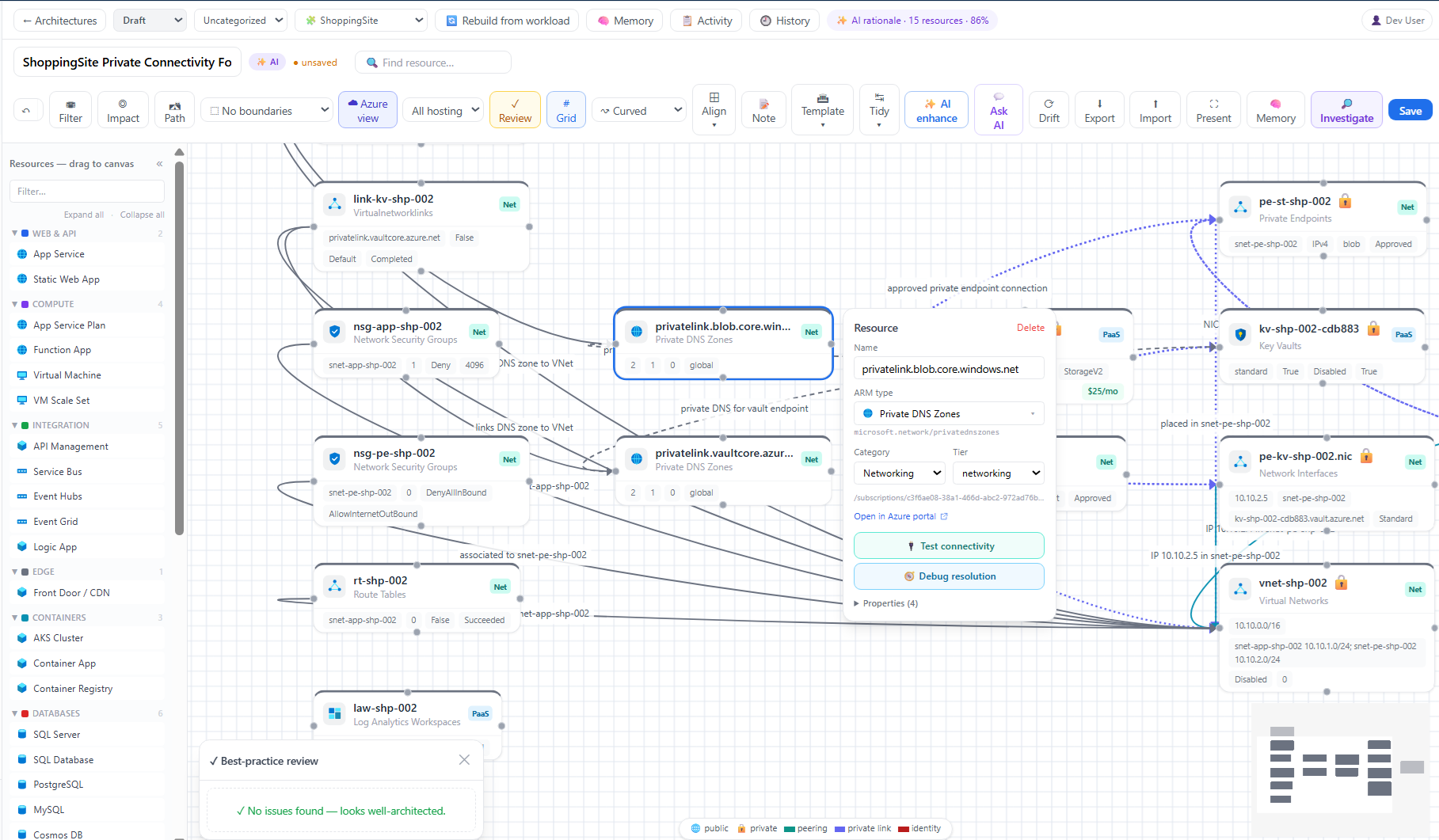
- Screenshots
- Deploy to Azure (one-click)
- Installation guide
- Quick start (local)
- How it works
- Tech stack
- Security & access model
- Documentation
- Contributing
- License
✨ Features
💬 Conversational operations
Multi-session chat with isolated context, live SSE streaming, a per-message reasoning + tool-call timeline that persists across reloads, image support, and smart starter suggestions. Cancel a running turn anytime — work continues server-side and is saved.
🕵️ Deep investigations ("War Room")
Toggle deep mode to dispatch specialist agents (Networking, Identity, Compute, Storage, Security, Reliability, Cost, Monitoring) that research in parallel, form hypotheses, and validate them against your live Azure data — then converge on a conclusion.
🗺️ Architectures + Architecture Memory
AI reverse-engineers live resources into interactive diagrams with best-practice review, network boundaries, and cost hints. Save revisions, build collections, and keep persistent Architecture Memory that powers dashboards and investigations.
📦 Workloads & inventory
Discover and group resources into workloads, browse a sortable inventory grid and world map, see cost/refresh metadata, and search your estate in natural language.
✅ Assessments & governance
Run Well-Architected-style assessments across Security, Reliability, Cost, Operations, and Performance pillars — with custom controls, framework mappings (NIST, ISO, CIS), waivers, finding lifecycle, and ticketing. Plus Policy compliance, baselines, and AI advisors.
📈 Monitoring & resilience
Monitor 2.0 customizable dashboards with AI authoring and ping history; AMBA baseline-alert coverage with one-click Bicep/Terraform gap remediation; Performance Profiler, Backup/DR coverage, Retirement Radar, and telemetry intelligence.
🤖 Automations & workflows
Build custom sub-agents with scoped tools, schedule recurring tasks, chain Workbooks into Playbooks, and route results through in-app Notifications and external connectors (Jira, ServiceNow).
🔌 Bring your own AI
11+ providers — OpenAI, Azure OpenAI, Anthropic Claude, Google Gemini, GitHub Copilot/Models, Grok, Mistral, OpenRouter, ChatGPT (OAuth), Ollama, LM Studio — switchable at runtime with live model catalogs. Disabled until you set them up.
Enterprise-ready
🔐 Read-only Azure by default · ✅ approval-gated writes · 🧾 full audit log · 👥 RBAC (users / roles / groups) · 🔑 OIDC + SAML SSO · 🗝️ encrypted connection credentials · 🖥️ Sandbox VMs for private-endpoint diagnostics · 🧩 multi-tenant Azure connections.
📸 Screenshots
🚀 Deploy to Azure (one-click)
Status: tested. Provisions a managed PostgreSQL database, Azure Files state storage, and the Container App running the public image — in your subscription, in one deployment. No CLI, no manual wiring.
What it creates:
- Azure Container App running the public Docker Hub image
- Azure Database for PostgreSQL — Flexible Server (managed), auto-linked via
DATABASE_URL(?ssl=require) - Azure Files share mounted at
/app/.data(registries, caches, encryption key) - Container Apps environment + external HTTPS ingress on port 8000
💰 Estimated cost: ~$25–35 / month for the default infra at typical low/idle usage (West US 3, pay-as-you-go) — mostly the Container App (1 vCPU / 2 GiB) and a Burstable
B1msPostgreSQL server.
You supply only an admin password (you're forced to change it on first login). Then connect your Azure tenant and an LLM from Settings — the AI does the rest (workload discovery, architectures, coverage scans, assessments, retirement radar, performance profiling). Defaults to West US 3 (validated for Container Apps + PostgreSQL B1ms).
📖 New here? Follow the step-by-step installation guide — from clicking the button to onboarding your first workload.
Prefer the CLI or want full control? See the manual deployment guide.
⚡ Quick start (local)
Prerequisites: Docker Desktop · Azure CLI (az) · an LLM key (or a local Ollama / LM Studio).
# 1) Sign in to the subscription you want to work with
az login
az account set --subscription "<your-subscription-id>"

# 2) Configure environment
Copy-Item .env.example .env     # set LLM_API_KEY (optional — you can also do it in the UI)

# 3) Run the whole stack
docker compose up --build
Open http://localhost:5173. The backend runs DB migrations on startup; the first Azure
MCP call fetches @azure/mcp via npx (a few seconds), then caches it.
Health check: /healthz · MCP tools (admin):
/api/admin/mcp/tools
Full local/dev instructions (native backend, tests, type-check) live in CONTRIBUTING.md.
🧩 How it works
The whole app — FastAPI API + the built React SPA + the in-process MCP servers — ships as one container image and runs as a single Container App. No separate frontend, database, or Redis containers required.
flowchart LR
    U([Browser]) --> SPA[React SPA]
    SPA -->|/api| BE[FastAPI backend<br/>orchestrator · SSE streaming]
    BE --> LLM{{LLM providers<br/>OpenAI · Claude · Gemini<br/>Copilot · Ollama · …}}
    BE --> AZ[Azure MCP server · stdio]
    BE --> EID[Entra / Graph MCP server · stdio]
    BE --> TOOLS[Built-in tools<br/>DNS · HTTP · ping · traceroute]
    BE --> DB[(PostgreSQL / SQLite)]
    BE --> FILES[[Azure Files<br/>/app/.data]]
    AZ --> SUB[(Your Azure subscription)]
    EID --> GRAPH[(Microsoft Graph)]
For local dev nothing is deployed to Azure — the MCP server reaches your real subscription outbound using your signed-in identity and existing RBAC, read-only by default.
🔧 Tech stack
| Layer | Tech |
|---|---|
| Backend | Python 3.12 · FastAPI · async SQLAlchemy 2 · Pydantic v2 · Alembic · SSE |
| Frontend | React 18 · TypeScript · Vite · Tailwind · TanStack Query · Recharts · XYFlow · Mermaid |
| AI | Provider abstraction with streaming + normalized tool-calls (11+ providers) |
| Azure | Official Azure MCP server (@azure/mcp) · Azure CLI / Resource Graph runner |
| Entra ID | Vendored Microsoft Graph (EntraID) MCP server over stdio |
| Data | PostgreSQL (prod) / SQLite (local) · Azure Files for state |
| Hosting | Azure Container Apps (single image) |
🔐 Security & access model
- Read-only by default. The Azure MCP server starts with
--read-only; write-capable tools are classified, approval-gated, and audited. - AI providers off until configured. A fresh install ships every provider disabled; a provider only becomes selectable once you add a key (or sign in / set a local base URL).
- Identity & SSO. Local users with RBAC (users / roles / groups), plus OIDC and SAML SSO. Forced password change on first admin login.
- Secrets. Connection credentials are encrypted at rest and never returned to the UI.
.env,backend/.data/, and keys are git-ignored. - Found a vulnerability? Please follow SECURITY.md — don't open a public issue.
📚 Documentation
| Doc | What's inside |
|---|---|
| docs/INSTALLATION.md | Step-by-step one-click install: deploy, first login, connect an LLM & tenant, onboard a workload |
| docs/TECHNICAL_SPEC.md | Full architecture & feature specification |
| docs/DEPLOYMENT.md | Manual Azure Container Apps deploy, env vars, cost/scaling, gotchas |
| docs/ENTRA_SETUP.md | EntraID (Microsoft Graph) MCP setup + required permissions |
| CONTRIBUTING.md | Local dev, tests, type-check, PR guidelines |
| SECURITY.md | Vulnerability disclosure policy |
| CODE_OF_CONDUCT.md | Community guidelines |
🤝 Contributing
Contributions are welcome! Please read CONTRIBUTING.md and our Code of Conduct. Good first steps: open an issue to discuss a change, keep PRs focused, and make sure backend tests and the frontend type-check pass.
📄 License
MIT © 2026 Zeeshan Mustafa (@zmustafa)
🙏 Acknowledgements
- Azure MCP server — the official Azure tool surface
- EntraID MCP server (Microsoft Graph, FastMCP) — vendored under
third_party/ - The Model Context Protocol community