
clawd-pet
Zlaxrr/clawd-pet
A little crab named Clawd who lives on your Windows taskbar. He walks, follows your cursor, gets thrown around, and quietly shows you what Claude Code is up to.
Instalação
npx convez-ai Zlaxrr/clawd-pet1 comando no terminal: detecta o formato do repositório (marketplace ou plugin avulso) e instala via Claude Code. Requer Node 18+ e o Claude Code instalado.
Métricas
README
A tradução para o português deste README ainda está na fila.
Clawd Pet
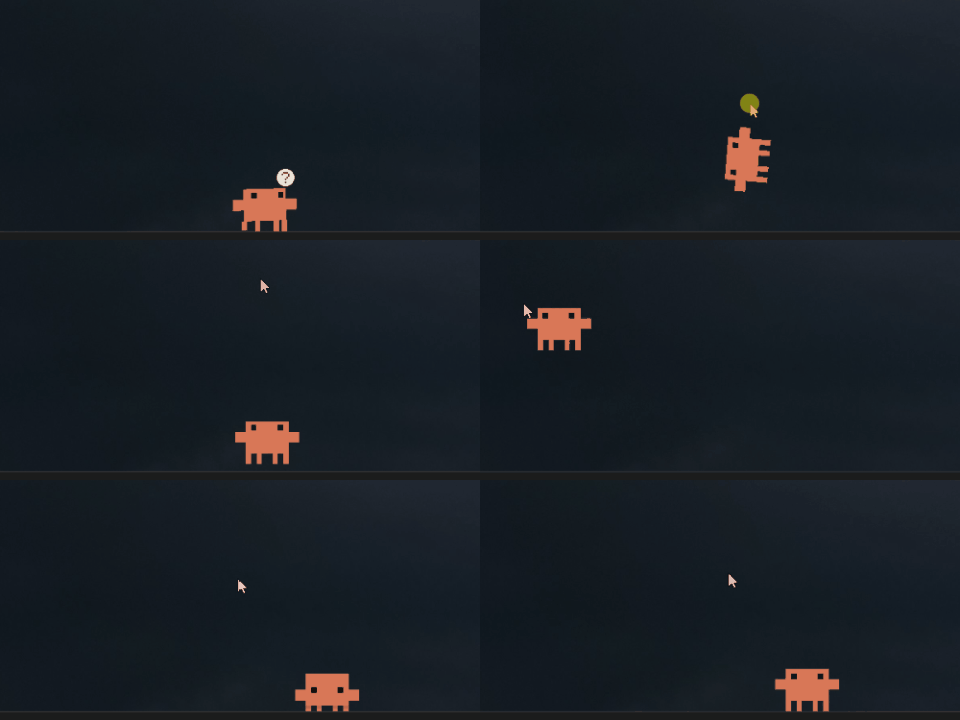
A little crab named Clawd who lives on your Windows taskbar. He walks around, follows your cursor, and you can pick him up and throw him. That's the basic idea. I built it in plain PowerShell + WinForms, so there's nothing to install and nothing to build. One script, one crab.
What he does
The everyday stuff:
- Walks along the taskbar with real frame-by-frame leg animation (pulled from the actual Clawd sprite, not redrawn)
- His eyes follow your cursor, and he blinks on his own
- Start typing and a confused "?" pops over his head
- He climbs onto the top edge of your app windows and rides them around- then walks right off when you close them
Pick him up and he dangles from the cursor, swinging like he's on a string. Throw him and he actually gets flung- the speed matches how fast you flick the mouse, he arcs through the air, bounces off the walls and the floor, squashes on impact, then settles down. The physics was the part I cared about most, so go wild with that one.
And the things he gets up to on his own
Leave him running for a while and he starts doing his own thing. A balloon might drift down out of nowhere. The sky might put on a show. Once in a while something that looks like him- but very much isn't- turns up at the edge of the screen and just… stares. He keeps a little secret behind the taskbar, too.
I'm not going to spoil all of them here- half the fun is catching one you weren't expecting. But if you're impatient, every single one is in the right-click menu, ready on demand:
The Shadow · Climb the Wall · Drag the Window · Push a Window · Meteor Shower · Balloon Ride · Hello World! · Dance · Hide · Sleep · Wave
He also keeps an eye on your machine: he paces and sweats when the CPU is slammed, dozes off when you wander away, and startles awake when you come back.
Claude Watch — he shows what Claude Code is doing
This is the part I'm proudest of. If you use Claude Code, Clawd can read its mind: a small bubble pops over his head telling you what Claude is doing right now
thinking… · running a command… · writing code… · reading files… · browsing the web… · needs your input…
with a little spinning spark, the same one Claude Code shows while it's working. When it wraps up, you get an all done ✓.
It runs on Claude Code's hooks: Claude writes a tiny status token, Clawd reads it and shows the bubble. No polling, no extra process. To switch it on:
Right-click tools\claude-watch-on.ps1 → Run with PowerShell
That installs the hooks into your Claude Code settings — it only adds Clawd's hooks and leaves everything else alone. To remove them later, run tools\claude-watch-off.ps1 the same way. It's enabled in the pet by default (features.claudeWatch), so once the hooks are in, the bubble just shows up whenever Claude is working.
Getting it running
You need Windows 10 or 11 (PowerShell 5.1 is already on there) and internet the first time you run it.
- Download or clone this repo wherever you want
- Double-click
start-clawd.vbs— first launch grabs the official Clawd sprites from claude.ai intoassets/ - Want him to start with Windows? Right-click
autostart-on.ps1→ Run with PowerShell
| Want to… | Do this |
|---|---|
| Close him | Right-click Clawd → Bye Clawd (quit), or run stop-clawd.vbs |
| Start him | start-clawd.vbs |
| Toggle autostart | autostart-on.ps1 / autostart-off.ps1 |
| Show what Claude Code is doing | tools\claude-watch-on.ps1 (off: claude-watch-off.ps1) |
If Windows or your antivirus blocks it:
.vbsfiles downloaded from the internet sometimes get a SmartScreen warning or get quarantined — it's a generic "this is a script" flag, not anything specific to this project. You can read the whole thing instart-clawd.vbs(it's three lines). If SmartScreen pops up, click More info → Run anyway; if your AV quarantines it, restore it and allow it.
Tweaking him — clawd.json
Everything's in one config file. Change it, restart, done.
| Key | Default | What it does |
|---|---|---|
size | 80 | How wide Clawd is in px (48–200). Everything scales with this. |
walkSpeed / gravity | 1.0 | Speed and gravity multipliers |
idleSecondsMin/Max | 5 / 10 | How long he waits between actions |
blinkSecondsMin/Max | 2.5 / 5.5 | How often he blinks |
features.eyeTracking | true | Eyes follow the cursor |
features.windowPlatforms | true | Stand and ride on app windows |
features.typingReaction | true | "?" bubble when you type |
features.edgeLurking | false | Peek from screen edges |
features.systemAwareness | true | React to CPU load / idle |
features.climbing | true | Climb up the screen edges |
features.mischief | true | The rarer, unprompted antics |
features.claudeWatch | true | The Claude Code status bubble |
terminal.command / output | clawd --hello / Hello, World! | Text in the terminal bit |
If the config is broken or missing he just falls back to safe defaults, so don't worry about bricking him.
About the sprites
Clawd and his artwork belong to Anthropic, so they're not in this repo. download-assets.ps1 pulls them straight from claude.ai the first time you run him, for personal use. This is a fan project — it's not official and Anthropic had nothing to do with it.
License
MIT, but that covers the code only — see the sprite note above.