
Obsidian Study Guide Builder
YuvGev00/obsidian-study-guide
Converta cursos em vaults Obsidian estruturados com notas, fórmulas, animações e flashcards
Ver no GitHubSkill Claude Code que transforma materiais didáticos (PDFs de aulas, guias de estudo, notebooks) em um cofre Obsidian profundamente interligado. Gera notas atômicas de termos e fórmulas, aulas em walkthrough, visualizações, GIFs animados por conceito e flashcards de repetição espaçada — tudo cross-linkado e verificado.
Instalação
npx convez-ai YuvGev00/obsidian-study-guide1 comando no terminal: detecta o formato do repositório (marketplace ou plugin avulso) e instala via Claude Code. Requer Node 18+ e o Claude Code instalado.
Métricas
Casos de uso
- Transformar PDFs de aulas em bases de conhecimento interligadas
- Gerar flashcards e materiais de repetição espaçada para estudantes
- Criar documentação visual de cursos com diagramas Mermaid e animações
- Construir second brains estruturados para disciplinas técnicas
Veredito

Ferramenta robusta e bem arquitetada para quem estuda disciplinas técnicas e quer transformar material bruto em vaults Obsidian prontos para uso. Entrega real (378 notas, 1.900 links) mostra maturidade; suporta múltiplos formatos de entrada e é agnóstico a domínio.
README
A tradução para o português deste README ainda está na fila.
📚 Obsidian Study Guide Builder
A Claude Code skill that turns raw course material into a polished, deeply interlinked Obsidian vault you can actually study from.
Point it at your lecture slides (PDF/PPTX), a study guide (HTML/MD), or Jupyter notebooks and it builds a complete second brain for the course — atomic notes, teaching walkthroughs, visuals, animations, and exam-ready flashcards — all cross-linked and verified.
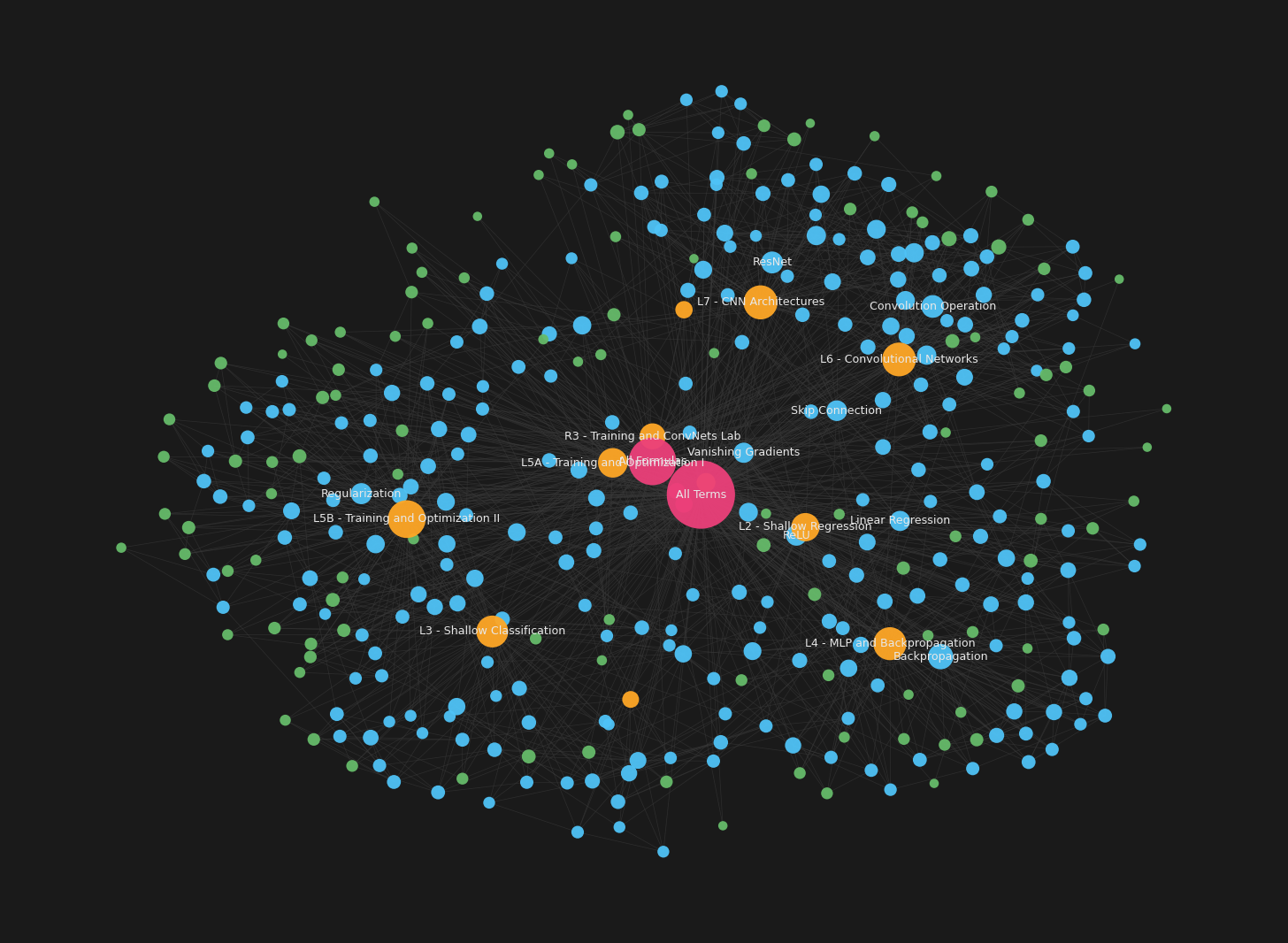
Graph view of a real generated vault — 378 notes, ~1,900 links. Blue = terms, green = formulas, orange = lectures, pink hub = the Home map-of-content.
✨ Install (one line)
The skill ships as a Claude Code plugin, so you don't clone or copy anything. In Claude Code:
/plugin marketplace add YuvGev00/obsidian-study-guide
/plugin install obsidian-study-guide@obsidian-study-guide
That's it. Now just ask:
"Turn the lecture PDFs in ~/Desktop/CS/ml/lectures into an Obsidian vault"
The skill triggers automatically, enters plan mode, asks you a few scoping questions (coverage, animation level, flashcards, build cadence…), shows you one sample lecture to approve the style, then builds the rest.
Clone and copy the skill folder into your skills directory:
git clone https://github.com/YuvGev00/obsidian-study-guide
cp -r obsidian-study-guide/skills/obsidian-study-guide ~/.claude/skills/
Requirements: Python with matplotlib + numpy (only for the animation
generators). The core vault is plain Markdown — Mermaid and MathJax are built into
Obsidian, no plugins required. Optional Obsidian plugins
(Spaced Repetition,
Dataview) light up flashcards
and live dashboards; the vault works without them.
🎯 What it produces
| Term notes | One per concept — formal definition, plain-words explanation with an analogy, why it matters, and links to everything related. |
| Formula notes | One per formula — a symbol-by-symbol table (every letter, sub/superscript, sum, operator), what it computes, and a worked numeric example. |
| Lecture notes | Full teaching walkthroughs — learn the whole lecture from the note alone, with the slides' real numbers, a problem→solution arc, and each lecture chained to the next. |
| Navigation | A Home map-of-content, per-kind indexes, and optional live Dataview dashboards. |
| Visuals | Mermaid diagrams, plotted curves, ASCII grids, GFM tables — the best type picked per concept. |
| Animations | Three tiers: fast template GIFs, genuinely per-concept LLM-authored animations, or hand-authored. Sandbox-safe. |
| Flashcards | Q::A + cloze cards per note, deck-tagged by lecture — exam-ready, Anki-exportable. |
It's subject-agnostic — built and verified on deep learning, plus tested across psychology, economics, sports, medicine, and law.
👀 Sample output
A generated term note open in Obsidian's reading mode — rendered LaTeX, a tidy properties panel, the "in simple words" callout, and the whole interlinked vault in the sidebar:
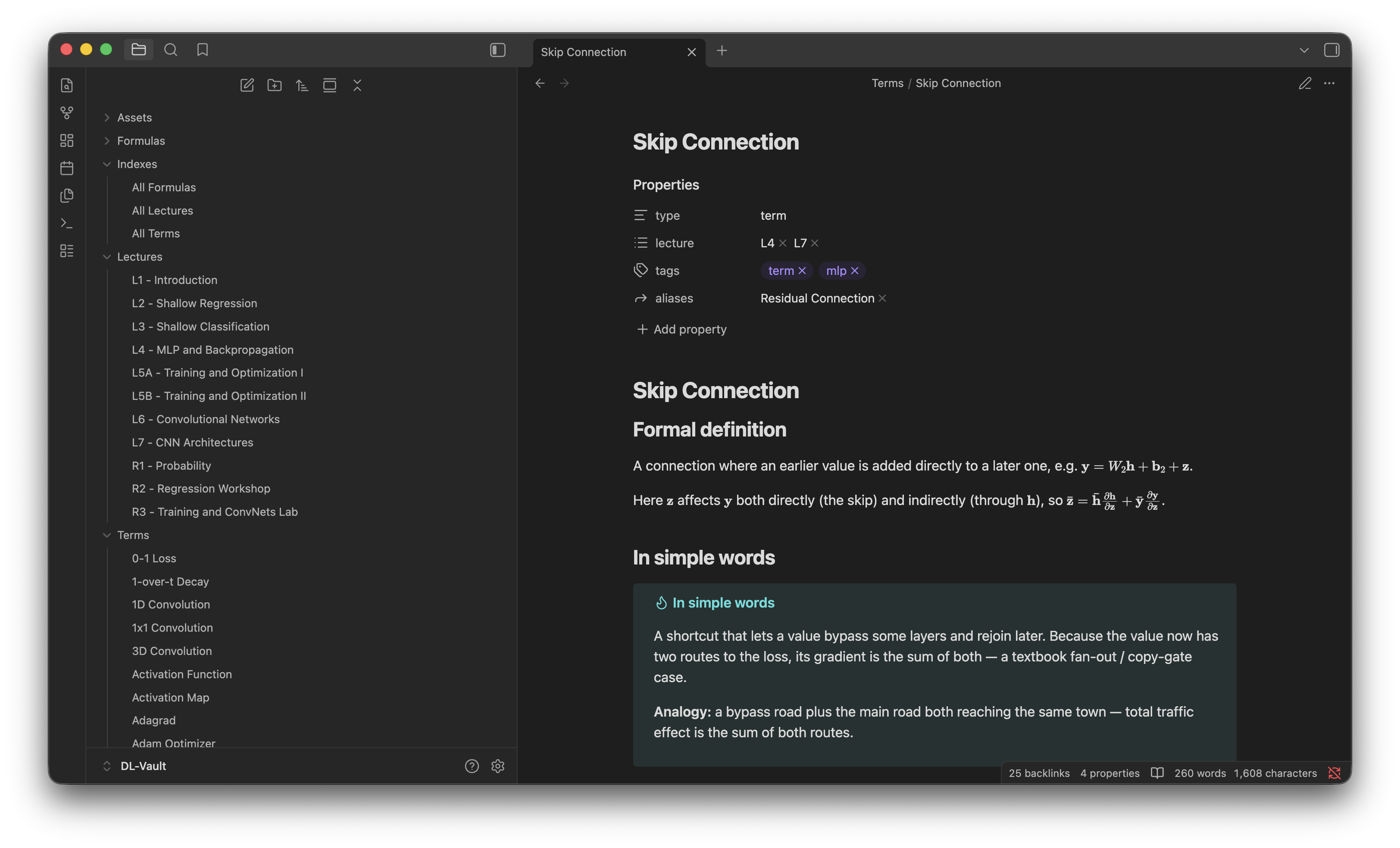
And here's the Markdown behind it. Every term note follows this shape: definition → plain-words callout with an analogy → why it matters → transcluded formulas → a visual (animation + diagram) → links → source.
---
type: term
lecture: [L4, L7]
tags: [term, mlp]
aliases: [Residual Connection]
---
# Skip Connection

## Formal definition
A connection where an earlier value is added directly to a later one, e.g.
$\mathbf{y}=W_2\mathbf{h}+\mathbf{b}_2+\mathbf{z}$.

## In simple words
> [!tip] In simple words
> A shortcut that lets a value bypass some layers and rejoin later. Because the
> value now has two routes to the loss, its gradient is the sum of both.
>
> **Analogy:** a bypass road plus the main road both reaching the same town —
> total traffic effect is the sum of both routes.

## Why we need it
It gives gradients a short "bypass path" that mitigates vanishing gradients in
deep networks.

## Formulas
![[f- Multivariate Chain Rule]]

## Visual
**Animated:** the gradient also flows the short way back via the skip path.

![[anim_skip_connection.gif]]

```mermaid
graph LR
  x["x"] --> F["F(x) (layers)"]
  x -->|"skip"| add(("+"))
  F --> add
  add --> y["y = F(x) + x"]
```

## Review
<!-- #flashcards/deep-learning/L4 -->
What is a **skip connection**?::An additive shortcut so a value reaches a later
layer directly, giving gradients a bypass path.

## Related
[[Residual]] · [[Vanishing Gradients]] · [[ResNet]] · [[Multivariate Chain Rule]]

## Source
L4 (MLP & Backpropagation) — "Skip connections"
The [[double-bracket links]] connect it to every related term; hover any link
for a preview; the ## Review card drops straight into spaced-repetition.
Animations — each is a real GIF generated for that concept (max-pooling window sliding to its max · ImageNet error falling as nets deepen · a U-Net's encoder / decoder with skip connections):
🛠️ What the build looks like
- You point the skill at a folder of lecture material.
- It enters plan mode and asks ~4–8 quick questions, each with a recommended
one-click default:
- Coverage — full course / match a study guide / guide + key foundations
- Animations — full / selective / none / do it after the vault is built
- Flashcards — on (exam-ready) / off (reading-only)
- Build cadence — all at once / in batches / one lecture at a time
- Audience — exam-prep / long-term reference / teaching
- Vault name — confirms a name derived from your folder
- It builds one sample lecture and shows it to you for sign-off.
- After approval, it produces the rest at your chosen cadence, runs
verify.py, and reports a clean vault (0 broken links).
You stay in control the whole way — nothing big happens without your go-ahead.
🧠 How it's built to be good (and cheap)
- Asks before it builds. A fresh build runs in plan mode and puts the real choices to you up front — no guessing, no runaway 600-note job you didn't want.
- Sample-first. On big courses it builds one lecture, shows you, and waits for sign-off before mass-producing — so a wrong style is caught at note 15, not 600.
- Token-economical. The orchestrator never bulk-reads slide images into its own context; reading happens in disposable sub-agents, and work is matched to the cheapest capable model tier.
- Verified. A bundled
verify.pygate enforces zero broken links, balanced fences, no rendering traps — run after every pass. - Honest. The docs are upfront about what each animation tier can and can't do.
📦 Repository layout
obsidian-study-guide/
├── README.md · LICENSE · CHANGELOG.md
├── .claude-plugin/
│   ├── plugin.json          # plugin manifest
│   └── marketplace.json     # makes this repo its own marketplace
└── skills/obsidian-study-guide/
    ├── SKILL.md             # the skill — the full playbook Claude follows
    └── assets/
        ├── templates.md                  # note templates (term/formula/lecture/index)
        ├── verify.py                     # vault verification gate
        ├── scripts.md                    # index build, GIF embed, collision fix, linking
        ├── per_term_generator.py         # template GIF generator (subject-agnostic)
        ├── llm_gif_pipeline.py           # sandboxed per-concept LLM-authored GIFs
        ├── example_subject_generator.py  # worked hand-authored generator (CNNs)
        ├── animation_generator.py        # hand-authored GIF generator + style harness
        ├── obsidian-*.json               # .obsidian config (graph colors, hover previews)
        └── README-template.md            # README dropped into a *generated* vault
📝 A note on generated content
The notes this skill produces are derived from your own source material. That content belongs to its original author (your instructor / institution) and may carry its own license or attribution terms — check before sharing a generated vault publicly.
⚖️ License
MIT — covers the skill/tool itself, not any vault content you generate from your own sources.