
YADE MCP — Simulações DEM por Conversa Natural
yusong652/yade-mcp
Execute simulações DEM YADE conversando naturalmente com seu agente IA
Ver no GitHubServidor MCP que conecta agentes IA ao YADE (Discrete Element Method engine). Permite rodar simulações complexas de dinâmica de partículas através de linguagem natural, gerenciar tarefas de longa duração em background e manter sincronização total com o console local do YADE.
Instalação
npx convez-ai yusong652/yade-mcp1 comando no terminal: detecta o formato do repositório (marketplace ou plugin avulso) e instala via Claude Code. Requer Node 18+ e o Claude Code instalado.
Métricas
Casos de uso
- Automação de simulações de dinâmica molecular e granular
- Otimização iterativa de parâmetros de simulação sem intervalo manual
- Análise exploratória de resultados enquanto simulações rodam em background
- Persistência de projeto: retomar simulações após context reset sem perder histórico
Veredito

Ferramenta especializada de alta maturidade para pesquisadores/engenheiros em simulação DEM. Integração sólida (MCP nativo, multi-client) e recursos sofisticados (tasks assíncronas, persistência, live shell). Requer conhecimento prévio do YADE; não é para iniciantes em simulação.
README
A tradução para o português deste README ainda está na fila.
yade-mcp


O.engines += [LLM()] # yet another engine.
yade-mcp connects AI agents to YADE — the open-source discrete element method engine — through the Model Context Protocol. Browse API docs, run simulations, and execute code, all through natural conversation.
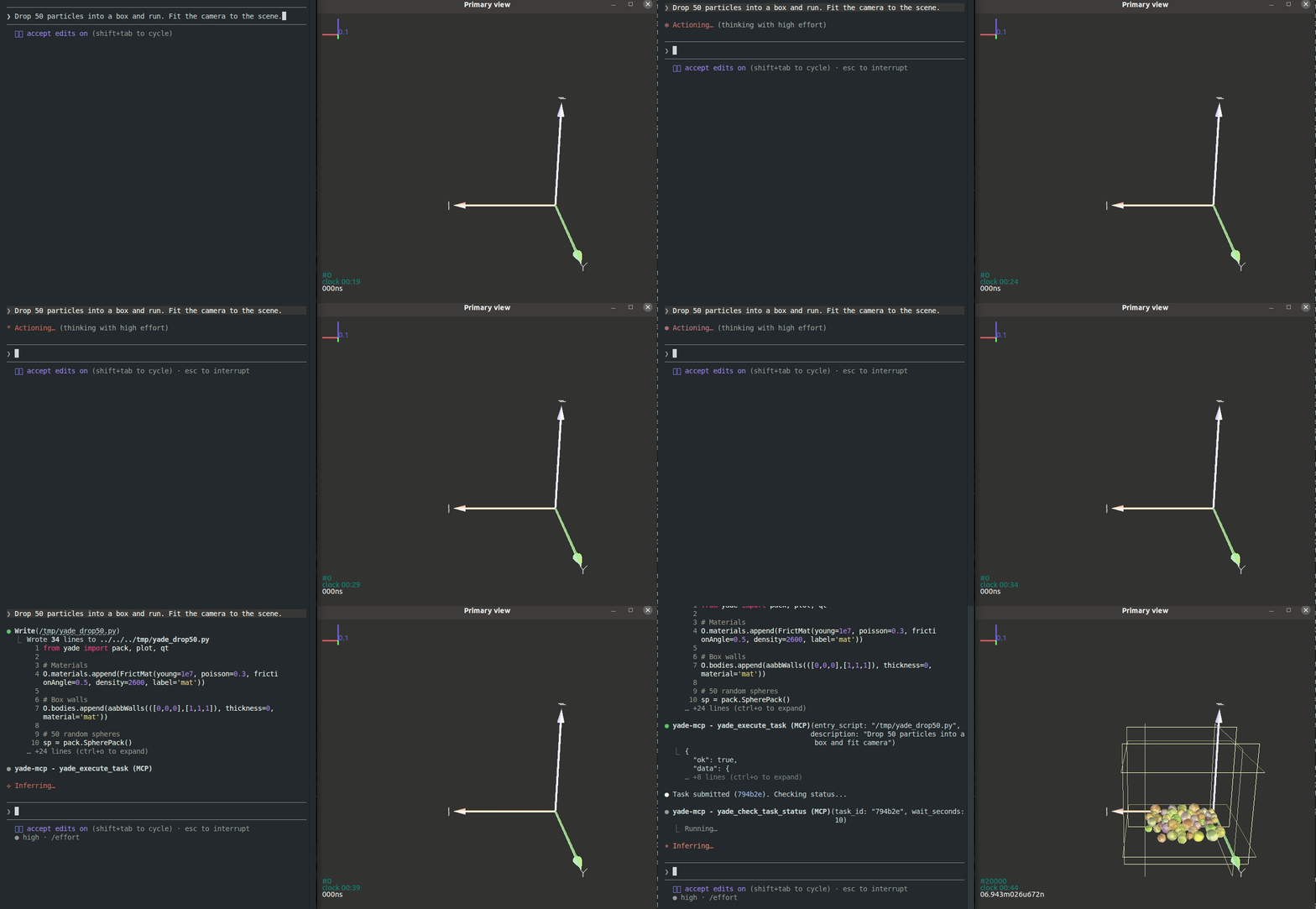
Your agent doesn't just call tools — it sits at your YADE console, runs long simulations on its own, and stays in sync with what you're doing.
Works with any MCP client — verified with Claude Code, Codex CLI, Gemini CLI, GitHub Copilot CLI, OpenCode, and toyoura-nagisa.
Features
Your agent types, YADE runs
Powered by yade_execute_code
Describe what you want in plain language. The agent types commands into your YADE console — inspecting particles, tweaking parameters, stepping the engine, analyzing results. It reads each output, debugs, and iterates, the same way you do at the console yourself.
Set it running, walk away
Powered by yade_execute_task + yade_check_task_status + yade_interrupt_task
Run a full YADE script as a background task — just like firing off yade script.py, except you don't have to babysit it. The agent watches on its own: tailing the live output, catching errors as they appear, stopping the run gracefully when something looks off, fixing the script, and resubmitting — until the simulation actually finishes.
New session, no cold start
Powered by yade_list_tasks + yade_check_task_status
Every task you've submitted — the script, the live output, the final state — stays on record. When the context window fills up or you come back the next day, a fresh agent walks into a project that already remembers itself: it lists what's been run, reads what each task produced, and picks up without you re-explaining anything.
A live shell into the running simulation
Powered by yade_execute_code
While a task runs, the agent has a live shell into the simulation — ask it to inspect any variable, dump any object's state, or render a fresh plot on demand, without editing the script or stopping the run.
You type, the agent's in sync
Beyond submitted tasks, every line you type into the YADE console — the variables you peeked at, the parameters you tested, the dead ends you walked away from — flows into the agent's context too. When you turn to chat, it already has the trail of what you've been trying. Learning YADE and want feedback on what you just typed? Stuck on an unexpected error? Just ask — the agent saw what you typed and how YADE answered.
Tools (7)
Two documentation tools (no bridge) and five execution tools (bridge required):
| Tool | Purpose | Bridge |
|---|---|---|
yade_browse_api | Walk the YADE Python class tree | No |
yade_query_api | BM25 keyword search across the API | No |
yade_execute_code | Run Python in the live YADE process; returns synchronously | Yes |
yade_execute_task | Submit a script as a long-running background task | Yes |
yade_check_task_status | Inspect a running or finished task (output, status) | Yes |
yade_interrupt_task | Gracefully stop a running task | Yes |
yade_list_tasks | List submitted tasks with metadata | Yes |
Quick Start
Prerequisites
Agentic Setup (Recommended)
Copy this to your AI agent and let it self-configure:
Fetch and follow this bootstrap guide end-to-end:
https://raw.githubusercontent.com/yusong652/yade-mcp/master/docs/agentic/yade-mcp-bootstrap.md
Manual Setup
1. Register the MCP server in your client config:
{
  "mcpServers": {
    "yade-mcp": {
      "command": "uvx",
      "args": ["yade-mcp"]
    }
  }
}
2. Start the bridge inside YADE:
In a YADE Python console, install the bridge using YADE's own interpreter:
import sys, subprocess
subprocess.check_call([sys.executable, "-m", "pip", "install", "--user", "yade-mcp-bridge"])
On PEP 668 externally-managed environments (pip refuses --user), see the bootstrap guide for a portable form.
Restart YADE, then in the Python console:
import yade_mcp_bridge
yade_mcp_bridge.start()
Verify
Restart your AI agent (Claude Code, Codex CLI, Gemini CLI, etc.) and ask it to call yade_execute_code to verify the connection.
Contributing
See CONTRIBUTING.md for development setup and guidelines.
License
MIT — see LICENSE.