
Construtor de Guia de Preparação para Exames
Yung1120/claude-exam-prep-skill
Converta provas passadas em guia de estudo com tópicos, soluções e diagramas
Ver no GitHubSkill que transforma PDFs de provas anteriores em guias de estudo estruturados e ilustrados. Agrupa questões por tema, ranking de frequência entre anos, soluções passo-a-passo, extração automática de diagramas e referência cruzada com aulas. Suporta qualquer tipo de exame e disciplina.
Instalação
npx convez-ai Yung1120/claude-exam-prep-skill1 comando no terminal: detecta o formato do repositório (marketplace ou plugin avulso) e instala via Claude Code. Requer Node 18+ e o Claude Code instalado.
Métricas
Casos de uso
- Organizar questões de múltiplos anos de provas identificando tópicos mais frequentes
- Gerar soluções detalhadas passo-a-passo para todas as questões de um exame
- Extrair e organizar diagramas e figuras das provas em um material de referência visual
Veredito

Ferramenta bem construída e prática para organizar material de estudo a partir de provas passadas, com foco em extração visual e ranking de prioridades. Ideal para estudantes e educadores que trabalham com exames em PDF, embora dependa do Claude Code e requer configuração local.
README
A tradução para o português deste README ainda está na fila.
exam-prep-guide-builder
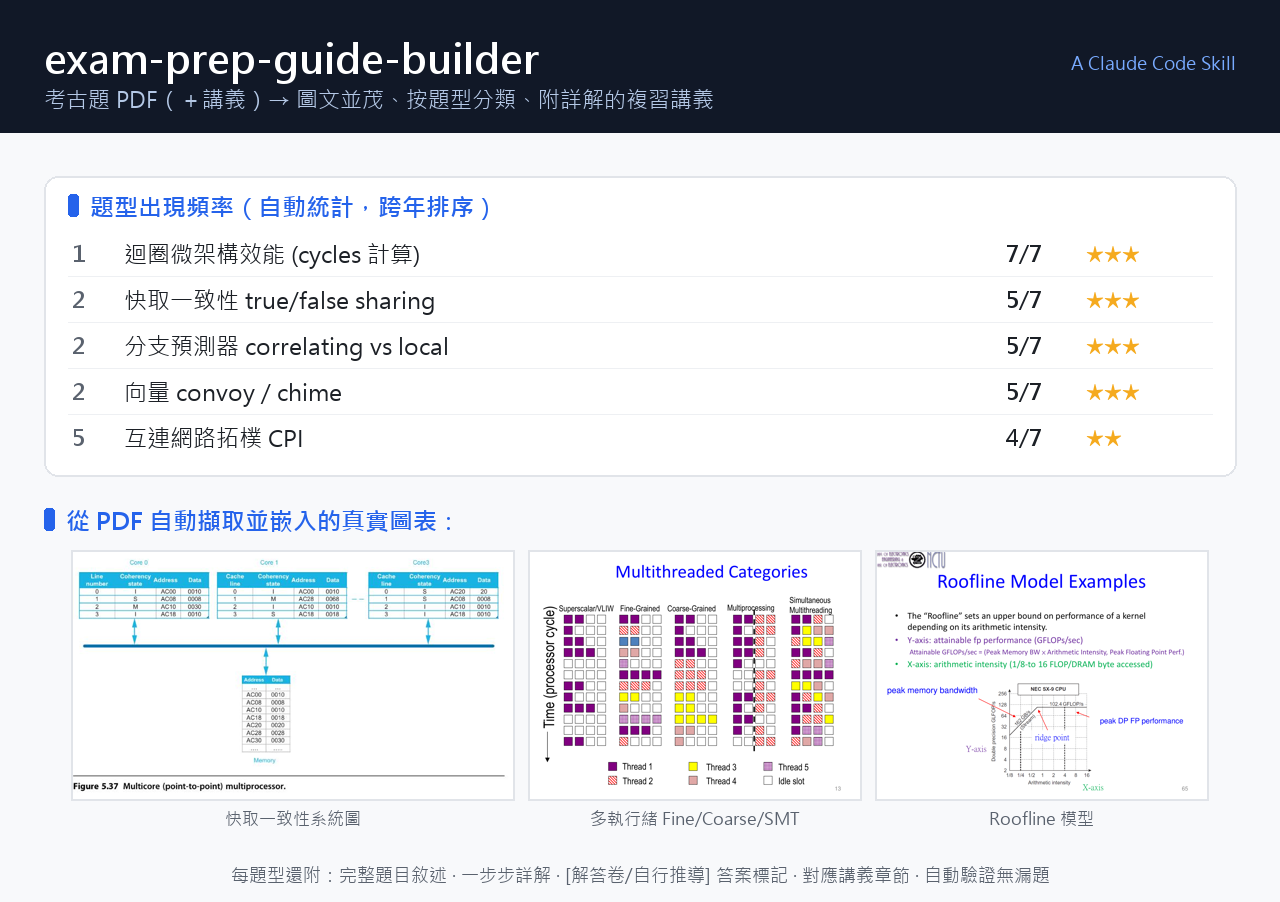
A Claude Agent Skill that turns a folder of past exam PDFs — any kind of test: quizzes, midterms, finals, certification / licensing exams, entrance or standardized tests (and optional course/lecture slides) — into a comprehensive, figure-rich study guide.
Preview above: real output from a Computer Architecture course — auto-computed topic frequency ranking and diagrams lifted straight out of the exam/slide PDFs.
It organizes questions by recurring topic, computes how often each topic appears across years, works out detailed step-by-step solutions, extracts the actual diagrams from the PDFs, and — when lecture slides are provided — cross-references each exam question back to the relevant lecture section.
What it does
- Topic clustering + frequency ranking — groups questions across all exams into recurring types and ranks them by how often they appear, so you know what to study first.
- Detailed worked solutions — every question gets a real step-by-step solution (formula → substitution → arithmetic → answer), never a one-liner.
- Figure extraction (圖文並茂) — pulls the real diagrams/tables out of the PDFs and embeds them, instead of describing pictures in prose. Handles both typed PDFs (embedded images) and scanned/photographed pages (render/crop).
- Answer provenance — marks each answer as taken from an official key (✅), self-derived (🧮), or uncertain (⚠️). No silent guessing.
- Lecture cross-reference — links each exam question to the slide section that teaches it; honestly flags topics that aren't in the provided slides.
- Self-verification — checks that every figure embed resolves and no question was dropped.
Triggers
Use it whenever you have past papers of any exam — 考古題 / 歷屆試題 / 小考 / 模擬考 / 證照考 / 國考 / midterms / finals / certification / entrance tests — and want them organized, solved, or turned into review material. E.g. "整理考古題", "幫我準備考試", "make a study guide from these past papers", "which topics show up most". Works for any subject, in any language.
Contents
SKILL.md                      # the workflow + trigger description
scripts/
  pdf_scan.py                 # locate question/figure pages via cheap text extraction
  pdf_figures.py              # extract embedded images / render pages / crop regions
  verify_guide.py             # check figure embeds resolve + no questions dropped
references/
  guide_structure.md          # output format & templates
exam-prep-guide-builder.skill # packaged artifact (zip) for one-click install
Requirements
- Claude Code (CLI, desktop, or IDE extension)
- Python 3.8+ with PyMuPDF:
pip install pymupdf
Installation
- Download this repo —
git clone https://github.com/Yung1120/claude-exam-prep-skill.git(or Code → Download ZIP and unzip). - Place the skill folder into your Claude Code skills directory so the
layout is exactly:
(Windows:~/.claude/skills/exam-prep-guide-builder/ ├── SKILL.md ├── scripts/ └── references/C:\Users\<you>\.claude\skills\.)SKILL.mdmust sit directly insideexam-prep-guide-builder/— no extra nested folder. Alternatively, the bundledexam-prep-guide-builder.skillis just a zip: rename it to.zip, unzip, and drop the resulting folder in the same place. - Restart Claude Code so it reloads skills.
- Verify — ask Claude "what skills do you have for organizing past exams?";
it should mention
exam-prep-guide-builder.
🇹🇼 中文逐步教學見 使用說明.md。
Usage
Point Claude at a folder of exam PDFs:
整理
./past-exams這個資料夾的考古題,幫我做一份複習講義,越詳細越好。
Or with lecture slides for cross-referencing:
Build a study guide from the exams in
./finals, and tell me which lecture slide covers each question.
License
MIT