
Relatório de Conquistas Especiais
xxxd666/special-achievement-report
Converta feitos em valor com metodologias de consultoria topo
Ver no GitHubSkill Claude que transforma relatórios soltos em apresentações de nível consultoria usando 9 metodologias (McKinsey, BCG, Bain, PwC, Deloitte, Amazon, Google, Bridgewater e outras). Gera estrutura lógica, grandes ideias e formatos prontos para investimento, reuniões executivas ou revisões de desempenho — sem necessidade de base técnica.
Instalação
npx convez-ai xxxd666/special-achievement-report1 comando no terminal: detecta o formato do repositório (marketplace ou plugin avulso) e instala via Claude Code. Requer Node 18+ e o Claude Code instalado.
Métricas
Casos de uso
- Relatórios anuais e trimestrais de desempenho
- Apresentações de competição interna e promoção
- Pitches de investimento e road shows
- Revisões de projetos e lições aprendidas
- Relatórios de impacto para liderança executiva
Veredito

Skill sólido que resolve um problema real: transformar lista de atividades em narrativa executiva estruturada. Abordagem prática, suporta 9 frameworks consolidados e não depende de habilidades técnicas. Valor genuíno para qualquer profissional que precise comunicar resultados.
README
A tradução para o português deste README ainda está na fila.
专项成果汇报 · Special Achievement Report
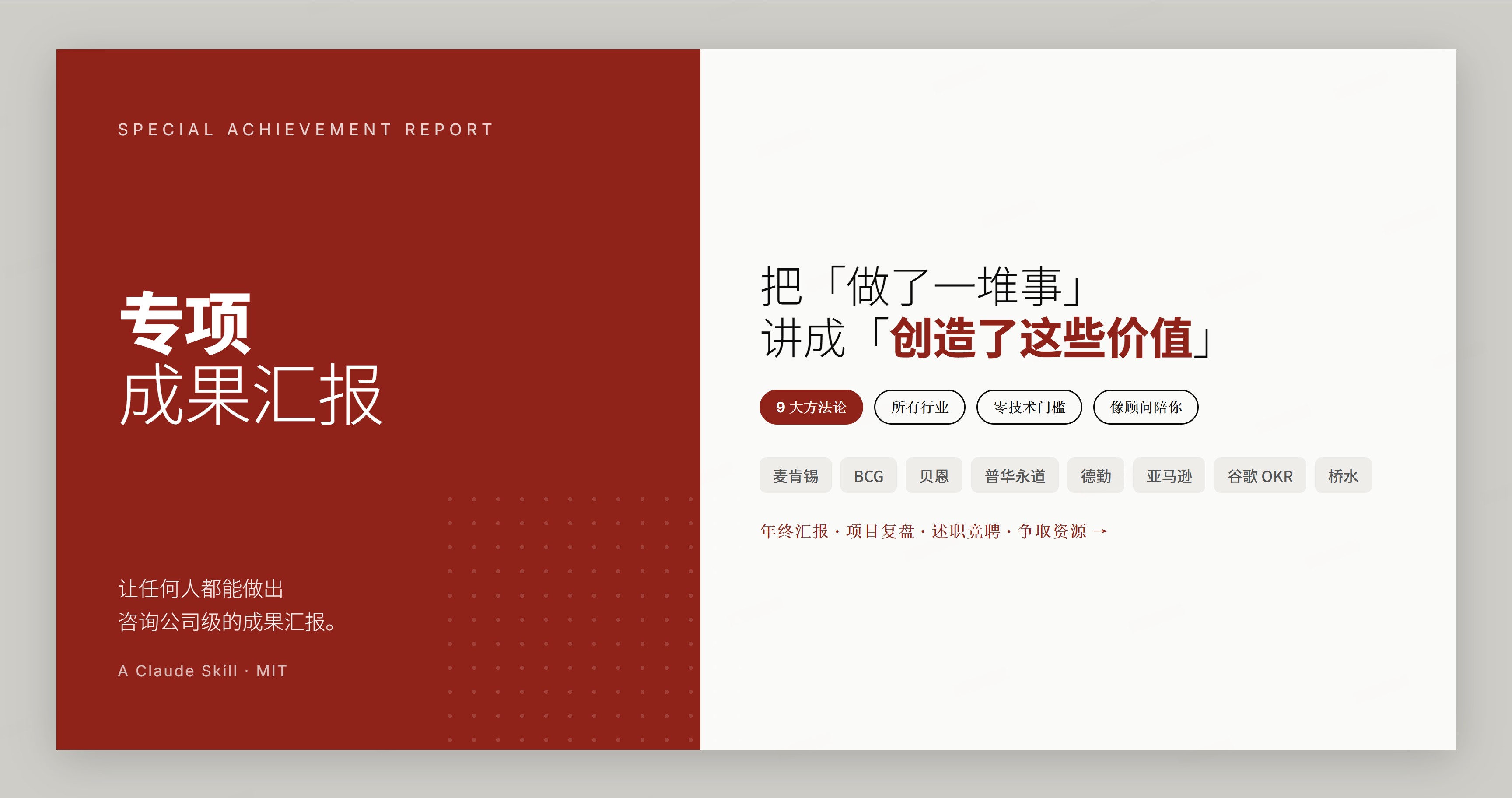
一个让任何人都能做出咨询公司级汇报的 Claude 技能。 它的核心不是帮你排版 PPT,而是帮你把「我做了一堆事」重组成「我创造了这些价值」——用麦肯锡、BCG、贝恩、亚马逊等顶级机构的汇报方法论,把零散素材变成有逻辑、有洞见、领导记得住的成果汇报。
不限行业、不限岗位、不需要任何技术基础。 无论你是做行政、运营、HR、市场、销售、研发、财务、教师、医生还是个体创业——只要你需要「把成果讲清楚、讲漂亮」,它就帮得上。全程像一个资深汇报顾问坐在你旁边,一步步陪你把汇报理出来。
🚀 30 秒上手(复制这句话,发给 Claude)
用专项成果汇报技能,帮我做一份 2025 年度工作成果汇报。
技能会像顾问一样和你聊几句(给谁看、你做了什么、有哪些数据),帮你理出汇报结构、生成大纲,最后再挑个好看的版式。你只管说,它负责想。
想更快出活,一句话带上素材就行:
用专项成果汇报技能:我是销售团队负责人,今年团队业绩涨了 40%、新签 28 个客户、
把回款周期从 90 天压到 60 天,帮我做一份给老板看的年终汇报。
✨ 它解决什么
很多人「事情做了一大堆,但汇报时讲不清价值」——领导听完没记住,自己也觉得亏。这个技能用方法论补上中间最难的那一环:
你:做了很多事,但说不清楚价值
        │  ← 用专业方法论重组(这一步才是关键)
技能:有逻辑、有数据、有洞见,领导记得住的成果汇报
适用于任何需要「汇报成果」的场景: 年终 / 季度总结 · 项目复盘 · 述职答辩 · 竞聘 · 争取预算资源 · 对外分享 · 投融资路演 · 课题结题 · 个人作品集……
适用于任何角色: 管理者、职能(行政/HR/财务/法务)、业务(销售/市场/运营)、技术、教育、医疗、个体创业者——汇报是通用刚需,方法论不挑行业。
🧠 九大类汇报方法论(按场景组合,不是只用一种)
真实汇报往往是几种方法叠加。技能会根据「给谁看、什么场合」帮你配一套,你也能加减、混搭。
| 大类 | 一句话 | 最适合 |
|---|---|---|
| 麦肯锡(默认) | 金字塔 + MECE + SCQA + 空雨伞,9 种 / 3 子类组合 | 通用、向上汇报 |
| BCG | 每页标题就是结论 | 数据高光、要冲击力 |
| Bain | 答案先行、结果交付 | 争取认可、讲 ROI |
| 普华永道 PwC | 事实-标准-差距-影响-建议 | 复盘 / 自查 / 风险 |
| 德勤 Deloitte | 现状 → 目标 + 价值地图 | 转型 / 流程改造 |
| 亚马逊 Amazon | 6 页叙事备忘 + PR/FAQ | 立项 / 深度论证 |
| 谷歌 Google | OKR 复盘、目标打分归因 | 目标达成复盘 |
| 桥水 / 名人 | 信号-诊断-原则-行动 | 经验沉淀 / 复盘 |
| 金字塔之外 | BLUF / STAR / 故事弧 | 极短汇报 / 述职 / 演讲 |
不确定用哪套?直接说「按最稳妥的来」,技能默认用麦肯锡基线组合。
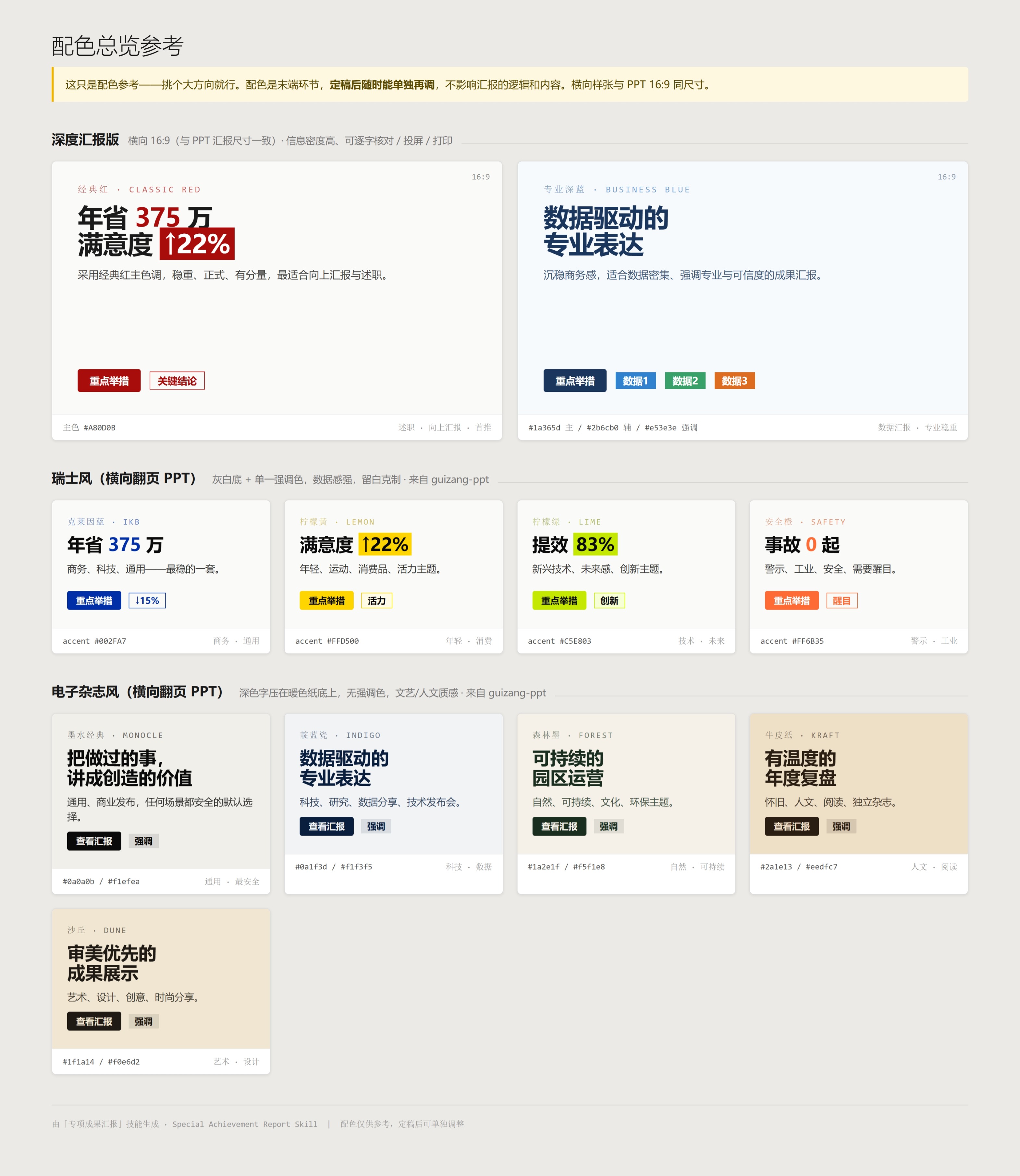
🎨 三种成品形态(内容定稿后才选,配色只是末端)
- 深度汇报版 —— 横向 16:9 单页 HTML,信息密度高,适合细读 / 投屏 / 打印。
- 电子杂志风 PPT —— 横向翻页,文艺人文质感(来自
guizang-ppt-skill)。 - 瑞士风 PPT —— 横向翻页,网格 + 高反差色,数据感强(来自
guizang-ppt-skill)。
第一次选配色时,技能会在本地生成一张「配色总览参考」,让你直观挑,而不是凭文字想象。
🔄 它怎么陪你走(6 步,全程像聊天)
① 了解你    首次用,记下你的行业/岗位(只问一次,以后自动复用)
② 摸场景    这份给谁看?年终?述职?争资源?——决定怎么帮你讲
③ 给素材    你提供数据,或让它先帮你起草草稿(先问后写,不瞎编)
④ 配方法论  按场景帮你配一套方法论组合,生成大纲让你确认
⑤ 选形态    内容定稿后,挑个版式 + 配色(本地出配色参考直观选)
⑥ 出成品    生成单文件 HTML,并告诉你"5 分钟该讲哪 3 页、领导会追问什么"
💡 为什么用它,而不是直接让 AI 写
| 直接让 AI「写个年终总结」 | 用这个技能 |
|---|---|
| 流水账式罗列「做了什么」 | 用方法论提炼「创造了什么价值」 |
| 套话、AI 味重 | 像资深顾问聊出来的,去模板腔 |
| 一种写法到底 | 9 大类方法论按场景配,述职/复盘/争资源各不同 |
| 给你一坨文字 | 给你能直接投屏/打印的成品 + 讲法建议 |
| 数字含糊 | 数字必须来自你,缺的明确标 【待填】,绝不编造 |
📦 安装
技能目录统一放在 ~/.claude/skills/special-achievement-report。任选一种方式:
⚡ 方式一:一行命令(推荐)
npx skills add https://github.com/xxxd666/special-achievement-report --skill special-achievement-report
🤖 方式二:把下面这段发给 AI(Claude Code / Cursor 等有 shell 权限的 Agent)
请帮我安装这个 Claude 技能:
1. 确保 ~/.claude/skills/ 目录存在(不存在就创建)
2. 执行 git clone https://github.com/xxxd666/special-achievement-report.git ~/.claude/skills/special-achievement-report
3. 验证:ls ~/.claude/skills/special-achievement-report/ 应能看到 SKILL.md 和 references/
🛠 方式三:手动命令行
git clone https://github.com/xxxd666/special-achievement-report.git ~/.claude/skills/special-achievement-report
Windows 用户:
~/.claude/即C:\Users\<你的用户名>\.claude\。
验证:装好后重启 Claude,发一句「用专项成果汇报技能帮我做份汇报」,能进入引导流程即成功。
更新:重跑安装命令,或在技能目录里执行 git pull。
⚠️ 关于网页 PPT 的依赖(重要)
- 深度汇报版(形态①)开箱即用,不依赖任何其他东西。
- 电子杂志风 / 瑞士风 PPT(形态②③) 复用了
guizang-ppt-skill的模板与配色,需要同级安装它:
仓库地址:**https://github.com/op7418/guizang-ppt-skill**(按其说明自行安装即可).claude/skills/ ├── special-achievement-report/ ← 本技能 └── guizang-ppt-skill/ ← 网页 PPT 依赖(同级) - 没装也没关系——技能会自动建议你用深度汇报版,照样能产出完整汇报。
🗂 项目结构
special-achievement-report/
├── SKILL.md                      技能主文档(两条核心原则 + 工作流)
└── references/
    ├── frameworks.md             九大类方法论总索引
    ├── framework-selector.md     方法论选择 / 推荐逻辑
    ├── palette-preview.md        配色总览参考的生成规范
    ├── ppt-styles.md             三种形态 + 版式映射
    ├── html-template.md          深度汇报版设计系统
    ├── ppt-output.md             传统 .pptx 兜底导出
    ├── examples.md               话术 / 案例库
    └── frameworks/               九大类方法论详解(各一文件)
        ├── mckinsey.md  bcg.md  bain.md  pwc.md  deloitte.md
        └── amazon.md  google-okr.md  bridgewater.md  beyond-pyramid.md
用户画像存在技能目录之外(
~/.claude/special-achievement-report.profile.md),重装技能不会丢,可手动编辑。
🔒 两条设计原则
- 卖点是汇报思维,不是配色。 功夫都花在「怎么把价值讲清楚」,视觉是末端、可随时单独再调。
- 去 AI 味。 全程像资深顾问聊天,不堆术语、不机械走流程。
📸 截图
配色总览参考(首次选配色时本地生成,让你直观挑):
更多截图说明与社交预览图设置见
docs/screenshots/。仓库自带可一键截图的 banner:docs/banner.html。
🙏 致谢 / 出处
- 网页 PPT 模板与配色来自
guizang-ppt-skill。 - 方法论参考自麦肯锡、BCG、贝恩、普华永道、德勤、亚马逊、谷歌、桥水等公开出版的汇报/沟通方法。
License
MIT © 2026 许吉伊
Special Achievement Report
A Claude skill that lets anyone produce consulting-grade achievement reports. Its core isn't laying out slides — it's turning "I did a lot of things" into "here's the value I created", using the reporting methodologies of McKinsey, BCG, Bain, Amazon and more to reshape scattered material into a logical, insightful report your leadership will actually remember.
Any industry, any role, zero technical background required. Whether you're in operations, HR, sales, marketing, R&D, finance, teaching, healthcare, or running your own thing — if you need to make your results clear and compelling, this helps. It works like a senior reporting advisor sitting next to you, walking you through it step by step.
🚀 Get started in 30 seconds (copy this to Claude)
Use the special achievement report skill to help me build my 2025 annual results report.
It chats with you like an advisor (who's it for, what you did, what data you have), structures your report, drafts an outline, then picks a clean visual format. You talk, it thinks.
✨ What it solves
Many people "did tons of work but can't articulate the value" — leadership doesn't remember it, and you feel shortchanged. This skill fills the hardest gap in the middle:
You:   did lots of things, but can't explain the value
        │  ← reorganize with proven methodology (this is the key step)
Skill: a logical, data-backed, insightful report leadership remembers
Fits any results-reporting scenario: annual/quarterly reviews, project retros, job defenses, promotions, budget/resource asks, external sharing, investor pitches, research wrap-ups, portfolios…
🧠 Nine families of reporting methodology (combined by scenario, not just one)
Real reports stack several methods. The skill configures a combination based on "who's it for, what's the occasion" — and you can add, drop, or mix.
| Family | In a nutshell | Best for |
|---|---|---|
| McKinsey (default) | Pyramid + MECE + SCQA + Air-Rain-Umbrella; 9 methods / 3 subgroups | General, upward reporting |
| BCG | Every slide title is the conclusion (action titles) | Data highlights, impact |
| Bain | Answer first, results delivered | Winning buy-in, ROI |
| PwC | Fact – Criteria – Gap – Impact – Recommendation | Retro / self-audit / risk |
| Deloitte | As-Is → To-Be + value map | Transformation / process redesign |
| Amazon | 6-pager narrative memo + PR/FAQ | New initiatives / deep cases |
| OKR review: objective–key results–scoring–attribution | Goal-attainment reviews | |
| Bridgewater / notables | Signal – Diagnosis – Principle – Action | Lessons & experience distillation |
| Beyond the pyramid | BLUF / STAR / story arc | Ultra-short / job defense / talks |
Not sure which? Just say "go with the safest option" — it defaults to the McKinsey baseline combination.
🎨 Three output formats (chosen only after content is final; color is the last mile)
- Deep report — landscape 16:9 single-page HTML, dense, for close reading / projection / print.
- Editorial-magazine PPT — horizontal deck, literary/humanistic feel (via
guizang-ppt-skill). - Swiss-style PPT — horizontal deck, grid + high-contrast color, data-forward (via
guizang-ppt-skill).
The first time you pick colors, the skill generates a local "palette overview" so you choose visually instead of imagining from text.
🔄 How it walks you through it (6 steps, all conversational)
① Get to know you   On first use, note your industry/role (asked once, reused after)
② Read the room     Who's it for? Annual? Defense? Resource ask?
③ Gather material   You provide data, or it drafts first (asks before writing, never fabricates)
④ Configure methods Pick a methodology combo by scenario; generate an outline to confirm
⑤ Choose format     After content is locked, pick layout + color (local palette preview)
⑥ Deliver           Single-file HTML + "which 3 pages to present in 5 min, likely questions"
💡 Why this instead of just asking AI to "write a summary"
| Just asking AI to "write a year-end summary" | Using this skill |
|---|---|
| A flat list of "what I did" | Distills "what value I created" via methodology |
| Generic, AI-flavored prose | Sounds like a senior advisor — no template tone |
| One style throughout | 9 method families matched to the occasion |
| A wall of text | A ready-to-project/print deliverable + talking points |
| Vague numbers | Numbers come from you; gaps marked 【TBD】, never fabricated |
📦 Install
The skill lives at ~/.claude/skills/special-achievement-report. Pick any method:
① One-line command (recommended)
npx skills add https://github.com/xxxd666/special-achievement-report --skill special-achievement-report
② Paste this to an AI agent (Claude Code / Cursor / any agent with shell access)
Please install this Claude skill:
1. Ensure ~/.claude/skills/ exists (create it if not)
2. Run: git clone https://github.com/xxxd666/special-achievement-report.git ~/.claude/skills/special-achievement-report
3. Verify: ls ~/.claude/skills/special-achievement-report/ should show SKILL.md and references/
③ Manual clone
git clone https://github.com/xxxd666/special-achievement-report.git ~/.claude/skills/special-achievement-report
Windows:
~/.claude/meansC:\Users\<you>\.claude\.
Verify: restart Claude and say "use the special achievement report skill to build a report." Update: re-run the install command, or git pull in the skill folder.
⚠️ About the web-PPT dependency
- Deep report (format ①) works out of the box — no dependency.
- Editorial / Swiss PPT (formats ②③) reuse templates and palettes from
guizang-ppt-skill, installed as a sibling:
Repo: https://github.com/op7418/guizang-ppt-skill (install per its own instructions).claude/skills/ ├── special-achievement-report/ ← this skill └── guizang-ppt-skill/ ← web-PPT dependency (sibling) - Skip it if you like — the skill falls back to the deep report and still produces a full report.
🔒 Two design principles
- The value is reporting thinking, not color. Effort goes into making the value clear; visuals are the last mile, adjustable anytime.
- No "AI flavor." It talks like a senior advisor — no jargon dumps, no robotic step-walking.
🙏 Credits
- Web-PPT templates and palettes from
guizang-ppt-skill. - Methodologies reference publicly published reporting/communication methods from McKinsey, BCG, Bain, PwC, Deloitte, Amazon, Google, Bridgewater, and others.
License
MIT © 2026 Xu Jiyi