
Fireworks Tech Graph
Xinyu-lumos/fireworks-tech-graph
Gere diagramas técnicos profissionais a partir de descrição em texto
Ver no GitHubSkill para Claude que transforma descrições em linguagem natural em diagramas técnicos SVG e PNG publication-ready. Oferece 7 estilos visuais (desde flat icon até glassmorphism) e 14 tipos de diagramas UML, com suporte específico para arquiteturas de IA (RAG, agentes, Mem0, multi-agent).
Instalação
npx convez-ai Xinyu-lumos/fireworks-tech-graph1 comando no terminal: detecta o formato do repositório (marketplace ou plugin avulso) e instala via Claude Code. Requer Node 18+ e o Claude Code instalado.
Métricas
Casos de uso
- Documentar arquiteturas de sistemas e microserviços
- Visualizar fluxos de agentes de IA e pipelines RAG
- Criar diagramas UML (classe, sequência, componentes, estado)
- Gerar assets visuais para presentations e documentação técnica
Veredito

Ferramenta sólida que automatiza a geração de diagramas técnicos, economizando tempo na documentação. Particularmente útil para arquiteturas de IA/agentes, com 7 estilos profissionais e saída vetorial de qualidade. Recomendado para times que precisam manter diagramas em sync com mudanças de arquitetura.
README
A tradução para o português deste README ainda está na fila.
fireworks-tech-graph
Stop drawing diagrams by hand. Describe your system in English or Chinese — get publication-ready SVG + PNG technical diagrams in seconds.





Overview
fireworks-tech-graph turns natural language descriptions into polished SVG diagrams, then exports them as high-resolution PNG via rsvg-convert. It ships with 7 visual styles and deep knowledge of AI/Agent domain patterns (RAG, Agentic Search, Mem0, Multi-Agent, Tool Call flows), plus full support for all 14 UML diagram types.
User: "Generate a Mem0 memory architecture diagram, dark style"
  → Skill classifies: Memory Architecture Diagram, Style 2
  → Generates SVG with swim lanes, cylinders, semantic arrows
  → Exports 1920px PNG
  → Reports: mem0-architecture.svg / mem0-architecture.png
Showcase
All samples exported at 1920px width (2× retina) via
rsvg-convert. PNG is lossless and the right choice for technical diagrams — sharp edges, no JPEG compression artifacts on text/lines.
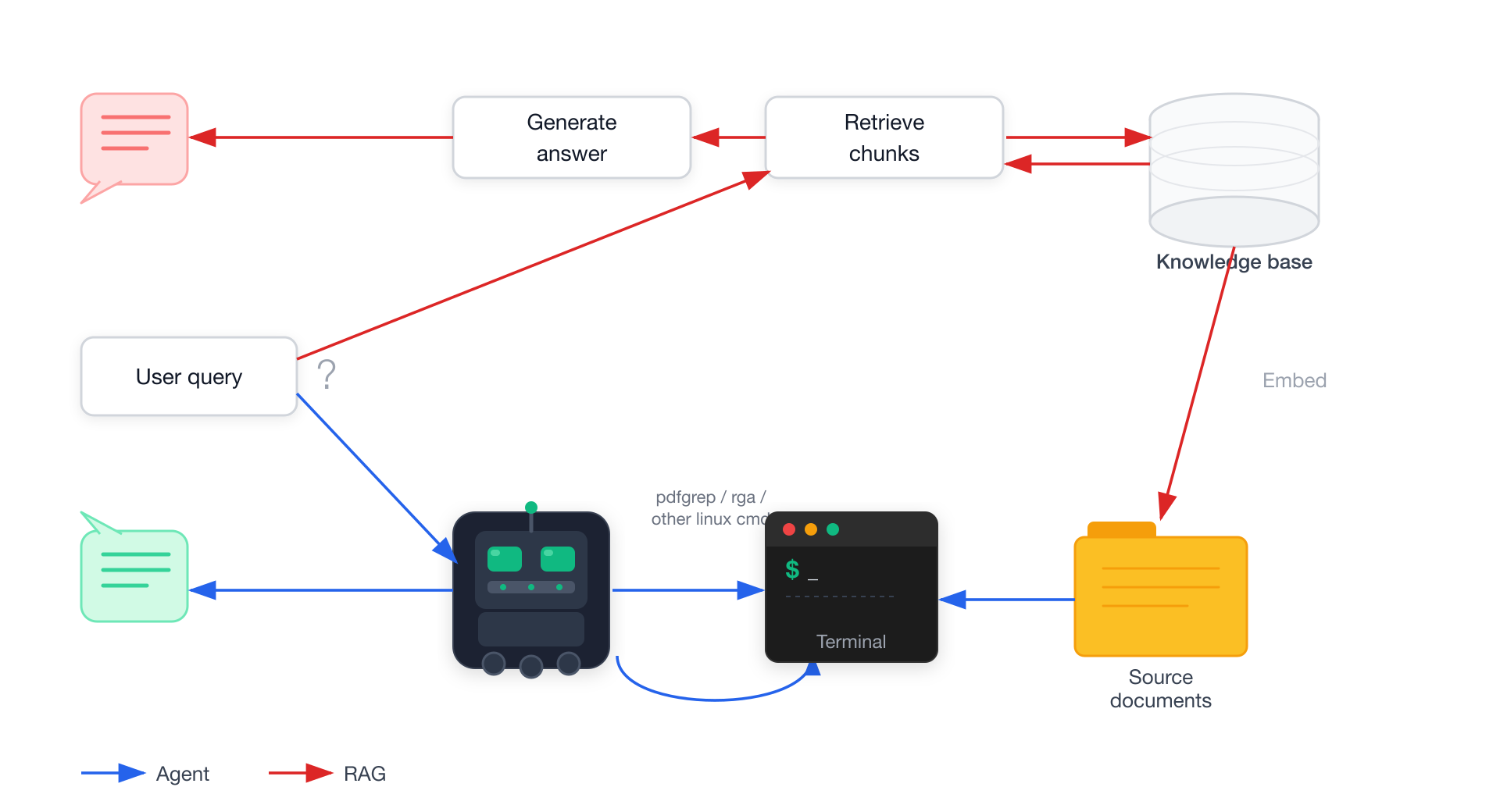
Style 1 — Flat Icon (default)
Agentic RAG Pipeline — white background, colorful semantic arrows
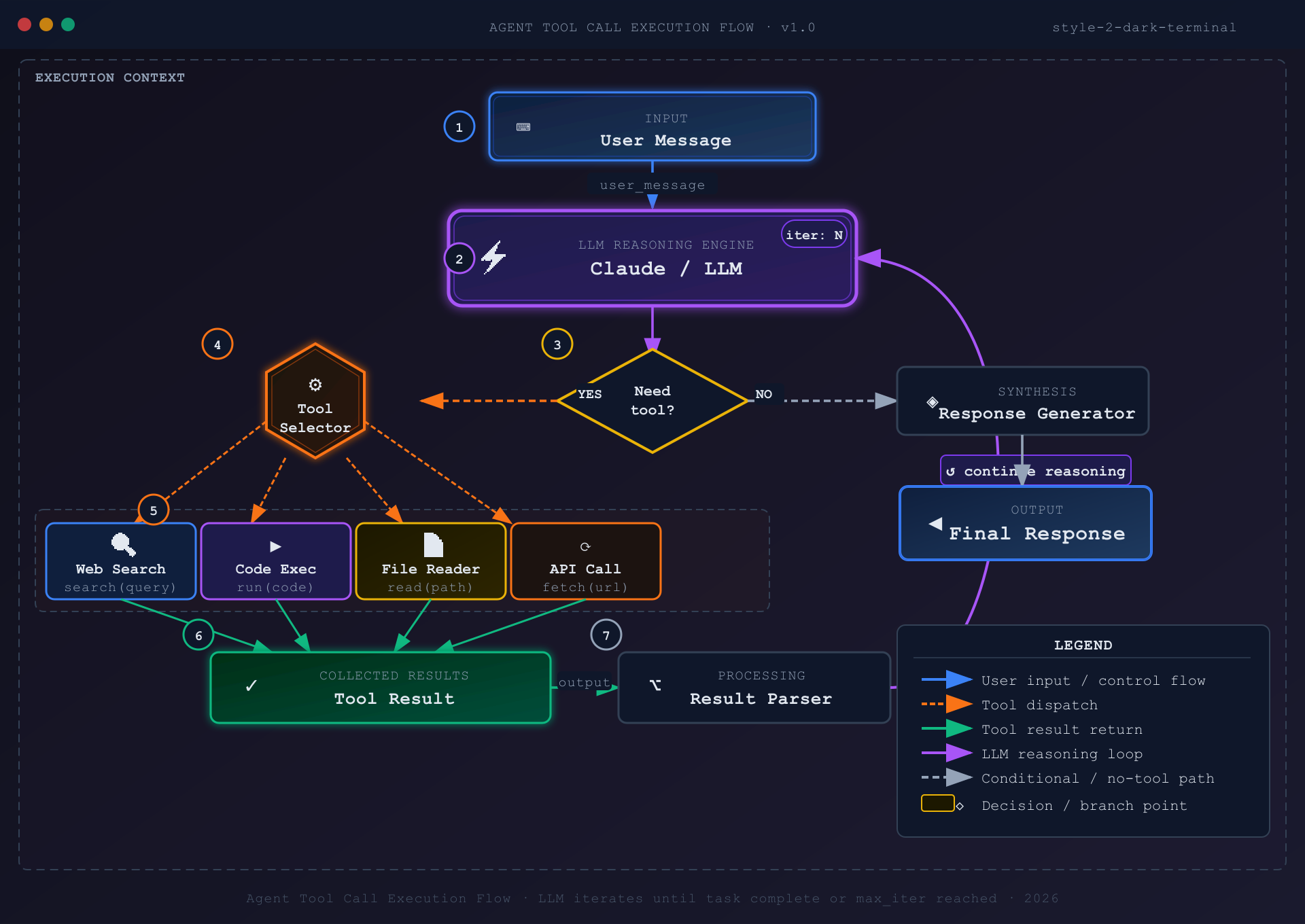
Style 2 — Dark Terminal
Tool Call Flow — dark background, neon accents, monospace font
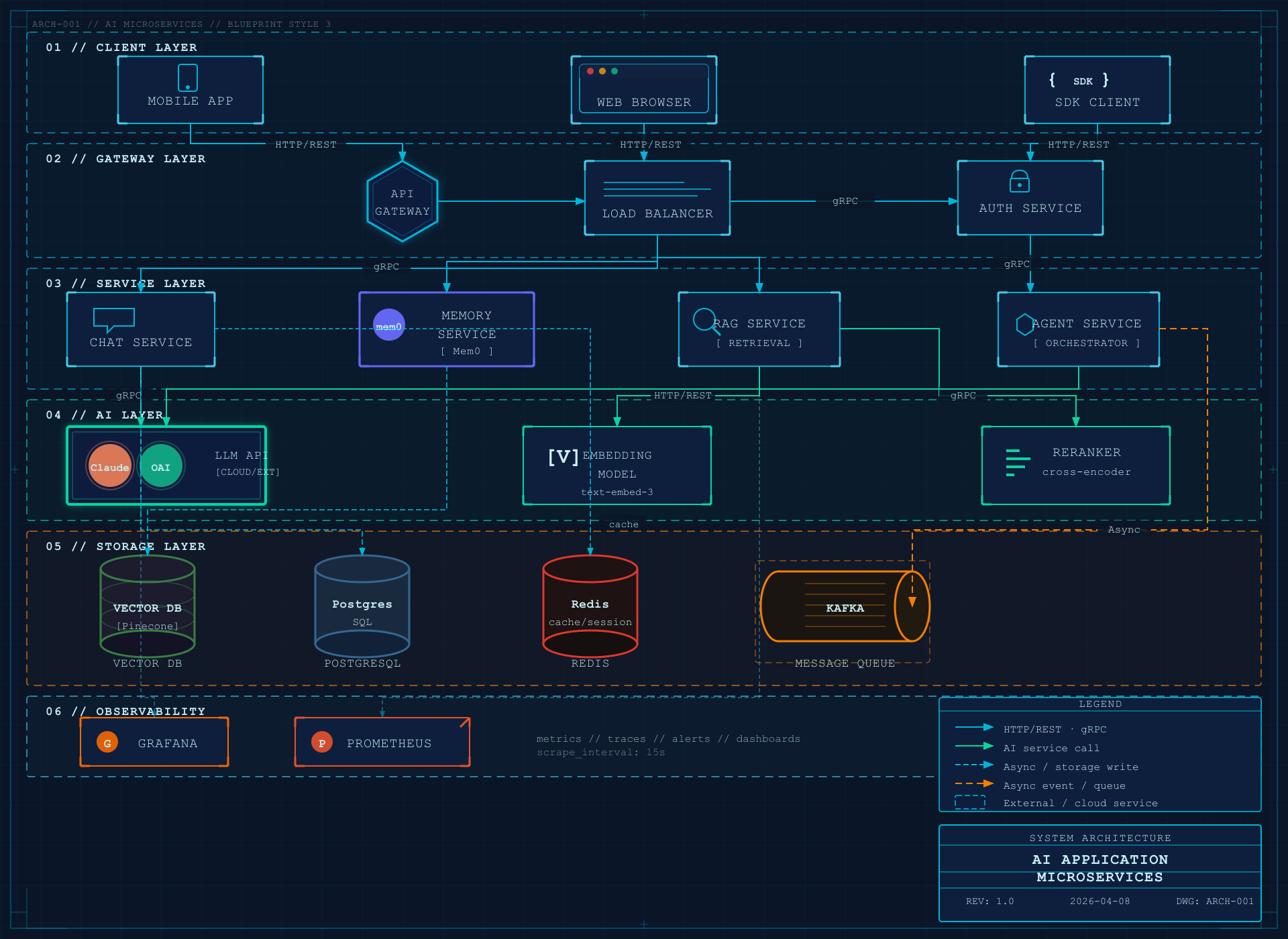
Style 3 — Blueprint
Microservices Architecture — deep blue background, grid lines, cyan strokes
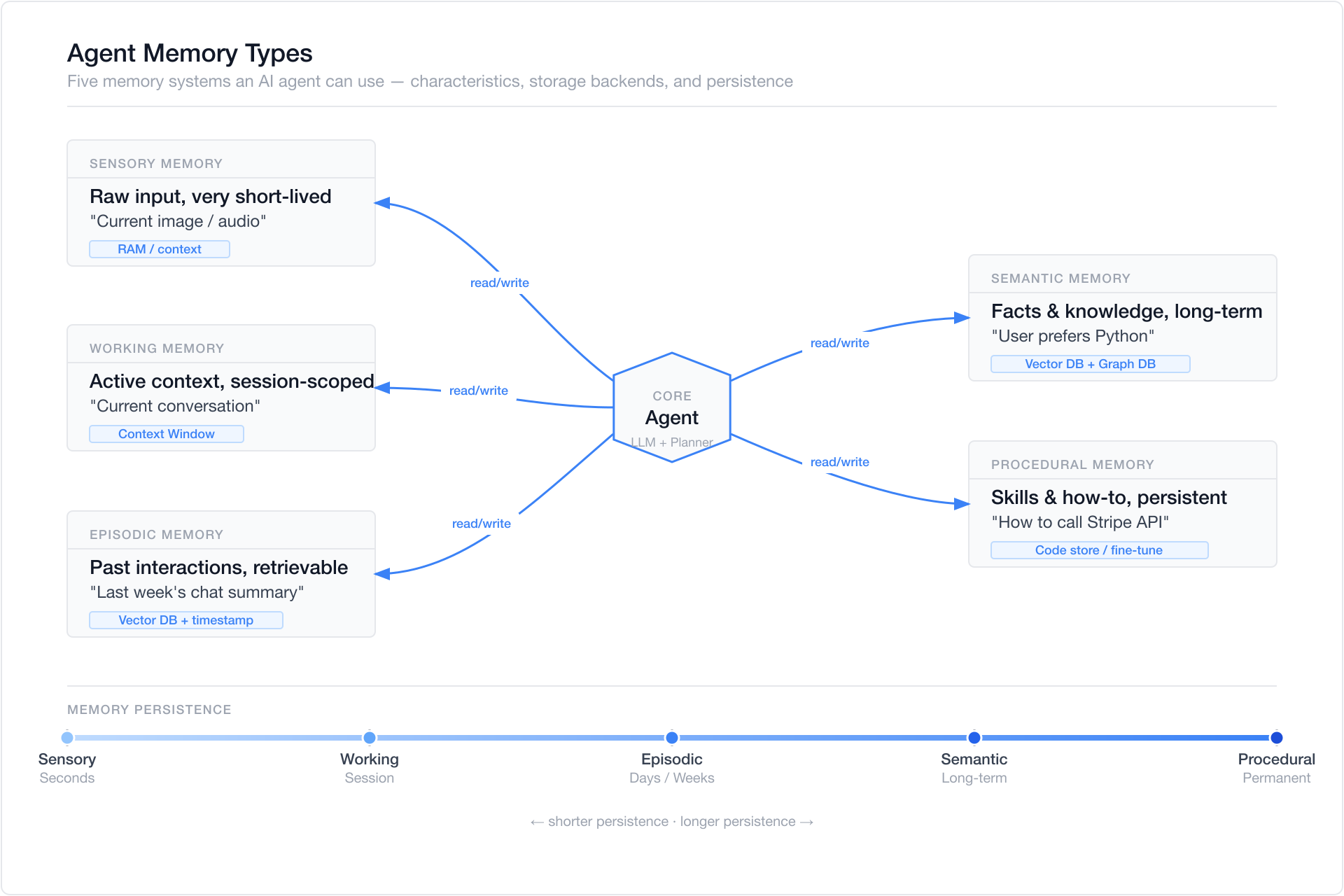
Style 4 — Notion Clean
Agent Memory Types — minimal white, single accent color
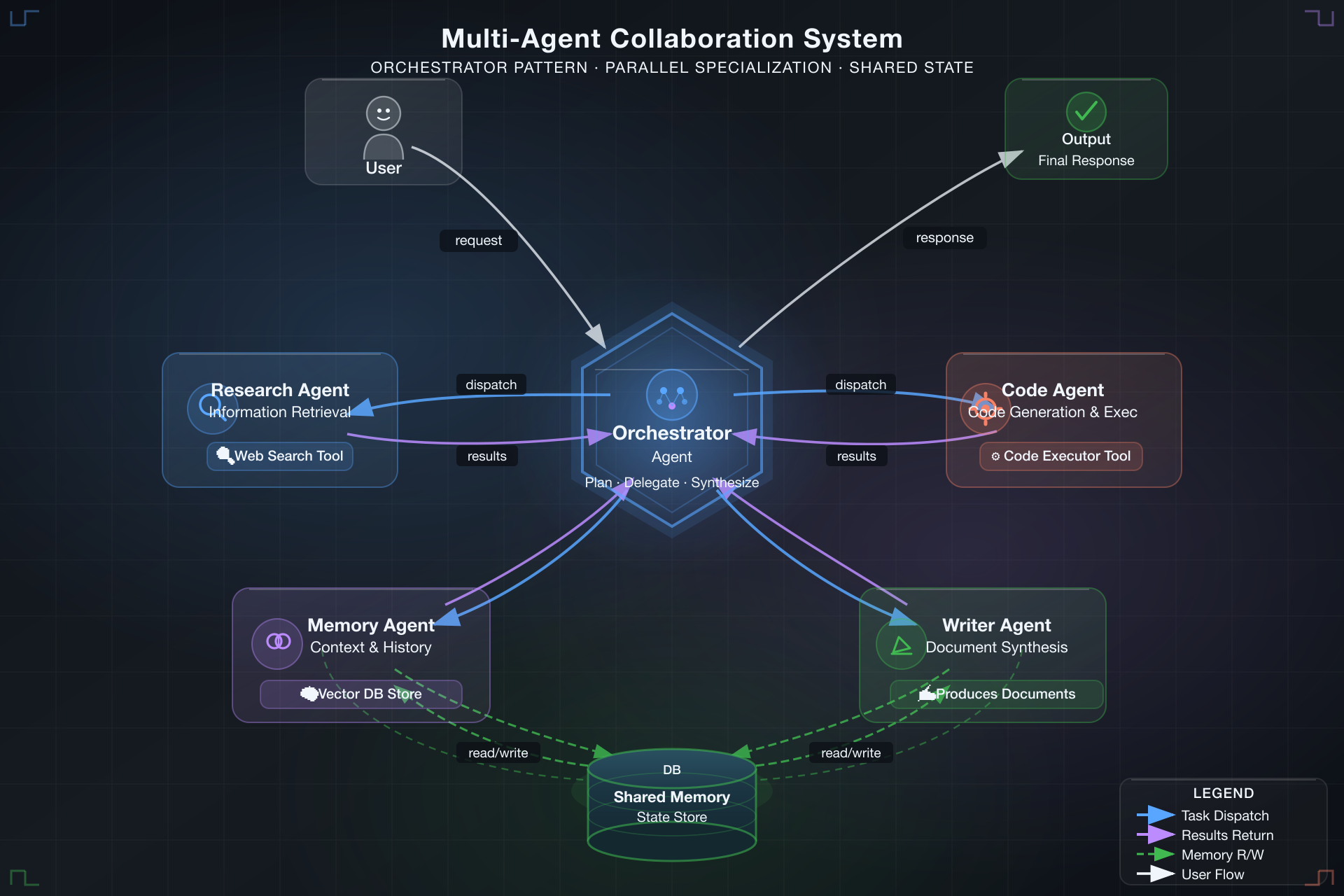
Style 5 — Glassmorphism
Multi-Agent Collaboration — dark gradient background, s cards
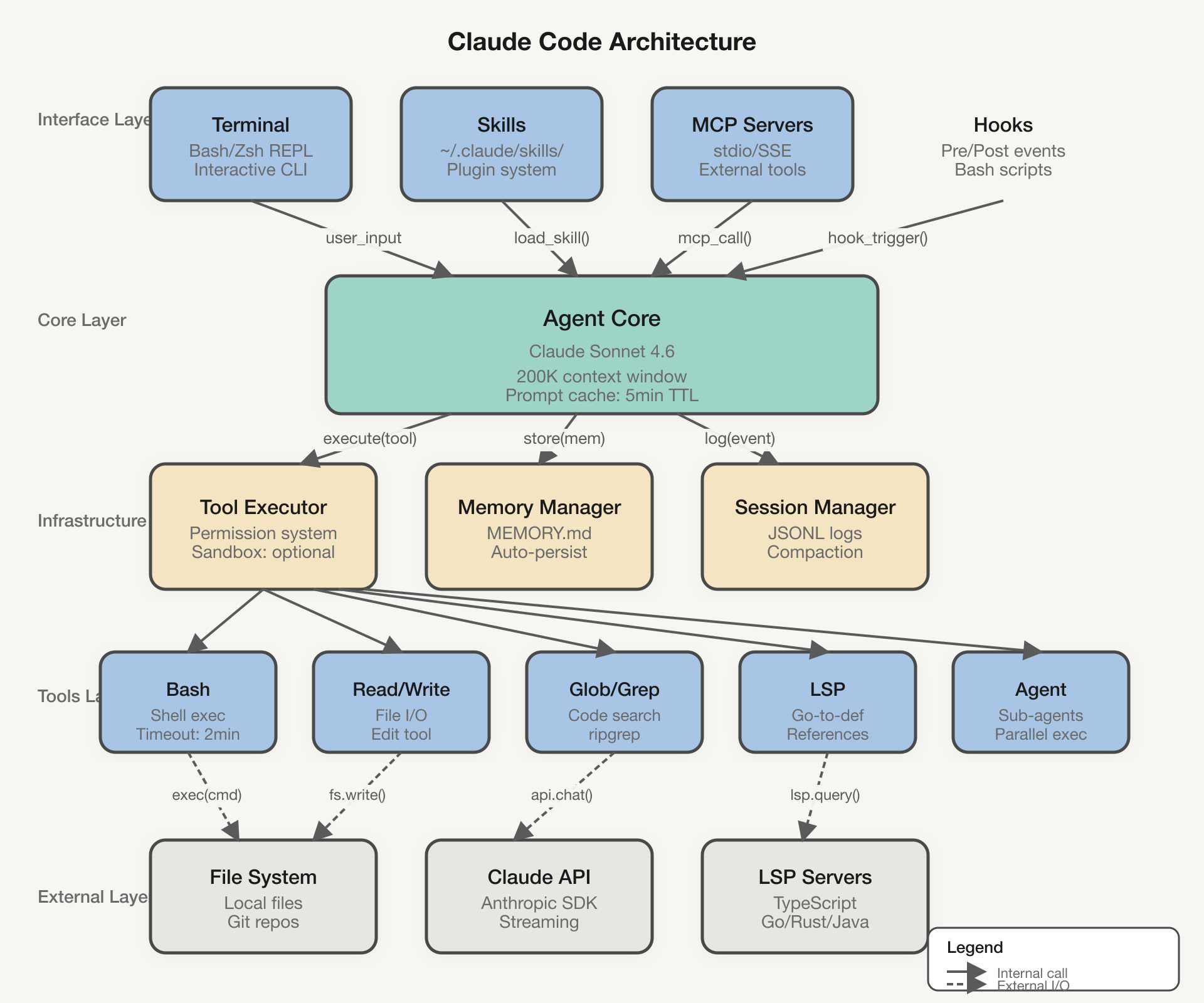
Style 6 — Claude Official
System Architecture — warm cream background (#f8f6f3), Anthropic brand colors, clean professional aesthetic
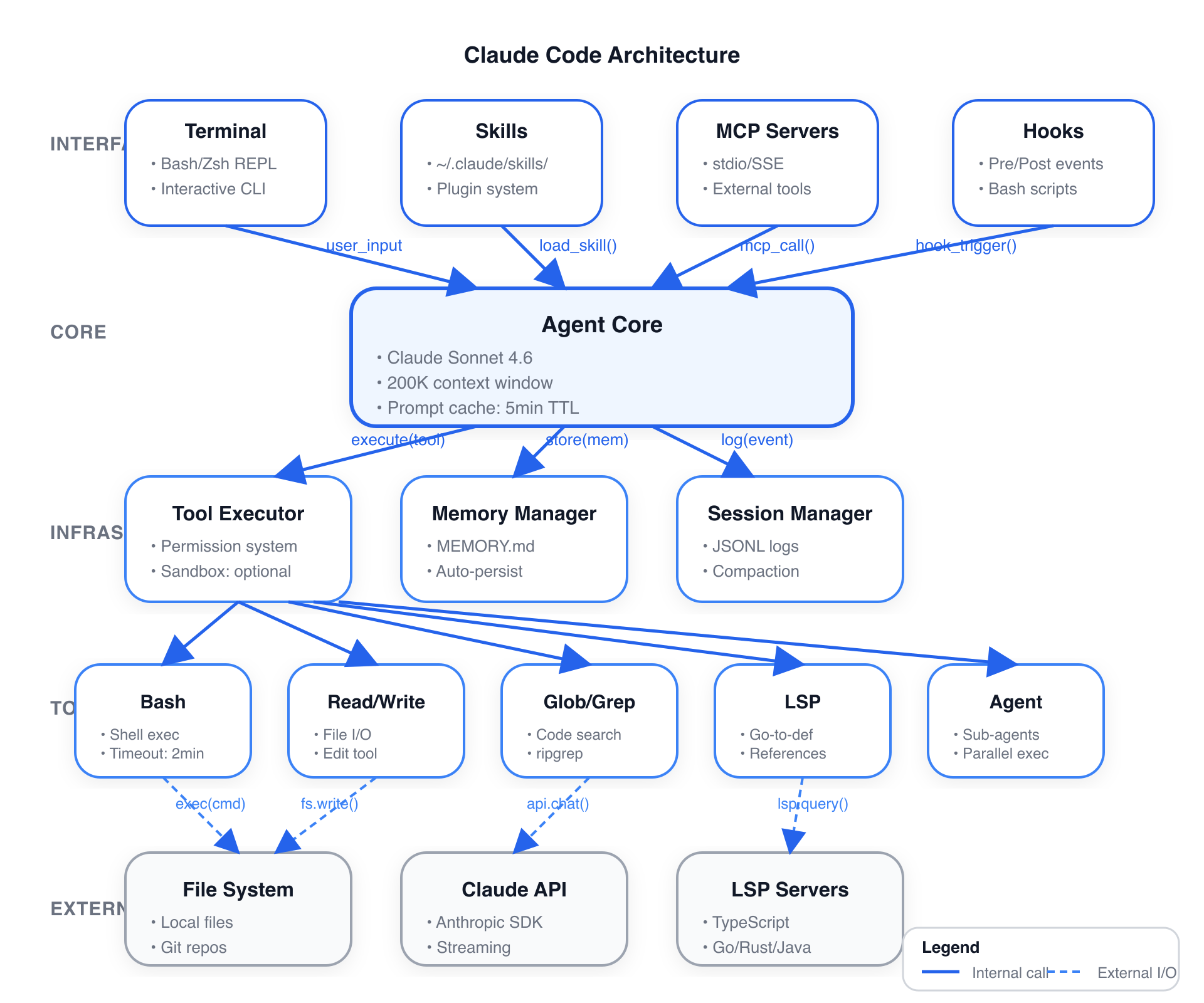
Style 7 — OpenAI Official
API Integration Flow — pure white background, OpenAI brand palette, modern minimalist design
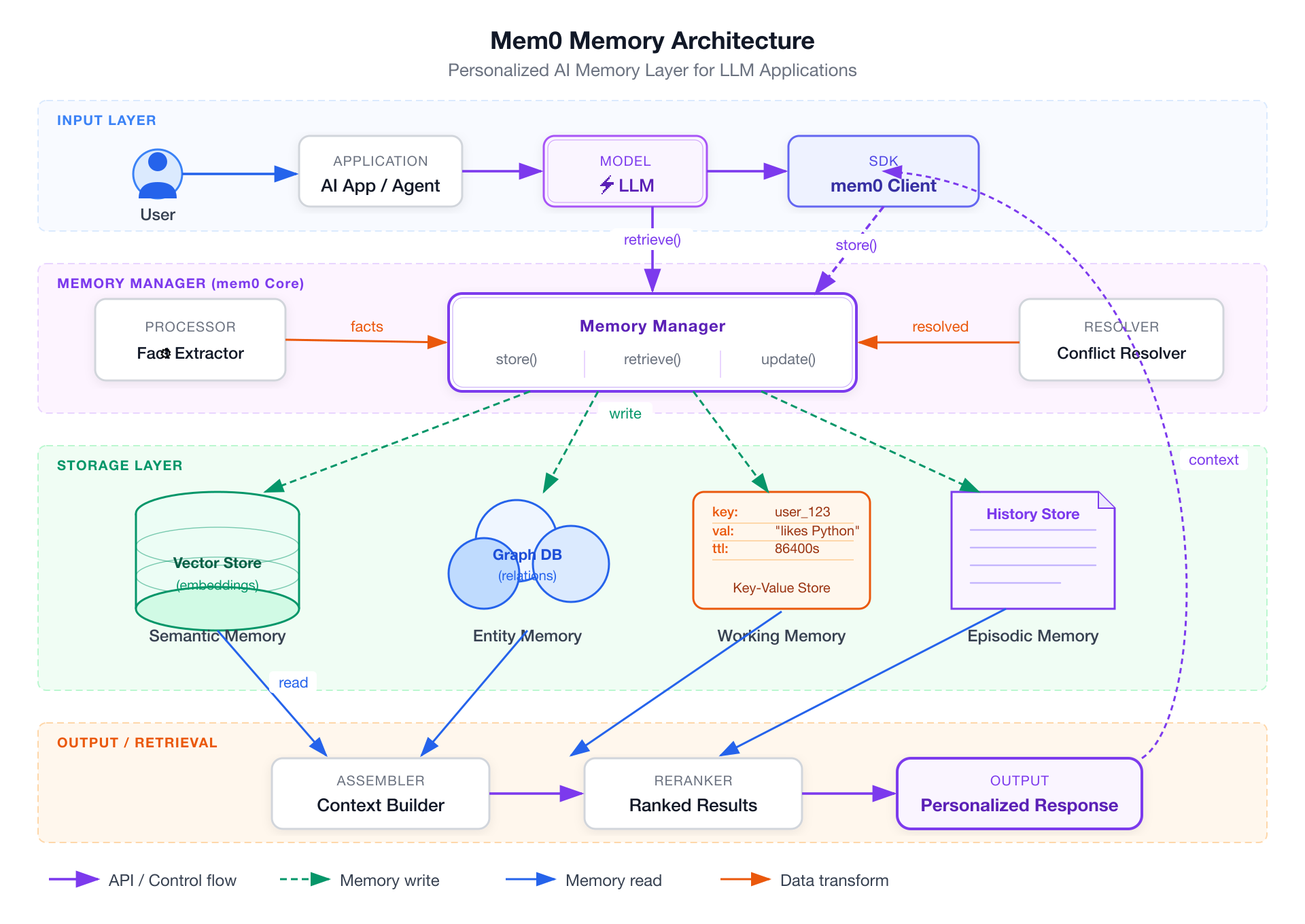
AI Domain — Mem0 Memory Architecture
Full memory architecture with swim lanes, cylinders, and semantic read/write arrows
Features
- 7 visual styles — from clean white docs to dark neon to frosted glass to official brand styles
- 14 diagram types — Full UML support (Class, Component, Deployment, Package, Composite Structure, Object, Use Case, Activity, State Machine, Sequence, Communication, Timing, Interaction Overview, ER Diagram) plus AI/Agent domain diagrams
- AI/Agent domain patterns — RAG, Agentic Search, Mem0, Multi-Agent, Tool Call, and more built-in
- Semantic shape vocabulary — LLM = double-border rect, Agent = hexagon, Vector Store = ringed cylinder
- Semantic arrow system — color + dash pattern encode meaning (write vs read vs async vs loop)
- Product icons — 40+ products with brand colors: OpenAI, Anthropic, Pinecone, Weaviate, Kafka, PostgreSQL…
- Swim lane grouping — automatic layer labeling for complex architectures
- SVG + PNG output — SVG for editing, 1920px PNG for embedding
- rsvg-convert compatible — no external font fetching, pure inline SVG
Installation
claude skills install fireworks-tech-graph
Or clone directly:
git clone https://github.com/yizhiyanhua-ai/fireworks-tech-graph.git ~/.claude/skills/fireworks-tech-graph
Requirements
# macOS
brew install librsvg

# Ubuntu/Debian
sudo apt install librsvg2-bin

# Verify
rsvg-convert --version
Why Not Mermaid or draw.io?
| Mermaid | draw.io | fireworks-tech-graph | |
|---|---|---|---|
| Natural language input | ✗ | ✗ | ✅ |
| AI/Agent domain patterns | ✗ | ✗ | ✅ |
| Multiple visual styles | ✗ | manual | ✅ 5 built-in |
| High-res PNG export | ✗ | manual | ✅ auto 1920px |
| Semantic arrow colors | ✗ | manual | ✅ auto |
| No online tool needed | ✅ | ✗ | ✅ |
Mermaid is great for quick inline diagrams in markdown. draw.io is great for manual polishing. fireworks-tech-graph is optimized for describing a system and getting a polished diagram immediately, without writing DSL syntax or clicking around a GUI.
Usage
Trigger phrases
The skill auto-triggers on:
generate diagram / draw diagram / create chart / visualize
architecture diagram / flowchart / sequence diagram / data flow
Basic usage
Draw a RAG pipeline flowchart
Generate an Agentic Search architecture diagram
Specify style
Draw a microservices architecture diagram, style 2 (dark terminal)
Draw a multi-agent collaboration diagram --style glassmorphism
Specify output path
Generate a Mem0 architecture diagram, output to ~/Desktop/
Create a tool call flow diagram --output /tmp/diagrams/
Example Prompts by Scenario
AI/Agent Systems
Compare Agentic RAG vs standard RAG in a feature matrix, Notion clean style
→ Comparison matrix: RAG vs Agentic RAG, covering retrieval strategy, agent loop, tool use
Generate a Mem0 memory architecture diagram with vector store, graph DB, KV store, and memory manager
→ Memory Architecture with swim lanes: Input → Memory Manager → Storage tiers → Retrieval
Draw a Multi-Agent diagram: Orchestrator dispatches 3 SubAgents (search / compute / code execution), results aggregated
→ Agent Architecture with hexagons, tool layers, and result aggregation
Visualize the Tool Call execution flow: LLM → Tool Selector → Execution → Parser → back to LLM
→ Flowchart with decision loop showing tool invocation cycle
Draw the 5 agent memory types: Sensory, Working, Episodic, Semantic, Procedural
→ Mind map or layered architecture showing memory tiers from sensory to procedural
Infrastructure & Cloud
Draw a microservices architecture: Client → API Gateway → [User Service / Order Service / Payment Service] → PostgreSQL + Redis
→ Architecture diagram with horizontal layers, swim lanes per service cluster
Generate a data pipeline diagram: Kafka → Spark processing → write to S3 → Athena query
→ Data flow diagram with labeled arrows (stream / batch / query)
Draw a Kubernetes deployment: Ingress → Service → [Pod × 3] → ConfigMap + PersistentVolume
→ Architecture with dashed containers per namespace, solid arrows for traffic flow
API & Sequence Flows
Draw an OAuth2 authorization code flow sequence diagram: User → Client → Auth Server → Resource Server
→ Sequence diagram with vertical lifelines and activation boxes
Draw the ChatGPT Plugin call sequence diagram
→ Sequence: User → ChatGPT → Plugin Manifest → API → Response chain
Decision & Process Flows
Draw a pre-launch QA flowchart for an AI app: Code Review → Security Scan → Performance Test → Manual Approval → Deploy
→ Flowchart with diamond decision nodes and parallel branches
Generate a feature comparison matrix: RAG vs Fine-tuning vs Prompt Engineering
→ Comparison matrix with checked/unchecked cells across cost, latency, accuracy, flexibility
Concept Maps
Visualize the LLM application tech stack: from foundation model to SDK to app framework to deployment
→ Layered architecture or mind map from model layer to product layer
Draw an AI Agent capability map: Perception / Memory / Reasoning / Action / Learning
→ Mind map with central "AI Agent" node and 5 radial branches
Styles
| # | Name | Background | Font | Best For |
|---|---|---|---|---|
| 1 | Flat Icon (default) | #ffffff | Helvetica | Blogs, slides, docs |
| 2 | Dark Terminal | #0f0f1a | SF Mono / Fira Code | GitHub README, dev articles |
| 3 | Blueprint | #0a1628 | Courier Newure docs, engineering | |
| 4 | Notion Clean | #ffffff | system-ui | Notion, Confluence, wikis |
| 5 | Glassmorphism | #0d1117 gradient | Inter | Product sites, keynotes |
| 6 | Claude Official | #f8f6f3 | system-ui | Anthro diagrams, warm aesthetic |
| 7 | OpenAI Official | #ffffff | system-ui | OpenAI-style diagrams, clean modern look |
Each style has a dedicated reference file in references/ with exact color tokens, SVG patterns, and templates.
Style Selection Guide
For UML Diagrams:
- Class/Component/Package: Style 1 (Flat Icon) or Style 4 (Notion Clean) — clear structure, easy to read
- Sequence/Timing: Style 2 (Dark Terminal) — monospace fonts help with alignment
- State Machine/Activity: Style 3 (Blueprint) — engineering aesthetic fits process flows
- Use Case/Interview: Style 1 (Flat Icon) — colorful, accessible
For AI/Agent Diagrams:
- RAG/Agentic Search: Style 2 (Dark Terminal) or Style 5 (Glassmorphism) — tech-forward aesthetic
- Memory Architecture: Style 3 (Blueprint) — emphasizes layered storage tiers
- Multi-Agent: Style 5 (Glassmorphism) — frosted cards distinguish agent boundaries
For Documentation:
- Internal docs: Style 4 (Notion Clean) — minimal, wiki-frieng posts**: Style 1 (Flat Icon) — colorful, engaging
- GitHub README: Style 2 (Dark Terminal) — matches dark theme
- Presentations: Style 5 (Glassmorphism) or Style 6 (Claude Official) — polished
Brand-Specific:
- Anthropic/Claude projects: Style 6 (Claude Official) — warm cream background, brand colors
- OpenAI projects: Style 7 (OpenAI Official) — clean white, OpenAI palette
Diagram Types
| Type | Description | Key Layout Rule |
|---|---|---|
| Architecture | Services, components, cloud infra | Horizontal layers top→bottom |
| Data Flow | What data moves where | Label every arrow with data type |
| Flowchart | Decisions, process steps | Diamond = decision, top→bottom |
| Agent Architecture | LLM + tools + memory | 5-layer model: Input/Agent/Memory/Tool/Output |
| Memory Architecture | Mem0, MemGPT-style | Separate read/write paths, memory tiers |
| Sequence | API call chains, time-ordered | Vertical lifelines, horizontal messages |
| Comparison | Feature matrix, side-by-side | Column = system, row = attribute |
| Mind Map | Concept maps, radial | Central node, bezier branches |
UML Diagram Support (14 Types)
| UML Type | Description | Best Style |
|---|---|---|
| Class Diagram | Classes, attributes, methods, relationships | Style 1, 4 |
| Component Diagram | Software components and dependencies | Style 1, 3 |
| Deployment Diagram | Hardware nodes and software deployment | Style 3 |
| Package Diagram | Package organization and dependencies | Style 1, 4 |
| Composite Structure | Internal structure of classes/components | Style 1, 3 |
| Object Diagram | Object instances and relationships | Style 1, 4 |
| Use Case Diagram | Actors, use cases, system boundaries | Style 1 |
| Activity Diagram | Workflows, parallel processes | Sty3 |
| State Machine | State transitions and events | Style 2, 3 |
| Sequence Diagram | Message exchanges over time | Style 2 |
| Communication Diagram | Object interactions and messages | Style 1, 2 |
| Timing Diagram | State changes over time | Style 2 |
| Interaction Overview | High-level interaction flow | Style 1, 2 |
| ER Diagram | Entity-relationship data models | Style 1, 3 |
AI/Agent Domain Patterns
Built-in pattern knowledge:
RAG Pipeline         → Query → Embed → VectorSearch → Retrieve → LLM → Response
Agentic RAG          → adds Agent loop + Tool use
Agentic Search       → Query → Planner → [Search/Calc/Code] → Synthesizer
Mem0 Memory Layer    → Input → Memory Manager → [VectorDB + GraphDB] → Context
Agent Memory Types   → Sensory → Working → Episodic → Semantic → Procedural
Multi-Agent          → Orchestrator → [SubAgent×N] → Aggregator → Output
Tool Call Flow       → LLM → Tool Selector → Execution → Parser → LLM (loop)
Shape Vocabulary
Shapes encode semantic meaning consistently across all styles:
| Concept | Shape |
|---|---|
| User / Human | Circle + body |
| LLM / Model | Rounded rect, double border, ⚡ |
| Agent / Orchestrator | Hexagon |
| Memory (short-term) | Dashed-border rounded rect |
| Memory (long-term) | Solid cylinder |
| Vector Store | Cylinder with inner rings |
| Graph DB | 3-circle cluster |
| Tool / Function | Rect with ⚙ |
| API / Gateway | Hexagon (single border) |
| Queue / Stream | Horizontal pipe/tube |
| Document / File | Folded-corner rect |
| Browser / UI | Rect with 3-dot titlebar |
| Decision | Diamond |
| External Service | Dashed-border rect |
Arrow Semantics
| Flow Type | Stroke | Dash | Meaning |
|---|---|---|---|
| Primary data flow | 2px solid | — | Main request/response |
| Control / trigger | 1.5px solid | — | System A triggers B |
| Memory read | 1.5px solid | — | Retrieve from store |
| Memory write | 1.5px | 5,3 | Write/store operation |
| Async / event | 1.5px | 4,2 | Non-blocking |
| Feedback / loop | 1.5px curved | — | Iterative reasoning |
File Structure
fireworks-tech-graph/
├── SKILL.md                      # Main skill — diagram types, layout rules, shape vocab
├── README.md                     # This file (English)
├── README.zh.md                  # Chinese version
├── references/
│   ├── style-1-flat-icon.md      # White background, colored accents
│   ├── style-2-dark-terminal.md  # Dark bg, neon accents, monospace
│   ├── style-3-blueprint.md      # Blueprint grid, cyan lines
│   ├── style-4-notion-clean.md   # Minimal, white, single arrow color
│   ├── style-5-glassmorphism.md  # Dark gradient, frosted glass cards
│   ├── style-6-claude-official.md # Warm cream background, Anthropic brand
│   ├── style-7-openai-official.md # Clean white, OpenAI brand palette
│   └── icons.md                  # 40+ product icons + semantic shapes
├── scripts/
│   ├── generate-diagram.sh       # Generate SVG + PNG with validation
│   ├── validate-svg.sh           # Validate SVG syntax
│   └── test-all-styles.sh        # Batch test all styles
└── assets/
    └── samples/                  # Showcase diagram PNGs
Product Icon Coverage
AI/ML: OpenAI, Anthropic/Claude, Google Gemini, Meta LLaMA, Mistral, Cohere, Groq, Hugging Face
AI Frameworks: Mem0, LangChain, LlamaIndex, LangGraph, CrewAI, AutoGen, DSPy, Haystack
Vector DBs: Pinecone, Weaviate, Qdrant, Chroma, Milvus, pgvector, Faiss
Databases: PostgreSQL, MySQL, MongoDB, Redis, Elasticsearch, Neo4j, Cassandra
Messaging: Kafka, RabbitMQ, NATS, Pulsar
Cloud: AWS, GCP, Azure, Cloudflare, Vercel, Docker, Kubernetes
Observability: Grafana, Prometheus, Datadog, LangSmith, Langfuse, Arize
Troubleshooting
| Symptom | Cause | Fix |
|---|---|---|
| PNG is blank or all-black | @import url() in SVG — rsvg-convert can't fetch fonts | Remove @import, use system font stack |
| PNG not generated | rsvg-convert not installed | brew install librsvg (macOS) or apt install librsvg2-bin |
| Diagram cut off at bottom | ViewBox height too short | Increase height in viewBox="0 0 960 <height>" |
| Text overflowing boxes | Labels too long | Add text-anchor="middle" + <clipPath> or shorten label |
| Icons not rendering | External CDN URL in rsvg-convert context | Use inline SVG paths from references/icons.md |
License
MIT © 2025 fireworks-tech-graph contributors