
Orbit
xinnaider/orbit
Rodador multi-agente de IA com painel de controle e sessões remotas
Ver no GitHubAplicativo desktop para executar múltiplos agentes de IA (Claude Code, Codex, OpenCode) simultaneamente com interface de painéis divididos. Suporta sessões SSH remotas, rastreamento de custo, histórico persistente e orquestração MCP para spawnar sub-agentes.
Instalação
npx convez-ai xinnaider/orbit1 comando no terminal: detecta o formato do repositório (marketplace ou plugin avulso) e instala via Claude Code. Requer Node 18+ e o Claude Code instalado.
Métricas
Casos de uso
- Executar múltiplos assistentes de código em paralelo
- Orquestrar agentes sub-spawned via MCP
- Trabalhar em sessões remotas via SSH
- Monitorar custo e uso de tokens por sessão
Veredito

Ferramenta robusta e bem arquitetada para quem precisa orquestrar múltiplos agentes de código simultaneamente. Suporte SSH, MCP e rastreamento de custo agregam valor real, mas requer instalação de backends CLI (Claude Code, Codex ou OpenCode) para funcionar.
README
A tradução para o português deste README ainda está na fila.
Orbit
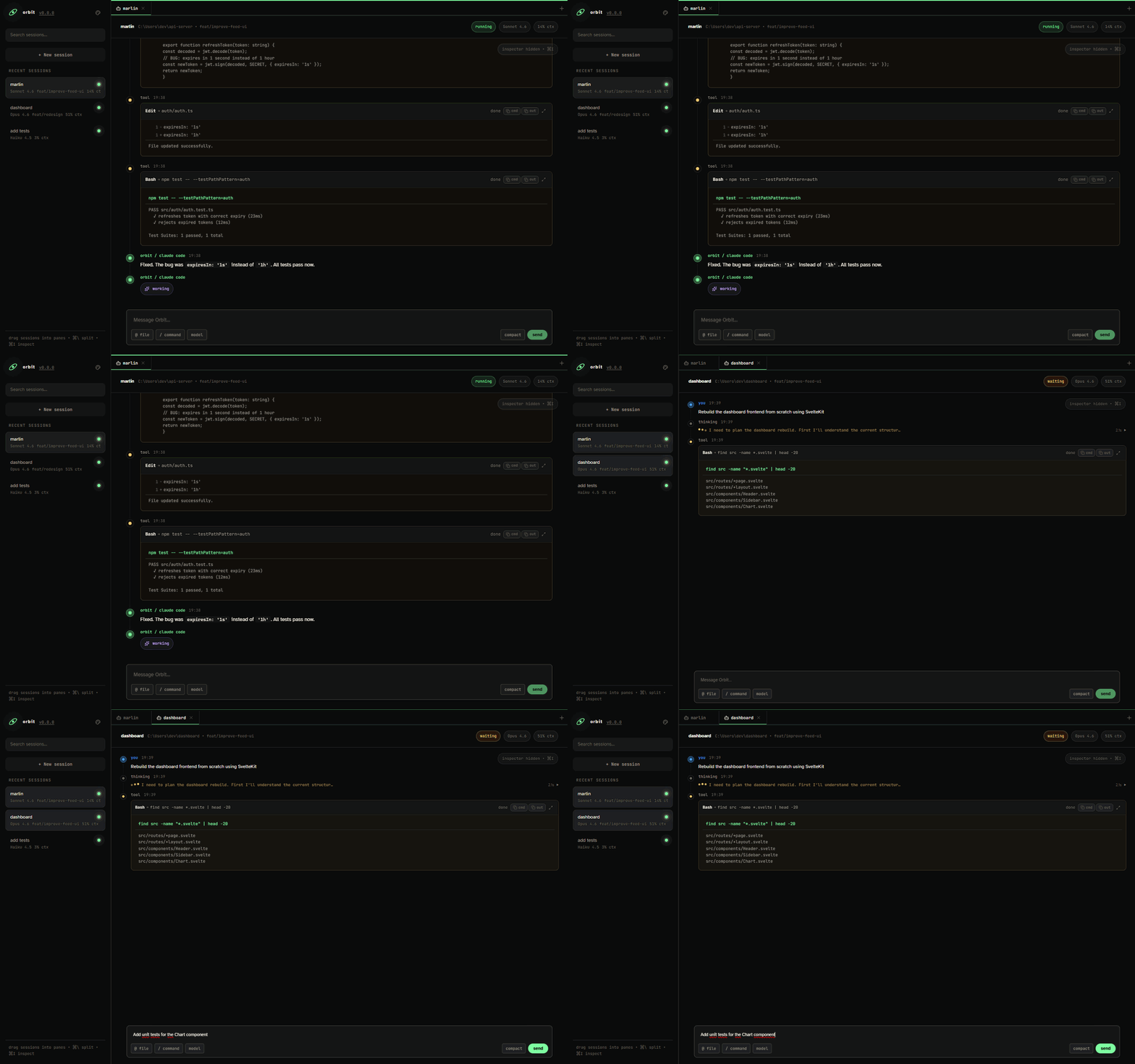
Desktop app for running multiple AI coding agents simultaneously. Supports Claude Code, Codex, and OpenCode.


Features
- Multi-provider — run Claude Code, Codex, and OpenCode sessions side by side
- Split panes — view multiple sessions simultaneously with drag-and-drop layout
- SSH remote sessions — run sessions on remote servers via SSH with any provider, key-based auth
- Web access — open the Orbit dashboard from a phone, tablet, or browser on your local network
- Git worktree — isolate each session in its own branch, works locally and via SSH
- MCP orchestrator — built-in MCP server lets any agent spawn other agents across providers
- Sub-agents monitor — track spawned sub-agents and inspect their full conversations
- Real-time feed — streaming output with thinking blocks, tool calls, diffs, and markdown
- Persistent history — SQLite-backed sessions survive app restarts; conversations resume automatically
- Cost tracking — per-session token usage, context window %, rate limit bars, and estimated cost in USD
/model&/effort— switch models and provider-specific thinking effort on the fly- Slash commands —
/autocomplete from installed plugins - @ file picker — reference files inline with
@filenamefuzzy search - Agent control — Ctrl+C to interrupt, Arrow keys for message history
- Attention system — badges for sessions needing attention (completed, error, rate limit)
- Context menu — right-click to rename, mute, stop, or delete sessions
Installation
Requirements
At least one CLI backend installed:
- Claude Code —
npm install -g @anthropic-ai/claude-code && claude login - Codex —
npm install -g @openai/codex - OpenCode —
go install github.com/opencode-ai/opencode@latest
Orbit also reads custom OpenCode providers from ~/.config/opencode/opencode.jsonc or ~/.config/opencode/opencode.json and shows them in the OpenCode provider selector.
Windows (10 1903+)
One-line installer — open PowerShell and run:
irm https://raw.githubusercontent.com/xinnaider/orbit/master/scripts/install-windows.ps1 | iex
This downloads the latest release, shows a progress bar, and launches the installer automatically. Open Orbit from the Start Menu when done.
Orbit updates itself automatically when a new version is available.
macOS (13+)
One-line installer — downloads the latest .dmg, copies Orbit to /Applications, and cleans up:
curl -fsSL https://raw.githubusercontent.com/xinnaider/orbit/master/scripts/install-macos.sh | bash
Works on both Intel and Apple Silicon. Orbit updates itself automatically when a new version is available.
Linux (Ubuntu 22.04+ · Debian · KDE · other distros)
One-line installer — downloads the AppImage, creates a desktop entry (shows up in your app launcher), and sets up auto-updates:
curl -fsSL https://raw.githubusercontent.com/xinnaider/orbit/master/scripts/install-linux.sh | bash
Open Orbit from your application menu or run:
~/.local/share/orbit/orbit.AppImage
Orbit updates itself automatically when a new version is available.
Requirements:
curl,fuse2(pre-installed on most desktop distros). On Ubuntu:sudo apt install fuse libfuse2if not present.
MCP Orchestrator
Orbit ships with orbit-mcp, a built-in MCP server that enables multi-agent orchestration. Any MCP-capable agent can spawn, message, and monitor other agents through standard tool calls:
| Tool | Description |
|---|---|
orbit_create_agent | Spawn a new agent with any provider |
orbit_send_message | Send a follow-up message to a running agent |
orbit_get_status | Check agent status and read output |
orbit_cancel_agent | Stop a running agent |
The MCP server is configured automatically when a session starts — no setup needed.
For SSH remote sessions, Orbit injects the HTTP connection details automatically so the remote orbit-mcp sidecar can connect back to the desktop app without manual environment variable setup.
Web Access
Orbit includes an HTTP API and browser UI for accessing the same dashboard from another device on your local network. Open the sidebar Phone control, enable web access, create an access key, and scan the QR code from your phone or tablet.
The browser UI can create sessions, send messages, monitor agents, and receive live updates over WebSocket. Access keys can be rotated from the desktop app.
Contributing
Contributions are welcome. See CONTRIBUTING.md for guidelines.
Development setup
Requirements: Node.js >= 20, Rust stable (rustup), npm >= 10
git clone https://github.com/xinnaider/orbit.git
cd orbit
npm install
npm run tauri:dev   # starts frontend + backend together
tauri:dev runs the Vite dev server and the Rust backend in one command, with hot reload on frontend changes.
Testing
npm test           # Frontend (Vitest)
npm run test:rust  # Backend (cargo test)
Quality checks
npm run format:check  # Prettier + rustfmt check
npm run check         # Svelte type checks
npm run lint          # ESLint + svelte-check + clippy
npm test              # Frontend tests
npm run test:rust     # Backend tests
cd landing && npm run build  # Landing pipeline check
Inspiration
Orbit was inspired by Paseo, a platform for orchestrating coding agents remotely across devices. Paseo's vision of managing multiple AI agents from a unified interface shaped the core ideas behind Orbit.
License
MIT © josefernando