
vibe-gaming
xi-zhao/vibe-gaming
🦖 Play a pixel mini-game in a split panel at the bottom of your terminal while AI coding agents (Claude Code, Codex) work
Instalação
npx convez-ai xi-zhao/vibe-gaming1 comando no terminal: detecta o formato do repositório (marketplace ou plugin avulso) e instala via Claude Code. Requer Node 18+ e o Claude Code instalado.
Métricas
README
A tradução para o português deste README ainda está na fila.
🦖 vibe-gaming
Play a pixel mini-game in a split panel at the bottom of your terminal — while your AI coding agent keeps working, fully visible, right above it.
English | 中文



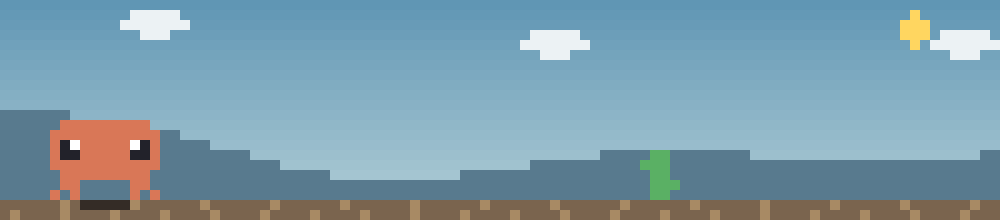
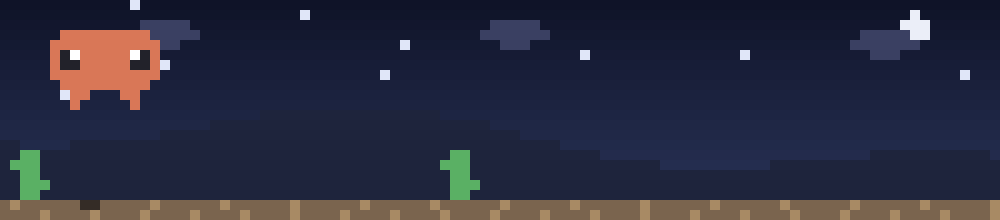
What is this?
When you use AI coding agents like Claude Code or Codex CLI, there's a lot of dead time: the model is thinking, the agent is running tests, refactoring, searching the web. You don't want to switch away and lose context — so you sit there, staring at a spinner.
vibe-gaming turns that dead time into play time. It wraps your CLI agent in a pseudo-terminal and splits the screen:
┌─ your real agent (Claude Code / Codex / any CLI) ──────┐
│  ... streaming output, fully live, fully visible ...   │
├─ game panel (bottom rows, summoned on demand) ─────────┤
│  vibe-gaming | claude ······ HI 00420 00132 [idle·Esc] │
│   🦖  day/night cycle · parallax hills · pterodactyls  │
└─────────────────────────────────────────────────────────┘
Type /vibegaming inside your agent → a Chrome-dino-style runner starring a pixel Claude appears at the bottom. Press Esc → it's gone, keyboard back to work. Just like Chrome's offline dinosaur, but living inside your working session.
Why would I want this?
- Zero interference with your agent — by design and by test. The host runs in a PTY with byte-for-byte passthrough. While you play, the agent above keeps streaming, keeps working, loses nothing. There's a smoke test asserting 40 streamed lines survive a full play session, line by line.
- You never miss the moment it finishes. The status bar watches host output and flashes
[* idle · Esc]when your agent has gone quiet — jump back exactly when you're needed. - It feels native. Summon it with a slash command typed into your agent's own input box, like any built-in command. No extra window, no tmux gymnastics.
- Host-agnostic. Claude Code, Codex, bash, anything interactive — if it runs in a terminal, it can carry the game.
- An actual game, not a gimmick. Physics and pacing ported from Chrome's open-source T-Rex runner and re-tuned for the terminal with an autopilot harness (6000-frame fairness regression: 0 unavoidable deaths). Day/night cycle, parallax hills, cactus clusters, two-altitude pterodactyls, proper GAME OVER banner.
- Terminal-craft under the hood. Half-block (
▀) truecolor pixel rendering, cell-level delta frames (only changed cells are ever re-sent — tear-free even on Apple Terminal), DEC 2026 synchronized updates where supported, alternate-screen session so your scrollback stays pristine.
Install
Requires Node ≥ 18, macOS or Linux.
git clone https://github.com/xi-zhao/vibe-gaming.git
cd vibe-gaming
npm install        # builds + fixes node-pty helper permissions automatically
npm link           # registers the global `vibegaming` command
Or in one step, without cloning:
npm install -g github:xi-zhao/vibe-gaming
Use
Launch any CLI through the game shell:
vibegaming claude
vibegaming codex
vibegaming bash      # try the split-screen with a plain shell first
| Key | Action |
|---|---|
/vibegaming + Enter | Summon the game (typed chars pass through to the host; the Enter is intercepted and the line is cleared) |
Space / ↑ | Jump |
Space (after GAME OVER) | Restart |
Esc / Ctrl-C | Dismiss the game, keyboard returns to the host |
Make it the default
Add aliases to ~/.zshrc (or ~/.bashrc):
alias claude='vibegaming claude'
alias codex='vibegaming codex'
Then plain claude / codex always carries the game. Bypass once with \claude.
Configure (optional)
| Env var | Default | Meaning |
|---|---|---|
VIBEGAMING_TRIGGER | /vibegaming | Summon command |
VIBEGAMING_PANEL | 12 | Panel height in rows (incl. status bar), 5–30 |
VIBEGAMING_FPS | 30 | Frame rate, 5–60 |
VIBEGAMING_IDLE_MS | 1200 | Host-quiet threshold for the idle hint |
How it works
The host CLI is spawned into a PTY and told the terminal is N rows shorter; a scroll region keeps its output in the upper area while the bottom rows become a pixel canvas rendered with half-block characters (two pixels per character cell, 24-bit color). A passive sniffer watches your keystrokes for the trigger command — escape-sequence-aware, so terminal query replies, bracketed paste, and kitty-protocol Enter all behave. The whole session lives on the alternate screen (like tmux), so when you quit, your terminal is exactly as you left it.
| File | Role |
|---|---|
src/session.ts | Core state machine: collapsed ⇄ expanded, keyboard routing, idle detection, cleanup |
src/host.ts | PTY layer: spawn, winsize control |
src/terminal.ts | Physical terminal: raw mode, scroll region, frame writes |
src/canvas.ts | Pixel canvas, half-block rendering, cell-level delta frames |
src/command-sniffer.ts | Trigger detection in the input stream (pure logic, unit-tested) |
src/games/ | Pluggable games — Game interface + the Claude runner |
Games only draw on a pixel canvas and handle keys — no terminal codes, no timers — so new games plug in trivially.
Troubleshooting
posix_spawnp failed— node-pty's prebuiltspawn-helpercan lose its exec bit when unpacked;postinstallfixes it automatically. Manual fix:chmod +x node_modules/node-pty/prebuilds/*/spawn-helper.- The agent's own slash menu pops up while typing the trigger — normal: we sit outside the host and can't register in its menu. Finish typing, hit Enter, the game takes over.
- Want older output after playing? The host repaints its recent transcript on return; for the full history use the host's own viewer (Claude Code:
Ctrl+O),--resume, or/export. Mouse-wheel terminal scrollback is unavailable in split/alt-screen mode — same tradeoff as tmux. - Window too small — the panel refuses to open below ~15 rows; enlarge and retry.
Known limitations
- macOS / Linux only (relies on scroll-region & friends; Windows untested).
- The sniffer tracks a plain typed line; in-line cursor editing of the trigger isn't followed (it just won't fire — type it fresh).
- Hosts that themselves switch to the alternate screen may conflict; Claude Code verified, Codex not yet field-tested.
Uninstall
npm unlink -g vibe-gaming # or: npm uninstall -g vibe-gaming
…and remove the aliases from your shell rc.
License
MIT © xi-zhao