
Wedding Invitation Skill
wyx-sg/wedding-invitation-skill
Desenha convites de casamento únicos via conversa, renderiza local
Ver no GitHubSkill de IA que gera convites de casamento personalizados a partir de uma conversa, em qualquer idioma e estética. Renderiza localmente em HTML e PNG (dois tamanhos), com editor visual para ajustes de cores, fontes e fotos — nada é enviado para a nuvem.
Instalação
npx convez-ai wyx-sg/wedding-invitation-skill1 comando no terminal: detecta o formato do repositório (marketplace ou plugin avulso) e instala via Claude Code. Requer Node 18+ e o Claude Code instalado.
Métricas
Casos de uso
- Criar convites de casamento personalizados sem ferramentas de design
- Gerar múltiplas opções de estilo rapidamente
- Ajustar cores, fontes e layouts em tempo real
- Exportar em alta resolução para impressão (300 DPI)
Veredito

Ferramenta criativa e bem executada que democratiza design de convites para casais. Execução sólida com renderização local (privacidade garantida) e editor visual intuitivo, embora tenha escopo limitado ao caso de uso específico de convites.
README
A tradução para o português deste README ainda está na fila.
Wedding Invitation

An AI-agent skill that designs your wedding invitation from a conversation — any language, any aesthetic, rendered locally, never uploaded.
🎨 Open the live gallery — click any of the 20 examples to see it rendered full-size.
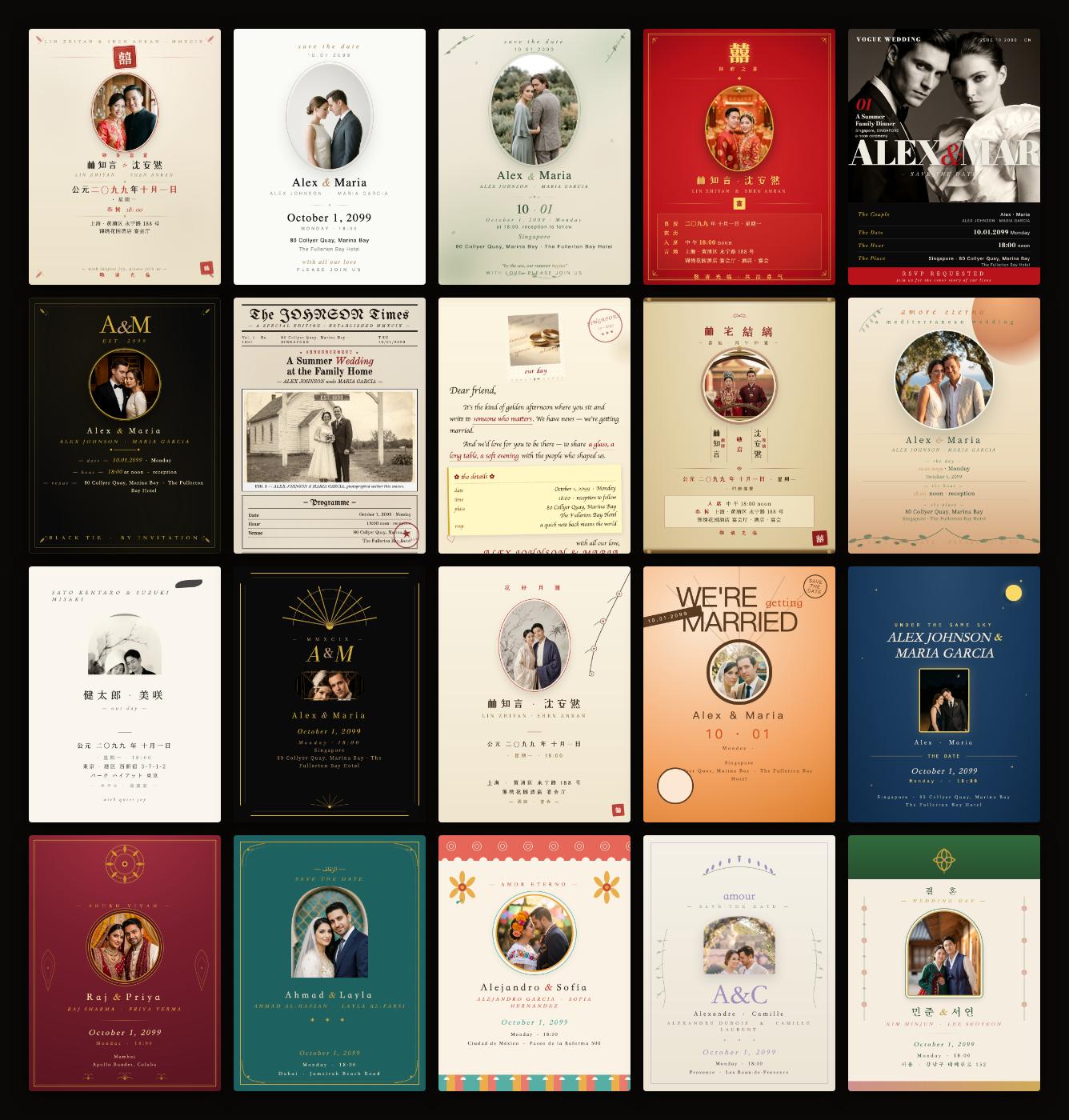
Quick start
Drop the latest release into your coding agent's skills directory. For Claude Code:
mkdir -p ~/.claude/skills && cd ~/.claude/skills
curl -L https://github.com/wyx-sg/wedding-invitation-skill/releases/latest/download/wedding-invitation-skill.zip -o wedding-invitation-skill.zip
unzip -o wedding-invitation-skill.zip && rm wedding-invitation-skill.zip
Then say "help me make a wedding invitation" — the skill takes it from there.
The release zip is under 100 KB and contains only the runtime files: SKILL.md, workflow.md, design-principles.md, LICENSE, references/, skeleton/.
Requirements
- Node.js 18+
- A Chromium-family browser (Google Chrome, Chromium, or Microsoft Edge) — used by
render.jsfor PNG export. If missing, the skill prints install instructions for your OS. - macOS, Linux, or Windows
Contributing? Clone the source instead
git clone https://github.com/wyx-sg/wedding-invitation-skill
The repo includes extras not needed to use the skill but useful for development:
examples/— 20 showcase invitations (source of truth for the README gallery)docs/— the GitHub Pages site, generated fromexamples/viascripts/build-pages.js__test__/tweak-fixture/— end-to-end test fixturescripts/— maintainer build tools
What you'll get
- A bespoke HTML design created for you — not picked from a generic gallery
- Two PNG sizes per design — 1080×1440 for messaging/email, 2160×2880 at 300 DPI for printing
- A local browser tweak studio to fine-tune color / font / photo-frame / optional components on each design — live, no rebuild needed
- Designed in your language(s) — English, Chinese, Spanish, Japanese, Korean, French, Hindi, Arabic, or any combination
- Your photos, names, and address never leave your machine
You pick how many designs by how many style directions you select. Pick one direction → one design. Pick three → three designs side-by-side in the gallery. You can also tell Claude to skip the curated picker and design from a conversation about your specific vision.
The 20 examples in the image above span world cultures and contemporary aesthetics, showing the visual range available:
- Chinese —
new-chinese,red-gold,gugong,ink-flower - Japanese —
wabi-sabi - Korean —
korean-hanbok - South Asian —
indian - Middle Eastern —
arabic - Latin / Mexican —
latin - European —
french-provence,art-deco,vogue,newspaper,letter - Contemporary —
morandi,modern-minimal,mediterranean,black-gold - Themed —
retro-poster,vintage-stars
Each invitation is custom-designed from scratch — not pulled from a template library.
How it works
flowchart LR
    A[💬 Talk: language<br/>names · date · venue] --> P[📷 Pick photos]
    P --> S[🎨 Pick style direction<br/>multi-select]
    S --> D[Claude writes one HTML<br/>template per direction]
    D --> ST[🛠 Stage 4 · Preview + tweak<br/>dist/preview.html<br/>live studio per design]
    ST --> DL[📥 Stage 5 · Deliver<br/>dist/index.html<br/>download Social / Print PNG]
- Talk — language(s), names, date, venue
- Pick photos — Claude shows every photo you provided as a card; tap to select (multi-select or "Select All"). First selected becomes primary; the rest stay available as alternates the design can switch to
- Pick style direction(s) — Claude looks at your photos and curates 5 best-matching aesthetic directions; you pick one or several. Reply "show me others" for a fresh batch (already-picked ones stay), or just tell Claude in chat "I want something custom" to skip the curated picker and design from a conversation about your specific vision
- Design — Claude writes a fresh HTML template per direction you picked
- Preview + tweak (Stage 4 —
dist/preview.html) — live iframe thumbnails of every design; click any card to open its studio with color / font / photo-frame / show-hide controls. Tweaks save to disk so Claude knows what you picked. Tell Claude in chat for anything the studio can't do - Deliver (Stage 5 —
dist/index.html) — final gallery with PNG thumbnails; click a card → detail page with Social (1080×1440) and Print (2160×2880) download buttons. You can flip back to Stage 4 anytime to tweak more
Privacy
Your photos, names, and address stay on your laptop. No uploads. No cloud accounts. No telemetry. No third-party services.
The skill makes zero network requests of its own. The only thing that hits the network is your browser loading webfonts from Google Fonts during HTML preview — and that's just font URLs, nothing about you.
FAQ
Yes. Any coding agent that reads markdown works — point it at SKILL.md and it picks up the workflow from there.
No. It produces a static PNG you can print, share, attach to email, or send via messaging apps.
Anything. The skill asks at the start. Chinese, English, Spanish, Japanese, Korean, French, Hindi, Arabic, or any combination — design-principles.md has typography guidance for the major scripts.
Yes. The skill asks where they live on your machine and copies them into the project.
Works. render.js shells out to whichever Chrome / Chromium / Edge you have installed. Bash-only commands in the skill docs all have Windows PowerShell equivalents.
License
MIT — see LICENSE.