
phone-mcp — Sentidos do Telefone para IA
wexi/phone-mcp
Dê visão, audição e voz ao seu assistente IA via KDE Connect
Ver no GitHubServidor MCP que estende assistentes de IA com acesso direto ao telefone via KDE Connect: câmera, notificações, SMS, digitação remota, controle de mídia e compartilhamento de arquivos. Usa conexão local certificada e persistente, sem necessidade de adb ou cabos.
Instalação
npx convez-ai wexi/phone-mcp1 comando no terminal: detecta o formato do repositório (marketplace ou plugin avulso) e instala via Claude Code. Requer Node 18+ e o Claude Code instalado.
Métricas
Casos de uso
- Capturar fotos da câmera do telefone remotamente para análise por IA
- Monitorar notificações e eventos do telefone em tempo real
- Automatizar envio de SMS e digitação remota em aplicativos
- Controlar mídia e periféricos do telefone desde a IA
- Transferir arquivos entre desktop e telefone de forma transparente
Veredito

Ferramenta bem arquitetada que abre possibilidades reais de IA multimodal (visão + controle) via transporte confiável. Exige setup KDE Connect prévio, mas oferece estabilidade superior ao adb para casos de uso específicos de bench work e controle remoto.
README
A tradução para o português deste README ainda está na fila.
phone-mcp — give your assistant senses on your phone
Give an AI assistant senses on your phone over KDE Connect — eyes (camera), ears (notifications, now-playing), and a voice (SMS, typing, file push, media control) — for hands-off bench work and remote control. Works with any KDE Connect-paired device (developed and tested against a Pixel 9 Pro).
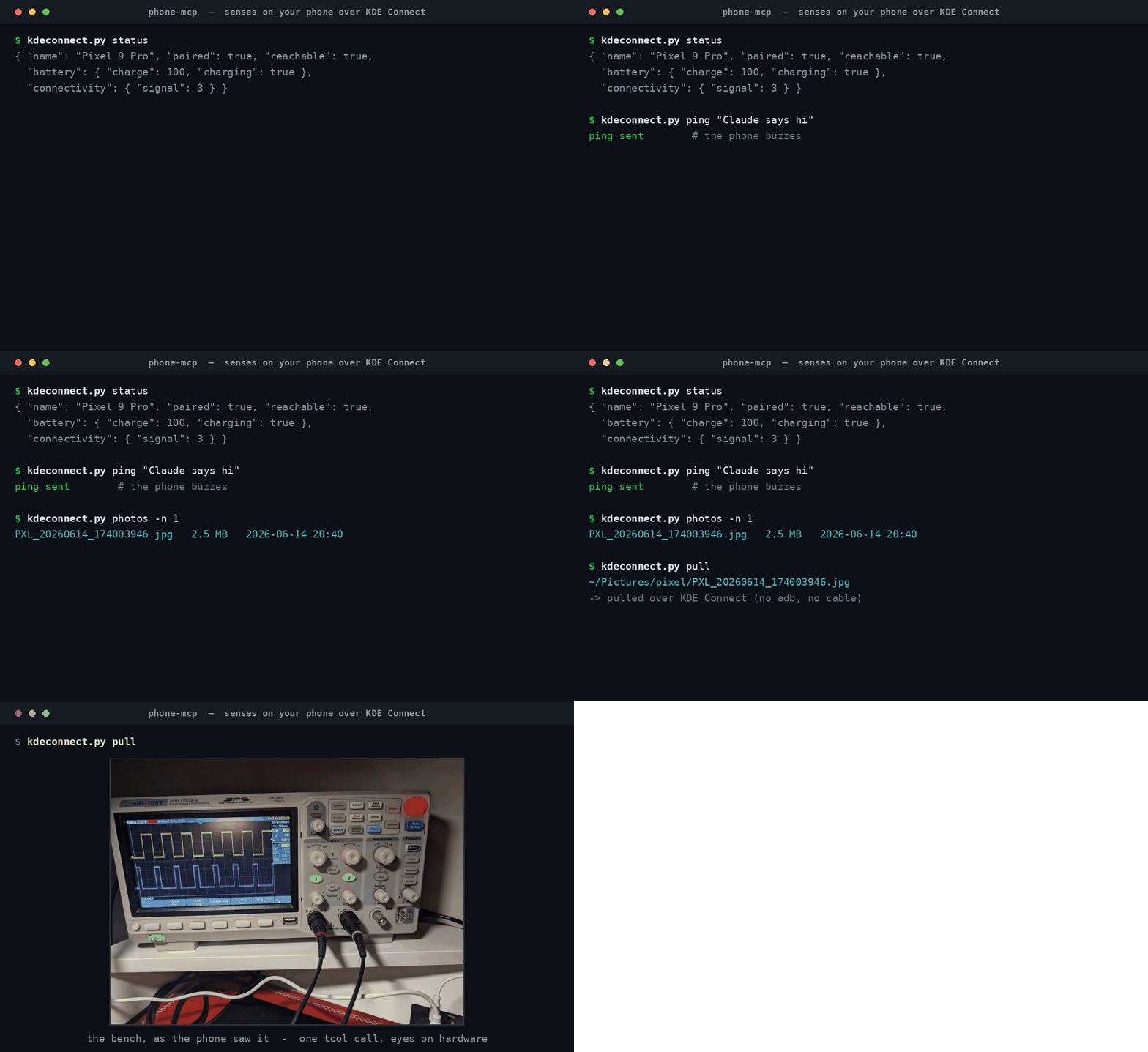
Above: real kdeconnect.py runs — status, a ping, and pulling the newest
camera photo (an oscilloscope on the bench) to the host, all over the stable
KDE Connect link with no adb and no cable.
KDE Connect is the whole transport: a persistent, cert-pinned link held warm by
the kdeconnectd daemon. Pair once on the phone and it survives drops and
reboots; each call is a fast local hop into the daemon — no rediscovery, no
toggling. (We deliberately do not use adb: it's flaky over Wireless
debugging and really an app-dev tool. Its only unique tricks — screencap of the
phone display and a raw shell — aren't what this is for.)
Two entry points share one KDEConnect class:
kdeconnect.py— library + CLI.pixel_mcp.py— MCP server exposing the moves askde_*tools.
Setup
kdeconnect-cliandgdbuson PATH (KDE Connect package, here 23.08).- The MCP server needs the
mcpPython package (present in~/PY3).
Pair once: on the phone, open KDE Connect, join the home Wi-Fi, and accept the pairing request:
kdeconnect-cli --pair            # then tap Accept on the phone
python3 kdeconnect.py status     # sanity check: paired?, battery, signal
By default the first paired+reachable KDE Connect device is used. Targeting and
paths are environment-overridable: KDECONNECT_NAME (pin a device by name),
KDECONNECT_DEVICE (pin by id), KDECONNECT_CLI, PIXEL_PULL_DIR (default
~/Pictures/pixel).
Standalone — CLI
| Verb | Purpose |
|---|---|
status | device snapshot — paired?, reachable?, battery, connectivity |
devices | list paired/reachable KDE Connect devices |
pair | request pairing (Accept on the phone) |
pull | pull newest (or named) camera photo to the host (over SFTP) |
photos | list newest camera files (name, size, mtime) |
photo | open the phone camera, wait for a shot, transfer it (needs camera permission) |
notifications | list the phone's active notifications |
sms | send an SMS (message destination) |
type | type text into the phone's focused field (remote keyboard) |
share | push a local file/URL to the phone |
clipboard | send the desktop clipboard to the phone |
playing | current media track + transport state |
players | list available media players |
media | media control (play/pause/playpause/next/previous/stop) |
ping | buzz the phone (optional message) |
ring | ring the phone loudly to locate it |
python3 kdeconnect.py status
python3 kdeconnect.py pull                    # newest camera photo -> ~/Pictures/pixel
python3 kdeconnect.py photos -n 5
python3 kdeconnect.py notifications
python3 kdeconnect.py sms "on my way" +15551234567
python3 kdeconnect.py type "hello from the desktop"
python3 kdeconnect.py share ~/Pictures/x.png
python3 kdeconnect.py ring
Two ways to get "eyes": pull grabs a photo you already shot (reads the
phone's camera folder over the SFTP plugin — the reliable everyday path, "took
a snap → look at it"). photo triggers a fresh on-demand capture by opening
the camera remotely; it needs the KDE Connect app to have Android camera
permission granted.
As a library:
from kdeconnect import KDEConnect
kc = KDEConnect()
print(kc.status())
local = kc.photo()         # opens camera, returns the saved Path
kc.send_sms("hi", "+15551234567")
status / battery / connectivity are read from the kdeconnectd D-Bus
interface (via gdbus), since kdeconnect-cli has no flag for them; all
actions go through kdeconnect-cli.
As an MCP server
pixel_mcp.py exposes the moves as MCP tools over stdio. Register with Claude
Code (or any MCP client):
claude mcp add pixel --scope user -- python3 /path/to/phone-mcp/pixel_mcp.py
# pin a specific paired device by name:
claude mcp add pixel --scope user --env KDECONNECT_NAME="My Phone" \
  -- python3 /path/to/phone-mcp/pixel_mcp.py
Tools: kde_status, kde_pull, kde_photos, kde_photo, kde_notifications,
kde_send_sms, kde_send_text, kde_share, kde_clipboard, kde_ls,
kde_get, kde_put, kde_rm, kde_now_playing, kde_media_control,
kde_media_players, kde_ping, kde_ring. The device snapshot is also a
read-only resource, pixel://status.
kde_ls / kde_get / kde_put / kde_rm are general file transfer over the
SFTP mount — list any directory, pull/push any file by path (relative to the
phone's internal storage), and delete. kde_rm is irreversible (no trash).
kde_photo returns the captured photo as an MCP image, so the model sees
the picture rather than only a file path. Every call rides the always-warm
daemon link.
Permissions
A few plugins need Android permissions before their tools work: Notification
sync (kde_notifications + the media tools), Camera (kde_photo), Receive
remote keypresses (kde_send_text), and the SMS grants. Grant them by hand in
the KDE Connect app (tap the desktop → "Some Plugins need permissions"), or
run the optional one-time adb bootstrap:
scripts/setup-permissions.sh          # needs adb + a reachable device
ADB_SERIAL=<serial> scripts/setup-permissions.sh   # pick one of several devices
It's idempotent and non-destructive (it won't change your active keyboard). adb is bootstrap-only here — the MCP transport stays KDE Connect. SMS, ping, ring, share, SFTP pull/photos, and status/battery need no extra grants.
Gotchas
- KDE Connect must be open on the phone, on the home Wi-Fi, and paired with this desktop, or calls report not-reachable. Pairing is one-time and persists across reboots.
kde_photoblocks until the user takes the shot — tell them the camera is open and to snap it.- No phone-screen screencap and no raw shell — KDE Connect can't do either. The camera is the eyes here, not the phone's own display.
- SMS goes over the phone's real cellular line — real messages, real recipients.
kde_photosaves to~/Pictures/pixel(overridePIXEL_PULL_DIR).