
Task Skill Router
wcqxgjy6d8-pixel/task-skill-router
Roteador de skills local-first para agentes de codificação decompostos
Ver no GitHubFerramenta de roteamento de skills pós-decomposição para agentes de codificação em terminal. Lê bibliotecas de SKILL.md, enriquece com mapeamentos comunitários opcionais e retorna sugestões JSON ranqueadas para tarefas de execução, detectando skills faltantes.
Instalação
npx convez-ai wcqxgjy6d8-pixel/task-skill-router1 comando no terminal: detecta o formato do repositório (marketplace ou plugin avulso) e instala via Claude Code. Requer Node 18+ e o Claude Code instalado.
Métricas
Casos de uso
- Rotear tarefas decompostas para skills específicos em agentes de terminal
- Detectar skills instaladas e recomendar skills ausentes para workflows
- Integrar com Codex, Claude Code ou agentes customizados sem modificação de código
Veredito

Solução pragmática para gerenciamento de skills em agentes de codificação, com design local-first e output estruturado para consumo direto por máquinas. Adequado para workflows que já usam decomposição de tarefas.
README
A tradução para o português deste README ainda está na fila.
task-skill-router


Post-decomposition skill routing for terminal coding agents.
task-skill-router scans one or more SKILL.md libraries, reads their frontmatter,
enriches them with optional community mappings, and returns ranked JSON
suggestions for decomposed execution tasks.
It is built for Codex, Claude Code, OpenCode, custom terminal agents, and any workflow where slash commands or skills have become too many to remember.
Local-first by design: no telemetry, no background service, and no maintainer data collection. See Privacy.
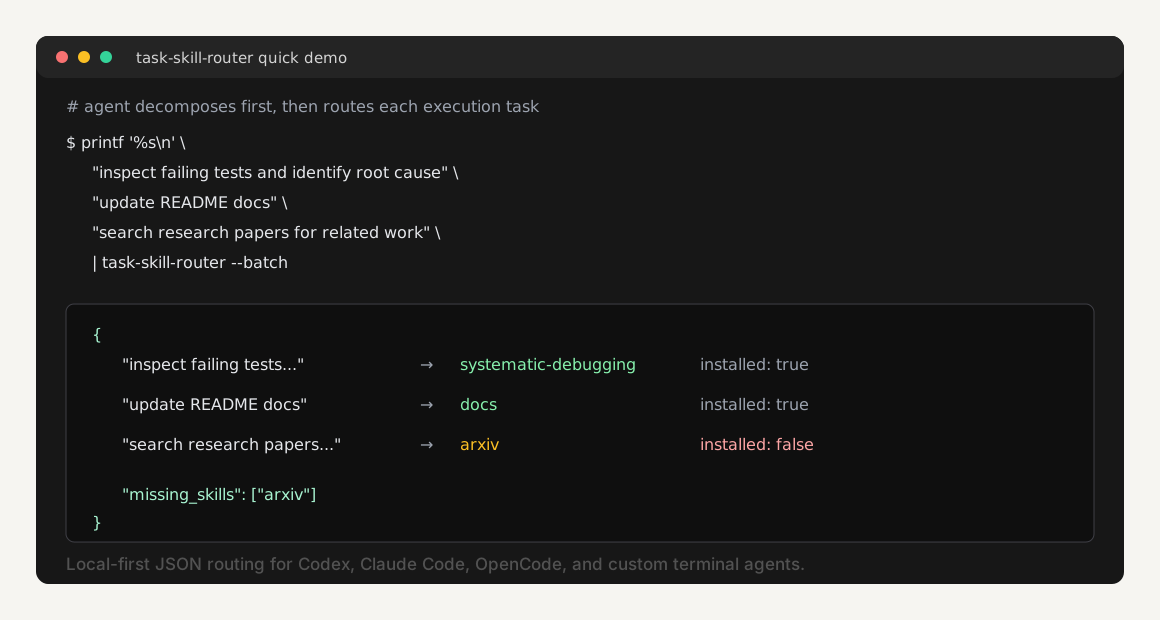
Quick Demo
Run this from a local clone. It uses synthetic demo skills in
examples/, so you do not need real Codex or Claude Code skills
installed first.
printf '%s\n' \
  "inspect failing tests and identify root cause" \
  "update README docs" \
  "search research papers for related work" \
  | TASK_SKILL_ROUTER_CONFIG=examples/demo-config.yaml python3 task-skill-router.py --batch
The output is JSON, so agents and shell scripts can consume it directly:
{
  "batch": true,
  "results": [
    {
      "task": "inspect failing tests and identify root cause",
      "matches": [
        {
          "skill": "systematic-debugging",
          "installed": true,
          "confidence": 0.42,
          "mode": "recommend"
        }
      ]
    }
  ],
  "missing_skills": [
    {
      "skill": "arxiv",
      "install_hint": "Install an arxiv or literature-search skill before research-heavy tasks."
    }
  ]
}
What It Does
The agent should not run the router before understanding the request. The right flow is:
- Understand the user's request.
- Decompose it into concrete execution tasks.
- Run task-skill-router for each task.
- Load or recommend the matched skill for execution.
- Tell the user when a useful skill exists but is not installed.
For one decomposed task:
task-skill-router "inspect failing auth test and identify root cause"
For multiple decomposed tasks:
printf '%s\n' \
  "inspect failing auth test and identify root cause" \
  "write a regression test for the root cause" \
  "verify the fix before completion" \
  | task-skill-router --batch
The router answers:
- which skill probably applies to each execution task
- whether that skill is installed locally
- where the matching
SKILL.mdlives - whether to auto-load it or only recommend it
- whether the task looks high-risk
- which missing skills would improve execution
This does not require modifying the agent's source code. Hard integration is
best, but soft integration through AGENTS.md, CLAUDE.md, workspace rules, or
a shell wrapper is enough for many terminal coding tools.
Why
Large user requests often need different skills for different parts:
- inspect a failing test:
systematic-debugging - implement a fix:
test-driven-development - update docs:
chinese-documentationor another docs skill - verify the final state:
verification-before-completion
A single router call on the original user request is too coarse. task-skill-router is the layer between planning and execution: decompose first, route each unit, execute with the right skill, verify at the end.
It is a lightweight heuristic, not an autopilot. Scores are TF-IDF cosine similarities, not calibrated probabilities.
How It Works
User request
    |
    v
Agent decomposes into execution tasks
    |
    v
task-skill-router --batch
    |
    | scans SKILL.md frontmatter + community.yaml
    v
Per-task skill ranking + missing-skill hints
The router:
- Recursively scans configured skill directories for
SKILL.md. - Reads frontmatter fields such as
name,description, andtags. - Also reads common nested skill metadata tags when present.
- Merges optional
config/community.yamlentries into installed skills. - Indexes community-only skills too, so missing useful skills can be surfaced.
- Builds an in-memory TF-IDF index using pure Python.
- Returns JSON matches above the configured threshold.
PyYAML is recommended for full YAML support. If PyYAML is missing, task-skill-router falls back to a small built-in parser that supports the config/frontmatter shapes used by this repository. If a single skill has invalid frontmatter, the router falls back to indexing that frontmatter as plain description text instead of crashing the entire scan.
jieba is used for better Chinese tokenization when available. If jieba is missing, task-skill-router falls back to built-in CJK ngram tokens and still runs.
Installation
task-skill-router is cross-platform. The router itself is a Python script and works on macOS, Linux, Windows PowerShell, Git Bash, and WSL.
Apple macOS
One-line install:
curl -fsSL https://raw.githubusercontent.com/wcqxgjy6d8-pixel/task-skill-router/main/install-macos.sh | bash
From a local clone:
git clone https://github.com/wcqxgjy6d8-pixel/task-skill-router.git
cd task-skill-router
python3 -m pip install -r requirements.txt
./install-macos.sh
The macOS installer places:
- executable:
~/.task-skill-router/task-skill-router.py - command:
~/.local/bin/task-skill-router - config:
~/.config/task-skill-router/config.yaml - community mappings:
~/.config/task-skill-router/community.yaml
Make sure ~/.local/bin is on your PATH.
Windows PowerShell
One-line install:
irm https://raw.githubusercontent.com/wcqxgjy6d8-pixel/task-skill-router/main/install-windows.ps1 | iex
From a local clone:
git clone https://github.com/wcqxgjy6d8-pixel/task-skill-router.git
cd task-skill-router
python -m pip install -r requirements.txt
.\install-windows.ps1
The Windows installer places:
- executable:
%USERPROFILE%\.task-skill-router\task-skill-router.py - command shim:
%USERPROFILE%\.local\bin\task-skill-router.cmd - config:
%USERPROFILE%\.config\task-skill-router\config.yaml - community mappings:
%USERPROFILE%\.config\task-skill-router\community.yaml
It also adds %USERPROFILE%\.local\bin to the user PATH. Open a new terminal
if task-skill-router is not found immediately after installation.
Linux
One-line install:
curl -fsSL https://raw.githubusercontent.com/wcqxgjy6d8-pixel/task-skill-router/main/install-linux.sh | bash
From a local clone:
git clone https://github.com/wcqxgjy6d8-pixel/task-skill-router.git
cd task-skill-router
python3 -m pip install -r requirements.txt
./install-linux.sh
The Linux installer places:
- executable:
~/.task-skill-router/task-skill-router.py - command:
~/.local/bin/task-skill-router - config:
~/.config/task-skill-router/config.yaml - community mappings:
~/.config/task-skill-router/community.yaml
Make sure ~/.local/bin is on your PATH.
Generic Shell Installer
For WSL, Git Bash, and other POSIX-like shells:
curl -fsSL https://raw.githubusercontent.com/wcqxgjy6d8-pixel/task-skill-router/main/install.sh \
  | TASK_SKILL_ROUTER_REPO=wcqxgjy6d8-pixel/task-skill-router bash
Usage
Single task:
task-skill-router "fix a bug, test failing, find root cause"
task-skill-router "redesign the landing page UI" | jq '.matches[0].skill'
echo "write Chinese documentation for this README" | task-skill-router
Batch mode after decomposition:
printf '%s\n' \
  "inspect failing tests" \
  "patch the root cause" \
  "run verification before completion" \
  | task-skill-router --batch
Example match:
{
  "skill": "systematic-debugging",
  "installed": true,
  "path": "/Users/me/.codex/skills/systematic-debugging/SKILL.md",
  "confidence": 0.34,
  "mode": "recommend",
  "reason": "TF-IDF match on skill metadata + community mapping",
  "commands": []
}
Example missing skill:
{
  "skill": "arxiv",
  "installed": false,
  "path": "",
  "confidence": 0.41,
  "mode": "recommend",
  "reason": "community mapping",
  "commands": [],
  "install_hint": "Install the 'arxiv' skill into one of skills_dirs, then rerun task-skill-router."
}
Configuration
Default config path:
~/.config/task-skill-router/config.yaml
Example:
skills_dirs:
  - "~/.task-skill-router/skills"
  - "~/.codex/skills"
  - "~/.claude/skills"
community_mapping: "~/.config/task-skill-router/community.yaml"
confidence_threshold: 0.12
max_matches: 5
preferred_skills:
  - systematic-debugging
mode_overrides:
  dangerous-tool: recommend
Environment variables override config values:
| Variable | Description |
|---|---|
TASK_SKILL_ROUTER_DIR | Directory or colon-separated directories containing installed skills |
TASK_SKILL_ROUTER_CONFIG | Config file path |
TASK_SKILL_ROUTER_COMMUNITY | Community mapping YAML path |
TASK_SKILL_ROUTER_HOME | Install location used by install.sh |
TASK_SKILL_ROUTER_REPO | GitHub owner/repo used by install.sh |
TASK_SKILL_ROUTER_REF | Git ref used by install.sh, default main |
Agent Integration
Copy-paste templates are available in docs/integration-templates.md.
Codex
Add this to AGENTS.md:
## Task Skill Router

For non-trivial terminal coding tasks:

1. First understand and decompose the user request into execution tasks.
2. Route each execution task:

```bash
printf '%s\n' "<task 1>" "<task 2>" "<task 3>" | task-skill-router --batch
```

3. Load installed `SKILL.md` files when the confidence and mode are appropriate.
4. If a matched skill is not installed, tell the user which skill is missing and
   why it would improve execution.
5. For high-risk tasks, recommend the skill to the user before proceeding.
Claude Code
Add the same protocol to CLAUDE.md.
Any Terminal Agent
Use the same post-decomposition routing step in the agent's workspace instructions, system prompt, or shell wrapper:
printf '%s\n' "$TASK_1" "$TASK_2" "$TASK_3" | task-skill-router --batch
If the tool cannot run shell commands, use manual mode: decompose the task, run
task-skill-router in a terminal for each subtask, then paste the recommended
SKILL.md or missing-skill summary into the tool.
Missing Skills
config/community.yaml can describe skills the user has not installed yet. When
one of those skills matches a decomposed task, the router returns:
installed: false- empty
path install_hint- top-level
missing_skills
Agents should surface this as an efficiency recommendation, not as a hard failure. Example:
This subtask would benefit from the arxiv skill, but it is not installed.
Install it before research-heavy tasks to improve execution quality.
Hit-Rate Auditing
task-skill-router can record local recommendation events so other skills, agents, or stronger AI reviewers can measure whether the recommended skill was actually useful. This is local JSONL auditing, not telemetry. Nothing is sent to the project maintainers.
Record recommendations:
task-skill-router --record "write README docs"
printf '%s\n' "inspect failing tests" "write regression test" | task-skill-router --batch --record
Default audit log:
~/.task-skill-router/audit/events.jsonl
Ask another skill, another agent, or a stronger model to review pending events:
task-skill-router --pending-reviews --limit 20
The reviewer should inspect the task, suggested skills, and actual outcome, then write back one judgment:
task-skill-router --review rec_xxxxx --judgment hit --evaluator agent:reviewer
task-skill-router --review rec_xxxxx --judgment partial --correct-skill docs --evaluator skill:code-review
task-skill-router --review rec_xxxxx --judgment miss --correct-skill systematic-debugging --evaluator gpt-5
Supported judgments:
hit: the top recommendation was useful and appropriatepartial: the recommendation helped, but a better skill existed or another skill should also have been recommendedmiss: the recommendation was wrongunknown: the reviewer cannot tell from available evidence
Summarize hit rate:
task-skill-router --stats
The stats output includes full hit rate, partial-credit hit rate, counts by
judgment, by top recommended skill, and by evaluator. Use this to improve
config/community.yaml, skill frontmatter, and threshold settings.
Community Mapping
config/community.yaml maps common task wording to skill names. It helps when a
skill's own frontmatter is too terse, and it lets the router surface missing
skills that would help the current plan.
If a mapped skill is installed locally, the mapping enriches the real skill and
keeps its real SKILL.md path. If it is not installed, the router can still
return a community-only suggestion with an empty path and install hint.
See config/community.yaml and CONTRIBUTING.md.
Related Projects
task-skill-router is intentionally narrower than most adjacent projects:
- pcx-wave/skill-router is a Claude Code meta-skill that routes one request to one installed skill.
- hussi9/skill-router routes skills, agents, models, and thinking depth inside Claude Code before tool use.
- SkillTree builds hierarchical
ROOT.md/ROUTER.md/SKILL.mdskill trees. - SkillForge focuses on creating, improving, and advising on skills.
- Skill registries such as claude-skill-registry help discover skills, but they are not runtime task routers.
This project focuses on one runtime step: after an agent has decomposed a user
request, route each execution task to installed SKILL.md workflows and surface
missing useful skills.
Development
python3 -m pip install -r requirements.txt
python3 -m unittest discover -s tests
python3 -m py_compile task-skill-router.py
bash -n install.sh
bash -n install-macos.sh
bash -n install-linux.sh
# Optional, when PowerShell is available:
pwsh -NoProfile -Command '$errors = $null; [System.Management.Automation.Language.Parser]::ParseFile("install.ps1", [ref]$null, [ref]$errors) > $null; if ($errors) { throw $errors }'
pwsh -NoProfile -Command '$errors = $null; [System.Management.Automation.Language.Parser]::ParseFile("install-windows.ps1", [ref]$null, [ref]$errors) > $null; if ($errors) { throw $errors }'
Open Source Checklist
- Keep private skill paths, tokens, auth state, and local agent memory out of issues and fixtures.
- Treat
auto-runas experimental. High-risk tasks are forced torecommend.
License
MIT. See LICENSE.