
cram-ai: Auditor de Tokens para Agentes de IA
vishbay/cram-ai
Perfil de tokens para agentes de código com otimizações verificadas
Ver no GitHubAgent que perfila e otimiza o gasto de tokens em sessões de agentes de código (Claude Code, Cursor, Codex), identificando desperdícios específicos como releituras, contexto excessivo e retry loops. Mede, documenta e verifica se otimizações realmente reduzem tokens sem prejudicar a qualidade das tarefas.
Instalação
npx convez-ai vishbay/cram-ai1 comando no terminal: detecta o formato do repositório (marketplace ou plugin avulso) e instala via Claude Code. Requer Node 18+ e o Claude Code instalado.
Métricas
Casos de uso
- Auditar consumo de tokens em sessões de agentes de IA
- Identificar desperdícios (releituras, contexto bloated, retry loops)
- Comparar consumo antes e depois de otimizações de contexto
- Gerar relatórios visuais detalhados de gasto de tokens
Veredito

cram preenche lacuna real em observabilidade de agentes: não apenas mostra o custo, mas explica o desperdício específico e valida se otimizações funcionam. Ferramenta técnica honesta, sem promessas vazias de economia.
README
A tradução para o português deste README ainda está na fila.
cram-ai


The profiler and referee for AI coding-agent tokens.
cram tells you where Claude Code, Cursor, and Codex sessions spend tokens, points at avoidable waste, and verifies whether an optimization actually helped at equal task success. It is a profiler first and a referee second: measure the run, name the waste, then prove whether any proposed fix helped without lowering task success.
Most token tools promise savings. cram asks the useful engineering question:
Did this reduce token spend without making the agent worse?
It is local-first, transcript-based, and honest about what is measured versus estimated.
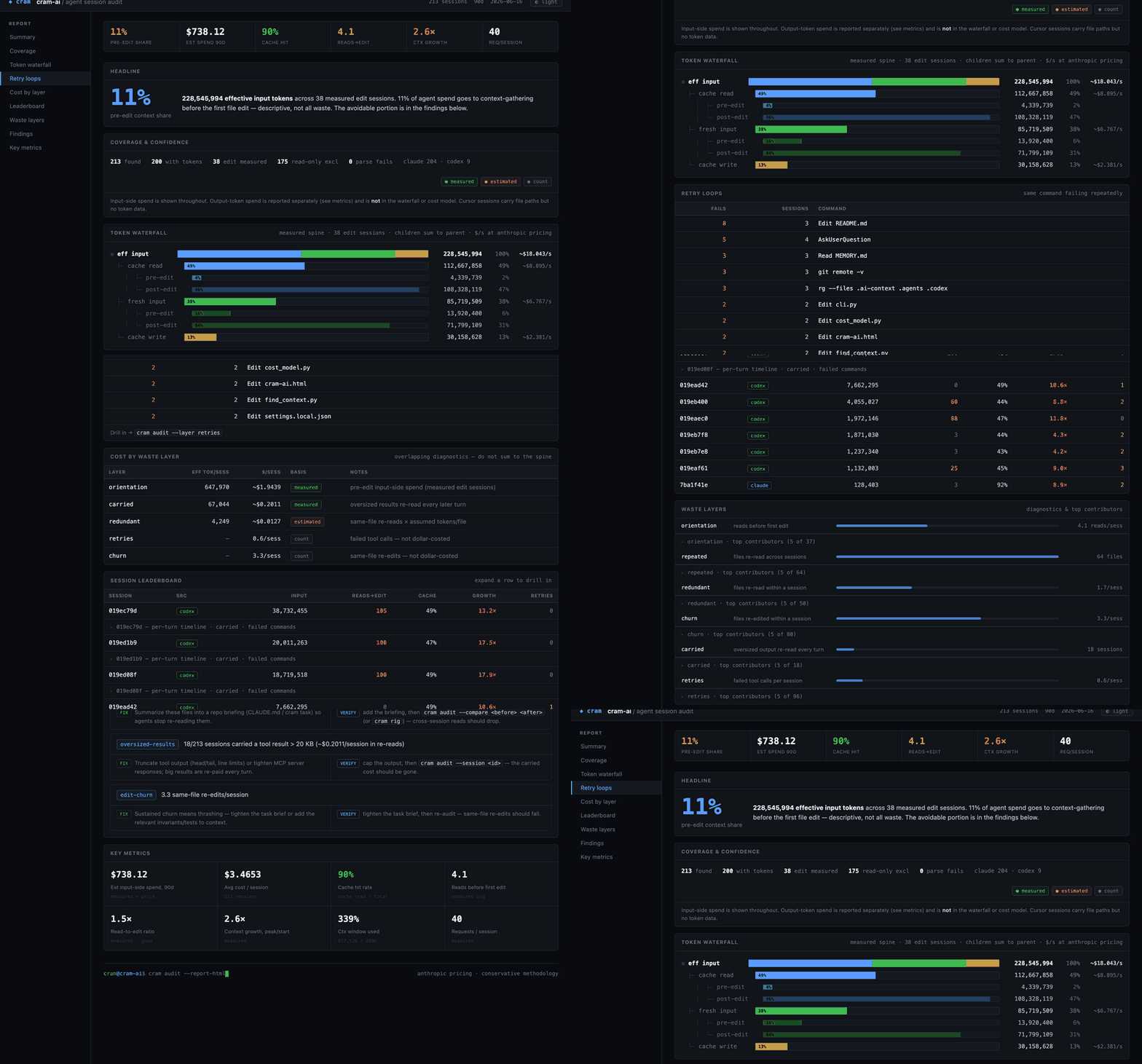
cram audit --report-html renders the whole audit as one self-contained file:
Why cram exists
AI coding agents do not only spend tokens writing code. They spend a surprising amount of context on:
- re-discovering the same repo structure every session
- reading the same central files repeatedly before the first edit
- carrying oversized tool outputs through later turns
- retrying failed shell commands or broken test invocations
- stuffing stale or excessive context into long agent loops
cram gives that waste a profile.
| What you want to know | cram command |
|---|---|
| Where did this session's tokens go? | cram audit --session <id> |
| Which sessions are wasting orientation tokens? | cram audit |
| Which files get re-read across sessions? | cram audit --report |
| Want a shareable visual report? | cram audit --report-html |
| Did cram context, claude-context, or another optimizer help? | cram rig ... |
| Did a real session use fewer tokens after a change? | cram audit --compare A B |
| Is optional repo context stale or too large? | cram status |
How cram is different
General LLM observability tools show traces, latency, request cost, and app-level quality signals. cram is narrower: it profiles coding-agent work loops from local transcripts and explains why an agent spent tokens before making useful progress.
It speaks in developer-native waste classes:
- startup context
- orientation before first edit
- repeated file reads
- oversized tool output carried forward
- retry loops and failed commands
- same-file edit churn
- cache blind spots
- optimizer-on vs optimizer-off
The goal is not only "what did this cost?" It is "why did the agent spend that much, what would reduce it, and did that fix preserve task success?"
What it does
1. Profiles real agent transcripts
cram audit reads the transcripts already on your disk and reports orientation cost,
pre-edit context share, context bloat, repeated reads, oversized carried results, retry
loops, edit churn, and cache engagement.
Supported transcript sources today:
| Tool | Reads/edits | Token usage |
|---|---|---|
| Claude Code | yes | measured |
| Codex | yes | measured when token usage is present |
| Cursor | yes | usually unmeasured; Cursor transcripts do not carry token usage |
2. Turns numbers into fixes
Findings are deterministic rules, not LLM judgment. Examples:
| Finding | Evidence | Likely fix |
|---|---|---|
| Repeated cross-session reads | same files read in many sessions | put durable context in repo briefing |
| Oversized carried result | large tool output re-read by later turns | cap command output |
| Cache blind session | cache write without cache read | stabilize prefix / fix cache config |
| Retry loop | failed commands or repeated same-file edits | record gotcha / improve task recipe |
| Context growth | late turns keep paying for old output | trim results / tune compaction |
3. Referees optimizers
cram rig compares token usage at fixed success. If an optimization saves tokens by failing
the task, cram does not count that as a win. It can test cram's own context layer, a third-party
optimizer, or no optimizer at all.
4. Offers an optional repo context layer
cram can maintain a small .ai-context/ directory with:
ARCHITECTURE.md: generated repo mapSYMBOLS.md: deterministic file-to-symbol indexDECISIONS.md: architectural decisions humans want agents to rememberGOTCHAS.md: non-obvious traps that grep cannot revealCURRENT_TASK.md: focused excerpts for the current task
Agents can load that context through MCP (get_context()) or file-based startup rules
(cram task "..." --target codex, --target cursor, etc.).
This layer is experimental as a token-saving mechanism. Use it when audits show repeated
re-discovery or when you have durable human knowledge to share with agents; verify it with
cram rig or cram audit --compare before treating it as a win.
Evidence so far
The repo includes a reproducible case study against pallets/click; see
CASE_STUDY.md and CASE_STUDY_RUNBOOK.md.
The useful result is not "cram context always saves tokens." It does not. The useful result is that cram can show exactly when an optimization helped, did nothing, or made the run worse.
One Claude Code case-study arm on a localized Click bug showed less re-discovery at equal task success:
| Metric | No cram | cram context | Change |
|---|---|---|---|
| Requests/session | 21.3 | 12.0 | -44% |
| Re-reads of target file | about 5x | about 2x | -60% |
| First edit | turn 5 | turn 3 | sooner |
| Peak context | 32,549 | 29,253 | -10% |
| Startup context | 18,180 | 20,904 | +2,724 |
| Task success | 3/3 | 3/3 | unchanged |
But the same context layer did not help elsewhere — measured the same way (per-session
cram audit, same pinned commit, equal-ish task success):
Claude, central-hub bug (#2786): the fix spans click's 3k-line core.py, so pre-loaded
excerpts didn't substitute for reading the hub. Re-reads stayed flat (~14×→~13×) and peak
context rose (+10%). Net neutral-to-negative.
Codex (N=1 per cell, directional): Codex reads go through shell, so compare orientation and context only. The context layer showed no orientation benefit on any cell tested:
| Cell | Reads before first edit | Peak context |
|---|---|---|
| #3571 localized | 6 → 8 | 50,785 → 56,481 |
| #2786 explicit | 33 → 39 | 150,990 → 128,030 |
| #2786 natural | 26 → 28 | 146,227 → 138,722 |
Codex, controlled rig (oracle-backed, reproducible): cram rig --runner codex on the
#2786 corpus, 3 reps per arm, comparing tokens only among runs that pass the success oracle:
| Arm | Pass rate | Passing-run eff. tokens |
|---|---|---|
| baseline | 2/3 | 2.87M, 1.70M |
| cram | 1/3 | 2.74M |
The one passing cram run was marginally cheaper than the comparable baseline run — but cram
failed 2 of 3 runs vs the baseline's 1, so it loses on the metric that comes first: pass
rate. A token saving that costs you task success is not a win. Reproduce with
cram rig corpus-click-2786.json --runner codex.
So the generated repo briefing / auto-excerpts should not be pitched as a universal token
reducer: it helped one localized Claude case and was neutral-to-negative everywhere else
measured. The manual DECISIONS.md / GOTCHAS.md path — humans recording non-greppable
project knowledge — is a separate, still-untested claim. Full per-session numbers, including
these, are in CASE_STUDY.md.
The context layer is most plausible for:
- unfamiliar repos
- natural-language bug reports where the exact file is not obvious
- long-running or autonomous agent loops
- repeated work in the same codebase
- multi-agent fan-out where every agent would otherwise rediscover the same context
- tacit project knowledge that cannot be inferred from syntax
It is weaker, and sometimes neutral or negative, for:
- tiny one-file edits
- prompts that already name the exact file and test
- familiar code where the agent needs little orientation
- stale context that has not been maintained
Install
# Standard install with MCP support
pip install 'cram-ai[mcp]'

# Extra provider support through LiteLLM
pip install 'cram-ai[mcp,multi-provider]'
Requires Python 3.10+.
Quick start
Start with audit. It is local and does not require model calls.
cd your-repo
cram audit
cram audit --report
Then verify changes with the referee. A controlled corpus compares optimizers only among runs that still pass the task oracle:
cram rig <corpus.json> --providers baseline,cram --dry-run
cram rig <corpus.json> --providers baseline,cram
For real before/after sessions:
cram audit --compare ../before ../after
If the audit shows repeated re-discovery, or you have durable project knowledge agents keep missing, you can try the optional context layer:
cram init
cram status
cram init gives the agent an immediate repo briefing by generating
.ai-context/ARCHITECTURE.md: a concise map of the project structure, stack, key modules,
and entry points. It also builds SYMBOLS.md, a deterministic file-to-symbol index used to
pick focused task excerpts.
Fill in the files that matter most:
vim .ai-context/DECISIONS.md
vim .ai-context/GOTCHAS.md
Then use one of the delivery paths.
MCP path: configure the cram mcp server in your agent and have the agent call:
get_context("fix the rate limiter")
File-based path: write context into a file your agent reads at startup:
cram task "fix the rate limiter" --target codex
cram task "fix the rate limiter" --target cursor
cram task "fix the rate limiter" --target claude
After a few sessions, measure again. Keep it only if it earns its keep:
cram audit
cram audit --compare ../my-repo-before-cram ../my-repo-after-cram
--compare expects two repo checkouts: for example, one checkout before adopting cram
context and another checkout after adopting it. It prints both audits side by side with
deltas, so you can see whether the change moved the numbers.
Session audit
cram audit answers: how much work happened before the first edit, how much context was
carried forward, and which patterns look avoidable?
cram audit                         # last 30 days for this repo
cram audit --days 7                # narrower window
cram audit --all                   # all known projects
cram audit --json                  # machine-readable output
cram audit --report [FILE]         # shareable markdown
cram audit --report-html [FILE]    # standalone HTML report (opens in your browser)
cram audit --layer NAME            # drill into one waste class (orientation, repeated, ...)
cram audit --compare PATH_A PATH_B # compare two repo checkouts side by side
cram audit --reingest              # ignore cache and re-parse
Typical output includes:
Avg reads before first edit:    8.2
Avg edits/session:              3.1
Avg read-to-edit ratio:         2.6x
Cache engagement:               18/24 sessions read from cache

Pre-edit context share (measured):
  Edit sessions:                16/24
  Pre-edit context share:       31% of 1,580,000 eff. input tokens
  Pre-edit spend/session:       ~41,200 eff. tokens
The audit is deliberately conservative:
- no-edit sessions are excluded from the headline pre-edit share
- sessions without token usage are counted as unmeasured
- output tokens are not included in input-side spend
- dollar attribution is provider-configurable and labeled as an estimate
- file attribution for Codex is limited because shell reads are not structured like Claude/Cursor tool calls
Parsed transcripts are cached in a local SQLite event store at
~/.local/share/cram-ai/audit.db unless CRAM_AUDIT_DB is set. The store is only a cache;
transcripts remain the source of truth.
Per-session waterfall
For one session, use:
cram audit --session <id>
cram audit --session <id> --json
This shows each request's input, cache-read, cache-write, output, context delta, and tool activity. It also attributes waste to concrete causes:
Carried waste:
  cram/audit_events.py: 12,307 tok x 18 later turns = 221,526 carried tok

Redundant re-reads: 2x cram/audit_events.py
Failed tool calls: 1
Use this when an aggregate finding is too abstract and you need the exact turn or file that caused the cost.
Layer drilldown
To expand one waste class into its concrete contributors across sessions:
cram audit --layer orientation   # sessions with the most reads before first edit
cram audit --layer repeated      # files re-read across sessions (briefing candidates)
cram audit --layer redundant     # files re-read within a session
cram audit --layer carried       # sessions carrying oversized tool output
cram audit --layer retries       # sessions with failed tool calls
cram audit --layer churn         # files re-edited within a session
Each lists the worst offenders (files or sessions), so you can go from "context bloat is high"
to the exact files/sessions causing it. Add --json for structured output.
Context layer
The context layer is optional and experimental as an optimizer. It is one remediation
among several, not required to use cram. Reach for it when your audit shows repeated
re-discovery, or when agents need durable repo knowledge that is not obvious from code search.
The audit and cram rig work without it.
.ai-context/
  ARCHITECTURE.md   generated repo map
  SYMBOLS.md        deterministic symbol index
  DECISIONS.md      manual architectural decisions
  GOTCHAS.md        manual foot-guns and production traps
  CURRENT_TASK.md   generated task-specific context
cram init creates the directory. cram sync refreshes generated files. A post-commit hook
can run sync automatically.
The highest-value files are expected to be the manual ones:
DECISIONS.md: "we use cursor pagination", "never call this API directly"GOTCHAS.md: "users.email is nullable in prod", "this test needs PYTHONPATH=src"
Those facts are not discoverable from syntax alone, which is why they remain useful even as models get larger context windows. This curated-knowledge claim is separate from the auto-orientation claim and should be tested independently on tacit-knowledge tasks.
When get_context("task") or cram task "task" runs, cram:
- reads the symbol index
- asks a cheap context model to pick the most relevant files
- extracts focused snippets around relevant identifiers
- writes
CURRENT_TASK.md
The goal is not to prevent the agent from reading files. The goal is to reduce blind re-discovery and preload durable project knowledge. Treat the generated briefing and excerpts as a candidate fix, not a guaranteed savings layer.
Concurrency and team
These are two different things; cram supports one today and not the other.
- Concurrent agents on one repo — supported now. Each
get_context("task")/cram taskcall writes its own slot file under.ai-context/tasks/<task>.md, so multiple agents working the same repo at once never overwrite each other's task context. The shared files (ARCHITECTURE.md,DECISIONS.md,GOTCHAS.md,SYMBOLS.md) are read-mostly and committed, so teammates get the same context layer through normal version control. - Hosted, multi-developer "team" features — not built yet. Shared dashboards and cross-developer audit rollups may come later around the open core. Today cram runs on a single developer's machine.
In short: concurrent agents, yes; centralized team analytics, not yet.
MCP delivery
For MCP-capable tools, configure one server:
{
  "mcpServers": {
    "cram-ai": {
      "command": "cram",
      "args": ["mcp", "--repo", "/absolute/path/to/your-repo"]
    }
  }
}
Use your client's native MCP config location. Claude Code, Cursor, Windsurf, Zed, and Codex CLI all have MCP support, but their config filenames and formats can differ by version.
Available MCP tools:
| Tool | What it does |
|---|---|
get_context(task='') | Builds or reloads focused task context |
get_architecture() | Returns ARCHITECTURE.md |
get_symbols(query='') | Returns or filters SYMBOLS.md |
get_decisions() | Returns DECISIONS.md |
get_gotchas() | Returns GOTCHAS.md |
add_file(path, identifiers='') | Adds focused excerpts from a file |
get_health() | Reports staleness and token budgets |
get_task_history(limit=20) | Shows recent task contexts |
propose_decision(...) | Adds a pending decision for human review |
run_benchmark() | Models context delivery costs |
Recommended agent instruction:
Call get_context("<task>") before starting work, and call it again when the task changes.
File-based delivery
For tools that read instruction files at startup:
cram task "add pagination to the users endpoint" --target codex
cram task "add pagination to the users endpoint" --target cursor
cram task "add pagination to the users endpoint" --target all
Built-in targets:
| Target | File |
|---|---|
codex | AGENTS.md |
claude | CLAUDE.md |
cursor | .cursor/rules/cram-task.md |
windsurf | .windsurf/rules/cram-task.md |
copilot | .github/cram-task.md |
gemini | GEMINI.md |
all | all detected targets |
Custom targets live in .ai-context/config.toml:
[targets.acme]
file = "ACME.md"
indicator = "acme.config.json"
upsert = true
Every file-based target includes command-output protection rules so agents do not accidentally carry huge shell output through the rest of a session.
Verify optimizers with cram rig
cram rig is the referee. It compares token usage only among runs that still pass a success
oracle.
cram rig <corpus.json> --providers baseline,cram,claude-context
cram rig <corpus.json> --dry-run
cram rig <corpus.json> --runner codex
cram rig --observe cram --days 30
Modes:
| Mode | What it means |
|---|---|
| Controlled | fixed corpus, fixture repo, success command, token comparison at equal success |
| Observational | split real sessions by whether the optimizer was used; useful signal, not proof |
Providers:
| Provider | Status |
|---|---|
baseline | no optimizer |
cram | cram context layer |
claude-context | third-party semantic code-search MCP |
headroom, context-mode | stubs that report what wiring is missing |
Runners (controlled mode — pick with --runner):
| Runner | Agent | Notes |
|---|---|---|
claude (default) | Claude Code headless (claude -p) | reuses your Claude login |
codex | Codex noninteractive (codex exec) | reuses your Codex login; routes the cram provider through AGENTS.md |
Both reuse the existing CLI login (no API key). More agent runners can be added behind the same corpus/oracle interface.
Model providers
The audit path is local and does not call a model. The context layer does call a configured
context model to generate ARCHITECTURE.md, mine decisions, and select files for a task.
Subscription or API key? If you have a Claude or Codex subscription, cram uses your
existing CLI login (claude / codex) — no API key required. API keys are only needed for
the direct-API providers (Anthropic/OpenAI/Gemini) or hosted gateways below.
Auto-discovery currently checks:
- Claude CLI
- Codex CLI
- Ollama
- LM Studio
- AWS Bedrock
- GCP Vertex AI
- Azure OpenAI
- direct Anthropic/OpenAI/Gemini API keys
- a custom proxy
To force a CLI preference in auto mode:
export CRAM_CONTEXT_PROVIDER=codex
# or
export CRAM_CONTEXT_PROVIDER=claude
To set an explicit context model, edit ~/.config/cram-ai/settings.json:
{
  "context_model": "codex-cli/default"
}
Other examples:
{ "context_model": "cli/haiku" }
{ "context_model": "openai/gpt-4o-mini" }
{ "context_model": "gemini/gemini-2.0-flash" }
{ "context_model": "ollama/mistral" }
{ "context_model": "lmstudio/my-local-model" }
For enterprise gateways:
{
  "proxy": {
    "base_url": "https://gateway.corp/v1",
    "headers": { "X-Corp-Token": "your-sso-token" }
  },
  "context_model": "proxy/custom"
}
Privacy note: cram audit stays local. cram init, cram sync, cram decisions --mine,
and cram task can send repo summaries or code excerpts to your configured context model.
Context health
Context can go stale. cram tracks this with a 0-10 staleness score based on commits since the generated context was last refreshed, mapped to a band:
| Score | Band | Meaning |
|---|---|---|
| 0-2 | fresh | context tracks the code |
| 3-5 | acceptable | minor drift |
| 6-7 | stale | refresh recommended (cram sync) |
| 8-10 | critical | likely misleading; refresh before relying on it |
Only commits that change repo structure count against ARCHITECTURE.md: a content-only
commit leaves it fresh by design, so the score does not creep on every commit.
cram status
cram sync
Health surfaces in:
cram statusget_health()get_context()warnings when context is stale or critical
Soft budgets warn but do not truncate:
| File | Default budget | Override |
|---|---|---|
ARCHITECTURE.md | 3,000 tok | CRAM_BUDGET_ARCHITECTURE |
DECISIONS.md | 1,800 tok | CRAM_BUDGET_DECISIONS |
GOTCHAS.md | 800 tok | CRAM_BUDGET_GOTCHAS |
CURRENT_TASK.md | 2,000 tok | CRAM_BUDGET_TASK |
SYMBOLS.md | none | scales with repo size |
HTML report
cram audit --report-html        # writes ./cram-audit-report.html and opens it
cram audit --report-html FILE   # write to a specific path
cram audit --report-html --no-open
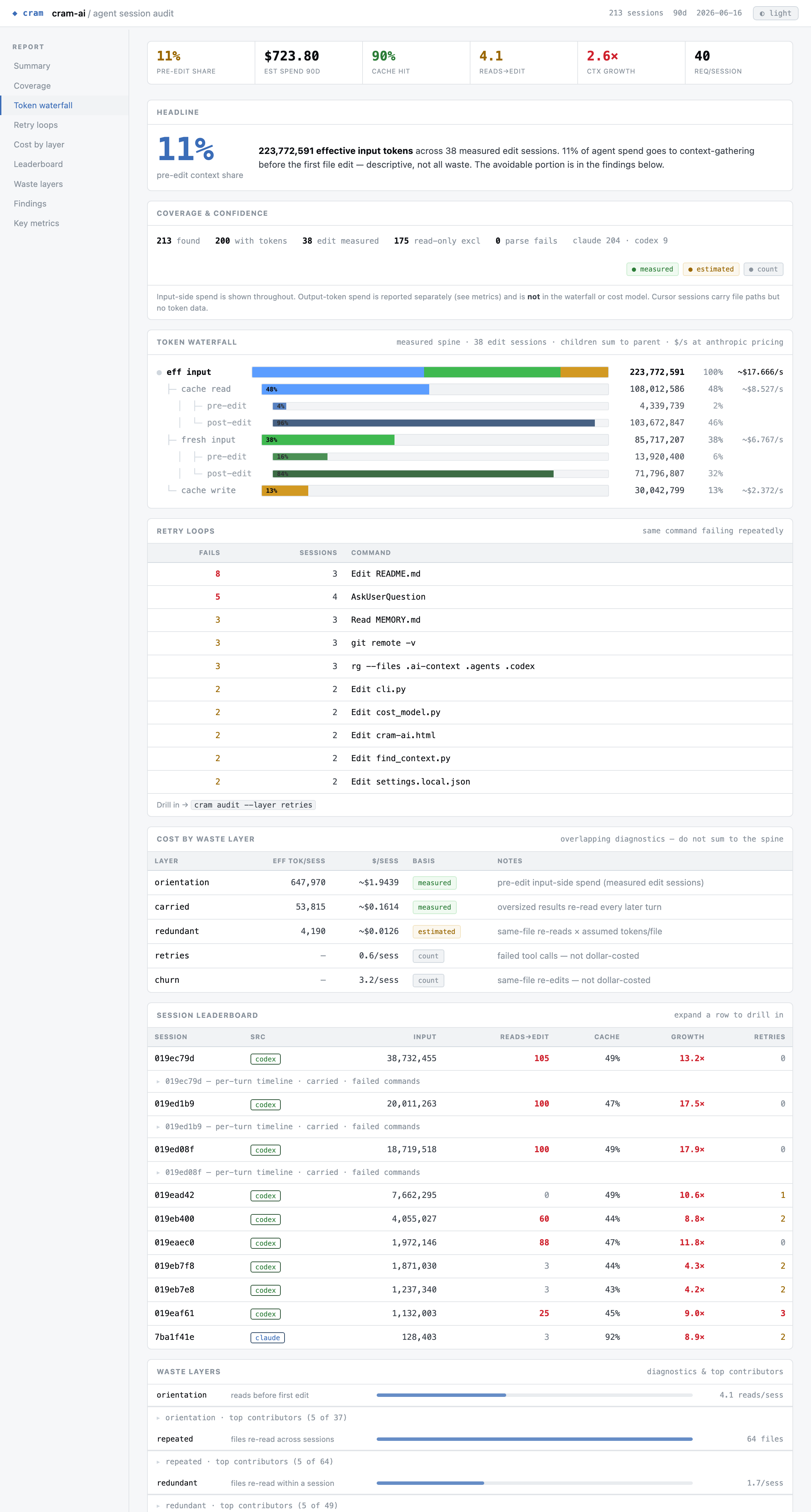
A single self-contained HTML file — inline CSS/JS, no external fonts or fetches — so it travels: open it locally, attach it to a PR, drop it in Slack. A restrained dark data dashboard (think Grafana / GitHub Actions logs, not a frosted-glass AI console) with a light/dark toggle. It renders:
- a KPI stat strip and the pre-edit headline
- coverage & confidence (sessions found / measured / excluded / parse failures, source mix, measured·estimated·count legend)
- the token waterfall with per-component
$/session - retry loops — the same command failing repeatedly
- cost by waste layer ($-ranked, with basis)
- the session leaderboard with expandable per-turn drilldowns (carried results, failed commands)
- waste layers with collapsible top-contributor lists
- findings with fix → verify
- context on/off A/B when the window contains both
- key metrics
It's built from the same collect_audit() data as cram audit --report, so it makes no
claim the text report doesn't.
Commands
| Command | Purpose |
|---|---|
cram audit | Profile agent sessions |
cram audit --session <id> | Inspect one session's token waterfall |
cram audit --layer <name> | Drill into one waste class (orientation/repeated/redundant/carried/retries/churn) |
cram audit --report [FILE] | Write a shareable markdown report |
cram audit --report-html [FILE] | Write a standalone HTML report (opens in your browser) |
cram audit --compare A B | Compare two checkouts |
cram init | Create .ai-context/ |
cram task "..." | Build task context |
cram add <file> | Add a file to current task context |
cram sync | Refresh generated context |
cram continue | Extend the task grace period before a commit resets context |
cram status | Check freshness and budgets |
cram decide "..." | Add a decision |
cram gotcha "..." | Add a gotcha |
cram decisions --mine | Mine git history for decision candidates |
cram benchmark | Estimate token savings vs full-repo auto-indexing |
cram rig ... | Verify optimizers |
cram mcp | Start the MCP server |
cram hook install|uninstall | Manage the git post-commit sync hook |
cram doctor | Check setup |
Environment variables
| Variable | Default | Description |
|---|---|---|
CRAM_CONTEXT_PROVIDER | auto | Prefer codex or claude CLI in auto context-model selection |
CRAM_PROVIDER | anthropic | Pricing table for audit dollar attribution |
CRAM_AUDIT_DB | ~/.local/share/cram-ai/audit.db | Audit cache path; :memory: accepted |
CRAM_PRICE_INPUT_PER_MTOK | provider default | Override input price for cost estimates |
CRAM_CACHE_WRITE_MULT | provider default | Override cache-write multiplier |
CRAM_CACHE_READ_MULT | provider default | Override cache-read multiplier |
CRAM_AUDIT_TOK_PER_FILE | 2500 | Tokens assumed per orientation file read in older cost modeling |
CRAM_AUDIT_BIG_RESULT_BYTES | 20000 | Threshold for oversized tool result findings |
AICONTEXT_MAX_FILES | 5 | Max files in task context |
AICONTEXT_MAX_LINES | 300 | Max excerpt lines per file |
CRAM_TASK_GRACE_SECONDS | 600 | Grace period before commit resets task context |
CRAM_STALE_CRITICAL_COMMITS | 10 | Commits that map to critical staleness |
CRAM_BUDGET_ARCHITECTURE | 3000 | Soft token budget |
CRAM_BUDGET_DECISIONS | 1800 | Soft token budget |
CRAM_BUDGET_GOTCHAS | 800 | Soft token budget |
CRAM_BUDGET_TASK | 2000 | Soft token budget |
AICONTEXT_MODEL is still supported by the older call_model() fallback path, but explicit
context-model routing should use ~/.config/cram-ai/settings.json.
What cram is not
cram is not an automatic universal token reducer.
It will not magically make every agent run cheaper. It gives you measurements, points at avoidable patterns, and lets you verify whether cram's optional context layer, a third-party optimizer, or a config change actually helped.
That is the product boundary: profiler and referee first; context memory is optional and must be measured.
Contributing
Issues and PRs are welcome.
pip install -e '.[mcp]' pytest
pytest
No API key is required for tests; model calls are mocked.
Audit-metric changes should be additive and clearly labeled as measured or estimated.
License
Apache-2.0. See LICENSE.
cram is open source and local-first. The local single-developer workflow — audit, event store, audit CLI, findings, context layer, and markdown reports — is open source. Hosted, multi-developer team features may be offered later around the open core. (Concurrent agents on one repo are supported today; see Concurrency and team.)