
Excalidraw Agent Skill
videnovnebojsa/excalidraw-agent-skill
Gera diagramas Excalidraw offline com agents isolados e exportação animada
Ver no GitHubSkill para Claude Code que gera diagramas Excalidraw estilizados com orquestração multi-agente, renderização offline e exportação SVG animada. Ideal para criar arquiteturas, fluxogramas e diagramas complexos sem sobrecarregar o contexto com JSON.
Instalação
npx convez-ai videnovnebojsa/excalidraw-agent-skill1 comando no terminal: detecta o formato do repositório (marketplace ou plugin avulso) e instala via Claude Code. Requer Node 18+ e o Claude Code instalado.
Métricas
Casos de uso
- Gerar diagramas de arquitetura de sistemas e microserviços
- Criar fluxogramas de login, CI/CD pipelines e mapas de dependências
- Atualizar e validar diagramas existentes com feedback visual
- Exportar diagramas como SVG animado para apresentações
Veredito

Ferramenta sólida para geração automatizada de diagramas técnicos dentro do Claude Code. Renderização offline elimina dependências externas, multi-agente permite criação escalável, mas requer instalação local e Node.js 20+. Ideal para equipes que precisam de diagramas consistentes sem sair do fluxo de desenvolvimento.
README
A tradução para o português deste README ainda está na fila.
excalidraw-agent-skill


A Claude Code skill for generating styled Excalidraw diagrams with isolated diagram-generation agents, an offline renderer, validation, visual critique, and optional animated SVG export.
Use it when you want architecture diagrams, flow charts, CI/CD pipelines, dependency maps, or updates to an existing .excalidraw file without filling your main Claude Code context with thousands of JSON tokens.
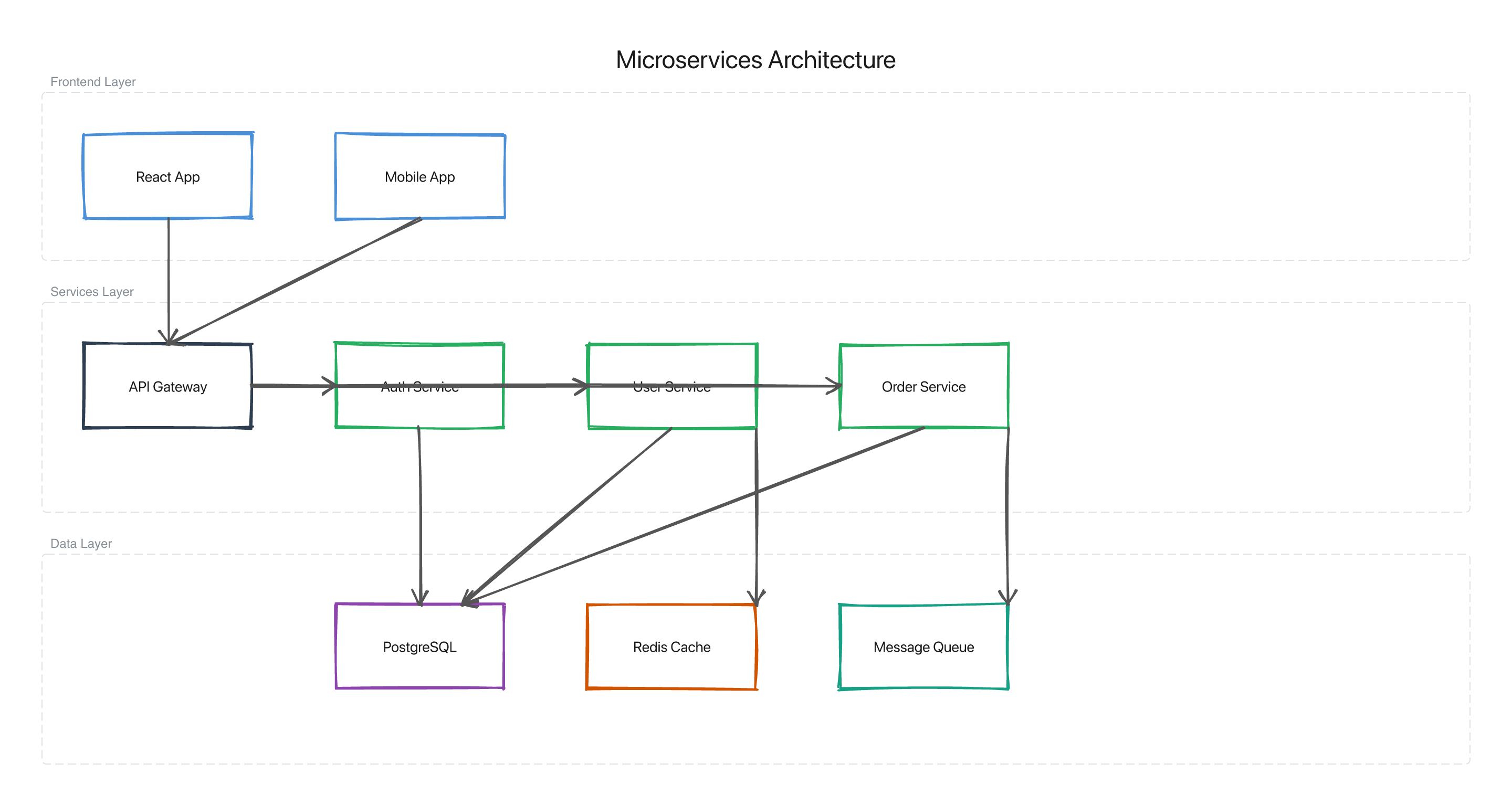
Generated from one prompt:
/excalidraw Draw a system architecture for my Node.js microservices app— semantic colors, layered grouping, and the hand-drawn Excalidraw look, all offline.
Prerequisites
- Claude Code with local skills support
- Node.js 20 or newer
- npm
- macOS or Linux recommended; the skill documentation uses
~/.claude/...paths
The renderer works offline through @moona3k/excalidraw-export; no browser or Playwright install is required.
Install
git clone https://github.com/videnovnebojsa/excalidraw-agent-skill
cd excalidraw-agent-skill

mkdir -p ~/.claude/skills
cp -r .claude/skills/excalidraw ~/.claude/skills/
cp style-profile.json ~/.claude/skills/excalidraw-style-profile.json

cd ~/.claude/skills/excalidraw
npm install
Installing the skill registers the /excalidraw command. Start a new Claude Code session to pick it up.
First Diagram
Start any Claude Code session and ask:
/excalidraw Draw a login flow: User -> Browser -> API -> Database
The skill writes the final .excalidraw file and rendered PNG to /tmp/diagram-final-<timestamp>.*, then shows the PNG path in the response.
Common Usage
/excalidraw Draw a system architecture for my Node.js microservices app
/excalidraw Draw a login flow and animate it --animate
/excalidraw Draw a CI/CD pipeline --tier=complex
/excalidraw Draw a database replication flow --style=./style-profile.json
To update an existing drawing, include the path in your prompt:
/excalidraw Add an OAuth Provider node between Browser and API.

Existing diagram: .claude/skills/excalidraw/examples/simple-flow.excalidraw
Flags
| Flag | Effect |
|---|---|
--animate | Export an animated SVG after diagram approval |
--style=<path> | Use a style profile for this run instead of the installed default |
--tier=simple|standard|complex | Override complexity detection |
--fill=hachure|solid|cross-hatch|zigzag | Override shape fill style |
--no-validate | Skip the visual feedback loop for faster output |
Custom Style
The default style profile is installed at:
~/.claude/skills/excalidraw-style-profile.json
Edit that file to change the palette and enforced drawing rules for future diagrams. For one-off runs, pass a profile explicitly:
/excalidraw Draw a customer onboarding flow --style=/path/to/my-style-profile.json
The strongest customization surface is palette.semantic.*, typography.fontFamily, stroke.width, and stroke.roughness; those are checked by validate.js. Some profile fields are advisory or reserved for future work. See customization.md for the exact behavior.
Scripts
Run these from the repository root:
# Render a diagram to PNG
node scripts/render.js .claude/skills/excalidraw/examples/simple-flow.excalidraw /tmp/simple-flow.png

# Validate a diagram against a style profile
node scripts/validate.js .claude/skills/excalidraw/examples/simple-flow.excalidraw style-profile.json
The root scripts forward to the installable skill scripts in .claude/skills/excalidraw/scripts/.
How It Works
User prompt
  -> Design Agent        element inventory and layout sketch
  -> Generation Agent    Excalidraw JSON
  -> Style Review Agent  validate.js plus style-guide.md
  -> Vision Critique     render, inspect, patch, re-render
  -> Confirmation Agent  user-facing summary
  -> Animation Agent     optional animated SVG for --animate
Simple diagrams run inline. Standard diagrams use the full agent pipeline. Complex diagrams are generated in sections and merged before validation and rendering.
Repository Structure
.claude/skills/excalidraw/
├── SKILL.md                 orchestration protocol read by Claude Code
├── package.json             skill runtime dependencies
├── scripts/
│   ├── render.js            offline PNG/SVG renderer
│   ├── validate.js          structure and style checker
│   └── describe.js          diagram fact sheet for visual critique
├── references/
│   ├── generation-guide.md
│   ├── style-guide.md
│   ├── visual-feedback.md
│   ├── animation-guide.md
│   ├── customization.md
│   └── style-extraction.md
├── examples/
└── tests/
Contributing
See CONTRIBUTING.md for local checks, test fixtures, and contribution notes.
Prior Art
License
MIT. See LICENSE.