
Claude Bridge - MCP Server
vedantggwp/littlebird-claude-mcp
Exponha Claude Code como serviço MCP para clientes remotos
Ver no GitHubServidor MCP que expõe Claude Code como ferramentas chamáveis via HTTP, permitindo que qualquer cliente MCP (Littlebird, Claude Desktop, etc.) execute prompts no Claude localmente sem API key. Ideal para integrar agentes em nuvem com execução local do Claude Code.
Instalação
npx convez-ai vedantggwp/littlebird-claude-mcp1 comando no terminal: detecta o formato do repositório (marketplace ou plugin avulso) e instala via Claude Code. Requer Node 18+ e o Claude Code instalado.
Métricas
Casos de uso
- Conectar agentes em nuvem (Littlebird) ao Claude Code local
- Executar prompts do Claude sem consumir tokens de API
- Automatizar fluxos que requerem interação com Claude Code
- Integrar Claude em pipelines MCP multi-cliente
Veredito

Solução técnica elegante para bridging local-cloud de Claude Code via MCP. Exige conhecimento de tunelamento HTTP e configuração de segurança, mas oferece uma ponte leve e bem documentada para casos específicos de integração.
README
A tradução para o português deste README ainda está na fila.
Claude Bridge
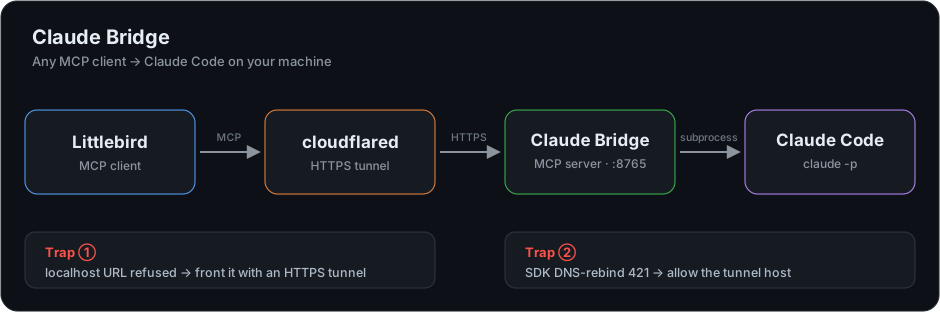
A small MCP server that exposes Claude Code as callable tools over Streamable HTTP, so any MCP client can drive Claude on your machine.
It was built to connect Littlebird (an MCP client) to Claude Code, and works with any Streamable-HTTP MCP client.
Tools
| Tool | Behaviour |
|---|---|
ping(message) | Health check. Returns pong: <message>. |
ask_claude(prompt) | Runs the prompt through the local Claude Code CLI (claude -p) and returns the answer. No API key; it reuses your existing Claude Code session. |
Adding a tool is one @mcp.tool() decorator.
Run
Requires uv and Claude Code on your PATH.
uv run server.py # http://127.0.0.1:8765/mcp (localhost only)
Dependencies are declared inline in server.py, so uv resolves them on first run. There is nothing to install and no virtualenv to manage.
Connecting a cloud client
Cloud MCP clients will not dial a private address, so the server has to be reachable over HTTPS. Put it behind a tunnel:
cloudflared tunnel --url http://127.0.0.1:8765      # -> https://<id>.trycloudflare.com
BRIDGE_PUBLIC_HOST=<id>.trycloudflare.com uv run server.py
In Littlebird: Settings > Integrations > Add integration > Add custom > Add MCP Server, then paste https://<id>.trycloudflare.com/mcp.
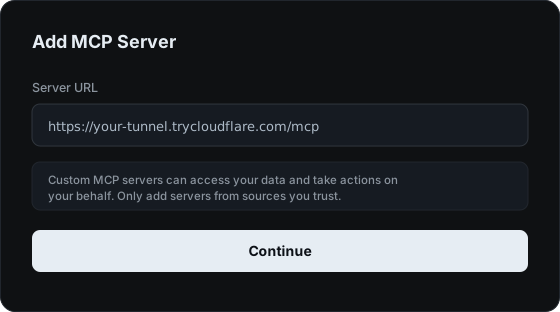
The client connects, lists the tools, and the agent can call them:
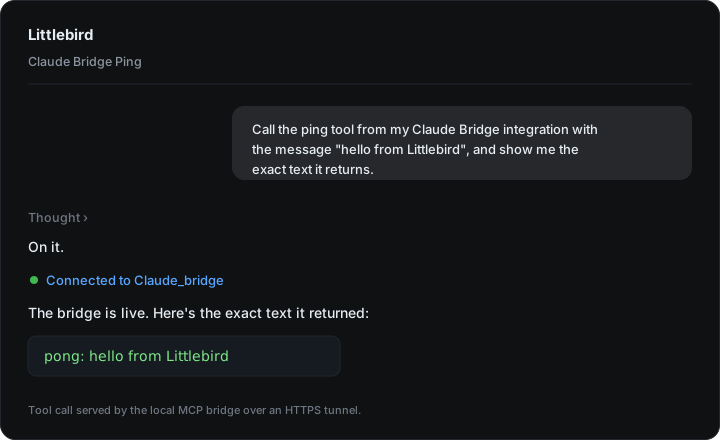
Server log for that call:
Processing request of type ListToolsRequest
INFO:  "POST /mcp HTTP/1.1" 200 OK
Processing request of type CallToolRequest
INFO:  "POST /mcp HTTP/1.1" 200 OK
Two traps worth knowing
Connecting a localhost MCP server to a cloud client surfaced two non-obvious failures.
1. The client rejects raw localhost URLs. Pasting http://127.0.0.1:8765/mcp returns Failed to discover server, because cloud clients will not connect to a private address. The fix is the HTTPS tunnel above.
2. The SDK then returns 421 through the tunnel. The MCP Python SDK auto-enables DNS-rebinding protection when bound to a loopback host, so it rejects any request whose Host header is not localhost, including the tunnel's. Allow the tunnel host explicitly:
mcp.settings.transport_security = TransportSecuritySettings(
    enable_dns_rebinding_protection=True,
    allowed_hosts=["127.0.0.1:*", "localhost:*", "<id>.trycloudflare.com"],
    allowed_origins=["https://<id>.trycloudflare.com"],
)
BRIDGE_PUBLIC_HOST applies this for you.
Security
ask_claude runs claude on your machine. The default bind is localhost-only and safe. A public tunnel removes that boundary: anyone with the URL can invoke Claude on your machine. A trycloudflare.com URL is random and unguessable, which is acceptable for a short test but not for leaving running.
For anything beyond local use, require authentication. Littlebird's Add MCP Server flow has an API Token field, so gate the server on a bearer token, or use a named Cloudflare tunnel with an access policy.
Configuration
| Variable | Default | Purpose |
|---|---|---|
BRIDGE_HOST | 127.0.0.1 | bind host |
BRIDGE_PORT | 8765 | bind port |
BRIDGE_PUBLIC_HOST | (unset) | tunnel hostname, added to the DNS-rebinding allowlist |
CLAUDE_BIN | claude on PATH | Claude Code binary |
CLAUDE_CONFIG_DIR | (unset) | optional config dir for the subprocess |
License
MIT © 2026 Vedant Gaikwad