
Journey — Visualizador de Evolução de Pensamento
vamshisuram/cc-journey
Capture a árvore de pensamento: mindmap + timeline de como seu raciocínio evoluiu
Ver no GitHubPlugin do Claude Code que captura automaticamente cada prompt como nó em uma árvore de conversas, gerando mindmaps e timelines interativas. Permite visualizar pivôs, desvios e branches abandonados com as razões, tudo sincronizado entre múltiplas conversas vinculadas ao mesmo objetivo.
Instalação
npx convez-ai vamshisuram/cc-journey1 comando no terminal: detecta o formato do repositório (marketplace ou plugin avulso) e instala via Claude Code. Requer Node 18+ e o Claude Code instalado.
Métricas
Casos de uso
- Rastrear decisões de design e pivôs técnicos em sessões longas de Code
- Visualizar branches abandonadas com motivos explícitos
- Sincronizar journeys entre múltiplas conversas ligadas ao mesmo objetivo
Veredito

Ferramenta criativa e bem-executada que resolve um problema real em sessões longas do Claude Code — perder o rastro do *por quê* das decisões. A detecção automática de pivôs e o dual-mode (browser + CLI) compensam a complexidade de instalação.
README
A tradução para o português deste README ainda está na fila.
Journey
A Claude Code plugin that captures every prompt as a node in a tree of conversation states — so you can see how your thinking evolved, where you pivoted, and which branches you abandoned.
Anchored to goals (not sessions), so a journey can span many conversations, projects, and days.
✨ Status: v0.4 — works end-to-end. Install from the GitHub marketplace below.
Why
Long Claude Code sessions are linear scrollback. You lose:
- Why you redirected three turns ago.
- What you tried before the current approach (and why it didn't work).
- The shape of your own thinking — where you're focused, where you're flailing.
Journey captures this automatically as a mindmap + timeline of your conversation, with branches for pivots and dead-ends marked with the reason they were abandoned.
What it does
- Capture is fully automated. Every user turn becomes one node in a per-goal tree. Zero friction, no slash commands to remember.
- Pivots branch the tree. Detected via redirection language (
no, instead, switch to, ...) plus an LLM-assist for soft hints (hmm, but, actually-soft, alternatively). - Dead-ends auto-explain. When a pivot fires, the abandoned branch is marked with an inferred reason — captured at zero user cost.
- Goals span conversations. Same conversation = same goal. New conversation? A small LLM call asks "does this continue any recent goal?" and matches if so.
- Lazy LLM summaries. Each node gets a one-line, ≤20-word summary — generated on demand when you actually look at it, then cached.
- Two views, same data.
- Browser (default):
/cc-journey:openstarts a local web UI with a Cytoscape mindmap, draggable minimap, timeline tab, click-to-detail, and live SSE updates. - Terminal:
/cc-journey:mindmap,/cc-journey:timeline,/cc-journey:back [N],/cc-journey:goalsfor quick at-a-glance views without leaving the CLI.
- Browser (default):
Install
From GitHub (recommended)
In Claude Code, run:
/plugin marketplace add vamshisuram/cc
/plugin install cc-journey
/reload-plugins
That's it — three commands. After /reload-plugins, hooks and slash commands are live: every prompt you send is captured, and /cc-journey:open opens the browser view.
Canonical docs: https://code.claude.com/docs/en/discover-plugins and https://code.claude.com/docs/en/plugin-marketplaces
From a local clone (for development)
git clone https://github.com/vamshisuram/cc-journey ~/code/cc-journey
Then in Claude Code:
/plugin marketplace add ~/code/cc-journey
/plugin install cc-journey
/reload-plugins
Edits to the cloned repo become live after another /reload-plugins.
Uninstall
/plugin uninstall cc-journey
/plugin marketplace remove cc
Your captured journeys remain on disk (under the plugin's data dir) until you delete them manually.
Configuration
All optional — sane defaults out of the box.
| Variable / arg | What it does | Default |
|---|---|---|
CLAUDE_PLUGIN_DATA | Where journeys are stored | Auto-set by Claude Code per plugin |
JOURNEY_PORT | Browser-UI port | 7777 |
ANTHROPIC_API_KEY | If set, LLM calls go via API (fast). Otherwise falls back to the claude CLI (uses your existing Claude Code auth). | unset |
Slash commands accept KEY=VALUE overrides:
/cc-journey:open CLAUDE_PLUGIN_DATA=/tmp/some-other-data JOURNEY_PORT=8080
Privacy
- All data stays on your machine. Captured prompts, the goal tree, and per-node summaries are written to
${CLAUDE_PLUGIN_DATA}— the plugin never phones home. - LLM calls are opt-in. Goal titling, lazy summaries, soft-pivot classification, and cross-conversation matching all need an LLM. Two ways to enable:
- Anthropic API — set
ANTHROPIC_API_KEY. Each call is a small Haiku request (typically <100 tokens out). claudeCLI — if no API key is set, the plugin falls back to spawningclaude -p, which reuses your existing Claude Code auth.
- Anthropic API — set
- No LLM available? The plugin still works — it just falls back to heuristics (regex pivot detection, first-15-words summaries, untitled goals) and prints nothing if calls fail. Hooks never break a turn on LLM errors.
- Stored content includes the first ~200 chars of each prompt. Full transcripts are not duplicated — the plugin keeps a pointer to Claude Code's transcript and reads from it on demand.
Performance / cost notes
- Per-turn capture is near-zero overhead (write a JSON node + maybe a regex test).
- First turn of a brand-new goal triggers up to two LLM calls — one for cross-conversation matching, one for the goal title — so it can add 1–3 s to that single turn. Every subsequent turn skips both.
- Soft-pivot LLM-assist only fires on turns containing hint words (
but,however,actually,hmm,alternatively, …). Most turns stay regex-only at zero LLM cost. - Summaries are lazy. Tokens are spent only on nodes you actually open in a view. Each summary is cached on disk after first generation.
Slash commands
All commands are namespaced under cc-journey: after install.
| Command | What it does |
|---|---|
/cc-journey:open | Open the web UI (mindmap, timeline, goals all live in the browser at http://localhost:7777) |
/cc-journey:stop | Stop the local web UI |
/cc-journey:goals | Terminal: list all known goals (active marked *) |
/cc-journey:mindmap | Terminal: ASCII mindmap of the active goal |
/cc-journey:timeline | Terminal: chronological list of all turns in the active goal |
/cc-journey:back [N] | Terminal: last N turns (defaults to 5) — "what did I tell you N pings ago" |
All commands accept KEY=VALUE overrides, e.g.:
/cc-journey:open CLAUDE_PLUGIN_DATA=/tmp/journey-demo JOURNEY_PORT=8080
Browser UI
Run /cc-journey:open (or node lib/server-control.mjs start for local dev), then open http://localhost:7777.
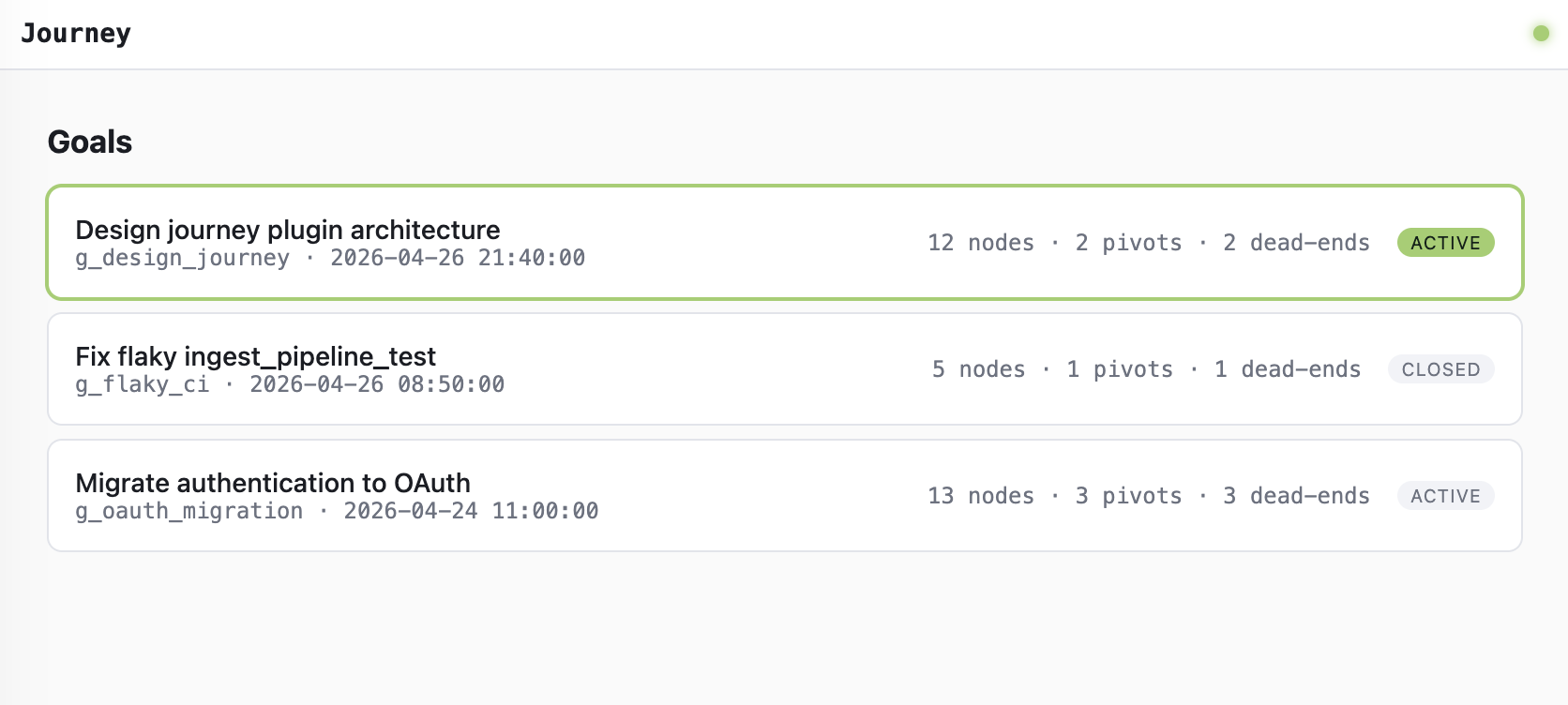
Homepage — every goal you've worked on
Most-recently-active goal is highlighted at the top. One card per goal with node count, pivot count, and dead-end count at a glance.
Goal view — interactive mindmap
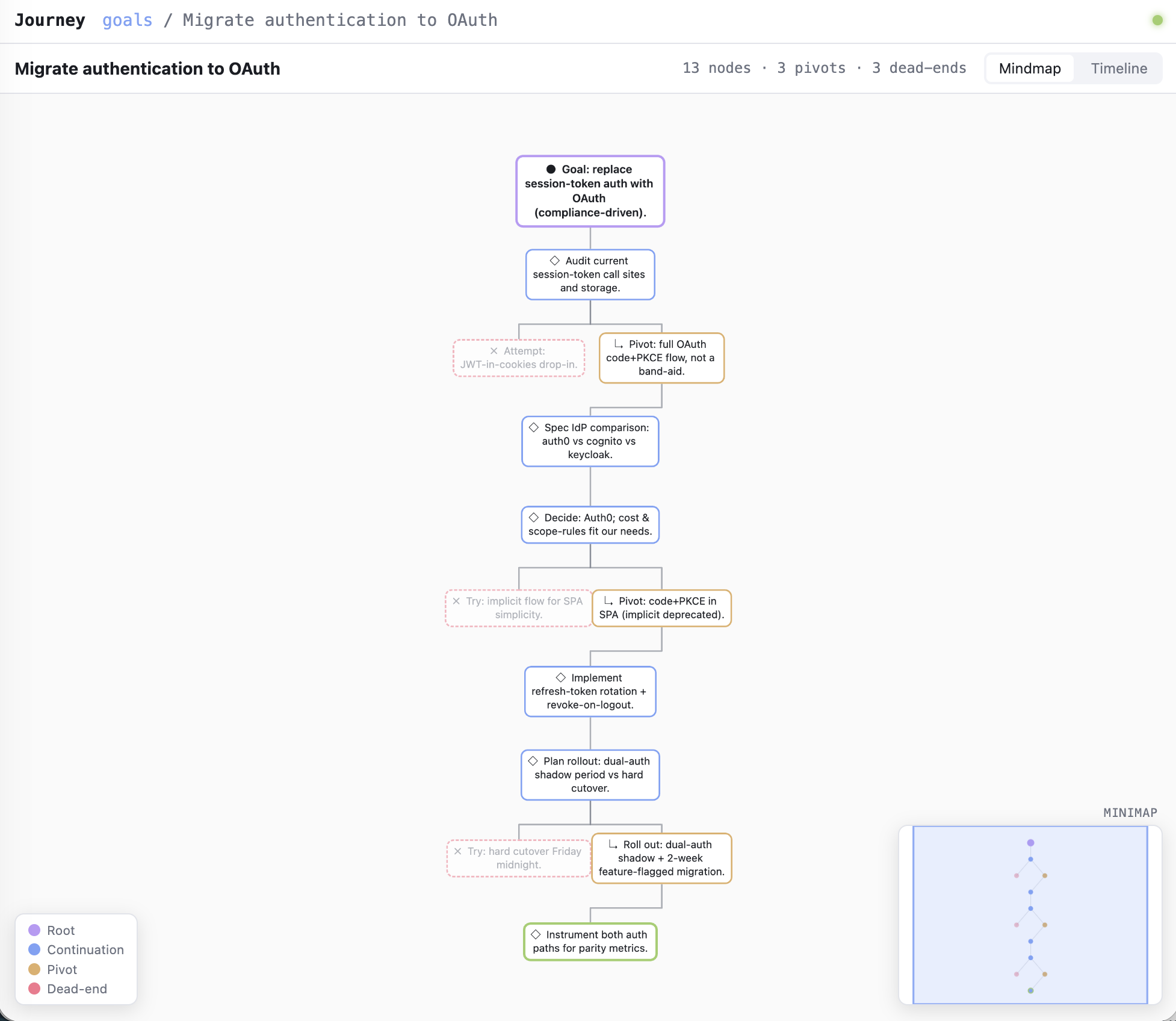
Each turn is a kind-coded bubble: root (purple), continuation (blue), pivot (orange), dead-end (faded red, dashed), and the live frontier glows green. Click a node for kind / time / pivot signal / dead-end reason / prompt preview. Drag the minimap viewport to pan, click outside it to jump.
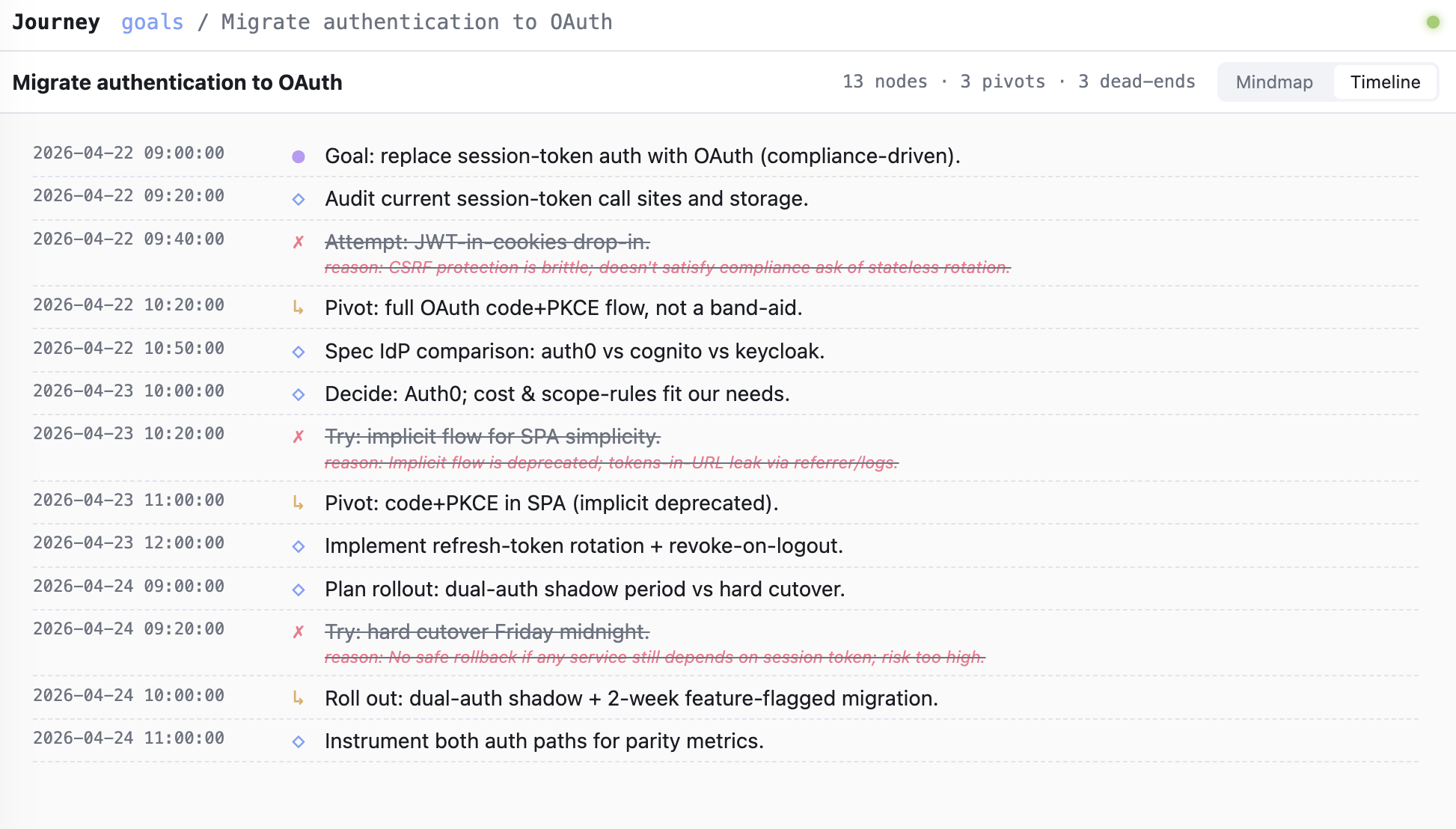
Timeline — same nodes, chronological
Useful for "when did we pivot" and "what happened today." Dead-ends are line-through with the reason inline.
Live updates: SSE pushes from the file watcher → all open views re-render when new turns are captured.
Try it without Claude Code (demo data)
git clone https://github.com/vamshisuram/cc-journey
cd cc-journey

# Seed three realistic goals (30 nodes total, branches and dead-ends)
node scripts/seed-demo.mjs CLAUDE_PLUGIN_DATA=/tmp/journey-demo

# Start the server
node lib/server-control.mjs start CLAUDE_PLUGIN_DATA=/tmp/journey-demo

# Open http://localhost:7777
Stop with node lib/server-control.mjs stop CLAUDE_PLUGIN_DATA=/tmp/journey-demo.
How it stores data
Per Claude Code conventions, under ${CLAUDE_PLUGIN_DATA}:
${CLAUDE_PLUGIN_DATA}/
├── index.json                  # global registry of all goals
├── goals/
│   └── g_<id>/
│       ├── tree.json           # nodes for this goal
│       └── meta.json           # goal title, status, timestamps
└── server.log                  # browser-UI server logs
Each node looks like:
{
  "id": "n_abc123",
  "parent_id": "n_def456",
  "conversation_id": "session_xyz",
  "timestamp": "2026-04-27T08:32:00Z",
  "kind": "root | continuation | pivot | deadend",
  "pivot_signal": "redirection | alternative | llm_inferred | null",
  "raw_meta": { "user_prompt_preview": "...", "transcript_pointer": {...} },
  "summary": "One-line ≤20-word summary, lazily filled.",
  "deadend_reason": "Why the branch was abandoned (filled when pivoted-from)."
}
Source of truth is the JSON tree on disk. Terminal renderer, browser server, and Mermaid export are all sibling read-only views over the same store.
Repo layout
cc-journey/
├── .claude-plugin/plugin.json   # plugin manifest
├── DISCUSSION.md                # design rationale (the conversation that shaped this)
├── hooks/
│   ├── hooks.json               # registers UserPromptSubmit → capture.mjs
│   └── capture.mjs              # per-turn capture
├── commands/                    # slash command definitions
├── lib/
│   ├── store.mjs                # JSON tree read/write
│   ├── detect.mjs               # regex + LLM-assist pivot detection
│   ├── llm.mjs                  # Claude caller (API + CLI fallback)
│   ├── render.mjs               # terminal ASCII renderer
│   ├── server-control.mjs       # start/stop/status for the browser UI
│   └── args.mjs                 # KEY=VALUE positional arg parser
├── server/
│   ├── server.mjs               # Node/Bun HTTP server + SSE
│   └── public/                  # vanilla HTML/CSS/JS + Cytoscape
└── scripts/
    └── seed-demo.mjs            # seed three demo goals
Status
v0.4 — capture, classification, summaries, titles, cross-conversation matching, terminal views, browser UI with mindmap + timeline + minimap. Stable enough to use daily.
Open enhancement ideas:
- Click-node-shows-real-transcript-turn (today shows prompt preview only).
Stophook to also capture assistant tool usage and files touched.- Cross-goal pattern surfacing ("you redirect most often when specs are vague").
License
MIT.