
javuk-code
UsmanovMahmudkhan/javuk-code
Build your own Claude Code from scratch — an LLM-powered coding assistant that understands code and acts through tool calls.
Instalação
npx convez-ai UsmanovMahmudkhan/javuk-code1 comando no terminal: detecta o formato do repositório (marketplace ou plugin avulso) e instala via Claude Code. Requer Node 18+ e o Claude Code instalado.
Métricas
README
A tradução para o português deste README ainda está na fila.

Javuk
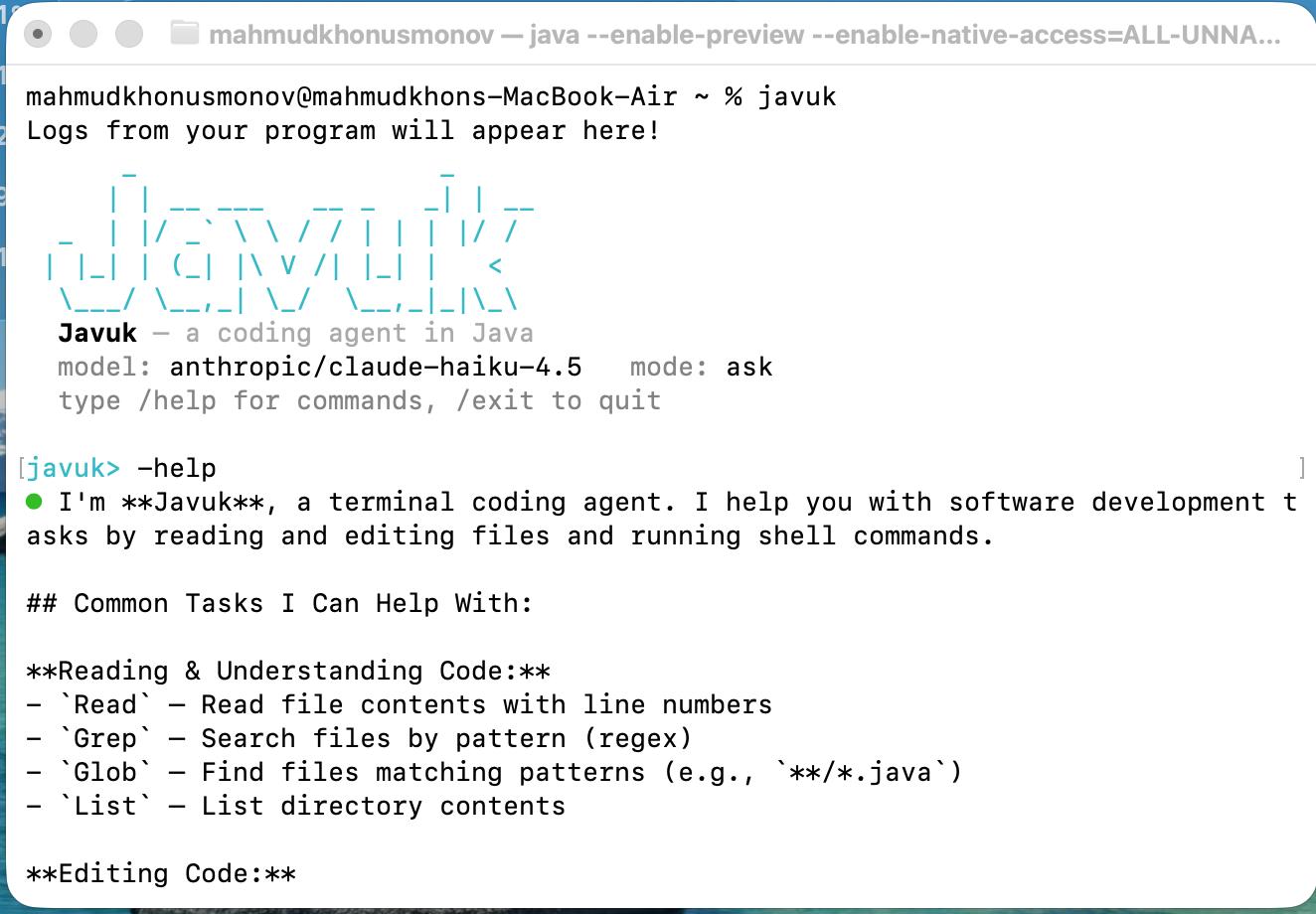
Javuk is a terminal-based coding agent implemented in Java. It accepts natural-language development tasks, sends them to a configured language model, and can read files, edit code, search a workspace, run shell commands, fetch web content, and delegate focused tasks to subagents.
The project supports an interactive REPL and a non-interactive one-shot mode. It began as an implementation of the CodeCrafters "Build your own Claude Code" challenge.
Project Overview
Javuk runs an agent loop that streams model responses, executes requested tools, returns tool results to the model, and continues until the model produces a final response. Interactive sessions include permission controls for mutating tools, persistent sessions, custom commands, project context files, hooks, and Model Context Protocol (MCP) tools.
For an implementation overview, see docs/ARCHITECTURE.md.
Key Features
- Interactive REPL with command history, streamed output, slash commands, and cancellable turns
- One-shot prompt execution for scripts and CodeCrafters compatibility
- Eleven built-in tools:
Read,Write,Edit,MultiEdit,Bash,Glob,Grep,List,TodoWrite,WebFetch, andTask - Permission modes for interactive sessions:
ask,auto, andplan - Edit previews before interactive approval of mutating actions
- Parallel execution when all tool calls in a batch are read-only
- Workspace confinement and private-network fetch protection by default
- OpenRouter, OpenAI, Ollama, custom OpenAI-compatible endpoints, and native Anthropic support
- Native Anthropic tool use and prompt caching
- MCP server connections over stdio or HTTP/SSE
- Persistent sessions, token usage, and estimated cost reporting
- Pre-tool and post-tool shell hooks
- Project-specific commands from
.javuk/commands/*.md - Selectable agent personas — built-in and user-defined — with restricted tool sets
- Notification sounds for turn completion, permission prompts, and errors
- Automatic context loading from
JAVUK.md,AGENTS.md, orCLAUDE.md
Technology Stack
| Component | Technology |
|---|---|
| Language and runtime | Java 25 with preview features |
| Build system | Maven |
| Command-line parsing | picocli |
| Interactive terminal | JLine |
| Model providers | OpenAI Java SDK and Anthropic Java SDK |
| MCP integration | Official MCP Java SDK |
| JSON processing | Jackson |
| Testing | JUnit 5 |
Installation
Requirements
- JDK 25
- Maven 3
- An API key for a hosted provider, or a running local Ollama server
Clone and build the project:
git clone https://github.com/UsmanovMahmudkhan/codecrafters-claude-code-java.git
cd codecrafters-claude-code-java
mvn -B package
The build creates an executable jar at:
target/codecrafters-claude-code.jar
Configure a provider before starting Javuk. OpenRouter is the default:
export OPENROUTER_API_KEY="your-api-key"
Other supported provider keys are OPENAI_API_KEY and ANTHROPIC_API_KEY. Ollama does
not require a real API key.
Usage
Start the interactive REPL:
java --enable-preview --enable-native-access=ALL-UNNAMED \
  -jar target/codecrafters-claude-code.jar
Run a single prompt:
java --enable-preview --enable-native-access=ALL-UNNAMED \
  -jar target/codecrafters-claude-code.jar \
  -p "Review the source code and summarize the main packages."
One-shot mode is non-interactive and automatically permits requested tool actions. Use it only in a workspace where those actions are acceptable.
Command-Line Options
-p <prompt>                  Run one prompt non-interactively
--model <id>                 Select a model
--provider <name>            Select openrouter, openai, ollama, or anthropic
--base-url <url>             Use a custom OpenAI-compatible endpoint
--yolo                       Automatically approve tool actions
--readonly, --plan           Block mutating tools
--resume [id]                Resume a saved session, or the most recent session
--allow-private-fetch        Allow WebFetch to access private or internal hosts
--allow-outside-workspace    Allow file and search tools outside the working directory
--no-sound                   Disable REPL notification sounds
--max-tokens <n>             Cap output tokens per turn (default 4096)
-h, --help                   Show command help
Interactive Commands
| Command | Purpose |
|---|---|
/help | Show interactive commands |
/model [id] | Show or change the current model |
/models | List models with known pricing |
/tools | List available tools |
/permissions [mode] | Show or set ask, auto, or plan mode |
/allow <Tool>[: prefix] | Persistently allow matching actions |
/allowed | List persisted allow rules |
/save [id], /load <id>, /sessions | Manage sessions |
/compact | Replace conversation history with a generated summary |
/commands | List project-specific commands |
/agents [name] | List agent personas, or switch to one (/agents default to reset) |
/sound [on|off] | Show or toggle notification sounds |
/cost, /tokens | Show usage information |
/clear | Clear the current conversation |
/exit | Exit the REPL |
Use @path/to/file in a prompt to include a readable file as context. Press Ctrl-C
during a running turn to cancel that turn.
Project Structure
src/main/java/Main.java              Application entry point
src/main/java/dev/javuk/agent/       Agent loop, conversations, and subagents
src/main/java/dev/javuk/cli/         CLI, REPL, slash commands, and file mentions
src/main/java/dev/javuk/config/      Configuration loading and runtime settings
src/main/java/dev/javuk/hooks/       Pre-tool and post-tool hooks
src/main/java/dev/javuk/llm/         Provider clients, models, and usage tracking
src/main/java/dev/javuk/mcp/         MCP connections and tool adapters
src/main/java/dev/javuk/permission/  Permission modes and persistent allowlist
src/main/java/dev/javuk/session/     Session persistence
src/main/java/dev/javuk/tools/       Built-in tool implementations and registry
src/main/java/dev/javuk/ui/          Terminal rendering
src/test/java/                       JUnit test suite
docs/ARCHITECTURE.md                 Architecture documentation
Configuration
Configuration precedence is:
defaults < user config < project config < environment variables < CLI options
Javuk reads user configuration from ~/.config/javuk/config.json and project
configuration from ./.javuk/config.json.
{
  "provider": "anthropic",
  "model": "claude-sonnet-4-6",
  "permissionMode": "ask",
  "maxTokens": 4096,
  "webFetch": {
    "allowPrivateHosts": false
  },
  "workspace": {
    "allowOutside": false
  },
  "sound": true,
  "hooks": {
    "preTool": [],
    "postTool": []
  },
  "mcpServers": {
    "filesystem": {
      "command": "npx",
      "args": ["-y", "@modelcontextprotocol/server-filesystem", "."]
    },
    "remote": {
      "url": "https://example.com/mcp"
    }
  }
}
Supported environment variables:
| Variable | Purpose |
|---|---|
OPENROUTER_API_KEY | OpenRouter API key |
OPENAI_API_KEY | OpenAI API key |
ANTHROPIC_API_KEY | Anthropic API key |
OPENROUTER_BASE_URL | OpenAI-compatible base URL |
JAVUK_MODEL | Default model identifier |
JAVUK_PROVIDER | Provider name |
JAVUK_PERMISSION_MODE | Interactive permission mode |
JAVUK_MAX_TOKENS | Max output tokens per turn |
JAVUK_DEBUG | Enable file logging at ~/.config/javuk/javuk.log |
By default, file and search tools cannot access paths outside the working directory, and
WebFetch rejects private, loopback, link-local, and non-HTTP targets. The related CLI
options and configuration fields explicitly disable these protections.
Mutating actions in interactive mode pass through the selected permission mode. Persistent
allow rules are stored at ~/.config/javuk/allowlist.json, and sessions are stored under
~/.config/javuk/sessions/.
Pre-tool hooks can block an action by returning a non-zero exit code. Hook commands receive
the tool name and arguments through JAVUK_TOOL and JAVUK_TOOL_ARGS. Tools discovered
from MCP servers are registered with names in the form server__tool.
Examples
Use OpenAI:
export OPENAI_API_KEY="your-api-key"
java --enable-preview --enable-native-access=ALL-UNNAMED \
  -jar target/codecrafters-claude-code.jar \
  --provider openai --model gpt-4o-mini
Use native Anthropic:
export ANTHROPIC_API_KEY="your-api-key"
java --enable-preview --enable-native-access=ALL-UNNAMED \
  -jar target/codecrafters-claude-code.jar \
  --provider anthropic --model claude-sonnet-4-6
Use a local Ollama model:
java --enable-preview --enable-native-access=ALL-UNNAMED \
  -jar target/codecrafters-claude-code.jar \
  --provider ollama --model qwen2.5-coder
Create a project command by adding .javuk/commands/review.md:
Review `$ARGUMENTS` for correctness issues and report findings with line references.
Run it in the REPL:
/review src/main/java/Main.java
Agents
Agents are reusable personas: a system prompt, an optional restricted tool set, and an
optional model override. Javuk ships four built-ins — code-reviewer, planner,
test-writer, and explorer — and you can add your own.
Switch the active session to an agent (this resets the conversation):
/agents              # list agents, highlighting the active one
/agents explorer     # switch to the read-only explorer persona
/agents default      # return to the standard Javuk agent
The model can also delegate to an agent through the Task tool by passing a
subagent_type, and the sub-agent runs with only that agent's tools.
Define your own agent at ~/.config/javuk/agents/<name>.md (user-global) or
.javuk/agents/<name>.md (project, which overrides a built-in of the same name):
---
name: doc-writer
description: Writes and improves documentation
tools: Read, Grep, Glob, Edit, Write
model: anthropic/claude-sonnet-4-6
---
You write clear, concise documentation. Read the code first, then update the docs.
All frontmatter keys are optional: name defaults to the file name, omit tools to grant
the full tool set, and omit model to use the session model. The text after the
frontmatter is the agent's system prompt.
Development
Build the project and assemble the executable jar:
mvn -B package
Run the CodeCrafters-compatible wrapper:
./your_program.sh -p "Summarize the current project."
When adding a built-in tool, implement dev.javuk.tools.Tool, register it in
Tools.defaultRegistry(), mark mutating behavior correctly, and add focused tests.
Testing
Run the test suite:
mvn -B test
The current suite contains 58 JUnit tests. CI runs mvn -B package for pushes and pull
requests targeting main or master.
Contributing
Contributions should be focused, include tests for behavior changes, and preserve the
non-interactive -p contract. Run mvn -B test before opening a pull request.
See CONTRIBUTING.md for project-specific guidance.
License
Javuk is available under the MIT License.