
Dev Coach
UltimaPhoenix/dev-coach
Coaching técnico progressivo calibrado ao seu nível, dentro do seu editor
Ver no GitHubServidor MCP local que oferece coaching técnico personalizado conforme você constrói, rastreando seu mapa de conhecimento e ensinando um conceito por vez. Sem tutorials genéricos, tudo roda offline em SQLite na sua máquina.
Instalação
npx convez-ai UltimaPhoenix/dev-coach1 comando no terminal: detecta o formato do repositório (marketplace ou plugin avulso) e instala via Claude Code. Requer Node 18+ e o Claude Code instalado.
Métricas
Casos de uso
- Acelerar transição para desenvolvedor sênior com feedback contextual
- Aprender conceitos novos apenas quando relevantes ao código que você escreve
- Construir histórico persistente de aprendizado sem enviar dados para a nuvem
Veredito

Abordagem inovadora de aprendizado contínuo integrado ao fluxo de desenvolvimento. Particularmente valioso para quem busca crescimento técnico estruturado sem distrações, embora dependa de integração MCP e tenha suporte inicial focado em Claude Code.
README
A tradução para o português deste README ainda está na fila.
devcoach




Progressive technical coaching that lives inside your AI agent. devcoach connects to Claude Code, Cursor, Windsurf, and other MCP-compatible tools. After every task you complete, it delivers a short targeted lesson calibrated to what you already know — no generic tutorials, no repeated topics, nothing to open.
Everything runs locally. No data leaves your machine. One SQLite file at ~/.devcoach/coaching.db.
How it works
flowchart TD
    A([Task completed]) --> B[Check rate limit]
    B -->|denied| Z([Silent])
    B -->|allowed| D

    subgraph loop["coaching loop"]
        D[Select topic & depth]
        E[Compose & deliver]
        G[log_lesson]
    end

    D -->|nothing| Z
    D -->|found| E
    E --> G
    G --> F([Done])
    G -.->|prompts| U(["You: ✅ ❌ ⏭"])
→ Full decision flow: session startup · lesson selection · depth calibration
Get started in 2 steps
Step 1 — Install
| Method | Command | Requirements |
|---|---|---|
| Homebrew (recommended) | brew tap UltimaPhoenix/tap && brew install devcoach | macOS / Linux |
| uv tool | uv tool install devcoach | uv + Python 3.12+ |
| uvx (no install) | (used directly in MCP config) | uv + Python 3.12+ |
Step 2 — Connect to your AI agent
devcoach install
This registers devcoach as an MCP server and sets up automatic lesson delivery. Restart your agent after running.
Add this to your agent's MCP config file:
{
  "mcpServers": {
    "devcoach": {
      "command": "devcoach",
      "args": ["mcp"]
    }
  }
}
Use "command": "uvx", "args": ["devcoach", "mcp"] if using uvx.
| Agent | Config file |
|---|---|
| Cursor | ~/.cursor/mcp.json |
| Windsurf | ~/.codeium/windsurf/mcp_config.json |
| Cline (VS Code) | VS Code Settings → cline.mcpServers |
| Continue.dev | ~/.continue/config.json → mcpServers |
| Zed | .zed/settings.json → context_servers |
Stop hooks (automatic lesson delivery after each task) are Claude Code-specific. Other agents have full access to all MCP tools and resources — coaching can be triggered manually or by prompting your agent.
Claude Code
Option A — via claude mcp CLI (recommended):
# Homebrew or uv tool (devcoach on PATH)
claude mcp add devcoach devcoach -- mcp

# uvx
claude mcp add devcoach uvx -- devcoach mcp

# global scope (all projects)
claude mcp add --scope global devcoach devcoach -- mcp
Option B — edit ~/.claude.json directly:
// Homebrew or uv tool
{ "mcpServers": { "devcoach": { "type": "stdio", "command": "devcoach", "args": ["mcp"] } } }

// uvx
{ "mcpServers": { "devcoach": { "type": "stdio", "command": "uvx", "args": ["devcoach", "mcp"] } } }
Then add the Stop hooks to ~/.claude/settings.json:
{
  "hooks": {
    "Stop": [
      { "hooks": [{ "type": "command", "command": "devcoach onboard-hook" }] },
      { "hooks": [{ "type": "command", "command": "devcoach lesson-ready" }] }
    ]
  }
}
Replace devcoach with uvx devcoach in the hook commands if using uvx.
Claude Desktop
Edit the config file for your platform:
| Platform | Config file |
|---|---|
| macOS | ~/Library/Application Support/Claude/claude_desktop_config.json |
| Windows | %APPDATA%\Claude\claude_desktop_config.json |
| Linux | ~/.config/Claude/claude_desktop_config.json |
{
  "mcpServers": {
    "devcoach": {
      "command": "devcoach",
      "args": ["mcp"]
    }
  }
}
Use "command": "uvx", "args": ["devcoach", "mcp"] if using uvx.
Claude.ai web (skill copy)
Claude.ai does not support MCP servers. Install the coaching instructions as a skill instead:
- Copy the content of
src/devcoach/SKILL.md - Go to claude.ai → Settings → Custom instructions (or Skills, depending on your plan)
- Paste the content and save
This gives claude.ai the coaching behaviour without the MCP tools (lesson logging and profile tracking will not work).
Keep the skill up to date. For Claude Code / Claude Desktop, the skill is served automatically via the MCP prompt and is always current. If you copied it manually to Claude.ai, re-paste the latest
SKILL.mdafter each devcoach update.
Onboarding
The first time your agent connects to devcoach it detects that your profile isn't set up and walks you through it inline — no separate command needed.
Phase 1 — Choose how to set up your profile
devcoach: Your knowledge profile isn't set up yet.

Do you have an existing devcoach backup to restore?
If yes, provide the file path — otherwise I'll help you build your profile from scratch.
Option A — restore from backup: If you're on a new machine or reinstalling, provide the path to your backup zip and your full profile (knowledge map, lessons, settings) is imported instantly.
Option B — build from scratch: Choose between automatic detection or a guided conversation.
Phase 2 — Build your profile
Automatic (recommended)
devcoach scans your project files and proposes your stack:
I detected these technologies in your project:

  python         → confidence 6  (keep? or enter 0–10 to adjust)
  docker         → confidence 7  (keep? or enter 0–10 to adjust)
  github_actions → confidence 6  (keep? or enter 0–10 to adjust)
  fastapi        → confidence 5  (keep? or enter 0–10 to adjust)

Anything I missed? List any tools, languages, or practices you work with regularly.
You confirm, adjust scores, or add topics the scan missed. Then devcoach proposes logical groups:
Here's how I'd organise these:

  Languages  → python, typescript
  Backend    → fastapi, django
  DevOps     → docker, github_actions
  Databases  → postgresql, redis

Does this look right? Any changes?
Guided conversation
If you prefer to describe your stack manually:
devcoach: Tell me about the technologies you work with day-to-day.
          For each one I'll ask how confident you are:
          1–3 = still learning · 4–6 = comfortable · 7–9 = strong · 10 = expert

You: I mostly do Node.js and TypeScript backend, some React, PostgreSQL, Docker.
     I've been doing this for about 3 years.

devcoach: Got it. Let me go through each:

  Node.js — you said you mostly work in it. I'd say 7. Sound right?
  TypeScript — comfortable or strong?
  React — how often do you use it?
  PostgreSQL — do you write raw SQL or mostly ORM?
  Docker — day-to-day or just deployment?
Phase 3 — Profile saved, coaching begins
✓ Profile saved — 24 topics across 6 groups.

From now on I'll deliver a short lesson after technical tasks,
calibrated to your current confidence on each topic.
That's it. You go back to work. Coaching happens silently in the background.
Your first lesson
You work on a task as normal. After Claude responds, devcoach appends a lesson:
You: Refactor this endpoint to handle concurrent requests properly.

Claude: [refactors the code, explains the changes]

---
🎓 devcoach · Python · Level: Mid

**asyncio.TaskGroup — structured concurrency without gather() surprises**

asyncio.gather() swallows exceptions from sibling tasks by default. If one
coroutine fails, the others keep running and the exception is only raised after
all of them complete — or silently dropped if return_exceptions=True.

TaskGroup (Python 3.11+) is the fix: it cancels all sibling tasks the moment
one raises, and re-raises immediately. No silent failures, no leaked coroutines.

    async with asyncio.TaskGroup() as tg:
        task_a = tg.create_task(fetch_user(user_id))
        task_b = tg.create_task(fetch_orders(user_id))
    # Both completed or both cancelled — no in-between.

Use gather() only when you explicitly want independent tasks that shouldn't
cancel each other on failure. TaskGroup is the right default for coordinated work.

💡 Senior tip: TaskGroup also makes it trivial to collect results — just read
   task.result() after the block, no zip() gymnastics needed.

Did that land?  ✅ know · ❌ don't know · ⏭ skip
Responding adjusts your confidence on that topic and shapes future lessons.
Screenshots
| Knowledge map | Lesson history | Settings |
|---|---|---|
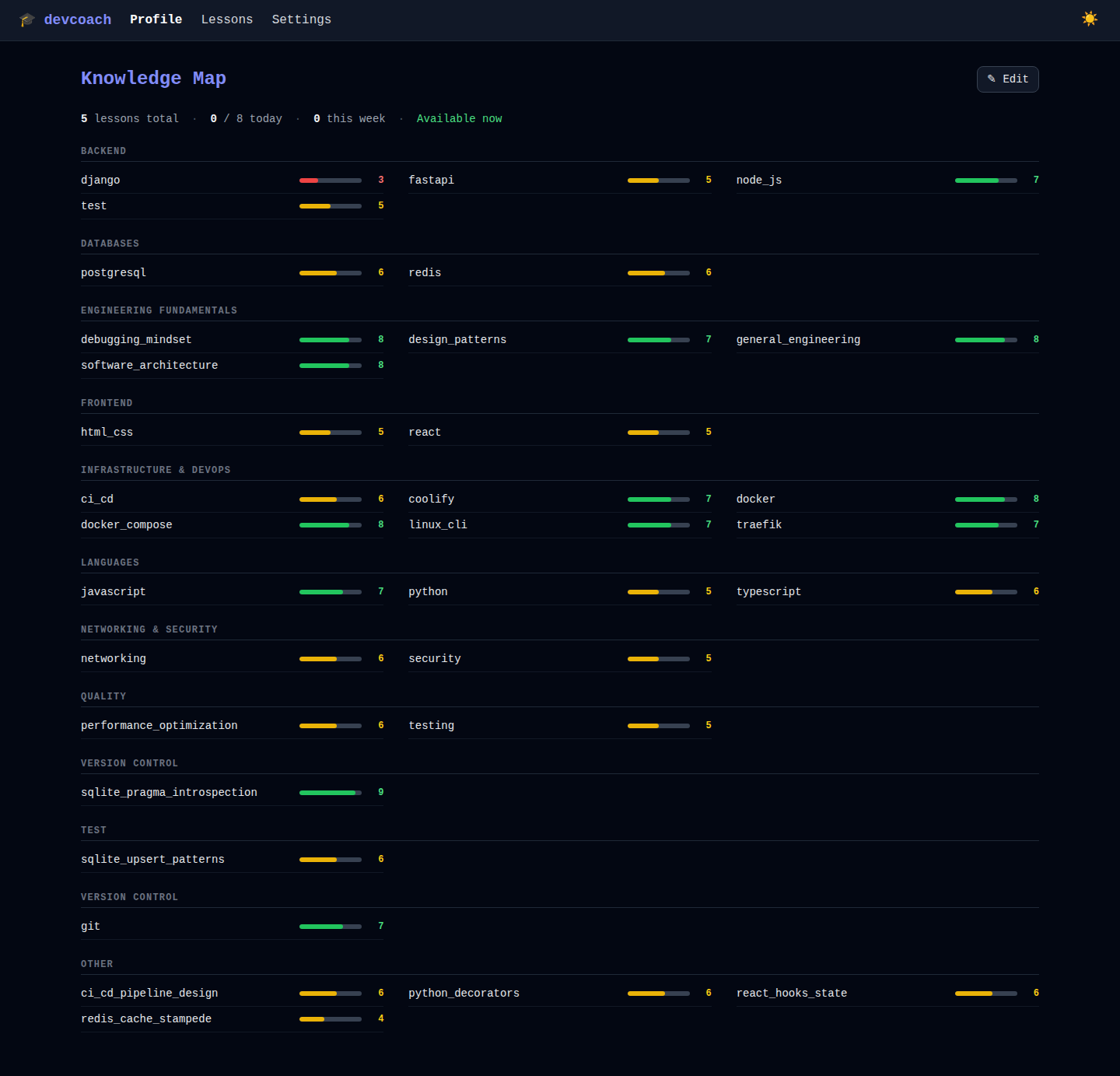 | 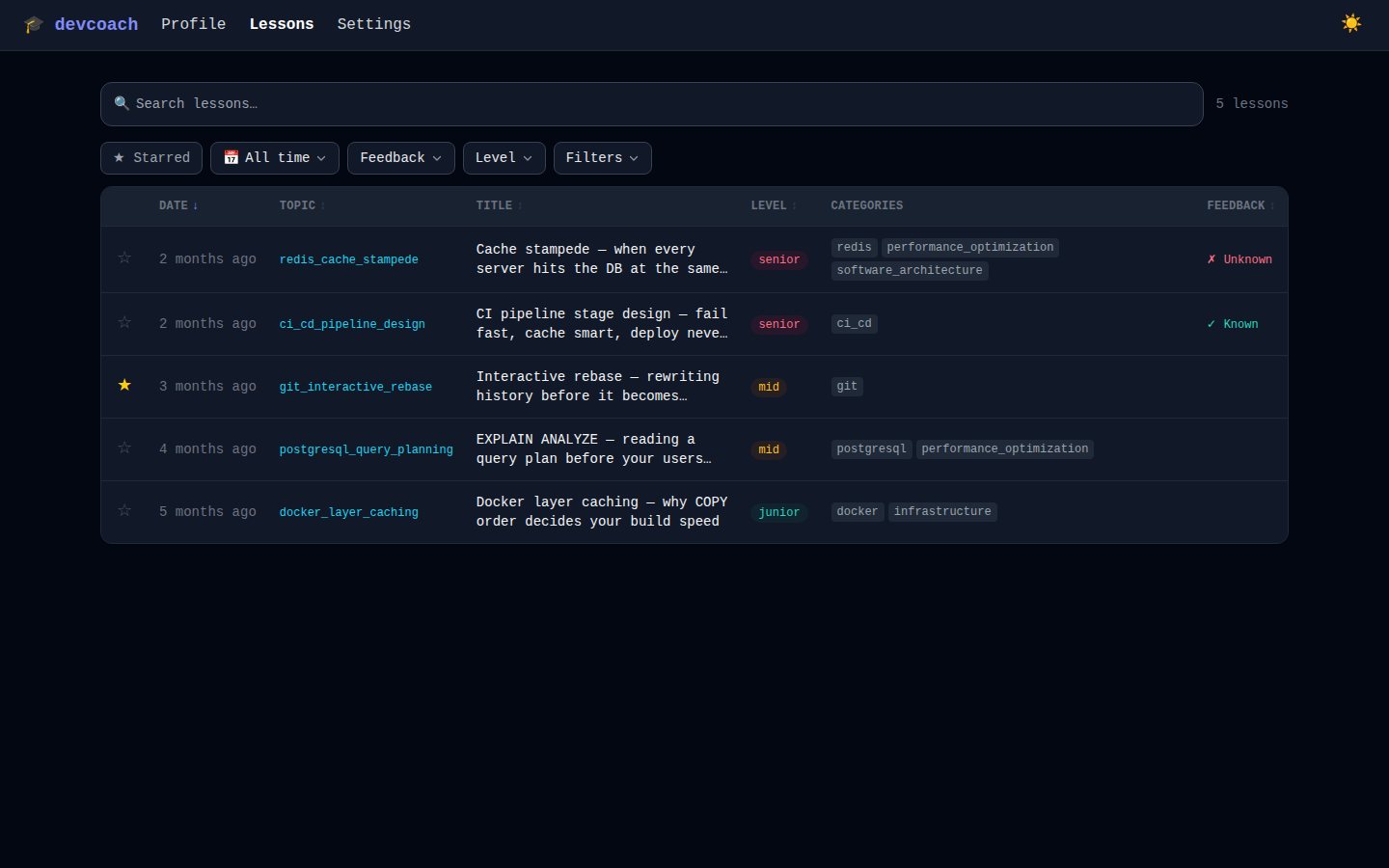 | 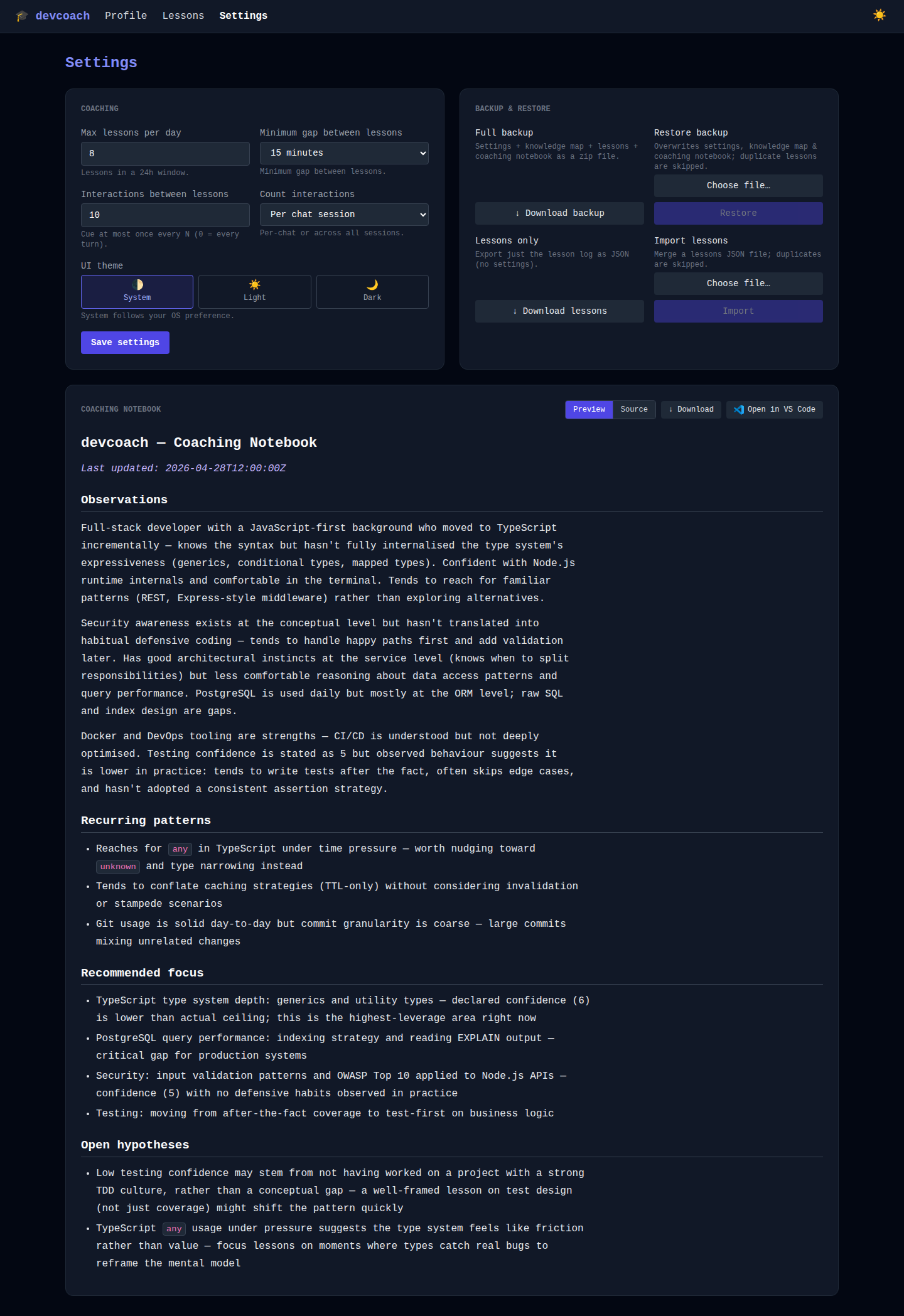 |
Web dashboard
Open the dashboard at any time to review your progress, edit your profile, or manage settings:
devcoach ui # → http://localhost:7860
| Page | What you can do |
|---|---|
| Knowledge map | See all topics with confidence bars; adjust scores directly |
| Lessons | Browse and filter your full lesson history; star lessons to revisit |
| Settings | Change rate limits, import/export your profile, take a backup |
Full reference: docs/web-ui.md
Documentation
| Document | Description |
|---|---|
| Getting started | Installation, onboarding, first lesson |
| Web UI | Dashboard pages and controls |
| CLI reference | All commands with examples |
| MCP server reference | Tools, resources, data models |
| Configuration | Rate limits, data location, schema, backup |
CLI reference
The CLI is a secondary interface for querying and managing your coaching data. Everything is also available in the web dashboard.
| Command | Description |
|---|---|
devcoach install | Register with Claude Code / Claude Desktop |
devcoach profile | Show your knowledge map with confidence bars |
devcoach stats | Overview: lesson counts, weakest/strongest topics |
devcoach lessons | Browse lesson history with filters |
devcoach lesson <id> | Show a single lesson in full |
devcoach star <id> | Mark a lesson as starred |
devcoach feedback <id> <know|dont_know|clear> | Record comprehension |
devcoach set max_per_day <n> | Max lessons per day (default 2) |
devcoach set min_gap_minutes <n> | Minutes between lessons (default 240) |
devcoach backup [file.zip] | Export knowledge + lessons + settings |
devcoach restore <file.zip> | Restore from a backup |
devcoach setup | Run the onboarding wizard in the terminal |
devcoach ui | Open the web dashboard |
Full reference: docs/cli.md
Configuration
devcoach set max_per_day 3        # up to 3 lessons per day
devcoach set min_gap_minutes 120  # at least 2 hours between lessons
Settings are stored in ~/.devcoach/coaching.db. See docs/configuration.md for all options.
Uninstallation
1. Remove the binary
brew uninstall devcoach && brew untap UltimaPhoenix/tap   # Homebrew
uv tool uninstall devcoach                                  # uv tool
# uvx: nothing to remove
2. Remove from Claude Code
claude mcp remove devcoach
Or manually remove the devcoach entry from ~/.claude.json → mcpServers and the two hook entries from ~/.claude/settings.json → hooks.Stop.
3. Remove from Claude Desktop
Edit the platform config file (paths in the Manual setup section above) and delete the devcoach key from mcpServers.
4. Delete all devcoach data
rm -rf ~/.devcoach
This removes the coaching database, knowledge map, lessons, settings, and notebook. Take a backup first if needed (devcoach backup).
Publishing a new release
Tag a commit with v* to trigger the CI/CD pipeline:
git tag v1.2.3
git push origin v1.2.3
The pipeline will lint, test across Python 3.12–3.13, build, publish to PyPI via OIDC Trusted Publishing, and create a GitHub Release automatically.
First-time PyPI setup: configure a Trusted Publisher on PyPI for
UltimaPhoenix/dev-coach(environment:pypi, workflow:ci.yml). No API token required after that.
License
Copyright 2026 UltimaPhoenix
Licensed under the Apache License, Version 2.0.
What this means for you:
- Free to use, modify, and distribute
- Commercial use and modifications must:
- Include a copy of this license
- State any changes made to the files
- Retain all copyright and attribution notices
- Include the
NOTICEfile in any derivative distribution
- You may not use the
devcoachname or branding to endorse derived products without permission
See NOTICE for third-party attributions.