
Medical Paper Assistant
u9401066/med-paper-assistant
Assistente IA para redação de papers médicos do PubMed ao Word
Ver no GitHubKit completo de escrita de artigos médicos alimentado por IA, integrando busca em PubMed, geração de conteúdo e exportação para Word — tudo funcionando como MCP server no VS Code. Orquestra 3 servidores MCP (mdpaper, pubmed-search, CGU) com 188+ ferramentas para workflow de pesquisa estruturada.
Instalação
npx convez-ai u9401066/med-paper-assistant1 comando no terminal: detecta o formato do repositório (marketplace ou plugin avulso) e instala via Claude Code. Requer Node 18+ e o Claude Code instalado.
Métricas
Casos de uso
- Pesquisadores escrevendo artigos médicos com busca automática em PubMed
- Redação estruturada com checkpoints de qualidade e loops de revisão
- Geração criativa de ideias e brainstorming para introduções e discussões
Veredito

Solução robusta e especializada para pesquisadores médicos que dominem MCP — 188+ ferramentas e 26 skills oferecem automação profunda, mas requerem setup técnico complexo. Vale o investimento para quem escreve papers regularmente.
README
A tradução para o português deste README ainda está na fila.
Medical Paper Assistant





🔬 An MCP-Orchestrated Research Workspace for Medical Paper Writing and LLM Wiki Workflows
3 MCP Servers · 188+ Tools · 26 Skills · 15 Prompts Workflows — monorepo authoring surface plus packaged VSIX surface in one VS Code ecosystem
📖 繁體中文版 🤖 Auto-Paper: Fully Autonomous Paper Writing Guide — 13 main gate checkpoints + Phase 2.1 sub-gate, 79 Quality Hooks, Structured Review Loop
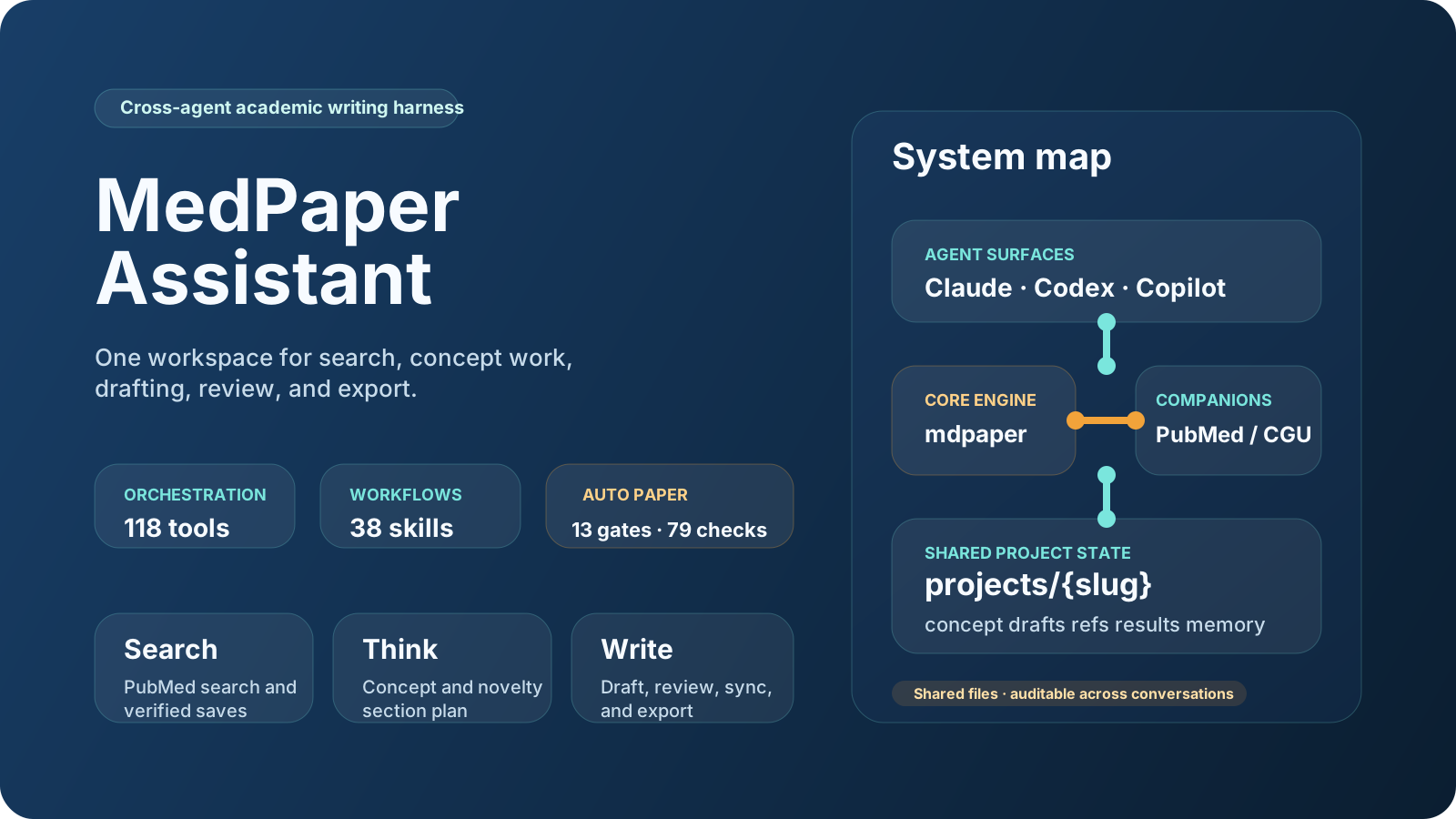
📦 What's in the Box
This repository is the full authoring and integration workspace behind MedPaper Assistant. It combines the core MCP runtime, the packaged VSIX extension, bundled guides, and pinned integration submodules in one place.
| Component | Type | Tools | Description |
|---|---|---|---|
| mdpaper | Core MCP Server | 118 (full) / 22 (compact default) | Dual workflow server for manuscript and library-wiki paths, plus 3 MCP prompts and 3 MCP resources |
| pubmed-search | MCP Server (submodule) | 46 | PubMed/Europe PMC/CORE search, PICO, citation metrics, session mgmt |
| CGU | MCP Server (submodule) | 24 | Creative generation: brainstorm, deep think, spark collision |
| VS Code Extension | Extension | 11 cmds + 10 chat | MCP auto-registration, compact-first packaged surface, workspace setup, LLM wiki guide, Foam graph views, @mdpaper chat participant |
| Dashboard | Next.js Web App | — | Project management UI, diagram editor |
| Foam | VS Code Extension | — | [[wikilink]] citation linking, hover preview, graph view |
| Skills | Agent Workflows | 26 | Guided multi-tool workflows (literature review, draft writing...) |
| Prompts | Prompt Files | 15 | /mdpaper.search, /mdpaper.draft, etc. |
External MCP Servers (optional, installed via uvx):
- asset-aware — Ingest user-provided DOCX/XLSX/PDF/PPTX source materials and reference full text before drafting
- drawio — CONSORT/PRISMA flowchart generation
- zotero-keeper — Import references from Zotero library
Counts in these tables are release-gated via tool-surface-authority.json and vscode-extension/bundle-manifest.json.
Choose Your Install Surface
| Surface | Best for | What you get |
|---|---|---|
| Full repository | Maintainers, power users, and workflow authors | Core mdpaper runtime, pinned MCP integrations/submodules, 26 skills, 15 prompt workflows, repo scripts, tests, and authoring docs |
| VSIX extension | End users who want the packaged experience | @mdpaper, 11 palette commands, compact-first mdpaper runtime (22 tools by default / 118 optional), 14 bundled skills, 13 bundled prompt workflows, 9 bundled agents, and bundled LLM wiki docs |
The repository is the broader engineering surface. The VSIX is the curated end-user surface.
VSX note: The MedPaper VS Code extension installs Python MCP tools persistently per machine via uv tool install, attempts uv tool upgrade on later activations, and skips duplicate PubMed Search / Zotero Keeper registration when another installed VS Code extension already provides those MCP servers. CI smoke now covers ubuntu-latest, windows-latest, and macos-14, including official MCP client checks plus VSX validation smoke.
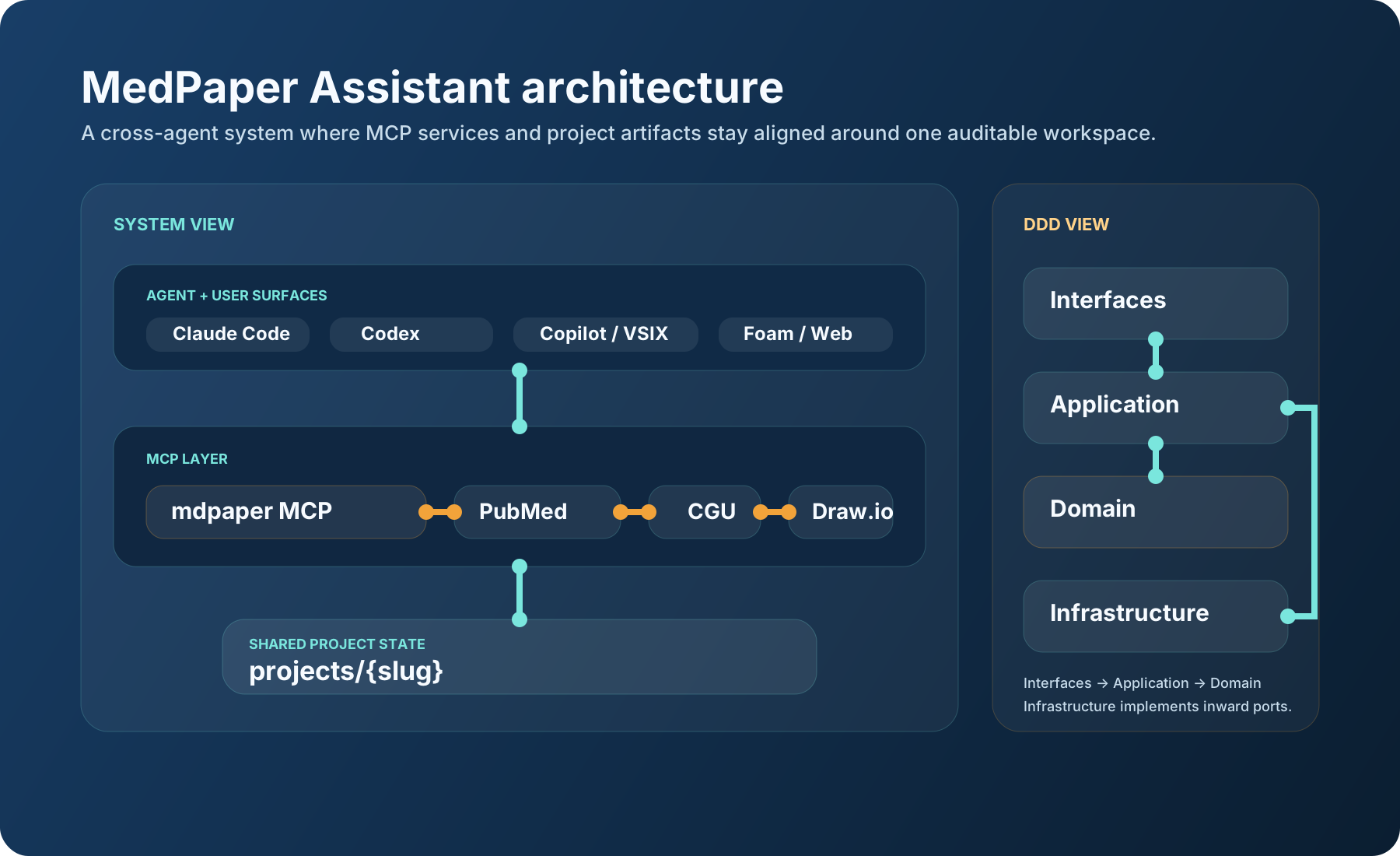
How the Pieces Fit Together
🎯 Why This Tool?
Traditional paper writing tools require you to know exactly what you want before you start. But research is rarely that linear.
Medical Paper Assistant is not just a writing assistant. It is a research workspace orchestrator:
- 🔍 Explore First, Decide Later — Browse literature freely, save interesting papers, then decide your research direction
- 📥 Source Material Intake First — Phase 0 scans user-provided DOCX/XLSX/PDF/CSV inputs and flags files that must go through asset-aware ingestion before drafting
- 💬 Conversational Workflow — Chat naturally with AI to refine your ideas, not fight with forms
- 🧭 Guided Process — Step-by-step prompts guide you from concept to publication-ready manuscript
- 🔗 All-in-One — Search, write, cite, analyze, export — all integrated inside VS Code
| Traditional Tools | Medical Paper Assistant |
|---|---|
| Fixed templates, rigid workflow | Flexible, exploratory approach |
| Separate apps for search/write/cite | One orchestrated workspace: 188+ tools and packaged workflows in VS Code |
| Manual reference management | Auto-save with verified PubMed data |
| Export then format | Direct Word export with journal styles |
| Learn complex UI | Natural language conversation |
🚀 Quick Start
Prerequisites
| Requirement | Version | Check |
|---|---|---|
| Python | 3.12+ | python3 --version |
| Git | Any recent | git --version |
| VS Code | Latest | Help → About |
| GitHub Copilot | Extension | Extensions panel |
Install
# Clone with submodules
git clone --recursive https://github.com/u9401066/med-paper-assistant.git
cd med-paper-assistant

# Run setup script
./scripts/setup.sh          # Linux/macOS
.\scripts\setup.ps1         # Windows PowerShell
The script will:
- ✅ Create Python virtual environment (
.venv/) - ✅ Initialize pinned Git submodules from this repository
- ✅ Install all dependencies (via
uv) - ✅ Create
.vscode/mcp.jsonconfiguration formdpaper,pubmed-search,cgu,zotero-keeper,asset-aware, anddrawio - ✅ Verify MedPaper and CGU startup paths
Important installation notes:
- The setup script uses pinned submodule commits for reproducible installs. It does not auto-track the latest upstream submodule HEAD.
- If you intentionally want newer submodule code, run
git submodule update --remote --mergeyourself and test before committing. drawiousesnpx -y @drawio/mcp, so Node.js/npm must be available on the machine.zotero-keeperandpubmed-searchare launched viauvxin the repo workflow. In the VSX workflow they may be provided either by MedPaper itself or by separate installed VS Code extensions.
Verify: In Copilot Chat, type /mcp — you should see mdpaper listed 🎉
Optional Integrations
# Foam for reference linking (highly recommended)
code --install-extension foam.foam-vscode

# Draw.io for diagram generation
./scripts/setup-integrations.sh && ./scripts/start-drawio.sh
Windows PowerShell:
.\scripts\setup-integrations.ps1
.\scripts\start-drawio.ps1
💬 MCP Prompts — Just Type and Go
In Copilot Chat, type these prompts to trigger guided workflows:
| Prompt | Description |
|---|---|
/mdpaper.search | 🔍 Start here! Explore literature, save papers |
/mdpaper.concept | 📝 Develop research concept with novelty validation |
/mdpaper.draft | ✍️ Write manuscript with auto-citations |
/mdpaper.analysis | 📊 Analyze CSV data, generate figures & Table 1 |
/mdpaper.format | 📄 Export to Word with journal formatting |
/mdpaper.clarify | 🔄 Refine specific sections through conversation |
/mdpaper.project | 📁 Create or switch research projects |
/mdpaper.strategy | ⚙️ Configure search strategy (dates, filters) |
/mdpaper.help | ❓ Show all available commands |
Two Workflow Paths
Library Wiki Path
- Create a project with
workflow_mode="library-wiki" - Move through
search/save_reference_mcp→write_library_note/move_library_note→show_reading_queues/build_library_dashboard - Use
materialize_agent_wiki, Foam graph views, anddocs/how-to/llm-wiki.mdfor cross-note synthesis and traversal
Manuscript Path
- Create a project with
workflow_mode="manuscript" - Move through
/mdpaper.search→/mdpaper.concept→/mdpaper.draft→/mdpaper.format - Only this path enforces concept validation, review loops, and export gates
💡 Recommended usage: converge your literature and concepts in Library Wiki Path first, then switch to Manuscript Path for formal drafting.
Foam + Copilot Knowledge Base
MedPaper already uses Foam as the browse-and-graph layer while Copilot drives ingestion, identity resolution, knowledge-map generation, synthesis pages, block-anchor embeds, and managed graph slices.
The current Foam/Copilot layer now includes orphan / placeholder repair loops, template-driven capture into inbox/, review/, and daily/, richer foam-query dashboards, publish-safe wikilink reference packs under notes/publish/, and project-specific graph_views_json slices.
Docs and tutorials:
- Using the MedPaper LLM Wiki
- Foam Dependency Reference
- Graph-view example for ICU sedation / delirium review
🧠 Skill System + Project Memory
Our core differentiator: We don't just provide tools — we provide guided workflows that know how to combine tools effectively, AND project memory that remembers your research journey across sessions.
What is a Skill?
Tool  = Single capability (search, save, analyze...)
Skill = Complete knowledge (how to combine tools to accomplish tasks)
Representative skill families across the 26 skills:
| Category | Skills | Triggers |
|---|---|---|
| 🔬 Research | literature-review, concept-development, concept-validation, parallel-search | "找論文", "search", "concept", "validate" |
| ✍️ Writing | draft-writing, reference-management, word-export | "寫草稿", "draft", "citation", "export" |
| 📁 Management | project-management, memory-updater, memory-checkpoint | "新專案", "切換", "存檔" |
| 🛠️ Development | git-precommit, code-refactor, test-generator, code-reviewer | "commit", "refactor", "test" |
Project Memory
Each project maintains its own .memory/ folder so the AI can continue previous research coherently. The directory layout now splits by workflow mode:
Manuscript Path
projects/{slug}/
├── .memory/
│   ├── activeContext.md   ← Agent's working memory
│   └── progress.md        ← Research milestones
├── concept.md             ← Research concept (with 🔒 protected sections)
├── references/            ← Foam-compatible literature library
├── drafts/                ← Markdown drafts with [[citations]]
├── data/                  ← CSV data files
└── results/               ← Figures, .docx exports
Library Wiki Path
projects/{slug}/
├── .memory/
│   ├── activeContext.md   ← Current library/wiki focus and triage state
│   └── progress.md        ← ingest / organize / synthesize milestones
├── concept.md             ← library workspace seed
├── references/            ← materialized reference notes
├── inbox/                 ← raw notes and capture queue
├── concepts/              ← atomic concept pages and backlinks
├── review/                ← graph repair worklists and review notes
├── daily/                 ← templated daily capture pages
└── projects/              ← synthesis pages / workstreams
✨ Key Features
Literature & References
- PubMed + Europe PMC + CORE search (46 search tools)
- PICO parsing for clinical questions
- MCP-to-MCP verified data — PMID sent directly, no agent hallucination
- Layered trust: 🔒 VERIFIED (PubMed) · 🤖 AGENT (AI notes) · ✏️ USER (your notes)
- Foam wikilinks:
[[author2024_12345678]]with hover preview & backlinks - Library Wiki Path —
inbox/,concepts/, andprojects/note flow with reading queues and cross-note dashboards - LLM wiki materialization — auto-generated
notes/index.md,notes/library/overview.md, context hubs, and draft / figure / table graph notes
Writing & Editing
- AI draft generation per section (Introduction, Methods, Results, Discussion)
- Citation-Aware Editing —
patch_draftvalidates all[[wikilinks]]before saving - Auto-fix citation format —
[[12345678]]→[[author2024_12345678]] - Novelty validation — 3-round independent scoring (threshold: 75/100)
- Anti-AI writing rules — Evidence funnel structure, no clichés
Data Analysis
- CSV dataset analysis with descriptive statistics
- Statistical tests (t-test, ANOVA, chi², correlation, Mann-Whitney, Fisher's)
- Table 1 generator — Baseline characteristics with automatic variable detection
- Publication-ready figures (matplotlib/seaborn)
Export & Submission
- Word export with journal template support
- Cover letter + highlights generation
- Manuscript consistency checker
- Reviewer response generator (point-by-point format)
- Submission checklist (word count, figure format, etc.)
Infrastructure
- DDD Architecture (Domain-Driven Design) with clean layer separation
- 16 pre-commit hooks (ruff, mypy, bandit, pytest, prettier, doc-update...)
- Workspace State recovery for cross-session continuity
- uv for all Python package management
- MCP SDK features in active use — tools, elicitation, and progress notifications for long-running audit/review operations
- Managed Foam graph views — named Default, Evidence, Writing, Assets, and Review graph slices
🏗️ Architecture
┌──────────────────────────────────────────────────────────────────────────┐
│                          👤 User Layer                                    │
│  ┌─────────────────┐    ┌──────────────────────────────┐  ┌──────────┐  │
│  │   VS Code        │    │  Foam Extension               │  │Dashboard │  │
│  │   Editor         │    │  [[wikilinks]] autocomplete    │  │(Next.js) │  │
│  │                  │    │  hover preview · backlinks     │  │          │  │
│  └─────────────────┘    └──────────────────────────────┘  └──────────┘  │
└──────────────────────────────────────────────────────────────────────────┘
                                    │
                                    ▼
┌──────────────────────────────────────────────────────────────────────────┐
│               🤖 Copilot Agent (Orchestrator)                             │
│      26 Skills + 15 Prompt Workflows + Agent Customization               │
│   /mdpaper.search → /mdpaper.concept → /mdpaper.draft → export          │
└───────┬──────────────────┬──────────────────┬──────────────────┬─────────┘
        │                  │                  │                  │
        ▼                  ▼                  ▼                  ▼
┌───────────────┐  ┌───────────────┐  ┌───────────────┐  ┌───────────────┐
│ 📝 mdpaper    │  │🔍 pubmed-     │  │💡 cgu         │  │🔌 External    │
│ 118/22 tools  │  │  search       │  │  24 tools     │  │   MCPs (uvx)  │
│               │  │  46 tools     │  │               │  │               │
│ • projects    │  │ • PubMed      │  │ • brainstorm  │  │ 🎨 drawio     │
│ • references  │  │ • Europe PMC  │  │ • deep_think  │  │ • diagrams    │
│ • drafts      │  │ • CORE        │  │ • spark       │  │               │
│ • validation  │  │ • PICO        │  │ • methods     │  │ 📖 zotero     │
│ • analysis    │  │ • Gene/Chem   │  │               │  │ • import refs │
│ • export      │  │ • Session     │  │               │  │ 📥 asset-aware│
│               │  │               │  │               │  │ • docx/xlsx   │
│               │  │               │  │               │  │ • fulltext    │
└───────┬───────┘  └───────────────┘  └───────────────┘  └───────────────┘
        │
        ▼
┌──────────────────────────────────────────────────────────────────────────┐
│                          💾 Local Storage                                 │
│  projects/{slug}/                                                        │
│  ├── .audit/source-materials.yaml ← Phase 0 scan of user-provided inputs │
│  ├── concept.md          ← Research concept with 🔒 protected sections   │
│  ├── references/{pmid}/  ← Foam-compatible .md + metadata.json           │
│  ├── drafts/             ← Markdown drafts with [[citations]]            │
│  ├── data/               ← CSV data files                                │
│  └── results/            ← Figures, .docx exports                        │
└──────────────────────────────────────────────────────────────────────────┘
MCP-to-MCP Direct Communication
When saving references, data flows directly between MCP servers — the Agent only passes a PMID, never full metadata:
Agent: "save PMID:24891204"
     │
     ▼
mdpaper.save_reference_mcp(pmid="24891204")
     │  Direct HTTP call (not through Agent)
     ▼
pubmed-search: GET /api/cached_article/24891204
     │  Returns verified PubMed data
     ▼
Saved with layered trust:
  🔒 VERIFIED: PubMed data (immutable)
  🤖 AGENT:    AI notes (marked source)
  ✏️ USER:     Your notes (editable)
🛠️ mdpaper MCP Tools
The mdpaper MCP server exposes 118 (full) / 22 (compact default) tools, plus 3 MCP prompts and 3 MCP resources for official MCP clients.
These counts are runtime-validated via tool-surface-authority.json and scripts/check_tool_surface_authority.py, and the validate/release gates fail if the docs drift from that authority.
Compact mode keeps the main facade entrypoints (project/workspace/review/pipeline/export) and hides most granular public verbs; set MEDPAPER_TOOL_SURFACE=full to expose the complete surface.
📁 Project Management
Projects, exploration mode, workspace state recovery, diagram management.
| Key Tools | Description |
|---|---|
create_project / switch_project / delete_project | Project lifecycle |
start_exploration / convert_exploration_to_project | Explore-first workflow |
get_workspace_state / sync_workspace_state | Cross-session recovery |
save_diagram / list_diagrams | Draw.io integration |
setup_project_interactive | Interactive paper type configuration |
update_authors | Manage structured author metadata |
📚 Reference Management
Save, search, format, and manage references with Foam integration.
| Key Tools | Description |
|---|---|
save_reference_mcp | Recommended — Save by PMID via MCP-to-MCP (verified data) |
list_saved_references / search_local_references | Browse & search library |
format_references / set_citation_style | Vancouver / APA / Nature |
sync_references | Sync [[wikilinks]] to numbered references |
✍️ Draft & Editing
Write, edit, cite — with built-in validation.
| Key Tools | Description |
|---|---|
draft_section / write_draft | Create and write sections |
list_drafts / read_draft / delete_draft | Draft lifecycle |
get_available_citations | List all valid [[citation_key]] before editing |
patch_draft | Citation-aware partial edit with wikilink validation |
insert_citation / suggest_citations | Smart citation insertion |
scan_draft_citations / sync_references | Citation management |
count_words | Section and manuscript word-count checks |
✅ Validation
| Tool | Description |
|---|---|
validate_concept | Full novelty scoring against the active concept |
validate_wikilinks | Auto-fix [[12345678]] → [[author2024_12345678]] |
compare_with_literature | Compare the current idea against saved references |
📊 Data Analysis
| Tool | Description |
|---|---|
analyze_dataset | Descriptive statistics for CSV |
run_statistical_test | t-test, ANOVA, chi², correlation, etc. |
generate_table_one | Baseline characteristics with auto variable detection |
create_plot | Publication-ready figures |
insert_figure | Insert figure into draft with archive validation |
insert_table | Insert table into draft with archive validation |
list_assets | List figures and tables in project results |
🔍 Review & Audit
| Category | Key Tools |
|---|---|
| Pipeline Gates | validate_phase_gate, pipeline_heartbeat, validate_project_structure |
| Review Loop | start_review_round, submit_review_round, request_section_rewrite |
| Pipeline Control | pause_pipeline, resume_pipeline, approve_section |
| Audit & Hooks | run_quality_audit, run_writing_hooks, record_hook_event |
| Self-Evolution | run_meta_learning, verify_evolution, apply_pending_evolutions |
| Domain Constraints | check_domain_constraints, evolve_constraint |
| Data & Health | validate_data_artifacts, diagnose_tool_health, check_formatting |
📄 Export & Submission
| Category | Key Tools |
|---|---|
| Inspection | inspect_export(action="list_templates"), inspect_export(action="read_template"), inspect_export(action="verify_document") |
| Session | export_document(action="session_start"), export_document(action="session_insert"), export_document(action="session_save") |
| Pandoc | export_document(action="docx"), export_document(action="pdf"), inspect_export(action="docx_smoke") |
| Submission | generate_cover_letter, generate_highlights |
🧩 MCP Prompts & Resources
| Capability | Names / URIs | Purpose |
|---|---|---|
| Prompts | project_bootstrap, draft_section_plan, word_export_checklist | Materialize guided prompt workflows through the official MCP prompt API |
| Resources | medpaper://workspace/state, medpaper://workspace/projects, medpaper://templates/catalog | Surface live workspace state, project lists, and template metadata via MCP resources |
🔍 pubmed-search MCP Tools (46 tools)
| Category | Key Tools |
|---|---|
| Search | unified_search, generate_search_queries, parse_pico |
| Databases | PubMed, Europe PMC (fulltext + text mining), CORE (200M+ open access) |
| Gene/Chem | search_gene, get_gene_details, search_compound, search_clinvar |
| Exploration | find_related_articles, find_citing_articles, get_article_references |
| Export | prepare_export (RIS/BibTeX/CSV), get_citation_metrics (iCite RCR) |
| Session | read_session(action="pmids"), get_session_log (survives AI memory limits) |
💡 CGU Creative Tools (24 tools)
| Category | Key Tools |
|---|---|
| Ideation | generate_ideas, spark_collision, spark_collision_deep |
| Analysis | deep_think, multi_agent_brainstorm |
| Methods | list_methods, select_method, apply_method |
CGU runtime notes:
- In the repository workflow, CGU is started from the pinned submodule with
uv run --directory integrations/cgu python -m cgu.server. - In the VSX workflow, MedPaper registers CGU when bundled code or the workspace submodule is available; otherwise CGU is simply skipped.
- CGU itself supports Python
>=3.11, but this repository currently requires Python>=3.12, so cross-platform repo setup should be treated as Python 3.12 baseline on macOS, Linux, and Windows. - The default repo MCP example uses
CGU_THINKING_ENGINE=simple, which is the low-friction mode. Advanced LLM-backed modes still depend on CGU-side model/provider configuration.
🔗 Foam Integration
| Feature | How to Use | Benefit |
|---|---|---|
| Wikilinks | [[greer2017_27345583]] | Link drafts, concept pages, and synthesis notes |
| Hover Preview | Mouse over any [[link]] | See abstract without opening file |
| Backlinks Panel | Open reference file | See which drafts or wiki notes cite this paper |
| Graph View | Ctrl+Shift+P → MedPaper: Show Foam Graph: ... | Jump directly to Default / Evidence / Writing / Assets / Review |
| Materialized Views | notes/index.md, notes/library/overview.md | Review live counts, context hubs, and asset/draft graph nodes |
| Project Isolation | Auto-switches on switch_project | Only see current project's references |
LLM Wiki Enhancements
notes/index.mdemits live Foam query counts- registered figures and tables materialize as first-class graph notes
- draft sections plus journal/author/topic/context hubs carry graph-friendly frontmatter
- the library dashboard now exposes
overview,queues,concepts,links, andsynthesiscross-note views
Citation Autocomplete
Type [[ in any draft to trigger the autocomplete menu:
According to previous studies [[    ← Type [[ here
                              ┌─────────────────────────────┐
                              │ 🔍 greer2017_27345583       │
                              │    smith2020_12345678       │
                              │    chen2019_87654321        │
                              └─────────────────────────────┘
Search by author ([[greer), year ([[2017), PMID ([[27345583), or keyword ([[sedation).
📚 Reference File Structure
References are stored with Foam-optimized, layered-trust structure:
references/{pmid}/
├── {citation_key}.md   ← YAML frontmatter + abstract (human-readable)
└── metadata.json       ← Full metadata (programmatic access)
---
# 🔒 VERIFIED (from PubMed, immutable)
title: "Complications of airway management"
author:
  - { family: Pacheco-Lopez, given: Paulette C }
year: 2014
journal: Respiratory Care
pmid: "24891204"
_source:
  mcp: pubmed-search
  verified: true

# 🤖 AGENT (AI-generated, marked)
_agent:
  notes: "Key review on airway complications"
  relevance: high

# Foam
aliases: [pachecolopez2014, "PMID:24891204"]
tags: [reference, airway, review]
---
📂 Project Structure
med-paper-assistant/
├── src/med_paper_assistant/       # Core MCP server (DDD architecture)
│   ├── domain/                    #   Business logic, entities, value objects
│   ├── application/               #   Use cases, services
│   ├── infrastructure/            #   DAL, external services
│   └── interfaces/mcp/            #   MCP server, 118 full / 22 compact tools + 3 prompts + 3 resources
│
├── integrations/                  # Bundled MCP servers
│   ├── pubmed-search-mcp/         #   PubMed/PMC/CORE search (46 tools)
│   └── cgu/                       #   Creative generation (24 tools)
│
├── vscode-extension/              # Packaged VSIX surface
│   ├── src/                       #   Extension source
│   ├── bundled/tool/              #   Mirrored Python runtime for marketplace installs
│   ├── skills/                    #   Bundled skill definitions
│   ├── docs/                      #   Bundled Foam / LLM wiki docs
│   └── prompts/                   #   Quick-action prompts
│
├── dashboard/                     # Next.js project management UI
│   └── src/
│
├── projects/                      # Research projects (isolated workspaces)
│   └── {slug}/
│       ├── .memory/               #   Cross-session AI memory
│       ├── concept.md             #   Research concept or library workspace seed
│       ├── references/            #   Local reference library
│       ├── drafts/                #   Markdown drafts (manuscript path)
│       ├── inbox/                 #   Raw notes (library-wiki path)
│       ├── concepts/              #   Atomic concept pages (library-wiki path)
│       ├── projects/              #   Synthesis pages / workstreams (library-wiki path)
│       └── results/               #   Figures, exports
│
├── .claude/skills/                # 26 Agent skill definitions
├── .github/prompts/               # 15 Prompt workflow files
├── templates/                     # Journal Word templates
├── memory-bank/                   # Global project memory
└── tests/                         # pytest test suite
🗺️ Roadmap
| Status | Feature | Description |
|---|---|---|
| ✅ | 3 MCP Servers | mdpaper (118 full / 22 compact) + pubmed-search (46) + CGU (24) |
| ✅ | Foam Integration | Wikilinks, hover preview, backlinks, named graph views, project isolation |
| ✅ | Project Memory | .memory/ for cross-session AI context |
| ✅ | Table 1 Generator | Auto-generate baseline characteristics |
| ✅ | Novelty Validation | 3-round scoring with 75/100 threshold |
| ✅ | Citation-Aware Editing | patch_draft with wikilink validation |
| ✅ | MCP-to-MCP Trust | Verified PubMed data via direct HTTP |
| ✅ | Pre-commit Hooks | 16 hooks (ruff, mypy, bandit, pytest, prettier...) |
| 🔜 | Richer VSX UX | TreeView, CodeLens, Diagnostics, and deeper in-editor surfaces (Direction C) |
| 🔜 | Pandoc Export | Word + LaTeX dual export with CSL citations |
| 📋 | Systematic Review | PRISMA flow, Risk of Bias, meta-analysis |
| 📋 | AI Writing Intelligence | Citation intelligence, coherence engine |
| 📋 | REST API Mode | Expose tools as REST API |
Architecture Direction: Direction C — Full VSX + Foam + Pandoc
Legend: ✅ Complete | 🔜 In Progress | 📋 Planned
🤝 Contributing
We welcome contributions! See CONTRIBUTING.md for guidelines.
- 🐛 Report bugs — Open an issue
- 💡 Suggest features — Share your ideas
- 🔧 Submit code — Fork → Branch → PR
� Citation
If you use Medical Paper Assistant in your research, please cite our paper:
@article{medpaper2025,
  title   = {MedPaper Assistant: A Self-Evolving, MCP-Based Framework for
             AI-Assisted Medical Paper Writing with Closed-Loop Quality Assurance},
  author  = {[Authors]},
  year    = {2025},
  note    = {Submitted to medRxiv},
  url     = {https://github.com/u9401066/med-paper-assistant}
}
Note: This paper was produced entirely by the MedPaper Assistant's autonomous pipeline as a self-referential demonstration. The manuscript, audit trail, and all quality metrics are available in
projects/self-evolving-ai-paper-writing-framework/. The preprint is being submitted to medRxiv — this section will be updated with the DOI once available.
�📄 License
Apache License 2.0 — See LICENSE