
remotepower
tyxak/remotepower
Server management dashboard, CVE-scanner, patch-mangement, SNMP-polling, monitoring, MCP-server, drift-detection, Proxmox. Basically a swiss-knife! AIO.
Instalação
npx convez-ai tyxak/remotepower1 comando no terminal: detecta o formato do repositório (marketplace ou plugin avulso) e instala via Claude Code. Requer Node 18+ e o Claude Code instalado.
Métricas
README
A tradução para o português deste README ainda está na fila.
RemotePower
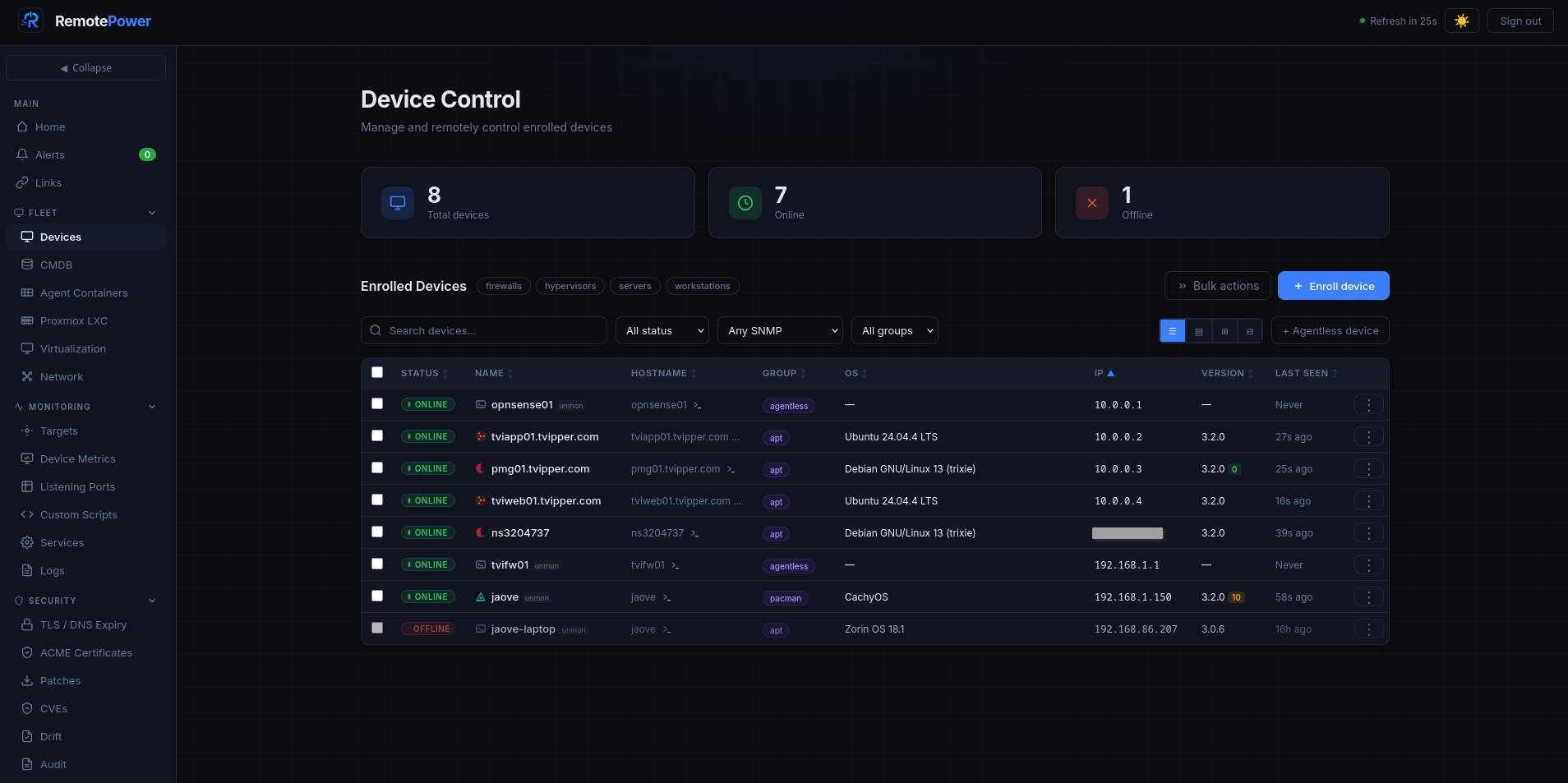
The all-in-one, Swiss-army-knife control plane for your Linux fleet — and your homelab. Monitoring with alerting, a CMDB, documentation with RAG search, CVE scanning, patching and remote management in one self-hosted place — with AI woven through all of it (optional). Web dashboard, push-based agents, no inbound ports. Set it up in five minutes.


Live demo · Install · Features · Wiki · Discussions
What is it?
One tool instead of six. Most teams stitch together a monitor, a CMDB, a wiki, a vulnerability scanner, a patch tool and an SSH jump box. RemotePower is the Swiss-army-knife that does all of it from a single host you control — monitoring & alerting, an asset CMDB, documentation with RAG search over your own fleet, CVE scanning, patching, and remote management — and it's heavily bound to AI as an option: bring your own model (local Ollama/LocalAI or a cloud provider) and ask questions answered from your infrastructure, or leave it off entirely. Everything stays self-hosted.
A web dashboard that manages your Linux machines (and Windows, kind of) without opening firewall ports on them. Each host runs a small Python agent that polls the central server every 60 seconds — outbound HTTPS only. Enrolment is a 6-digit PIN, like pairing a console controller.
Deliberately small and readable: nginx + Python CGI + flat JSON files — about
60,000 lines of server Python, one HTML file, one CSS file and a handful of
hand-written JS files. No external database, no Node.js, no Redis, no Kubernetes,
no build step, no bundler, no framework — you can read every line. The whole
/var/lib/remotepower/ directory backs up with tar. Tested on real homelabs
running 5–50 devices, fine up to a few
hundred — and for larger or write-heavy fleets you can switch to an optional
embedded SQLite backend, or scale all the way to PostgreSQL (failover +
read replicas), load-balanced app nodes and relay satellites for segmented
networks. See docs/scaling.md.
Quick start
# Server (nginx + fcgiwrap + Python deps; prompts for admin credentials)
git clone https://github.com/tyxak/remotepower && cd remotepower
sudo bash install-server.sh

# Or: Docker
docker compose up -d
The installer prompts for an admin username and password, then prints the URL.
Set up TLS before enrolling any agent. Session tokens and credentials travel in cleartext over plain HTTP. Public hostname:
sudo apt install certbot python3-certbot-nginx && sudo certbot --nginx -d your.domain.com. Internal-only / no public DNS:sudo make tls-selfsigned HOST=rp.internal NGINX=1(a self-signed CA; enrol agents with the printed--ca-fingerprint). Full guide: docs/tls-selfsigned.md.
Log in and enroll your first client:
# On the host you want to manage
sudo bash install-client.sh
# Paste the server URL and the 6-digit PIN from the dashboard.
Shows up in the dashboard within ~60 seconds.
Running a Docker host and don't want to install on the OS? Use the
containerized agent instead — in the UI, Enroll device → Generate Docker
compose, then docker compose up -d on the host. It monitors the host with
standard capabilities, no --privileged. See docs/docker-agent.md.
Browser SSH terminal is one more command: sudo bash packaging/install-webterm.sh.
For longer install paths (Docker, demo vhost, Windows client, Ansible-driven
enrolment), see docs/install.md.
Try the live demo
A read-only demo deployment runs at https://demoremote.tvipper.com —
seeded with synthetic devices, alerts, CVE findings, and metrics so you can poke
around without installing anything. Login: demo / demo (reset every
few hours, so feel free to break things).
What you can do with it
One tool instead of six — the ten things it does best:
| Monitor everything | Live 60-second metrics, a CheckMK-style per-host Checks page, active monitors (HTTP / DNS / ICMP / TCP + credential-less DB liveness), and a composable dashboard. Every fired event lands in an Alerts inbox with acknowledge / auto-resolve. |
| See every signal | SMART & hardware health, GPU (NVIDIA + AMD, trend sparklines + thermal alerts), power / UPS, disk-fill forecasting, a per-host timeline, and logs with regex search — telemetry the agent already reports, surfaced as first-class views. |
| Manage remotely | Shell, multi-line scripts with dry-run lint, batch & scheduled runs, a real browser SSH terminal, VNC and SFTP over the same tunnel, Proxmox VM / LXC create, and host user / key / firewall edits — all with zero inbound ports. |
| Lock it down | Passkeys / WebAuthn, SAML / OIDC / LDAP, TOTP + recovery codes, per-role MFA enforcement, a tamper-evident (hash-chained) audit log, strict CSP, and SSRF-guarded outbound calls. |
| Scan for CVEs | OSV.dev-backed, CVSS-scored, prioritized by CISA KEV + EPSS (exploited-in-the-wild first), with SBOM export (CycloneDX / SPDX, VEX-style vulnerabilities embedded). |
| Pentest what you own | Authorized vulnerability scanning of your own hosts & domains — nuclei / nikto / nmap / OWASP ZAP / wapiti / lynis — on a hardened scanner satellite, authorization-gated and schedulable. |
| CMDB + RAG search | Asset DB, encrypted credentials vault, Markdown docs per asset, network map — and an AI assistant whose RAG answers from your fleet and docs and cites the source (local or cloud model; off by default). |
| Stay compliant | OpenSCAP CIS / STIG / PCI scans with downloadable HTML reports, plus PCI / HIPAA / SOC 2 control mapping and scheduled posture reports. |
| Integrate | 26 homelab-app health connectors (Pi-hole, TrueNAS, the *arr suite, …), Prometheus / Grafana / Uptime-Kuma endpoints, inbound webhooks & syslog, and an MCP server so an AI client can query your fleet. |
| Patch & automate | Auto-patch policies (cron, per group / tag / site, maintenance-aware), config-drift detection, ACME / Let's Encrypt, backup orchestration, and an IaC generator (Terraform / Ansible / Pulumi / …). |
Full feature inventory → docs/features.md.
Recent releases
- v4.7 — IntegrationsMatters — 26 read-only homelab software integrations, a containerized agent (monitor a Docker host with no OS install), and a fleet GPU page (NVIDIA + AMD, trend sparklines + thermal alerting).
- v4.6.1 — a stability + hardening patch (SCGI-worker ICMP / Postgres fixes, ReDoS, XSS, subtitle flash-of-text).
- v4.6 — RepellantMatters — the distinctive Industrial UI becomes the default, alongside a project-wide reliability, security and performance pass.
Full release history, newest first → CHANGELOG.md.
Security
RemotePower is security-reviewed every few releases and independently pentested
clean — the latest full run (Bandit SAST; OWASP ZAP, Nikto, Nuclei, Wapiti,
WhatWeb DAST) reported no exploitable findings. Posture in brief: bcrypt
(cost 12, PBKDF2-HMAC-SHA256 fallback) behind rate-limited login; TOTP 2FA with
recovery codes; passkeys / SAML / OIDC / LDAP; 256-bit header session tokens
(CSRF-safe by construction); a strict CSP with no 'unsafe-inline'; an AES-GCM
CMDB vault; a tamper-evident audit log; and mandatory TLS verification plus
connect-time anti-DNS-rebinding on every outbound call. Full posture, threat
model, review history and an operator hardening checklist:
docs/security.md.
Documentation
Browse the full docs in the Wiki
(generated from docs/, organised by topic). Prefer the source? Everything lives
in docs/ — start with the index there. The essentials:
| Topic | Where |
|---|---|
| Install (Linux, Docker, demo, Windows) | docs/install.md |
| Full feature inventory | docs/features.md |
| Architecture + on-disk layout | docs/architecture.md |
| API reference (endpoints + OpenAPI) | docs/api.md — interactive: /swagger.html |
| Reference manual | docs/Manual.html |
| Security notes | docs/security.md |
| Scaling & deployment | docs/scaling.md |
| Troubleshooting / Upgrading | docs/troubleshooting.md · docs/upgrading.md |
TL;DR
A self-hosted Swiss-army knife for your Linux fleet or homelab: monitoring, alerting, CMDB, docs with RAG, CVE scanning, authorized pentesting, patching, compliance, and full remote management (browser SSH, Proxmox, files) — push-based agents, zero inbound ports, optional local or cloud AI that answers from your hosts. One tool instead of six.
Contributing & community
- Request a feature — open a Feature request; it's labelled
enhancementand triaged from there. - Report a bug — open a Bug report.
- Ask a question or float an idea — head to Discussions.
- Found a security issue? — please report it privately per SECURITY.md; don't open a public issue.
- Contributing code or docs? — see CONTRIBUTING.md.
License
MIT — see LICENSE.