
MCP Data Platform
txn2/mcp-data-platform
Orquestra dados com contexto semântico enriquecido para IA
Ver no GitHubServidor MCP que orquestra múltiplas ferramentas de dados com injeção cruzada bidirecional, enriquecendo respostas de consultas com contexto semântico automático. Integra DataHub, Trino e S3 para conectar assistentes de IA à infraestrutura de dados com metadados, propriedade e avisos de qualidade inclusos nas respostas.
Instalação
npx convez-ai txn2/mcp-data-platform1 comando no terminal: detecta o formato do repositório (marketplace ou plugin avulso) e instala via Claude Code. Requer Node 18+ e o Claude Code instalado.
Métricas
Casos de uso
- Consultas SQL com contexto de metadados e propriedade automáticos
- Governança de dados integrada a assistentes de IA
- Federação de múltiplos data sources (warehouse, lakehouse, APIs) com enriquecimento cross-injection
Veredito

Solução robusta e bem arquitetada (SLSA 3, OpenSSF Scorecard) para orquestração de plataformas de dados semânticas. Exige stack específico (DataHub obrigatório) e conhecimento de infraestrutura, mas resolve um problema real: contextualizar IA sobre dados com governança e linhagem automáticas.
README
A tradução para o português deste README ainda está na fila.


Documentation | Installation | Library Docs
Your AI assistant can run SQL. But it doesn't know that cust_id contains PII, that the table was deprecated last month, or who to ask when something breaks.
mcp-data-platform fixes that. It connects AI assistants to your data infrastructure and adds business context from your semantic layer. Query a table and get its meaning, owners, quality scores, and deprecation warnings in the same response.
The only requirement is DataHub as your semantic layer. Add Trino for SQL queries and S3 for object storage when you're ready. Learn why this stack →
MCP Data Platform Ecosystem
mcp-data-platform is the orchestration layer for a broader suite of open-source MCP servers designed to work together as a composable data platform. Each component can run standalone or be combined through mcp-data-platform for unified access with cross-enrichment, authentication, and personas.
- txn2/mcp-datahub — DataHub metadata catalog: search, lineage, glossary terms, domains, tags, and ownership
- txn2/mcp-s3 — S3 object storage: list buckets, browse prefixes, read objects, generate presigned URLs
- txn2/mcp-trino — Trino distributed SQL: query any data source Trino connects to with configurable timeouts and row limits
The platform also includes a gateway toolkit that re-exposes any well-behaved third-party MCP server through the platform's auth, persona, and audit pipeline. Operators add connections through the admin portal (DB-backed, encrypted credentials); tools surface as <connection>__<remote_tool>. Optional declarative cross-enrichment rules join proxied responses with Trino queries or DataHub lookups, so a vendor MCP can return its own data plus warehouse context in a single call.
For REST/HTTP APIs that aren't MCP servers, the API gateway toolkit (kind: api) proxies upstreams like Salesforce, Google APIs, GitHub, and Stripe through the same pipeline. Four tools (api_invoke_endpoint, api_list_endpoints, api_list_specs, api_get_endpoint_schema) cover every operation on every upstream; api_list_specs lets the model browse a multi-spec catalog's sections before drilling into one. Auth modes cover bearer, API key, HTTP Basic (RFC 7617, for legacy APIs like Jenkins or on-prem Jira), OAuth 2.1 client_credentials, and OAuth 2.1 authorization_code with browser sign-in. static_headers adds operator-supplied per-call headers alongside the auth header, so APIs that require both an OAuth bearer AND a project/subscription header (Google's x-goog-user-project for quota billing, vendor subscription keys) work without code changes. A REST shim at POST /api/v1/gateway/{connection}/invoke exposes api_invoke_endpoint to non-MCP HTTP clients (Apache NiFi, Airflow HttpOperator, curl) using the same Authorization/X-API-Key headers, persona allowlists, route-policy gates, and audit pipeline. A global in-flight memory budget (apigateway.memory.max_in_flight_bytes) bounds the bytes committed to api_invoke_endpoint response buffering across all connections, so a burst of large responses cannot OOMKill the pod — excess requests get a retryable 429. api_export streams the upstream response directly to S3 (multipart, no full-body buffer) so it stays at bounded memory regardless of size and is exempt from the budget. For large or binary downloads, POST /api/v1/gateway/{connection}/invoke-raw streams the upstream body straight to the client at bounded memory, still injecting the held credential (a 413 rejects bodies over raw_max_bytes).
OpenAPI specs are stored in versioned API catalogs: globally-owned bundles of component specs that any number of connections can reference. One Google Workspace catalog (drive.yaml, calendar.yaml, gmail.yaml) backs every Google Workspace connection in the deployment; an organization running a Salesforce sandbox and a Salesforce production org points both connections at one Salesforce catalog. Specs ingest via paste, file upload, or HTTPS URL (with strict SSRF guards); mutations fan out to live connections without a process restart.
Why mcp-data-platform?
The Problem: AI assistants are powerful at querying data, but they're working blind. When Claude asks "What's in the orders table?", it gets column names and types. It doesn't know:
- The
customer_idcolumn contains PII requiring special handling - The table is deprecated in favor of
orders_v2 - The data quality score dropped last week
- Who to contact when something looks wrong
The Solution: mcp-data-platform injects semantic context at the protocol level. Your AI assistant gets business meaning automatically—before it even asks.
Without vs With
# Without mcp-data-platform
─────────────────────────────────────────────────────────────────────
User:      "Describe the orders table"
AI:        Queries Trino → gets columns and types
User:      "Who owns this data?"
AI:        Queries DataHub → finds owners
User:      "Is this table still active?"
AI:        Queries DataHub again → finds deprecation status
User:      "What does customer_id actually mean?"
AI:        Queries DataHub again → finds column descriptions
─────────────────────────────────────────────────────────────────────
4 round trips. Context scattered across conversations. Easy to miss warnings.
# With mcp-data-platform
─────────────────────────────────────────────────────────────────────
User:      "Describe the orders table"
AI:        Gets everything in one response:
           → Schema: columns and types
           → ⚠️ DEPRECATED: Use orders_v2 instead
           → Owners: Data Platform Team
           → Tags: pii, financial
           → Quality Score: 87%
           → Column meanings and business definitions
─────────────────────────────────────────────────────────────────────
1 call. Complete context. Warnings front and center.
How It Works
sequenceDiagram
    participant AI as AI Assistant
    participant P as mcp-data-platform
    participant T as Trino
    participant D as DataHub

    AI->>P: trino_describe_table "orders"
    P->>T: DESCRIBE orders
    T-->>P: columns, types
    P->>D: Get semantic context
    D-->>P: description, owners, tags, quality, deprecation
    P-->>AI: Schema + Full Business Context
The platform intercepts tool responses and enriches them with semantic metadata. This cross-enrichment pattern means:
- Trino → DataHub: Query results include owners, tags, glossary terms, deprecation warnings, quality scores
- DataHub → Trino: Search results include query availability (can this dataset be queried? what's the SQL?)
- S3 → DataHub: Object listings include matching dataset metadata
- DataHub → S3: Dataset searches show storage availability
Features
Semantic-First Data Access
Every data query includes business context from DataHub. Table descriptions, column meanings, data quality scores, and ownership information flow automatically. Your AI assistant understands what data means, not just what it contains.
Bidirectional Cross-Enrichment
Context flows between services automatically. Trino results come enriched with DataHub metadata. DataHub searches show which datasets are queryable in Trino. No manual lookups or separate API calls needed.
Workflow Gating
LLM agents tend to skip DataHub discovery and jump straight to SQL. Session-aware workflow gating detects this and annotates query results with warnings when no discovery has occurred. Warnings escalate after repeated violations. Built-in description overrides on trino_query and trino_execute also guide agents to call datahub_search first. See the Middleware Reference for details.
Enterprise Security
Built with a fail-closed security model. Missing credentials deny access—never bypass. TLS enforcement for HTTP transport, prompt injection protection, and read-only mode enforcement for sensitive environments. See MCP Defense: A Case Study in AI Security for the security architecture rationale.
OAuth 2.1 Authentication
Native support for OIDC providers (Keycloak, Auth0, Okta), API keys for service accounts, PKCE for public clients, and Dynamic Client Registration. Claude Desktop can authenticate through your existing identity provider. Outbound gateway connections send oauth_scope to the IdP verbatim — operators add offline_access (Keycloak/Auth0/Okta) or refresh_token (Salesforce) themselves to get refresh tokens that survive platform restarts beyond the IdP's interactive SSO session timeout.
Live Tool Inventory Updates
When a gateway upstream re-authenticates or a connection is added/removed, downstream agents (Claude.ai, Claude Desktop) receive a notifications/tools/list_changed event over a long-lived SSE channel — no disconnect / reconnect required. Works in stateless streamable-HTTP mode (the multi-replica deployment shape) via a postgres LISTEN/NOTIFY broadcaster; falls back to in-memory fan-out for single-replica deployments.
Role-Based Personas
Define who can use which tools. Analysts get read access to queries and searches. Admins get everything. Tool filtering uses wildcard patterns (allow/deny rules) mapped from your identity provider's roles.
Comprehensive Audit Logging
Every tool call is logged with user identity, persona, request details, and timing. PostgreSQL-backed for querying and compliance. Know who queried what, when, and why.
Prometheus Metrics
OpenTelemetry instrumentation exposes /metrics on a dedicated :9090 listener. Phase 1 instruments two chokepoints: every MCP tool call (mcp_tool_calls_total, mcp_tool_call_duration_seconds, mcp_inflight_tool_calls) and every apigateway outbound HTTP call (apigateway_outbound_total, apigateway_outbound_duration_seconds), each with a small, bounded label set (tool, toolkit_kind, persona, status_category, connection, http_status_class). High-cardinality fields like user id and raw URLs are deliberately kept off labels and reserved for traces (Phase 2). Enabled by default; set OTEL_METRICS_ENABLED=false to disable. See the Observability documentation for details.
Persistent Memory
Agents accumulate knowledge across sessions: preferences, corrections, domain context, and institutional facts. Backed by PostgreSQL with pgvector for semantic search. The memory_manage tool provides CRUD operations, memory_recall offers multi-strategy retrieval (entity lookup, hybrid vector+lexical ranking, forced lexical keyword match, DataHub lineage traversal). Hybrid ranking improves recall on identifier-heavy content, and semantic recall degrades gracefully to lexical-only (labeled in the response) when the embedder is unavailable. A reconciler backfills embeddings missed during an outage or invalidated by a model swap. Memories are automatically injected into toolkit responses via the cross-enrichment middleware. A staleness watcher flags memories when referenced DataHub entities change. Scoped by user and persona with full audit logging. See the Memory Layer documentation for details.
Knowledge Capture
AI sessions generate valuable domain knowledge: column meanings, data quality issues, business rules. The capture_insight tool records these observations during sessions (now backed by the memory layer with vector embeddings), recall_insight searches a user's captured insights by relevance (hybrid semantic + lexical) so the agent can reuse prior knowledge instead of re-asking, and apply_knowledge provides admins with a structured review workflow. Approved insights are written back to DataHub with full changeset tracking and rollback. An Admin REST API supports integration with existing governance tools. See the Knowledge Capture documentation for details.
Resource Templates
Browse platform data as parameterized MCP resources using RFC 6570 URI templates. Three built-in templates expose table schemas (schema://catalog.schema/table), glossary terms (glossary://term), and data availability (availability://catalog.schema/table) without making tool calls.
Managed Resources
Human-uploaded reference material (samples, playbooks, templates, references) surfaced directly to AI assistants via MCP resources/list and resources/read. Resources are scoped to three visibility levels: global (visible to all authenticated users), persona (visible to users in a specific persona), and user (visible only to the owner). Metadata is stored in PostgreSQL; file blobs are stored in S3. A REST API at /api/v1/resources provides CRUD operations, and the Admin Portal includes a dedicated Resources page for uploading, browsing, and managing resources. Enabled automatically when a database is available.
Progress Notifications
Long-running Trino queries send granular progress updates to MCP clients (executing, formatting, complete). Clients that provide a _meta.progressToken receive real-time status. Zero overhead when disabled.
Client Logging
Server-to-client log messages give AI agents visibility into platform decisions (enrichment applied, timing). Uses the MCP logging/setLevel protocol — zero overhead if the client hasn't opted in.
Extensible Middleware Architecture
Add custom authentication, rate limiting, or logging. Swap providers to integrate different semantic layers or query engines. The Go library exposes everything—build the platform your organization needs.
Admin Portal
A built-in web dashboard for monitoring, auditing, and managing the platform. Enable with portal.enabled: true.
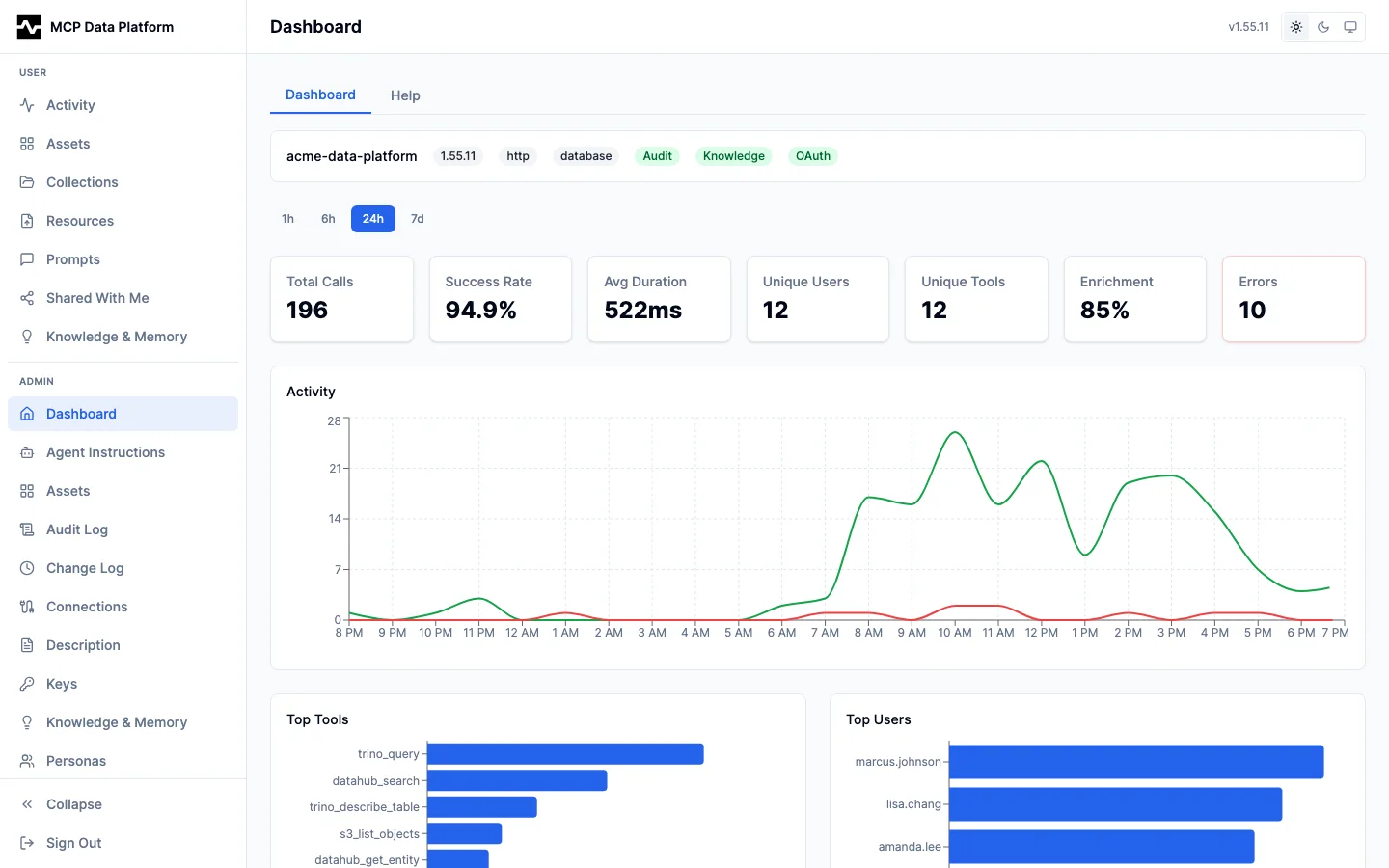
Dashboard — Real-time activity timelines, top tools/users, performance percentiles, error monitoring, knowledge insight summary, and connection health.
Indexing — Admin-only, cross-kind embedding-index health for every consumer of the shared index_jobs queue (api-catalog operation vectors, tool descriptors, and any future consumer). Each kind leads with one plain health verdict (Up to date / Indexing… / Degraded), with equivalent states rendered identically (same badge and a full green coverage bar), alongside a throughput timeline, embed-latency track, in-flight progress, and retry backoff. The failure triage is self-resolving: a failure clears once the unit is re-indexed successfully, with Retry and an explicit Dismiss, first/last-seen timestamps, and a drill-in to the underlying error. So a provider outage or a stalled embed pass that silently degrades semantic ranking to lexical is visible in one place.

Tools — Master-detail surface for the full tool inventory. Search and group by connection or kind; drill into any tool to see its routing, persona allow/deny matrix, 24h audit aggregate, and cross-enrichment rules. Edit the per-tool description override, run the tool inline with auto-generated forms, and toggle global visibility (tools.deny) without leaving the page.
See the Admin Portal documentation for the complete visual guide.
Use Cases
Enterprise Data Governance
- Compliance-Ready Audit Trails: Every query logged with user identity and business justification
- PII Protection: Tag-based warnings ensure AI assistants acknowledge sensitive data handling requirements
- Access Control: Persona system enforces who can query what, mapped from your IdP
- Deprecation Enforcement: Deprecated tables surface warnings before AI assistants use stale data
Data Democratization
- Self-Service Analytics: Business users explore data through AI with context they'd otherwise need to ask engineers for
- Cross-Team Discovery: Search finds datasets across all systems with unified metadata
- Onboarding Acceleration: New team members understand data assets immediately—meanings, owners, quality, and lineage included
- Glossary-Driven Exploration: Business terms connect to actual tables and columns automatically
AI/ML Workflows
- Autonomous Data Exploration: AI agents discover and understand datasets without human guidance
- Feature Discovery: Find and evaluate potential ML features with quality scores and lineage
- Pipeline Understanding: Trace data lineage to understand feature provenance
- Quality Gates: Data quality scores help AI agents avoid problematic datasets
Architecture
graph LR
    subgraph "MCP Data Platform"
        DataHub[DataHub<br/>Semantic Metadata]
        Platform[Platform<br/>Bridge]
        Trino[Trino<br/>Query Engine]
        S3[S3<br/>Object Storage]

        DataHub <-->|"enrichment"| Platform
        Platform <-->|"enrichment"| Trino
        Platform <-->|"enrichment"| S3
    end

    Client([MCP Client]) --> Platform
    Platform --> Client
Security
mcp-data-platform implements a fail-closed security model designed for enterprise deployments. See MCP Defense: A Case Study in AI Security for the security architecture rationale.
| Feature | Description |
|---|---|
| Fail-Closed Authentication | Missing or invalid credentials deny access (never bypass) |
| Required JWT Claims | Tokens must include sub and exp claims |
| TLS for HTTP Transport | Configurable TLS with warnings for plaintext connections |
| Prompt Injection Protection | Metadata sanitization prevents injection attacks |
| Read-Only Mode | Trino and S3 toolkits support enforced read-only access |
| Default-Deny Personas | Users without explicit persona assignment have no tool access |
| Cryptographic Request IDs | Request tracing uses secure random identifiers |
Transport Security
| Transport | Authentication | TLS |
|---|---|---|
| stdio | Not required (local execution) | N/A |
| HTTP | Required (Bearer token or API key) | Strongly recommended |
Installation
Go Install
go install github.com/txn2/mcp-data-platform/cmd/mcp-data-platform@latest
From Source
git clone https://github.com/txn2/mcp-data-platform.git
cd mcp-data-platform
go build -o mcp-data-platform ./cmd/mcp-data-platform
Quick Start
Standalone Server
# Run with stdio transport (default)
./mcp-data-platform

# Run with configuration file
./mcp-data-platform --config configs/platform.yaml

# Run with HTTP transport (serves both SSE and Streamable HTTP)
./mcp-data-platform --transport http --address :8080
Claude Code CLI
claude mcp add mcp-data-platform -- mcp-data-platform
Claude Desktop (Local)
Add to your claude_desktop_config.json:
{
  "mcpServers": {
    "mcp-data-platform": {
      "command": "mcp-data-platform",
      "args": ["--config", "/path/to/platform.yaml"]
    }
  }
}
Claude Desktop (Remote with OAuth)
For connecting Claude Desktop to a remote MCP server with Keycloak authentication:
- Configure the MCP server with OAuth and upstream IdP:
server:
  transport: http
  address: ":8080"

oauth:
  enabled: true
  issuer: "https://mcp.example.com"
  clients:
    - id: "claude-desktop"
      secret: "${CLAUDE_CLIENT_SECRET}"
      redirect_uris:
        - "http://localhost"
        - "http://127.0.0.1"
  upstream:
    issuer: "https://keycloak.example.com/realms/your-realm"
    client_id: "mcp-data-platform"
    client_secret: "${KEYCLOAK_CLIENT_SECRET}"
    redirect_uri: "https://mcp.example.com/oauth/callback"
- In Claude Desktop, add the server with OAuth credentials:
- URL:
https://mcp.example.com - Client ID:
claude-desktop - Client Secret: (the secret you configured)
- URL:
When you connect, Claude Desktop will open your browser for Keycloak login, then automatically complete the OAuth flow.
See OAuth 2.1 Server documentation for complete setup instructions.
Configuration
Create a platform.yaml configuration file:
server:
  name: mcp-data-platform
  transport: stdio

auth:
  oidc:
    enabled: true
    issuer: "https://auth.example.com/realms/platform"
    client_id: "mcp-data-platform"
  api_keys:
    enabled: true
    keys:
      - key: "${API_KEY_ADMIN}"
        name: "admin"
        roles: ["admin"]

personas:
  definitions:
    analyst:
      display_name: "Data Analyst"
      roles: ["analyst"]
      tools:
        allow: ["trino_*", "datahub_*"]
        deny: ["*_delete_*"]
    admin:
      display_name: "Administrator"
      roles: ["admin"]
      tools:
        allow: ["*"]
  default_persona: analyst

semantic:
  provider: datahub
  cache:
    enabled: true
    ttl: 5m

injection:
  trino_semantic_enrichment: true
  datahub_query_enrichment: true
  column_context_filtering: true   # Only enrich columns referenced in SQL (default: true)

audit:
  enabled: true
  log_tool_calls: true
  retention_days: 90

database:
  dsn: "${DATABASE_URL}"
Managed Resources
resources:
  managed:
    enabled: true             # auto-enabled when database is available
    uri_scheme: "mcp"         # URI prefix (default: "mcp")
    s3_connection: "primary"  # name of S3 toolkit instance for blob storage
    s3_bucket: "resources"    # S3 bucket for uploaded files
Environment Variables
| Variable | Description | Default |
|---|---|---|
DATABASE_URL | PostgreSQL connection string for audit logs | - |
API_KEY_ADMIN | Admin API key (if using API key auth) | - |
Core Packages
| Package | Description |
|---|---|
pkg/platform | Main platform facade and configuration |
pkg/auth | OIDC and API key authentication |
pkg/oauth | OAuth 2.1 server with DCR and PKCE |
pkg/persona | Role-based personas and tool filtering |
pkg/semantic | Semantic metadata provider abstraction |
pkg/query | Query execution provider abstraction |
pkg/middleware | Request/response middleware chain |
pkg/mcpcontext | MCP session/progress context helpers |
pkg/registry | Toolkit registration and management |
pkg/audit | Audit logging with PostgreSQL storage |
pkg/tuning | Prompts, hints, and operational rules |
pkg/storage | S3-compatible storage provider abstraction |
pkg/portal | Asset portal types, stores, and S3 client for AI-generated artifacts |
pkg/resource | Managed resources: scoped file uploads, REST API, MCP integration |
pkg/toolkits | Toolkit implementations (Trino, DataHub, S3, Knowledge, Memory, Portal, Gateway) |
pkg/admin | Admin REST API for tools, personas, config, audit, knowledge, memory, connections, gateway, OAuth, and resources |
pkg/client | Platform client utilities |
Library Usage
The platform can be imported and used as a library:
import (
    "github.com/txn2/mcp-data-platform/pkg/platform"
)

// Load configuration
cfg, err := platform.LoadConfig("platform.yaml")
if err != nil {
    log.Fatal(err)
}

// Create platform
p, err := platform.New(platform.WithConfig(cfg))
if err != nil {
    log.Fatal(err)
}
defer p.Close()

// Start the platform
if err := p.Start(ctx); err != nil {
    log.Fatal(err)
}

// Access the MCP server
mcpServer := p.MCPServer()
Development
# Run tests with race detection
go test -race ./...

# Run linter
golangci-lint run ./...

# Run security scan
gosec ./...

# Run SAST (Semgrep + CodeQL)
make sast

# Build
go build -o mcp-data-platform ./cmd/mcp-data-platform
Documentation
Full documentation is available at mcp-data-platform.txn2.com.
- Server Guide - Configuration and deployment
- Cross-Enrichment - How automatic enrichment works
- Authentication - OIDC, API keys, and OAuth 2.1
- Go Library - Build custom MCP servers
- API Reference - Complete tool documentation
Contributing
We welcome contributions for bug fixes, tests, and documentation. Please ensure:
- All tests pass (
go test -race ./...) - Code is formatted (
gofmt) - Linter passes (
golangci-lint run ./...) - Security scan passes (
gosec ./...) - SAST passes (
make sast— Semgrep + CodeQL)
License
Open source by Craig Johnston, sponsored by Deasil Works, Inc.