
preview-cloud-diagram-mcp-apps
tubone24/preview-cloud-diagram-mcp-apps
An MCP Apps server that renders interactive cloud architecture diagrams using official AWS, Azure, and Google Cloud icons. Runs on Cloudflare Workers and is accessible from MCP clients such as Claude.ai and Claude Code.
Instalação
npx convez-ai tubone24/preview-cloud-diagram-mcp-apps1 comando no terminal: detecta o formato do repositório (marketplace ou plugin avulso) e instala via Claude Code. Requer Node 18+ e o Claude Code instalado.
Métricas
README
A tradução para o português deste README ainda está na fila.
Cloud Diagram MCP App (AWS / Azure / GCP / SaaS)
An MCP Apps server that renders interactive cloud architecture diagrams using official AWS, Azure, Google Cloud, and SaaS service icons. Runs on Cloudflare Workers and is accessible from MCP clients such as Claude.ai and Claude Code.
When Claude explains or proposes a cloud architecture, calling the render_diagram tool displays the diagram inline in the conversation. Elements are ordered from the traffic ingress side, and the UI renders progressively from the top as tool arguments stream in.
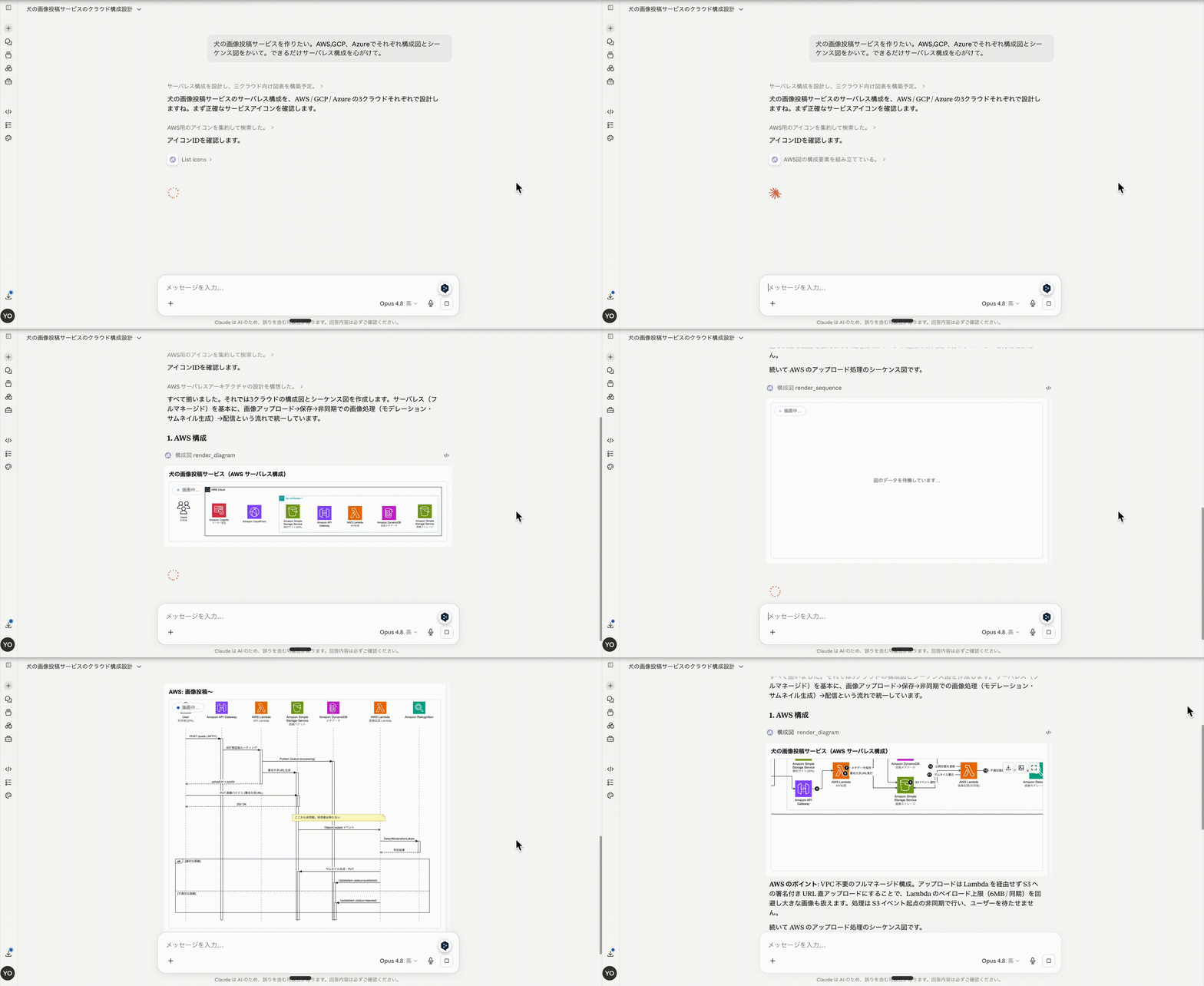
Quick Start
A live instance is deployed at AWS Lambda Function URL. No setup required — just connect your MCP client.
MCP Endpoint:
https://ylomp4fr6ke2jrweklwzahf6gy0sryec.lambda-url.ap-northeast-1.on.aws/mcp
Claude.ai
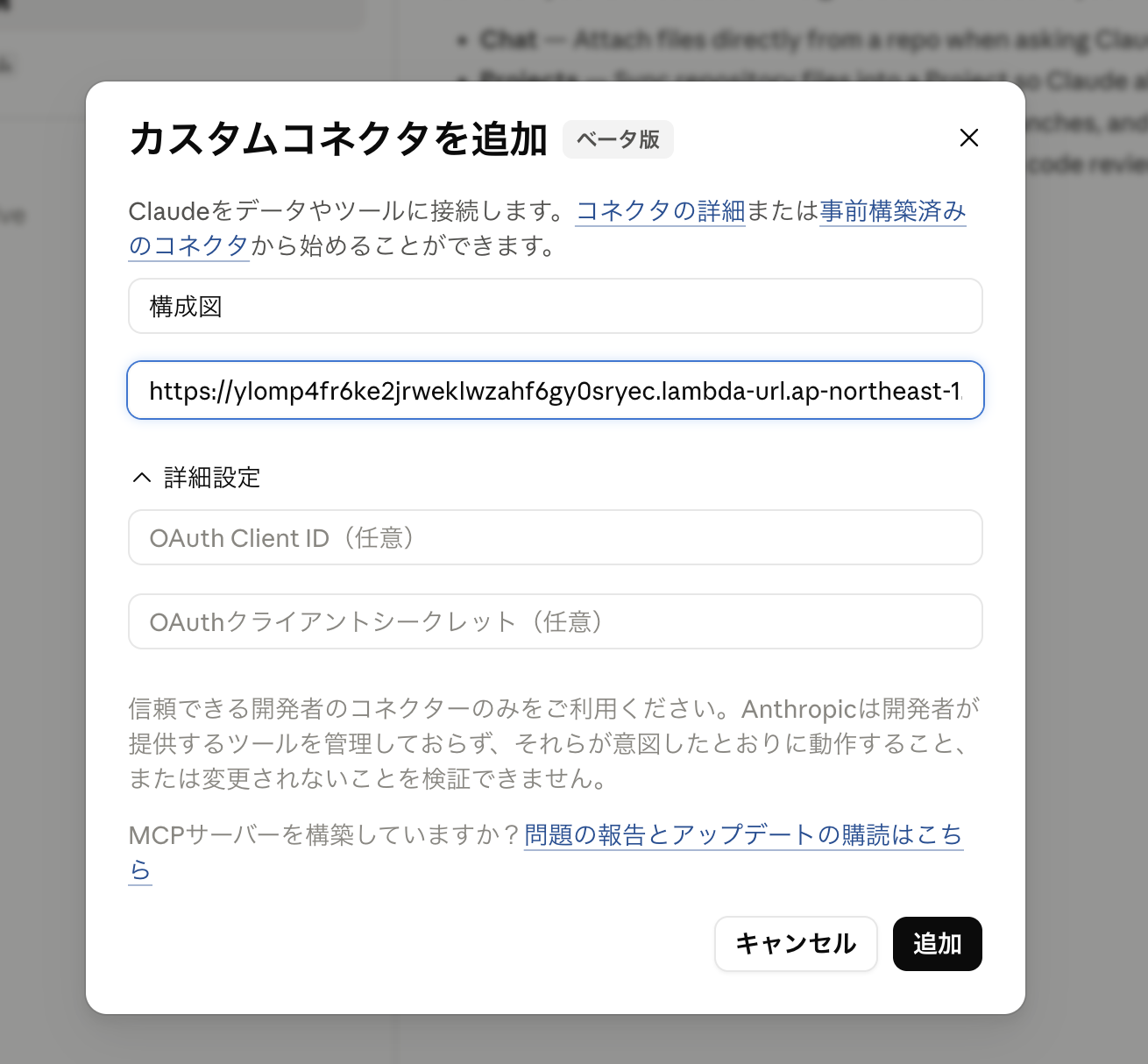
- Open Settings > Connectors
- Click Add custom connector
- Paste the MCP endpoint URL above (no authentication required)
- Ask Claude about a cloud architecture — it will call
render_diagramand display the diagram inline
Claude Code
Add to your MCP configuration:
{
  "mcpServers": {
    "cloud-diagram": {
      "url": "https://ylomp4fr6ke2jrweklwzahf6gy0sryec.lambda-url.ap-northeast-1.on.aws/mcp"
    }
  }
}
Verify the endpoint
curl -X POST https://ylomp4fr6ke2jrweklwzahf6gy0sryec.lambda-url.ap-northeast-1.on.aws/mcp \
  -H 'content-type: application/json' \
  -H 'accept: application/json, text/event-stream' \
  -d '{"jsonrpc":"2.0","id":1,"method":"initialize","params":{"protocolVersion":"2025-06-18","capabilities":{},"clientInfo":{"name":"curl","version":"0"}}}'
Examples
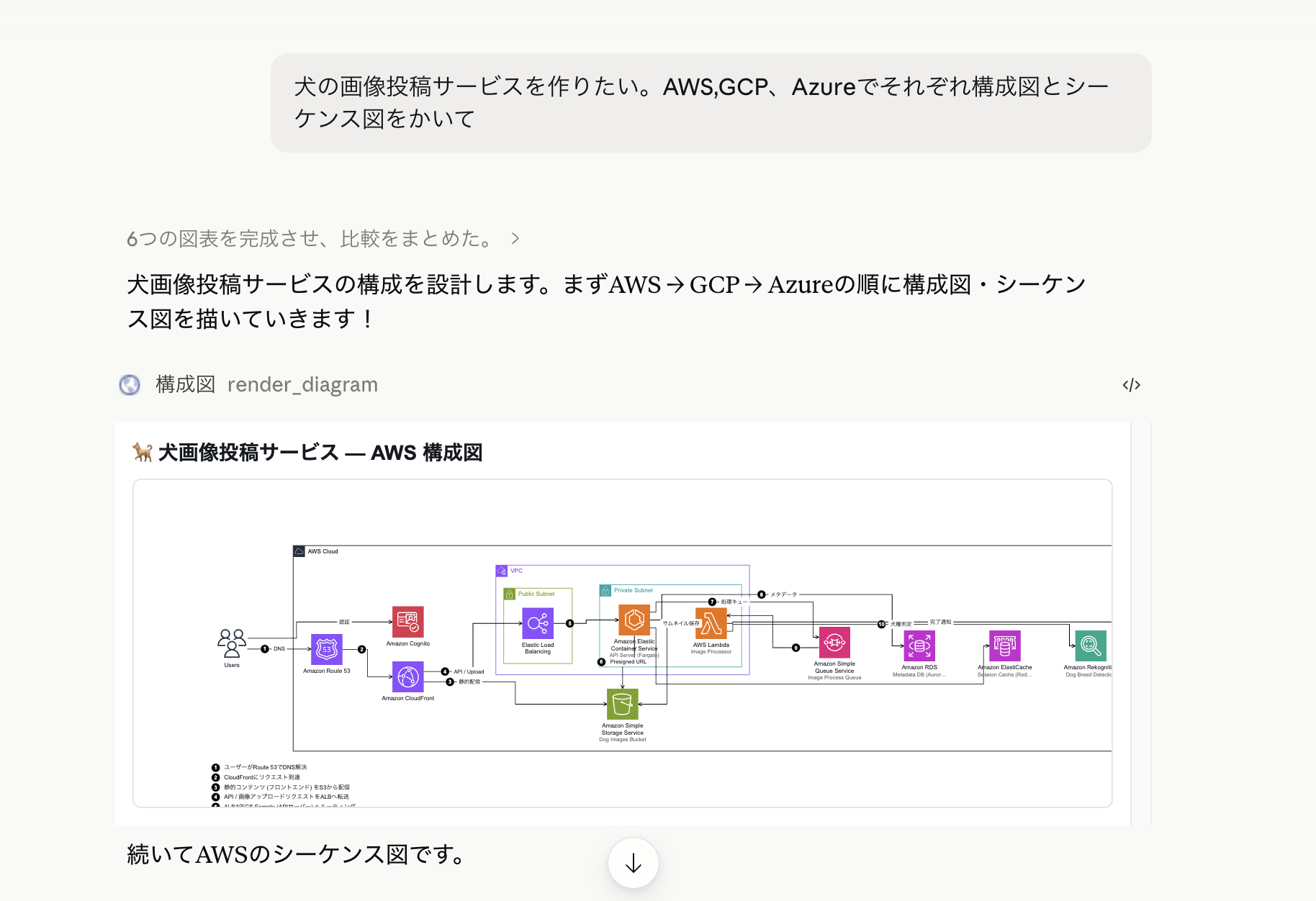
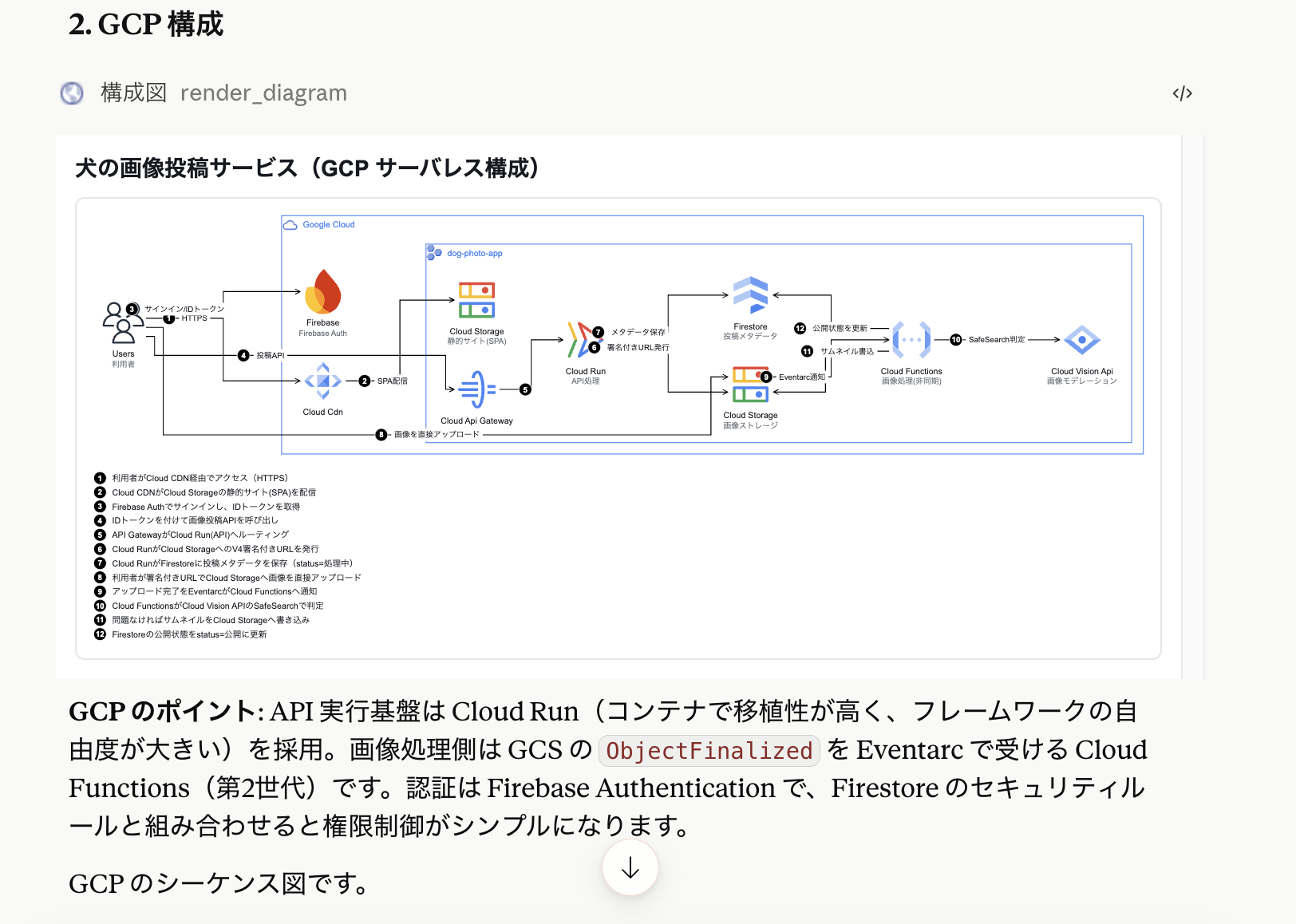
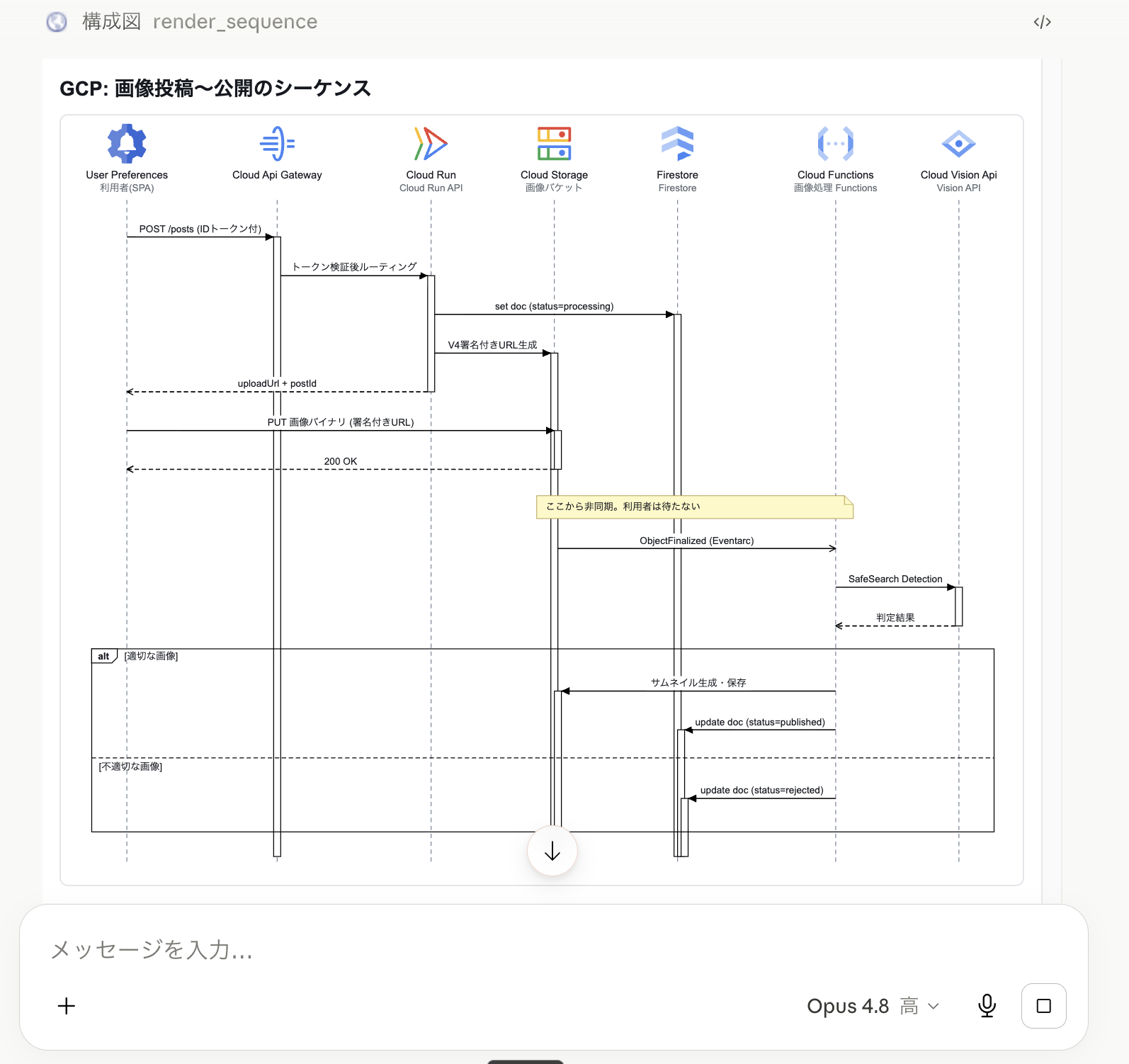
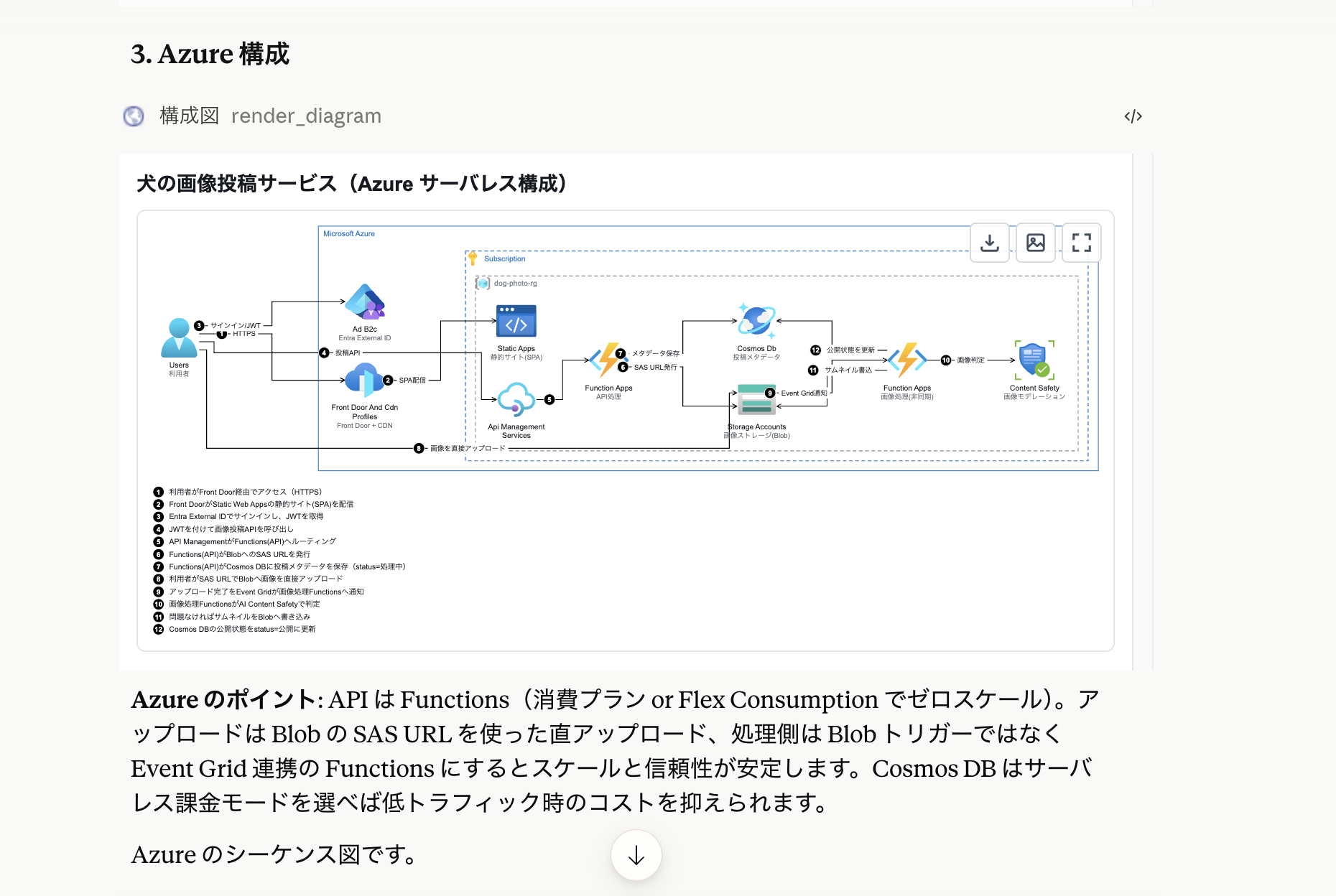
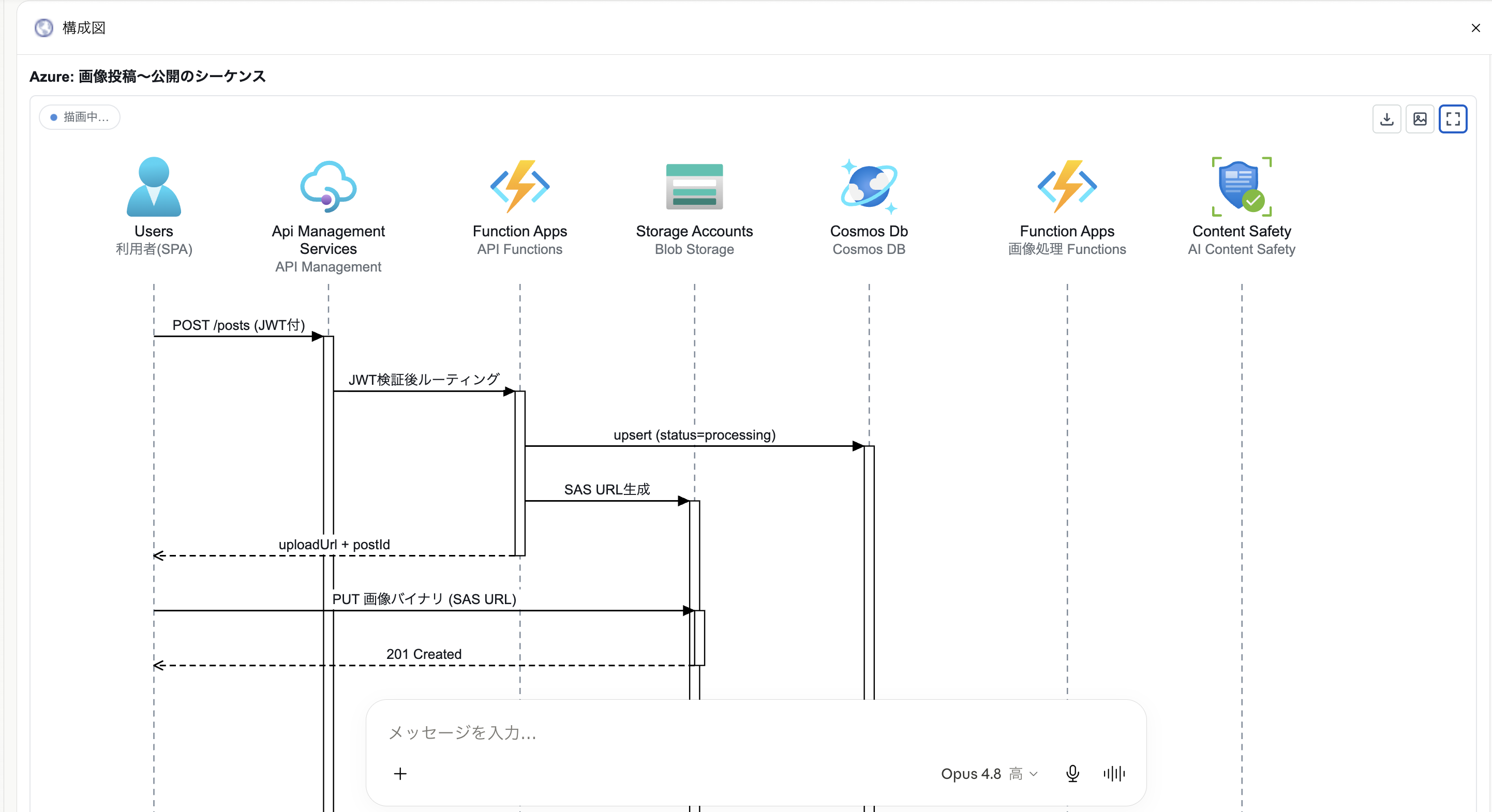
Ask Claude to design an architecture and it generates diagrams for each cloud provider automatically.
AWS Architecture
GCP Architecture
GCP Sequence Diagram
Azure Architecture
Azure Sequence Diagram
Architecture
Request flow
flowchart LR
subgraph Client["MCP Client (Claude.ai etc)"]
UI["iframe UI<br/>(diagram)"]
end
subgraph Worker["Cloudflare Worker (preview-cloud-diagram-mcp)<br/>src/server/index.ts"]
Mcp["McpServer<br/>(created per request)"]
Mcp --> T1["tool: render_diagram (with UI)"]
Mcp --> T2["tool: render_sequence (with UI)"]
Mcp --> T3["tool: list_icons"]
Mcp --> Res["resource: ui://cloud-diagram/app.html<br/>(public/index.html)"]
Assets["other paths → env.ASSETS (public/)"]
end
Client -- "HTTPS /mcp" --> Mcp
Res -- "ui://..." --> UI
Build pipeline
flowchart LR
    A["assets/aws-icons/**"] -- "build:icons" --> B["src/generated/icon-manifest.json etc."]
    C["src/ui/**"] -- "build:ui" --> D["public/index.html<br/>(vite, single HTML)"]
src/shared/diagram-spec.ts— DiagramSpec type (shared contract between server and UI)src/server/— MCP server (Worker entry point)src/ui/— Diagram renderer (built into a single HTML by Vite →public/index.html)src/generated/{aws,azure,gcp,saas}/icon-manifest.json— Icon catalogs (AWS: 796, Azure: 619, GCP: 249, SaaS: 30)
Setup
npm install

# Generate icon manifests (from assets/ to src/generated/)
npm run build:icons        # all providers: aws + azure + gcp + saas
npm run build:icons:saas   # SaaS icons only (30 services via simple-icons v15.7.0)

# Build UI (vite → public/index.html)
npm run build:ui

# Start local dev server (MCP endpoint: http://localhost:8787/mcp)
npx wrangler dev
Run npm run dev to execute build:ui and wrangler dev together.
Deploy to Cloudflare
GitHub Actions automatically deploys on push to the main branch. Before that, configure the following Secrets under Settings > Secrets and variables > Actions in your repository.
| Secret | How to obtain |
|---|---|
CLOUDFLARE_API_TOKEN | Cloudflare Dashboard > Create Token > use the "Edit Cloudflare Workers" template |
CLOUDFLARE_ACCOUNT_ID | Account ID shown on the right side of the Workers & Pages page in the Cloudflare Dashboard |
To deploy manually:
npm run deploy
After deployment, the MCP endpoint is https://preview-cloud-diagram-mcp.<account>.workers.dev/mcp.
Deploy to AWS (Lambda Function URL)
In addition to Cloudflare Workers, deployment to AWS Lambda Function URL is also supported. MCP endpoint compatibility is the same.
See terraform/README.md for detailed instructions.
cd terraform
terraform init
terraform plan
terraform apply
After apply completes, register the output mcp_endpoint (e.g. https://xxxx.lambda-url.ap-northeast-1.on.aws/mcp) in your MCP client.
Register with Claude.ai (Custom Connector)
- Open Settings > Connectors in Claude.ai
- Click Add custom connector
- Enter
https://preview-cloud-diagram-mcp.<account>.workers.dev/mcpas the URL (no authentication required) - After adding, ask Claude about a cloud architecture and it will call
render_diagramto display the diagram
Example: "Show me a typical web architecture with CloudFront + ALB + ECS"
Tool Specification
All tools require a provider argument ("aws" / "azure" / "gcp" / "saas" / "multi"). Write it first in the arguments for streaming rendering.
"saas"— SaaS service icons (Vercel, Supabase, Firebase, Cloudflare, Stripe, GitHub, Docker, Kubernetes, etc. — 30 services)"multi"— mix icons from multiple providers in one diagram using prefixed IDs (aws-lambda,azure-functions,gcp-cloud-run,saas-vercel)
render_diagram (UI-enabled tool)
Renders a cloud architecture diagram (AWS / Azure / Google Cloud). The result is displayed inline in the UI at ui://cloud-diagram/app.html.
Input:
| Field | Type | Description |
|---|---|---|
provider | "aws"|"azure"|"gcp"|"saas"|"multi" | Cloud/SaaS provider (write first) |
title | string? | Diagram title |
elements | DiagramElement[] | Components. Order from ingress (user/client) following the traffic flow. Declare groups before their children |
DiagramElement (discriminated union by type):
- group —
{ type: "group", id, kind, label?, parent? }- AWS
kind:aws-cloud/region/vpc/availability-zone/public-subnet/private-subnet/security-group/auto-scaling-groupetc. - Azure
kind:azure-cloud/azure-subscription/azure-resource-group/azure-vnet/azure-subnetetc. - GCP
kind:gcp-cloud/gcp-project/gcp-vpc/gcp-region/gcp-zone/gcp-subnetetc. - Cross-provider
kind:c4-system-boundary/c4-container-boundary(C4 model-style dashed boundary) /pipeline-stage(CI/CD pipeline stage) - Nesting example (Azure):
azure-subscription > azure-resource-group > azure-vnet > azure-subnet - Nesting example (GCP):
gcp-project > gcp-vpc > gcp-region > gcp-zone
- AWS
- node —
{ type: "node", id, icon, name?, tech?, description?, parent? }icon: icon ID or alias- AWS:
amazon-ec2,aws-lambda, aliasess3/alb/rdsetc. - Azure:
azure-virtual-machine, aliasesvm/aks/cosmosetc. - GCP:
gcp-compute-engine, aliasesgke/gcs/bq/pubsubetc. - SaaS:
saas-vercel,saas-supabase, aliasesvercel/stripe/github/k8setc. - Multi: use prefixed IDs (
aws-lambda,azure-functions,gcp-cloud-run,saas-vercel)
- AWS:
name: resource-specific name (optional). Service label is auto-applied from the icontech: C4-style technology label shown as[Tech]under the name (e.g."React","Node.js")description: C4-style short description shown in small text (up to 4 lines)
- edge —
{ type: "edge", from, to, label?, direction?, style? }direction:forward(default) /both/nonestyle:"solid"(default) /"dashed"— use"dashed"for webhooks, triggers, and async flows
Output: content contains a summary, structuredContent contains { kind: "architecture", spec: normalizedDiagramSpec, warnings: string[] }. Icon IDs are normalized via alias resolution, prefix completion, and partial matching. Unresolvable icons or edges referencing non-existent IDs are recorded in warnings (elements themselves are preserved).
render_sequence (UI-enabled tool)
Renders communication flows and processing sequences between cloud services as a UML-compliant sequence diagram. The result is displayed inline in the same UI at ui://cloud-diagram/app.html. The UI distinguishes between architecture and sequence diagrams based on structuredContent.kind. Use render_diagram for static structure and this tool for dynamic message flows.
Input:
| Field | Type | Description |
|---|---|---|
provider | "aws"|"azure"|"gcp"|"saas"|"multi" | Cloud/SaaS provider (write first) |
title | string? | Diagram title |
participants | SequenceParticipant[] | Lifelines. Order from left to right, traffic ingress first (user/client at far left) |
events | SequenceEvent[] | Event sequence in chronological order from top |
SequenceParticipant — { id, icon, name? }
icon: cloud service icon ID or alias (searchable vialist_icons). Generic icons likeuser,client,internetare also available for non-AWS providersname: resource-specific name (optional). Service label is auto-applied from the icon
SequenceEvent (discriminated union by type):
- message —
{ type: "message", from, to, label, kind?, activate?, deactivate? }kind:sync(default, synchronous call / filled arrowhead) /async(asynchronous / open arrowhead) /return(response / dashed line) /self(self-call)labelshould describe the specific operation (e.g."PutItem (orders table)","POST /api/orders")
- fragment / else / end — combined fragments. Open with
{ type: "fragment", kind: "alt" | "opt" | "loop" | "par" | "break", label? }and close with{ type: "end" }. Separatealtbranches with{ type: "else", label? } - note —
{ type: "note", over: string[], text }. Supplementary note spanning multiple lifelines
Output: content contains a summary (participant count, message count, warnings), structuredContent contains { kind: "sequence", spec: normalizedSequenceSpec, warnings: string[] }. Participant icon IDs are normalized by the same rules as render_diagram. Unresolvable icons, references to undeclared participants, and fragment mismatches (extra end, unclosed, else outside alt) are recorded in warnings (elements themselves are preserved).
list_icons
Searches for icon IDs usable in render_diagram / render_sequence icon fields. Includes catalogs of AWS (796), Azure (619), GCP (249), and SaaS (30) icons.
| Argument | Type | Description |
|---|---|---|
provider | "aws"|"azure"|"gcp"|"saas" | Provider to search |
query | string? | Partial match on ID, name, or alias (case-insensitive) |
category | string? | Filter by category (e.g. Compute, Database, DevOps & CI/CD) |
Returns up to 50 results as {id, name, category}. Calling without query/category returns a category list with counts.
Usage Examples
Multi-cloud diagram
Use provider: "multi" to mix AWS, Azure, GCP, and SaaS icons in one diagram. Prefer prefixed IDs to avoid ambiguity. Unprefixed names resolve in order: aws → azure → gcp → saas.
{
  "provider": "multi",
  "title": "SaaS + AWS backend",
  "elements": [
    { "type": "node", "id": "fe",  "icon": "saas-vercel",   "name": "Frontend" },
    { "type": "node", "id": "api", "icon": "aws-lambda",    "name": "API" },
    { "type": "node", "id": "db",  "icon": "saas-supabase", "name": "Database" },
    { "type": "edge", "from": "fe",  "to": "api", "label": "HTTPS" },
    { "type": "edge", "from": "api", "to": "db",  "label": "SQL" }
  ]
}
C4 model-style diagram
Use c4-system-boundary / c4-container-boundary groups and the tech / description node fields to draw C4 context or container diagrams.
{
  "provider": "multi",
  "title": "C4 Container View",
  "elements": [
    { "type": "group",  "id": "sys", "kind": "c4-system-boundary", "label": "E-Commerce System" },
    { "type": "node",   "id": "web", "icon": "saas-vercel",  "name": "Web App",
      "tech": "Next.js", "description": "Server-side rendered storefront", "parent": "sys" },
    { "type": "node",   "id": "api", "icon": "aws-lambda",   "name": "Order API",
      "tech": "Node.js", "description": "Handles orders and payments",     "parent": "sys" },
    { "type": "node",   "id": "pay", "icon": "saas-stripe",  "name": "Stripe" },
    { "type": "edge", "from": "web", "to": "api", "label": "REST" },
    { "type": "edge", "from": "api", "to": "pay", "label": "Charge" }
  ]
}
CI/CD pipeline diagram
Use pipeline-stage groups for pipeline stages and style: "dashed" edges for webhook or trigger flows.
{
  "provider": "saas",
  "title": "CI/CD Pipeline",
  "elements": [
    { "type": "group", "id": "ci",  "kind": "pipeline-stage", "label": "CI" },
    { "type": "group", "id": "cd",  "kind": "pipeline-stage", "label": "CD" },
    { "type": "node",  "id": "gh",  "icon": "saas-github",         "name": "GitHub",         "parent": "ci" },
    { "type": "node",  "id": "gha", "icon": "saas-github-actions",  "name": "GitHub Actions", "parent": "ci" },
    { "type": "node",  "id": "reg", "icon": "saas-docker",          "name": "Container Registry", "parent": "cd" },
    { "type": "node",  "id": "k8s", "icon": "saas-kubernetes",      "name": "Kubernetes",     "parent": "cd" },
    { "type": "edge", "from": "gh",  "to": "gha", "label": "push",   "style": "dashed" },
    { "type": "edge", "from": "gha", "to": "reg", "label": "push image" },
    { "type": "edge", "from": "reg", "to": "k8s", "label": "deploy",  "style": "dashed" }
  ]
}
SaaS Icon License
SaaS logos are used for identification purposes only. Trademarks belong to their respective owners. This project is not affiliated with any of the listed services. Official SVGs are sourced from each service's brand guidelines; remaining icons are from simple-icons v15.7.0 (CC0-1.0). See assets/saas-icons/SOURCES.md for a full per-icon attribution table.
Development
npm run typecheck # type check
Local verification (MCP handshake):
curl -s http://localhost:8787/mcp \
  -H "Content-Type: application/json" \
  -H "Accept: application/json, text/event-stream" \
  -d '{"jsonrpc":"2.0","id":1,"method":"initialize","params":{"protocolVersion":"2025-06-18","capabilities":{},"clientInfo":{"name":"curl","version":"0.0.0"}}}'