
SymSafe AI - Assistente de Triagem Hospitalar
travisfunk/symsafe-ai
Triagem hospitalar inteligente com loop de aprendizado clínico
Ver no GitHubSistema de triagem de saúde alimentado por IA que escala call centers de enfermagem. Combina avaliação contextual via Claude com classificador local de risco de dupla camada, gerando triagem proporcional para pacientes e workstation de revisão clínica com feedback contínuo que melhora o sistema automaticamente.
Instalação
npx convez-ai travisfunk/symsafe-ai1 comando no terminal: detecta o formato do repositório (marketplace ou plugin avulso) e instala via Claude Code. Requer Node 18+ e o Claude Code instalado.
Métricas
Casos de uso
- Automatizar triagem de sintomas em call centers de saúde
- Gerar avaliações clínicas estruturadas para revisão de enfermeiros
- Capturar feedback clínico para melhorar classificador de risco continuamente
Veredito

Arquitetura de IA-em-healthcare bem pensada com humanos no loop: triagem proporcional para pacientes + workstation clínico que aprende com correções. Produção requer regulação (não é para uso clínico real), mas o padrão de feedback é exemplar para qualquer sistema crítico.
README
A tradução para o português deste README ainda está na fila.
SymSafe AI
AI-powered healthcare triage assistant that helps scale nurse call systems. Built with Python, Flask, and Anthropic Claude.
What It Does
SymSafe is a two-sided system. On the patient side, a guided intake form and conversational chat interface help people describe their symptoms, understand how serious they might be, and figure out what kind of care to seek. The AI gives proportionate responses — a common cold gets practical home care advice, not an urgent care referral — and generates a printable Patient Preparation Document with questions to ask their doctor. Every response is classified through a dual-layer risk system: a fast local keyword classifier as a safety net, plus a Claude API contextual assessment. The system always takes the higher of the two, because in triage, missing a real emergency is far worse than over-triaging a cold.
On the clinician side, an AI-powered review workstation analyzes every patient session. One API call per session generates a clinical summary, risk justification, per-exchange quality scores, differential considerations, synonym suggestions with reasoning, and a review priority rating. Clinicians don't wade through raw data — they see AI-generated insights and approve, correct, or override. Every clinician action feeds back into the system: approved synonyms are written into the classifier, combination rules are loaded at startup, and corrected responses become training signal. The system gets smarter with every review.
This is a portfolio prototype built in collaboration with an RN and phlebotomist. It demonstrates AI-in-healthcare architecture — it is not intended for real clinical use.
Why I Built This
I built SymSafe to demonstrate how AI can augment healthcare workflows without replacing clinical judgment. Most symptom checkers are black boxes — patients type symptoms, get a risk score, and have no idea why. SymSafe is transparent: patients see proportionate responses (not everything is an emergency), and clinicians see exactly why the AI made each decision.
The core insight is the learning loop. Every time a clinician reviews a session, their corrections feed back into the classifier. Approved synonyms get written into the risk engine. Over time, the system gets more accurate without any code changes. This is the architecture pattern I believe AI-in-healthcare should follow — AI does the analytical work, humans stay in the loop.
How It Works
Patients complete an optional intake questionnaire (concern, location, onset, severity, trajectory, medications, conditions) and enter a chat powered by Claude Sonnet. Each message passes through the local keyword classifier (risk_classifier.py) which checks against curated HIGH and MODERATE risk flag lists and combination rules, then through Claude for contextual risk assessment. The two risk levels are merged — always taking the higher — and mapped to one of five care levels: emergency, urgent_care, primary_care, telehealth, or self_care. Patient-facing banners are proportionate and calm; internal risk flags stay aggressive for clinician review.
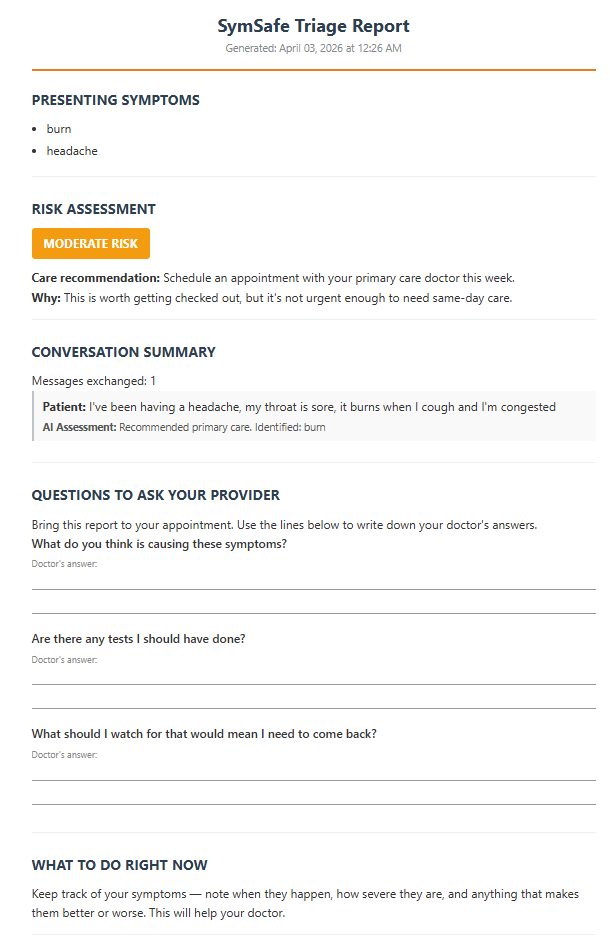
Every exchange is saved to SQLite immediately. Session metadata (message count, highest risk, symptoms) updates after each message so the clinician dashboard reflects live sessions. At session end, a standalone HTML report is generated with provider questions and answer lines for the patient to print and bring to their appointment.
Clinician Review Workstation
The clinician interface at /review is a 3-tab workstation:
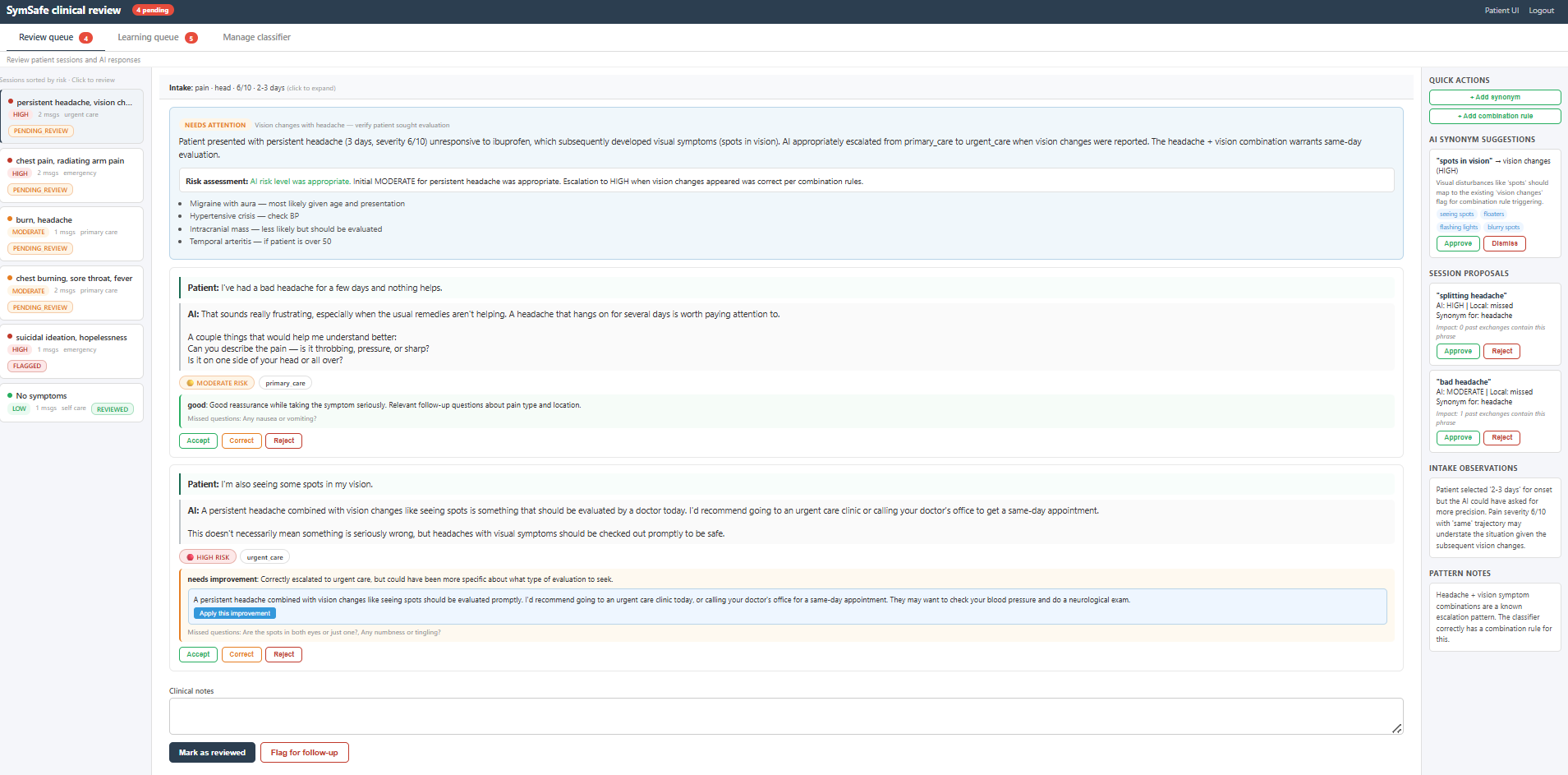
Review Queue uses a 3-panel layout. The left panel shows all sessions sorted by review status and risk level (pending HIGH-risk sessions surface first). Clicking a session loads its detail in the center panel, which shows a sticky intake summary bar, AI-generated clinical summary with review priority badge, risk assessment comparison, differential considerations, and exchange-by-exchange review with per-exchange quality scores. Each exchange has Accept, Correct, and Reject buttons. The Correct workflow includes an AI-suggested rewrite, editable risk/care level dropdowns, and a reason field. The right panel shows AI synonym suggestions with clinical reasoning, session-specific proposals, classifier gap detection, and quick-add forms.
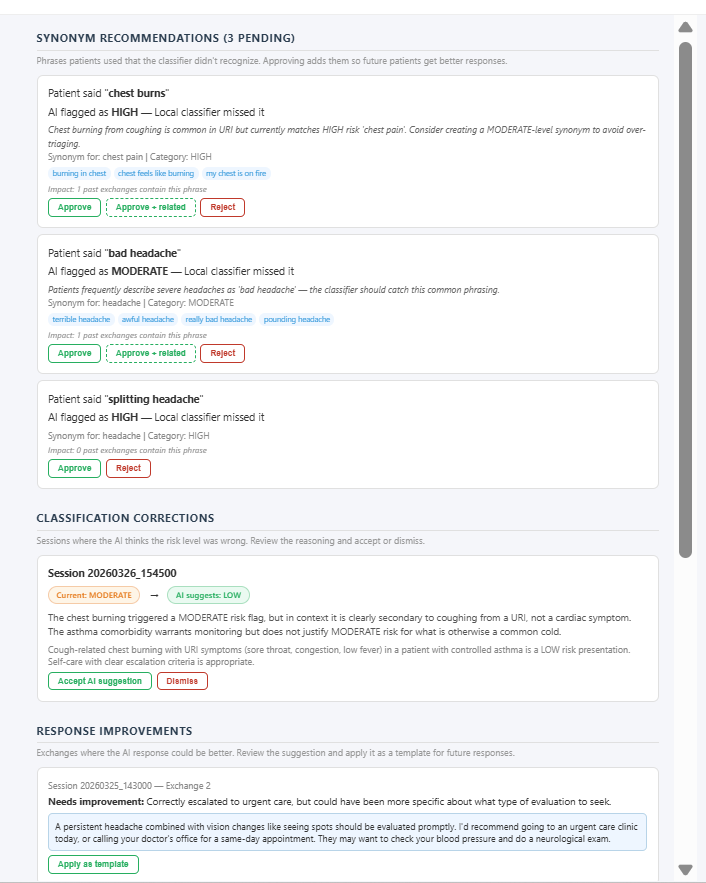
Learning Queue aggregates AI insights across all sessions. Synonym recommendations show the patient phrase, AI reasoning from the cached analysis, related phrases as approvable pills, and impact counts. Classification corrections surface sessions where the AI analysis disagrees with the assigned risk level, showing current vs suggested with explanation. Response improvements highlight exchanges scored "needs_improvement" or "poor" with suggested rewrites.
Manage Classifier groups HIGH risk flags by clinical category (Cardiac, Neurological, Respiratory, Vision, Mental health, Severe, Allergic) with collapsible sections. Each flag has a remove button. Combination rules show plain-English descriptions and are removable at runtime. Both sections support adding new entries inline.
AI Analysis Engine
The ai_analyzer.py module makes one Claude Haiku call per session with the full context — intake, every exchange, risk classifications, and current classifier flags. It returns structured JSON with: clinical_summary, risk_assessment (whether the AI risk was appropriate, with reasoning), response_quality (per-exchange scores with feedback and suggested improvements), differential_considerations, synonym_suggestions (with clinical reasoning and similar phrases), response_templates, intake_observations, review_priority (routine/needs_attention/urgent), priority_reason, and pattern_notes. Results are cached in a session_analyses SQLite table so each session is analyzed only once unless explicitly refreshed.
A secondary function generates bulk synonym suggestions — given an approved phrase mapping, Claude suggests 10-15 related phrases patients might use colloquially.
Tech Stack
Python 3.11, Flask, Anthropic Claude API (Sonnet for patient chat, Haiku for analysis and evaluation), SQLite for persistence, vanilla JavaScript for the frontend, deployed on Render. The v3.0.0 architecture was built on OpenAI GPT-4o; v4.0 migrated to Anthropic Claude.
Running Locally
git clone https://github.com/travisfunk/symsafe-ai.git
cd symsafe-ai
pip install -r requirements.txt
cp .env.example .env
# Edit .env and add your Anthropic API key
python run_web.py
Patient UI at http://localhost:5000. Clinician review at http://localhost:5000/review (default password: symsafe-review).
The CLI is also available:
python -m symsafe.main
python -m symsafe.main --intake --learn
To seed the clinician dashboard with demo data:
python -m scripts.seed_demo_data
Environment Variables
| Variable | Required | Description |
|---|---|---|
ANTHROPIC_API_KEY | Yes | Anthropic API key for Claude chat and analysis |
FLASK_SECRET_KEY | Production | Session cookie encryption key |
REVIEW_PASSWORD | No | Clinician dashboard password (default: symsafe-review) |
Testing
pytest tests/ -v
305 tests across 22 test files. All tests run without a valid API key — API calls are mocked. Coverage spans risk classification, combination rules, care routing, structured output parsing, intake questionnaire, HTML report generation, AI analyzer, SQLite persistence, gap detection, synonym proposals, Flask routes, input sanitization, authentication, rate limiting, security headers, and clinician review API endpoints.
The original test suite started at 248 tests in v3.0.0 and has grown as features were added.
Screenshots
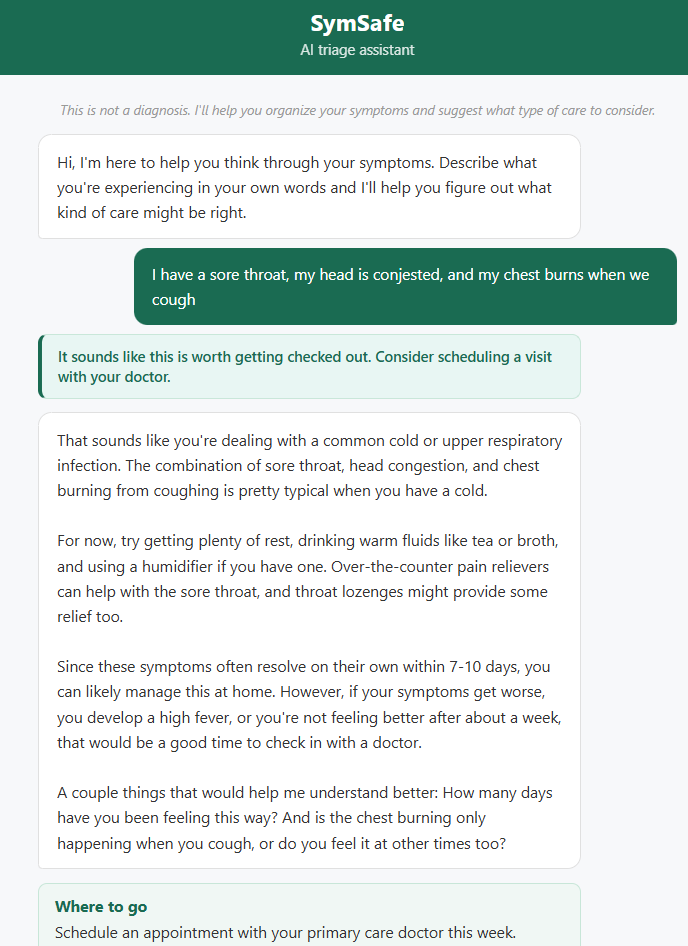
Patient triage chat
Patients describe symptoms in their own words and receive proportionate care guidance — a common cold gets home remedies, not an ER referral.
Clinician review workstation
AI analyzes each session with clinical summaries, risk justification, differential considerations, and per-exchange quality scoring. Clinicians accept, correct, or override.
Learning queue
Every classifier gap becomes a learning opportunity. AI explains why each synonym should be added and suggests related phrases for bulk approval.
Patient triage report
Patients get a printable report with provider questions and answer lines to bring to their appointment.
Key Modules
| Module | Purpose |
|---|---|
| app.py | Flask web application — patient UI, clinician dashboard, 24 API routes |
| agent.py | Claude Sonnet API calls with structured JSON output |
| evaluator.py | AI self-evaluation of responses via Claude Haiku |
| ai_analyzer.py | Session analysis engine — clinical summaries, risk review, synonym suggestions |
| risk_classifier.py | Local keyword risk classification with combination rules |
| store.py | SQLite persistence — sessions, exchanges, proposals, analysis cache |
| care_router.py | 5-tier care level routing and risk-care merging |
| feedback.py | Classifier gap detection, synonym/rule proposal generation and application |
| report.py | HTML Patient Preparation Document generator |
| intake.py | Guided intake questionnaire (7 steps) |
| config.py | Configuration, API client initialization, prompt loading |
| main.py | CLI entrypoint and conversation loop |
| logger.py | Markdown session logging |
| symptom_tree.py | Symptom-to-guidance JSON matching |
| seed_demo_data.py | Demo data seeder for clinician dashboard |
Security
Input sanitization on all routes with HTML tag stripping, XSS protection headers, rate limiting (30 messages per session), session cookie security (HttpOnly, SameSite), clinician authentication, and API key protection. See the security test suite for coverage.
Project Status
Current version: v4.0 (architecture evolved from v3.0.0)
Built by Travis in collaboration with clinical reviewers (RN and phlebotomist). This is a portfolio project demonstrating how AI can augment healthcare triage workflows while keeping clinicians in the loop. The self-improving classifier — where every clinician action makes the system smarter — is the core architectural insight.
Disclaimer
SymSafe is a prototype for demonstration and portfolio purposes only. It is not intended for real patient use, real clinical decision-making, or deployment in any healthcare setting. Always consult a qualified healthcare provider for medical advice.
Contact
Built by Travis — LinkedIn