
dddx — Agent de Design Integrado ao Repositório
tranbathanhtung/dddx
Design e código juntos — agent de IA que roda no seu repo e browser
Ver no GitHubAgent de IA que vive no seu repositório e navegador, conectando-se a agentes de código como Cursor e Claude Code. Oferece Studio com chat, preview ao vivo e canvas de design, funcionando em paralelo ao seu app de desenvolvimento.
Instalação
npx convez-ai tranbathanhtung/dddx1 comando no terminal: detecta o formato do repositório (marketplace ou plugin avulso) e instala via Claude Code. Requer Node 18+ e o Claude Code instalado.
Métricas
Casos de uso
- Prototipagem de UI integrada ao fluxo de desenvolvimento
- Chat assistido por IA durante codificação de interfaces
- Preview ao vivo com sandbox de designs isolados
- Gerenciamento de plugins (temas, templates, skills de agent)
Veredito

Ferramenta promissora para desenvolvedores que querem design colaborativo com IA no fluxo de código. Precisa de maturação na estabilidade e documentação, mas a arquitetura (proxy + sandbox + marketplace de plugins) é bem pensada para workflows reais.
README
A tradução para o português deste README ainda está na fila.
dddx
Design where you code. dddx is an AI design agent that lives in your repo and browser. It runs alongside your app, connects to coding agents like Cursor, Claude Code, OpenCode, and Codex, and gives you a Studio for chat, live preview, and design prototypes.
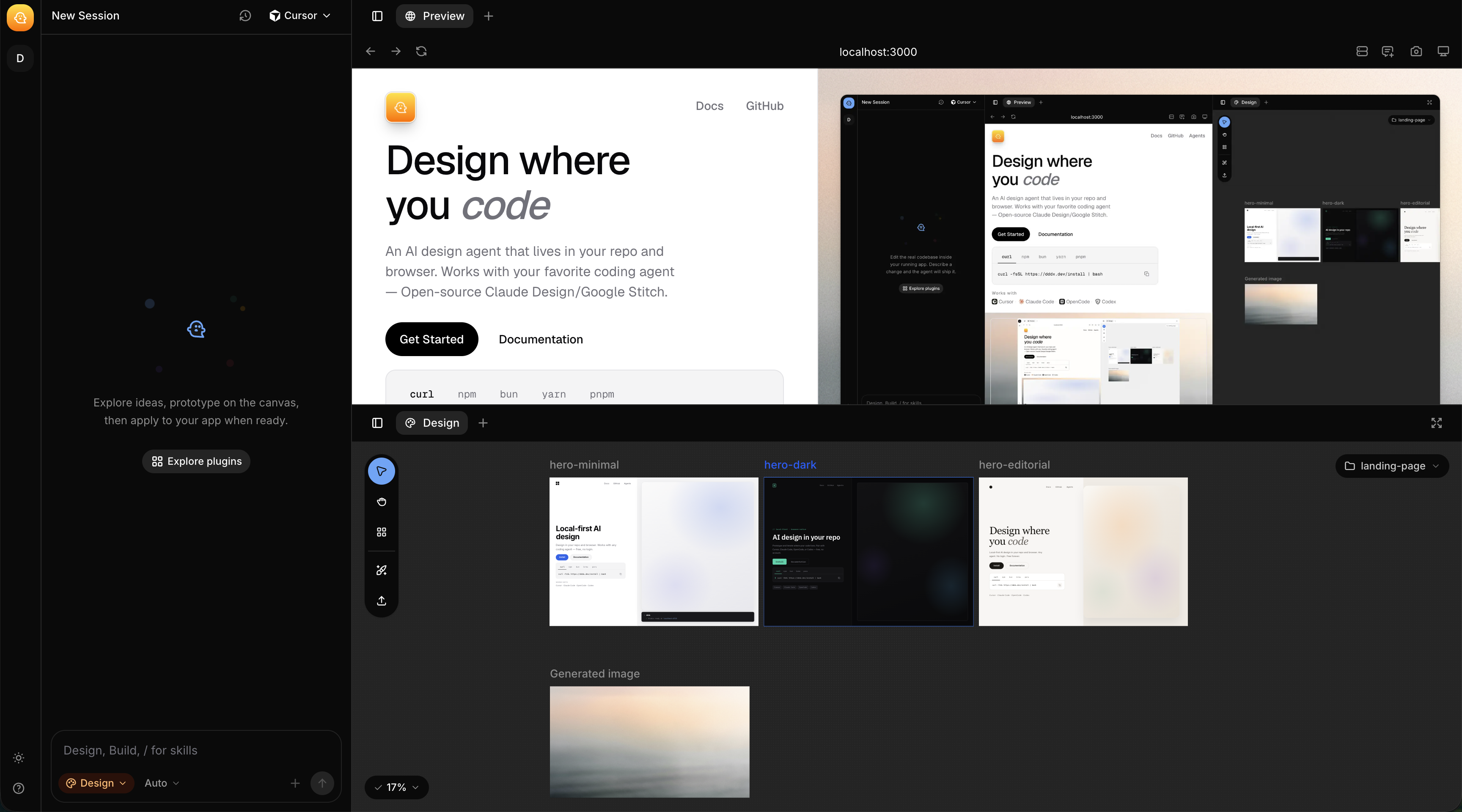
- Site: dddx.dev
- Install:
curl -fsSL https://dddx.dev/install | bash
What it does
- Starts your dev server and proxies it into Studio with live preview
- Runs agent mode against your main codebase
- Runs design mode in isolated sandboxes under
.dddx/designs/<slug>/ - Ships plugins (themes, HTML templates, agent skills) from a local marketplace
- Works with Node, Python, and Rails projects (auto-detected)
Install
curl -fsSL https://dddx.dev/install | bash
The installer puts dddx in ~/.dddx/bin and adds it to your shell PATH. Node.js 18+ is required for the dev proxy.
Other install paths:
npm install -g @dddx/cli
bun add -g @dddx/cli
Upgrade or check version:
dddx upgrade          # latest from npm
dddx upgrade 0.1.4    # specific version
dddx version
Quick start
From any project with a dev script:
cd my-app
dddx
dddx detects your package manager and framework, starts your app, opens Studio in the browser, and wires up the AI chat panel.
Common flags:
dddx -p 5173                    # proxy port (default: 3000)
dddx --script dev               # npm/bun script to run (default: dev)
dddx --command "vite --port 5173"  # override auto-detection
dddx --startup-timeout 60       # wait longer for the app to boot
dddx --debug                    # verbose logs
dddx --no-open-browser          # skip auto-opening Studio
CLI reference
| Command | Description |
|---|---|
dddx | Start dev environment + Studio |
dddx version / dddx v | Print installed CLI version |
dddx upgrade [version] | Upgrade @dddx/cli |
dddx plugin add <source> | Add a plugin marketplace to ~/.dddx/plugins/<id> |
dddx plugin remove <id> | Remove an installed marketplace |
dddx plugin index | Generate plugin.json or marketplace.json |
dddx plugin validate | Validate plugin manifests |
Plugin commands
# Add the official marketplace from GitHub
dddx plugin add https://github.com/tranbathanhtung222/ddd

# Index a plugin folder (for authors)
dddx plugin index --dir ./my-plugin --name "My Plugin"

# Index a collection and capture HTML previews
dddx plugin index --dir . --collection --capture-previews
Plugins install under ~/.dddx/plugins/. Each plugin can ship themes (DESIGN.md style guides), templates (HTML starting points), and skills (agent instructions).
Configuration
dddx reads config from package.json under a top-level "dddx" key.
Single app
For a normal project, dddx runs the dev script in the current directory. You can override per-package settings:
{
  "dddx": {
    "port": "5173",
    "script": "dev",
    "name": "My App"
  }
}
| Field | Description |
|---|---|
script | Dev script name (default: dev) |
port | Proxy port for Studio preview |
name | Label shown in Studio |
Monorepo
In a workspace with multiple packages that have dev scripts, list the apps you want proxied in the root package.json:
{
  "dddx": {
    "script": "dev",
    "apps": {
      "apps/web": { "port": "3000" },
      "apps/docs": { "port": "3001", "name": "Docs" }
    }
  }
}
- Every workspace package with a matching
devscript is started - Only packages listed under
dddx.appsget a Studio preview proxy - If a monorepo has no
dddx.apps, dddx prints a config guide and exits
This repo's root config:
{
  "dddx": {
    "apps": {
      "apps/web": { "port": "3000" }
    }
  }
}
Project layout
When you run dddx in a project, it creates a .dddx/ directory:
my-project/
├── .dddx/
│   ├── designs/          # design-mode prototypes (one folder per slug)
│   │   └── landing/
│   │       ├── hero.html
│   │       └── hero.css
│   └── dev.json          # local dev state (e.g. studio opened timestamp)
├── package.json
└── src/
Agent vs design mode
| Mode | Write target | Use for |
|---|---|---|
| agent | Main project (outside .dddx/designs/) | Shipping code, refactors, features |
| design | .dddx/designs/<slug>/ | Visual prototypes, flows, mockups |
Design prototypes are plain HTML/CSS/JS served over HTTP. Each top-level .html file becomes a canvas frame in Studio. Use device suffixes for frame size:
screen.html— desktop (1440×1024)screen.tablet.html— tablet (834×1112)screen.mobile.html— mobile (390×844)
See examples/react/.dddx/designs/ for real prototypes.
Supported coding agents
dddx connects to agents through the Agent Client Protocol (ACP):
- Cursor — agent, plan, ask modes
- OpenCode — build, plan modes
- Claude Code (via ACP)
- Codex (via ACP)
Agent capabilities and model options are defined in packages/cli/src/agents/registry.json.
Environment variables
| Variable | Description |
|---|---|
DDDX_STUDIO_PORT | Studio worker port (default: 4723) |
DDDX_ORIGIN | Override CDN/site origin (staging, local web app) |
Bun loads .env automatically when developing this repo.
Repository structure
This is a Turborepo monorepo managed with Bun.
ddd/
├── apps/
│   └── web/                 # Marketing site + install script (dddx.dev)
├── packages/
│   ├── cli/                 # @dddx/cli — dev server, Studio, MCP, plugins
│   ├── sdk/                 # @dddx/sdk — Studio UI (React)
│   ├── plugins-official/    # Official themes, templates, and skills
│   └── r2/                  # R2/CDN publish helpers
├── examples/
│   └── react/               # Vite + React example with design prototypes
├── package.json             # Workspace root + dddx.apps config
└── turbo.json
Packages
| Package | npm name | Description |
|---|---|---|
packages/cli | @dddx/cli | CLI binary, dev proxy, Studio server, plugin system |
packages/sdk | @dddx/sdk | Studio frontend bundled and served from R2 in production |
packages/plugins-official | — | Official plugin marketplace (design-md, hallmark, hyperframes, …) |
packages/r2 | @dddx/r2 | Internal S3/R2 upload utilities |
apps/web | — | Next.js landing page and /install route |
Development
Prerequisites
- Bun 1.3+ (package manager for this repo)
- Node.js 18+ (used by the CLI dev proxy at runtime)
Setup
git clone https://github.com/tranbathanhtung222/ddd.git
cd ddd
bun install
Run from source
# CLI with hot reload (from repo root or any project)
bun run dddx

# Built CLI binary (after build:caps)
bun run dddx:prod

# Example React app
cd examples/react
bun run dddx
Scripts
| Script | Description |
|---|---|
bun run dddx | Run CLI from source with hot reload |
bun run dddx:prod | Run built packages/cli/bin/dddx |
bun run dev | Start all turbo dev tasks |
bun run build | Build all packages |
bun run typecheck | Type-check all workspaces |
bun run lint | Lint all packages |
bun run build:caps | Build agent capability bundles |
bun run build:plugins | Index official plugins + capture previews |
bun run clean | Remove build artifacts |
Build and publish the CLI:
bun run --cwd packages/cli build
bun run --cwd packages/cli publish
Build and publish the SDK to R2:
bun run --cwd packages/sdk build
bun run --cwd packages/sdk publish
Run the marketing site locally:
bun run dev --filter=web
# or
cd apps/web && bun dev
Testing
bun test                          # all tests
bun test packages/cli/src/...     # specific file
License
See individual package licenses. Official plugins include MIT-licensed themes and templates from third-party collections (e.g. awesome-design-md).