
Windows Microphone Manager
tomrussell-ia/windows-mic-manager
Seletor de microfones com flyout para Windows (WinUI 3)
Ver no GitHubAplicação de bandeja do sistema (system tray) para Windows 10/11 que permite seleção rápida de microfones com interface tipo flyout nativo. Gerencia automaticamente os papéis de dispositivo padrão e comunicação, com detecção em tempo real de mudanças de hardware e controle de mute.
Instalação
npx convez-ai tomrussell-ia/windows-mic-manager1 comando no terminal: detecta o formato do repositório (marketplace ou plugin avulso) e instala via Claude Code. Requer Node 18+ e o Claude Code instalado.
Métricas
Casos de uso
- Alternar rapidamente entre múltiplos microfones sem acessar Configurações
- Sincronizar dispositivos padrão para aplicações de comunicação (Teams, Zoom)
- Gerenciar estado de mute da bandeja do sistema com ícone indicador
Veredito

Ferramenta prática em C# que preenche uma lacuna no Windows usando padrões robustos (WinUI 3, MVVM, COM interop). Adequada para quem precisa de switching rápido de áudio, mas requer .NET 8 instalado e é específica do Windows.
README
A tradução para o português deste README ainda está na fila.
Windows Microphone Manager
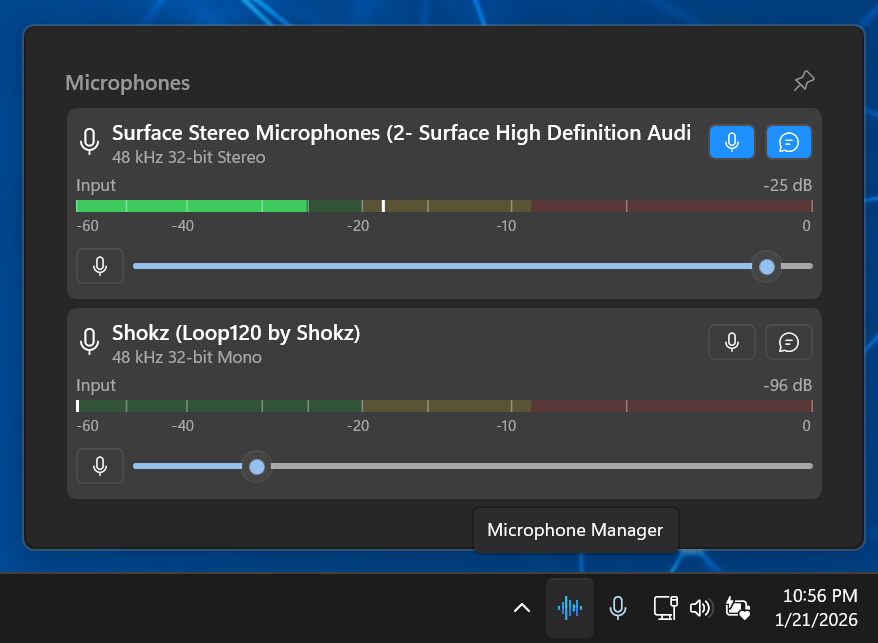
A Windows 10/11 system tray application for quick microphone selection, similar to the native speaker quick-select flyout.

Features
- System tray icon - Microphone indicator that shows muted state
- Click to open flyout - Shows all available microphones
- One-click selection - Changes both Default and Communication Device roles together
- Mute/unmute button - Quick toggle in flyout, tray icon reflects muted state
- Real-time updates - Automatically detects device changes (plug/unplug)
Requirements
- Windows 10 version 1809 or later (Windows 11 recommended)
- .NET 8.0 Runtime (included in self-contained builds)
Building
Prerequisites
- .NET 8.0 SDK
- Windows SDK 10.0.19041.0 or later
Build from command line
dotnet build MicrophoneManager.WinUI/MicrophoneManager.WinUI.csproj -p:Platform=x64
Note: WinUI 3 requires the -p:Platform=x64 parameter.
Build portable EXE (Release)
Recommended (uses the checked-in publish profile):
dotnet publish MicrophoneManager.WinUI/MicrophoneManager.WinUI.csproj -c Release -p:PublishProfile=win-x64-singlefile
The output will be in publish\win-x64-singlefile\MicrophoneManager.WinUI.exe.
Usage
- Run
MicrophoneManager.WinUI.exe - A microphone icon appears in the system tray
- Left-click the icon to open the microphone selection flyout
- Click on any microphone to set it as the default
- Use the "Mute/Unmute" button at the bottom to toggle mute
- Right-click the icon and select "Exit" to close the application
Technical Details
Architecture
- Framework: WinUI 3 (.NET 8)
- System Tray: H.NotifyIcon.WinUI
- Audio Management: NAudio + IPolicyConfig COM interface
- MVVM: CommunityToolkit.Mvvm
Setting Default Microphone
Windows does not provide a public API to change the default audio device. This application uses the undocumented IPolicyConfig COM interface, which is the standard approach used by utilities like EarTrumpet. This works reliably but is not officially supported by Microsoft.
Device Roles
Windows has two "default" designations:
- Default Device (eConsole) - Used by most apps
- Default Communication Device (eCommunications) - Used by Teams, Zoom, etc.
This application sets both roles when you select a microphone.
Project Structure
MicrophoneManager.WinUI/
├── App.xaml                    # Application entry
├── MainWindow.xaml             # Main window with tray icon
├── Views/
│   ├── FlyoutWindow.xaml       # Flyout window container
│   └── MicrophoneFlyout.xaml   # Flyout UI with device list
├── ViewModels/
│   ├── TrayViewModel.cs        # Tray icon state
│   ├── MicrophoneListViewModel.cs
│   └── MicrophoneEntryViewModel.cs
├── Services/
│   ├── AudioDeviceService.cs   # NAudio device enumeration
│   ├── PolicyConfigService.cs  # IPolicyConfig wrapper (set defaults)
│   ├── ObsMeterMath.cs         # OBS-style meter calculations
│   ├── StartupService.cs       # Windows startup configuration
│   └── IconGenerator.cs        # Programmatic icon generation
├── Models/
│   └── MicrophoneDevice.cs     # Device data model
└── Converters/
    └── [XAML value converters]

MicrophoneManager.Tests/
└── [xUnit test suite]
Development
This project was developed with assistance from AI coding agents:
- GitHub Copilot - Code completion and suggestions
- Claude (Anthropic) - Architecture design and implementation
Specification Management
Feature development follows a specification-driven workflow using OpenSpec:
- All significant features start with a proposal in
openspec/changes/ - Requirements and scenarios are documented before implementation
- Changes are validated and approved before coding begins
- Completed changes are archived with their specifications
All code has been reviewed, tested, and validated by human developers. See CONTRIBUTING.md for guidelines on contributing to this project.
License
MIT License - Feel free to use and modify as needed.
Attribution
- Tray icon (
MicrophoneManager.WinUI/Assets/wave-sound.png): Radio icons created by Freepik - Flaticon