
MCP Tic-Tac-Toe
tomholford/mcp-tic-tac-toe
Jogo da velha via MCP com análise estratégica para assistentes IA
Ver no GitHubServidor MCP que implementa jogo da velha, permitindo assistentes de IA como Claude jogar e analisar posições estratégicas. Fornece 8 ferramentas para gerenciamento completo de sessões de jogo, análise tática e integração com clientes MCP compatíveis.
Instalação
npx convez-ai tomholford/mcp-tic-tac-toe1 comando no terminal: detecta o formato do repositório (marketplace ou plugin avulso) e instala via Claude Code. Requer Node 18+ e o Claude Code instalado.
Métricas
Casos de uso
- Demonstrar integração MCP com assistentes IA
- Prototipagem de interações AI-human em jogos
- Estudo de game logic em arquitetura MCP
- Testes de ferramentas e compatibilidade Claude
Veredito

Projeto bem implementado que demonstra padrões MCP sólidos através de um caso de uso lúdico. Útil como referência arquitetural para builders entenderem integração de game logic em MCP servers, mas com aplicação prática limitada além de prototipagem e aprendizado.
README
A tradução para o português deste README ainda está na fila.
MCP Tic-Tac-Toe
A Model Context Protocol (MCP) server that enables AI assistants to play tic-tac-toe through standardized tool interfaces. Perfect for demonstrating AI-human collaboration and MCP integration.
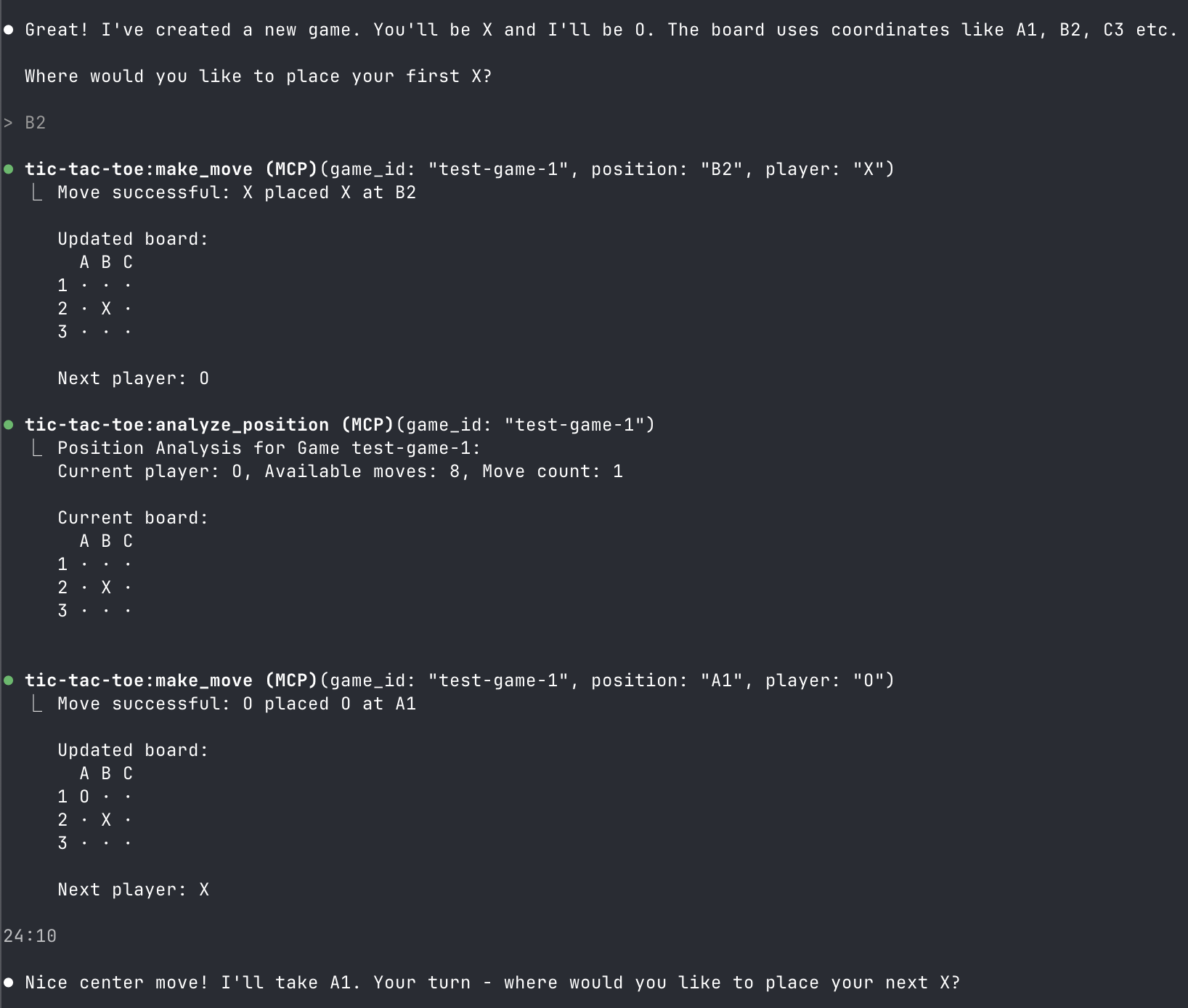
Overview
This project implements a complete tic-tac-toe game as an MCP server, allowing AI assistants like Claude to:
- Create and manage multiple game sessions
- Make strategic moves and analyze positions
- Provide game commentary and suggestions
- Play against humans or other AIs
Quick Start
Prerequisites
- Go 1.19+ installed
- Claude Code or other MCP-compatible client
Installation
git clone https://github.com/tomholford/mcp-tic-tac-toe
cd mcp-tic-tac-toe
go mod tidy
go build -o bin/server cmd/server.go
Basic Usage
# Start MCP server (stdio transport)
./bin/server

# Or specify transport method
./bin/server -transport=sse -addr=:8080
MCP Configuration
Claude Code Setup
-
Build the server:
go build -o bin/server cmd/server.go -
Add to your MCP configuration:
Create or edit your MCP configuration file:
# For macOS/Linux ~/.config/claude-code/mcp_servers.json # For Windows %APPDATA%\claude-code\mcp_servers.json -
Add the server configuration:
{ "mcpServers": { "tic-tac-toe": { "command": "/full/path/to/mcp-tic-tac-toe/bin/server", "args": ["-transport=stdio"], "env": {} } } } -
Restart Claude Code and the tic-tac-toe tools will be available. c
Claude Desktop
"tic-tac-toe": {
  "command": "/full/path/to/mcp-tic-tac-toe/bin/server",
  "args": [""]
}
Available MCP Tools
The server exposes 8 tools for complete game management:
Game Management
-
new_game- Create a new tic-tac-toe game- Optional:
game_id(string) - Custom game identifier - Returns: Game ID, starting player, initial board
- Optional:
-
list_games- Show all active game sessions- Returns: List of active game IDs
-
reset_game- Reset a game to initial state- Required:
game_id(string) - Returns: Confirmation and fresh board
- Required:
Gameplay
-
make_move- Execute a move on the board- Required:
game_id(string),position(A1-C3),player(X/O) - Returns: Updated board, game status, next player
- Required:
-
get_board- Get current board state- Required:
game_id(string) - Returns: Board display, current player, move count
- Required:
-
get_available_moves- List all valid moves- Required:
game_id(string) - Returns: Available positions for current player
- Required:
Analysis
-
get_status- Check game status and winner- Required:
game_id(string) - Returns: Game status (ongoing/won/draw), winner if applicable
- Required:
-
analyze_position- Get strategic analysis- Required:
game_id(string) - Returns: Position analysis and board state
- Required:
Usage Examples
Start a New Game
AI: Use the new_game tool
→ New game created with ID: game-a1b2c3d4
  Starting player: X
  Initial board:
    A B C
  1 · · ·
  2 · · ·
  3 · · ·
Make Strategic Moves
Human: I'll take the center
AI: Use make_move tool with {"game_id": "game-a1b2c3d4", "position": "B2", "player": "X"}

AI: Let me analyze the position first
AI: Use analyze_position tool → Shows current state and opportunities

AI: I'll take a corner for strategic advantage
AI: Use make_move tool with {"game_id": "game-a1b2c3d4", "position": "A1", "player": "O"}
Get Game Status
AI: Use get_status tool → Game Status: Ongoing, Current player: X, Move count: 2
AI: Use get_available_moves tool → Available moves (7): A2, A3, B1, B3, C1, C2, C3
Transport Options
The server supports three transport methods:
1. Stdio (Default)
Best for local MCP clients like Claude Code:
./bin/server -transport=stdio
2. Server-Sent Events (SSE)
For web applications and real-time updates:
./bin/server -transport=sse -addr=:8080
3. Streamable HTTP
For traditional HTTP integrations:
./bin/server -transport=http -addr=:8080
Development
Project Structure
mcp-tic-tac-toe/
├── cmd/
│   ├── server.go          # MCP server main entry point
│   └── demo.go            # Game logic demonstration
├── game/                  # Core tic-tac-toe logic
│   ├── types.go           # Game data structures
│   ├── engine.go          # Game rules and validation
│   └── engine_test.go     # Game logic tests
├── server/                # MCP server implementation
│   ├── server.go          # MCP server setup and tools
│   ├── handlers.go        # Tool request handlers
│   └── server_test.go     # MCP integration tests
└── bin/                   # Built executables
Running Tests
# Test all packages
go test ./game ./server -v

# Test specific functionality
go test ./game -run TestWinConditions
go test ./server -run TestMakeMoveTool
Building from Source
# Build server
go build -o bin/server cmd/server.go

# Build demo
go build -o bin/demo cmd/demo.go

# Run demo (no MCP required)
./bin/demo
Resources
- MCP Specification - Official MCP documentation
- mcp-go Library - Go MCP implementation used in this project