
Agent Andon
tianshanghong/agent-andon
Painel visual para monitorar agentes de IA em tempo real no iPad ou navegador
Ver no GitHubQuadro de status e notificador para agentes de IA (Claude Code, Codex) que exibem em tempo real o estado do processamento em um iPad ou navegador. Mostra quando um agente está trabalhando, precisa de intervenção, terminou ou travou, com zero dependências e auto-hospedagem.
Instalação
npx convez-ai tianshanghong/agent-andon1 comando no terminal: detecta o formato do repositório (marketplace ou plugin avulso) e instala via Claude Code. Requer Node 18+ e o Claude Code instalado.
Métricas
Casos de uso
- Monitorar múltiplos agentes Claude Code/Codex simultaneamente
- Receber alertas desktop quando um agente precisa de aprovação ou fica travado
- Acompanhar progresso de tarefas de IA sem olhar constantemente o terminal
Veredito

Solução prática e minimalista (zero dependências) para monitorar agentes de IA, especialmente útil em fluxos com Claude Code. Implementação TypeScript limpa, mas restrita ao ecossistema Anthropic/OpenAI e requer auto-hospedagem.
README
A tradução para o português deste README ainda está na fila.
🚦 Agent Andon — a status board & notifier for Claude Code and Codex
Glance at an iPad — or get a desktop alert — the moment your AI coding agent is working, needs you, done, or stuck.


Stand an old iPad on your desk. Submit a task to Claude Code or OpenAI Codex, then go do something else — one glance tells you whether the agent is working, needs you, done, or stuck. No babysitting the terminal, no forgetting to come back.
It's a lightweight, self-hosted way to monitor several AI coding agents at once and get notified the instant one needs your approval, finishes its turn, or gets blocked — across an iPad/phone/browser, a desktop banner, or your menu bar. No app, no account, zero dependencies.
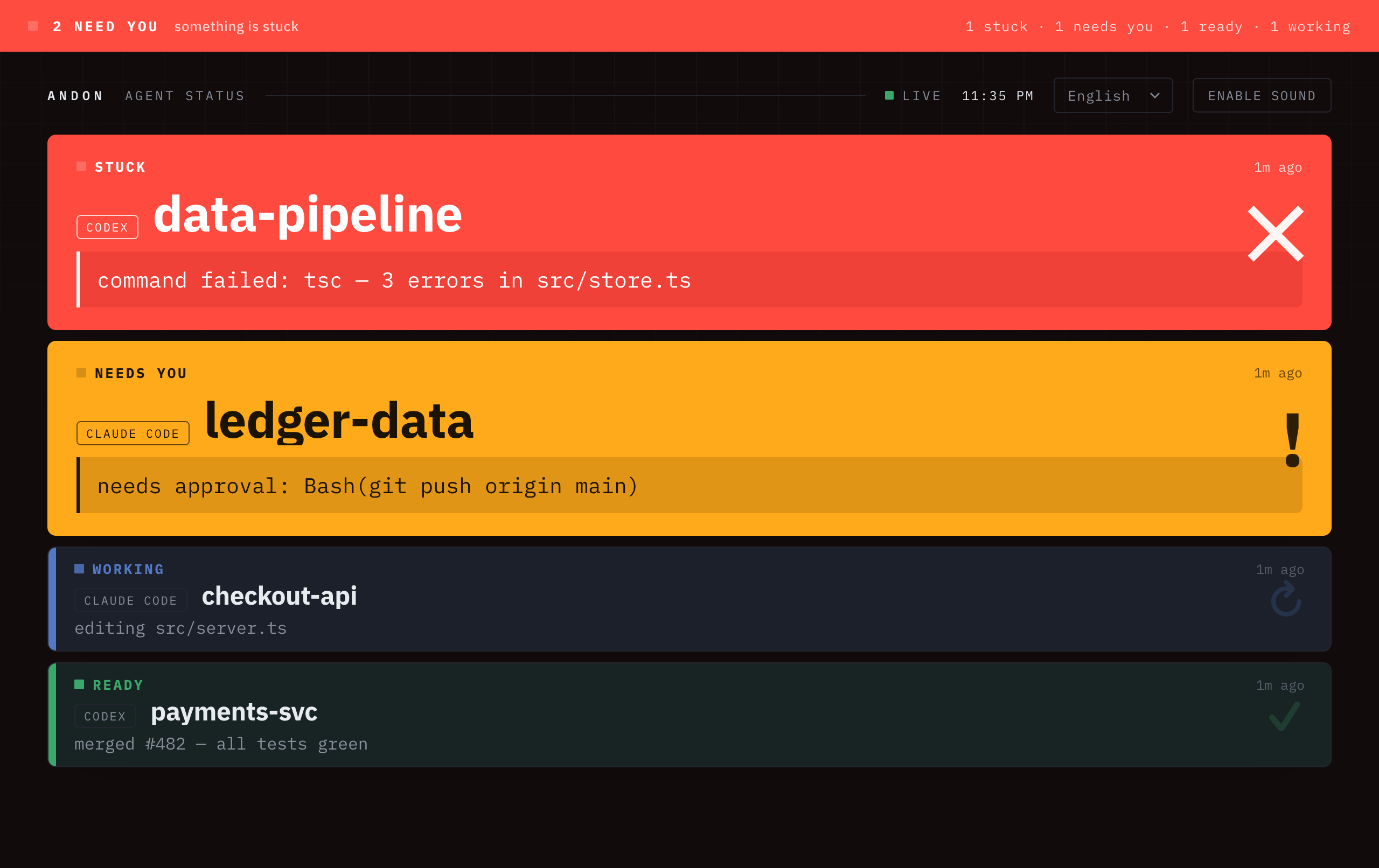
Andon (行灯) is the lean-manufacturing signal board: a light that tells the whole floor, at a glance, whether a line is running or needs a human. Same idea, for your agents.
- Zero runtime dependencies — pure Node.js standard library.
- One command to wire up —
andon install claudeedits your hooks for you (with a backup). - Multi-agent native — one full-width row per session; whatever needs you floats to the top and a signal bar across the top shows the most-urgent state.
- Speaks your language — one language per screen, auto-detected from the browser (English · 中文 · 日本語 · 한국어 · Español · Deutsch · Français); pick another from the header dropdown, or
?lang=to force one. - Just an iPad + Safari — no app, no hardware, no account.
中文用户:把闲置 iPad 立在桌边,变成 Claude Code / Codex 的"安灯"状态看板。提交任务后放心去干别的,一瞥就知道 agent 在跑 / 该你了 / 完成了 / 卡住了。
Contents · How it works · Install · Quickstart · Commands · Notifications · Security · Configuration · Develop · Troubleshooting
How it works
Claude Code / Codex ──(native hook)──▶ andon server (your Mac) ◀──(SSE push)── iPad Safari
- Detect — each tool's native hook mechanism reports state changes. No change to your workflow.
- Relay — a tiny HTTP server on your Mac receives the events.
- Display — the iPad holds an open SSE stream, so a state change shows in well under a second (it falls back to 1 s polling if SSE is unavailable). A signal bar across the top is the "tower light," readable across the room; the single most-urgent row pulses and chimes.
State priority (the top bar — and the row order — take the most urgent one):
stuck (red) > needs-you (amber) > done (green) > working (blue) > idle.
The board
- One full-width row per process, stacked top → bottom; the board scrolls when there are many.
- Size by urgency — stuck and needs-you rows are large and show their full message (never truncated); working / ready / idle rows stay compact, so a busy floor still fits a glance.
- What needs you floats to the top and the board auto-scrolls it into view — the first screen is always the things waiting on you.
- Calm by default — only the single most-urgent row pulses; everything else stays still. Tap Enable sound once on the iPad for the chime (remembered across reloads).
- Your language — one language per screen, auto-detected from the browser:
English · 中文 · 日本語 · 한국어 · Español · Deutsch · Français. Pick another from the header
dropdown (a native picker that scales to any number of languages; remembered per device), or open
with
?lang=en|zh|ja|ko|es|de|frto force one. Agent messages (commands, file paths) stay verbatim, and adding a language is a single block inassets/dashboard.html.
Install
npm install -g agent-andon # or: npx agent-andon serve --demo
From source:
git clone https://github.com/tianshanghong/agent-andon && cd agent-andon
npm install && npm run build
node dist/cli.js serve --demo
Requires Node.js ≥ 18.
Quickstart (60 seconds)
1. Verify the board with fake data:
andon serve --demo
It prints a http://<your-mac-ip>:8787 URL. Open it on the iPad — you should see two
rows cycling colors. Once it looks right, Ctrl-C and run for real:
andon serve
2. Set up the iPad (same Wi-Fi as the Mac):
- Safari → open the printed URL. It's
http://, nothttps://. - Tap "Enable sound" once to unlock the chime (Safari mutes audio until you tap; this is the board's in-browser sound, separate from the default-on desktop alerts). The choice is remembered across reloads — you won't need to tap it again.
- Share → Add to Home Screen → launch from the icon for a full-screen, address-bar-free board.
- Belt-and-suspenders against sleep: Settings → Display & Brightness → Auto-Lock → Never. (The page also requests a Wake Lock.)
3. Wire up your agents:
andon install claude        # edits ~/.claude/settings.json (keeps a .andon-backup)
andon install codex         # edits ~/.codex/hooks.json    (keeps a .andon-backup)
andon doctor                # confirm everything's connected; reprints the iPad URL
Restart your Claude Code session and it lights up the board automatically. That's it.
Commands
| Command | What it does |
|---|---|
andon serve [--demo] [--port N] [--token T] [--no-notify] [--say] | Run the board server; desktop alerts on by default (--no-notify off, --say adds speech) |
andon install claude | Wire Claude Code status hooks (timestamped backup) |
andon install codex | Wire Codex lifecycle hooks (run /hooks to trust) |
andon uninstall <claude|codex> | Remove only what Andon added; leaves the rest of your config intact |
andon doctor | Health check + what's wired + iPad URL |
andon post <state> <agent> [title] [msg] | Push a status by hand |
andon sub <+n|-n> [id] | Bump a process's background-task count |
andon hook / andon codexhook | (internal — invoked by the hooks) |
andon install --dry-run claude prints the change without writing.
Event → state mapping (Claude Code)
| Claude Code event | Board state | When |
|---|---|---|
SessionStart | idle (slate) | session launched — the tile appears right away |
UserPromptSubmit | working (blue) | you just submitted a prompt |
PostToolUse | working (blue) | a tool just ran — clears amber the moment you approve |
Notification | needs-you (amber, pulses) | waiting on permission / your input |
Stop | ready (green) | turn handed back to you — your move, not "all done" |
StopFailure | stuck (red, pulses) | the turn failed (newer Claude Code only) |
SessionEnd | removed | session ended; tile disappears |
Multiple sessions each get their own tile (keyed by session_id). One process =
one tile; its sub-agents roll up into it rather than spawning their own. A session
that was already running before the board started appears on its next event
(prompt, tool, turn end) — Andon stays out of your statusLine entirely.
Background work: keep a card honest past "done"
Stop means the foreground agent handed the turn back — it does not mean
background work finished. If a process kicks off background workflows, have them
report so the card stays "running" (blue) until they drain instead of falsely
going green:
export ANDON_SESSION="<this process's tile id>"   # the session_id of the parent tile
andon sub +1     # a background task started
#   ...do the work...
andon sub -1     # it finished
While the count is > 0 the card reads WORKING ⋯N background and only turns
green once every task has reported -1.
Codex
Modern Codex (≈ 0.117+) has a full Claude-compatible hooks system, so Andon gets the same lifecycle as Claude Code — including amber needs-you:
andon install codex # wires lifecycle hooks → ~/.codex/hooks.json
| Codex hook event | Board state |
|---|---|
SessionStart | idle (tile appears at launch) |
UserPromptSubmit / PostToolUse | working (blue) |
PermissionRequest | needs-you (amber) |
Stop | ready (green) |
SessionEnd | removed |
One extra step Codex requires: new hooks must be trusted before they run — run
/hooksinside Codex once (or launchcodex --dangerously-bypass-hook-trust).andon uninstall codexcleanly removes the hooks again, with a timestamped backup.
Residual caveat: red "stuck" stays staleness-based (no dedicated failed-turn hook). (Already-running sessions appear on their next event, same as Claude.)
Notifications: desktop alerts and menu bar
Andon's whole job is to grab your attention at the right moment — when an agent needs you or gets blocked — and otherwise stay quiet. The board is the universal channel (works on any device); these add more, each degrading gracefully across macOS / Linux / Windows.
Native desktop alerts — a banner on the machine running the server, on by default. Loud for the states that need you, quiet for completion:
- needs-you (amber) / stuck (red) → banner + sound (immediate).
- done (green) → one quiet banner (no sound), debounced 4s so a transient green never fires a false "ready".
andon serve                 # alerts on by default
andon serve --say           # also speak needs-you / stuck aloud
andon serve --no-notify     # turn alerts off
Uses osascript/say (macOS), notify-send/spd-say (Linux), PowerShell
toast/System.Speech (Windows). Missing tool → silently skipped. (Auto-off
under --demo so the cycling fake agents don't spam you.) Alerts are
throttled (per-session cooldown + a global token bucket) so a busy — or
malicious — LAN client posting to /event can't drive a process-spawn flood.
Menu / status bar — a one-glance summary without a separate iPad:
curl -s http://127.0.0.1:8787/menubar # plain-text summary endpoint
Wire it to SwiftBar/xbar (macOS) or Waybar/polybar (Linux); see
examples/andon-menubar.5s.sh.
Fewer interruptions? Configure approvals yourself
Andon never touches your permission/approval settings — that's yours to own. If amber "needs you" fires more than you'd like, pre-approve safe operations in your agent's own config (Andon will then only light up for the rest):
- Claude Code — add read-only patterns to
permissions.allowin~/.claude/settings.json, e.g."Read","Bash(git status:*)","Bash(npm test:*)". Yourdeny/askrules always take precedence, and the Bash matcher is shell-operator-aware (soBash(git status:*)won't approvegit status && rm -rf). See/permissions. - Codex — set
approval_policy(e.g."untrusted"auto-runs trusted read-only commands) and/orsandbox_modein~/.codex/config.toml.
Keeping this in your hands means Andon can never weaken your safety rules — and the board stays a faithful mirror of when you're genuinely needed.
Naming a tile
The default title is the project folder name. Override per-terminal:
ANDON_LABEL="backend refactor" claude
ANDON_LABEL="landing copy"     codex
Run it in the background
# tmux
tmux new -s andon 'andon serve'

# or nohup
nohup andon serve >/tmp/agent-andon.log 2>&1 &

# or at login: see examples/com.agentandon.server.plist
Security
By default the server binds 0.0.0.0 with no authentication — anyone on the LAN can
read and post status. Fine on a trusted home Wi-Fi; don't run it on a public/untrusted
network. For a shared network, set a token (export it everywhere the hooks run too):
ANDON_TOKEN=somesecret andon serve
With a token set, /state and /event require it. The hooks and CLI send it as an
x-andon-token header automatically (as long as ANDON_TOKEN is in their environment);
on the iPad, open the board with ?token=somesecret and it carries the token through.
/healthz stays open so andon doctor always works.
The board only ever exposes high-level status (state, project name, a one-line message) — never code or full logs. Event bodies are capped at 64 KB.
Configuration
| Env var | Default | Meaning |
|---|---|---|
AGENT_STATUS_URL | http://127.0.0.1:8787 | server base URL the hooks post to |
ANDON_TOKEN | (none) | shared token required by /state and /event when set |
ANDON_PORT / ANDON_HOST | 8787 / 0.0.0.0 | server bind |
ANDON_LABEL | folder name | tile title (per terminal) |
ANDON_SESSION | — | override a tile's session id (e.g. for a background job) |
Develop
npm run build     # tsc -> dist/
npm test          # node:test unit tests for the store (Node 22.6+)
npm run dev       # tsc --watch
Architecture: src/store.ts is the pure, tested state model; src/server.ts is the
HTTP layer; src/commands/* are the CLI verbs; assets/dashboard.html is the
self-contained board.
Troubleshooting
- iPad can't open the page — same Wi-Fi?
httpnothttps? Mac firewall allowing incoming connections (System Settings → Network → Firewall)? IP copied correctly (it's printed at startup, andandon doctorreprints it)? - Claude hook does nothing — run
claude --debugonce and watch for hook errors; re-runandon install claude;andon doctorto confirm. - Codex tiles never appear / never change — run
/hooksinside Codex once to trust the hooks (Codex skips untrusted hooks);andon doctorconfirms wiring. - A "working" tile is stuck — a process likely died before sending its end event.
It auto-clears after 6h; for Codex,
andon post gone codexfrom that project dir clears it now.
FAQ
How do I get notified when Claude Code finishes or needs approval?
Run andon serve (desktop alerts are on by default) and andon install claude. You get a desktop
banner the instant a session needs you or finishes, plus the live board on any device.
Can I monitor multiple Claude Code / Codex sessions at once? Yes — that's the point. Every session is its own row, and whatever needs you floats to the top.
Does it work with OpenAI Codex?
Yes. andon install codex wires Codex's lifecycle hooks (run /hooks once to trust them).
Do I actually need an iPad? No. The board is a plain web page — open it on any phone, tablet, or browser. A spare iPad just makes a nice always-on wall display. You also get desktop banners and a menu-bar summary.
Is my code or data sent anywhere? No — by default nothing about your agents leaves your machine. Andon is fully self-hosted: no account, no telemetry, no analytics, no "phone home." It only ever holds high-level status (state, project name, a one-line message) — never your code, logs, or secrets.
Two honest caveats: (1) the board loads its web fonts from Google Fonts unless you self-host them — that request carries no agent data, just your browser's normal font fetch. (2) Optional features (phone push, and a possible hosted relay) are strictly opt-in and each spells out exactly what leaves your machine — a hosted relay would be designed so even it can't read your agents' messages. They never change this local-first default.
Hosted ("board from anywhere")
Andon is local-first and free to self-host forever — that stays the default. If you'd rather reach your board (and get phone alerts) from anywhere without setting up HTTPS/Tailscale, there's an optional, opt-in hosted relay built in:
andon relay                      # run the zero-knowledge relay (you or anyone can host it)
andon hosted setup <relay-url>   # opt in — generates a key that never leaves your machine
andon verify <relay-url>         # check the relay serves the exact open-source code
Every status is end-to-end encrypted on your machine before it leaves; the relay routes + stores
ciphertext only and can't read your agents' titles, messages, or code. The board you open is the
same board, decrypted in your browser with a key carried in the link's #fragment (never sent to the
server) — no local server needed.
What the relay can / can't see — ✓ can't read: prompts, code, project names, messages. • can see: that you're active and roughly when, how many sessions, your IP. Self-host shares nothing and stays the default.
Verifiable, not just trusted. A web board's code is served by the relay, so "even if breached" only
holds for an installed client. For the web board the honest claim is "we can't secretly backdoor you":
the served code is open-source + reproducible, the relay declares its hash at /version, and andon verify confirms it matches your own copy.
Full guides: using hosted (board, phone/PWA, verify, multi-tenant, troubleshooting) · deploying a relay (HTTPS, auto-start, capacity & abuse).
A turnkey managed service (so you don't run the relay yourself) may come later — star / watch to follow along.
License
AGPL-3.0-or-later — © 2026 wwang.
Run, self-host, audit, fork, and modify Andon freely. If you run a modified version as a network service, AGPL §13 asks you to offer its source to your users; running it unmodified (a wall board talking to your own agents) carries no such obligation. The maintainer also offers Andon under separate commercial terms for a hosted service — see CONTRIBUTING for how that stays possible.
The name "Andon" / "Agent Andon" and the logo are reserved marks of the author — the license covers the code, not the name (see TRADEMARK). Forks must use a different name.