
Super CLI
TheStreamCode/super-cli
Um launcher para todos os seus agentes de IA de codificação direto do VS Code
Ver no GitHubExtensão VS Code que unifica o lançamento de múltiplos agentes de codificação (Claude Code, Copilot CLI, Cursor, Droid, e outros) em um único painel lateral. Oferece gerenciamento centralizado, atalhos de teclado personalizáveis e detecção automática de instalação.
Instalação
npx convez-ai TheStreamCode/super-cli1 comando no terminal: detecta o formato do repositório (marketplace ou plugin avulso) e instala via Claude Code. Requer Node 18+ e o Claude Code instalado.
Métricas
Casos de uso
- Alternar rapidamente entre múltiplos agentes de IA sem sair do editor
- Gerenciar instalação e atualização de CLIs de agentes de codificação
- Configurar atalhos personalizados para seu agente favorito
Veredito

Ferramenta prática que resolve um problema real: fragmentação de agentes de IA. Implementação sólida com suporte a presets nativos e configuração customizável. Limite: depende de CLIs já instalados localmente.
README
A tradução para o português deste README ainda está na fila.
Super CLI


One VS Code extension to launch any coding agent CLI — Claude Code, Codex, GitHub Copilot CLI, Cursor, Droid, Grok, Kilo, Antigravity, OpenCode, Command Code, Crush, Hermes, MiMo Code, and your own — from a single sidebar and a side terminal.
Works on Windows, macOS, and Linux, and across the VS Code family (VS Code, Cursor, Antigravity, Windsurf).
This extension is unofficial and is not affiliated with, endorsed by, or sponsored by Anthropic, OpenAI, GitHub, Google, or any other vendor.
Install
Install Super CLI from the Visual Studio Marketplace, or from the command line:
code --install-extension mikesoft.vscode-super-cli
You can also open the Extensions view in VS Code (or Cursor, Antigravity, Windsurf), search for Super CLI, and click Install.
Features
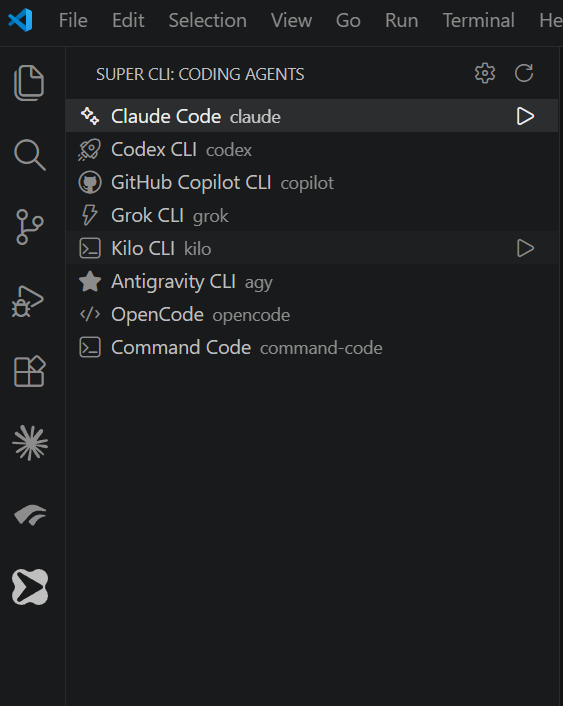
- One launcher for every agent. A Super CLI view in the activity bar lists all configured agents; click one to open it in a terminal beside your editor. A toolbar button and the Super CLI: Launch Coding Agent command open a quick pick of the same list.
- Favorite agent, one keystroke. Click the star (★) next to an agent to mark it as your favorite,
then launch it anywhere with
Ctrl+Alt+A(Cmd+Alt+Aon macOS; remap it in Keyboard Shortcuts). With no favorite set the shortcut opens the picker and offers to remember your choice. - Install status at a glance. Agents whose CLI isn't on your
PATHare shown dimmed and marked not installed, so you know what to install before launching. - Built-in presets. Claude Code, Codex, GitHub Copilot CLI, Cursor, Droid, Grok, Kilo, Antigravity, OpenCode, Command Code, Crush, Hermes, and MiMo Code are available out of the box. (Gemini CLI was retired by Google and replaced by Antigravity.)
- Add your own, no code required. Define new agents in
settings.json. The sidebar updates automatically. - Update from the sidebar. Agents with a known update command show an update button next to
Launch, which runs the CLI's official update (e.g.
codex update,kilo upgrade,cursor-agent update,opencode upgrade,droid update). CLIs that update themselves don't show one. - Guided install. If a built-in CLI isn't found, Super CLI offers to install it with its official command after explicit confirmation — npm for Claude Code, Codex, Copilot, Kilo, OpenCode, Command Code, Droid, Crush and MiMo Code, and the official installer (native PowerShell on Windows, shell on macOS/Linux) for Grok, Antigravity, Cursor and Hermes.
- Native integrated terminal. Each agent runs in a real VS Code terminal, inheriting your
shell,
PATH, and environment. No bundled emulator, no runtime dependencies.
Adding or overriding an agent
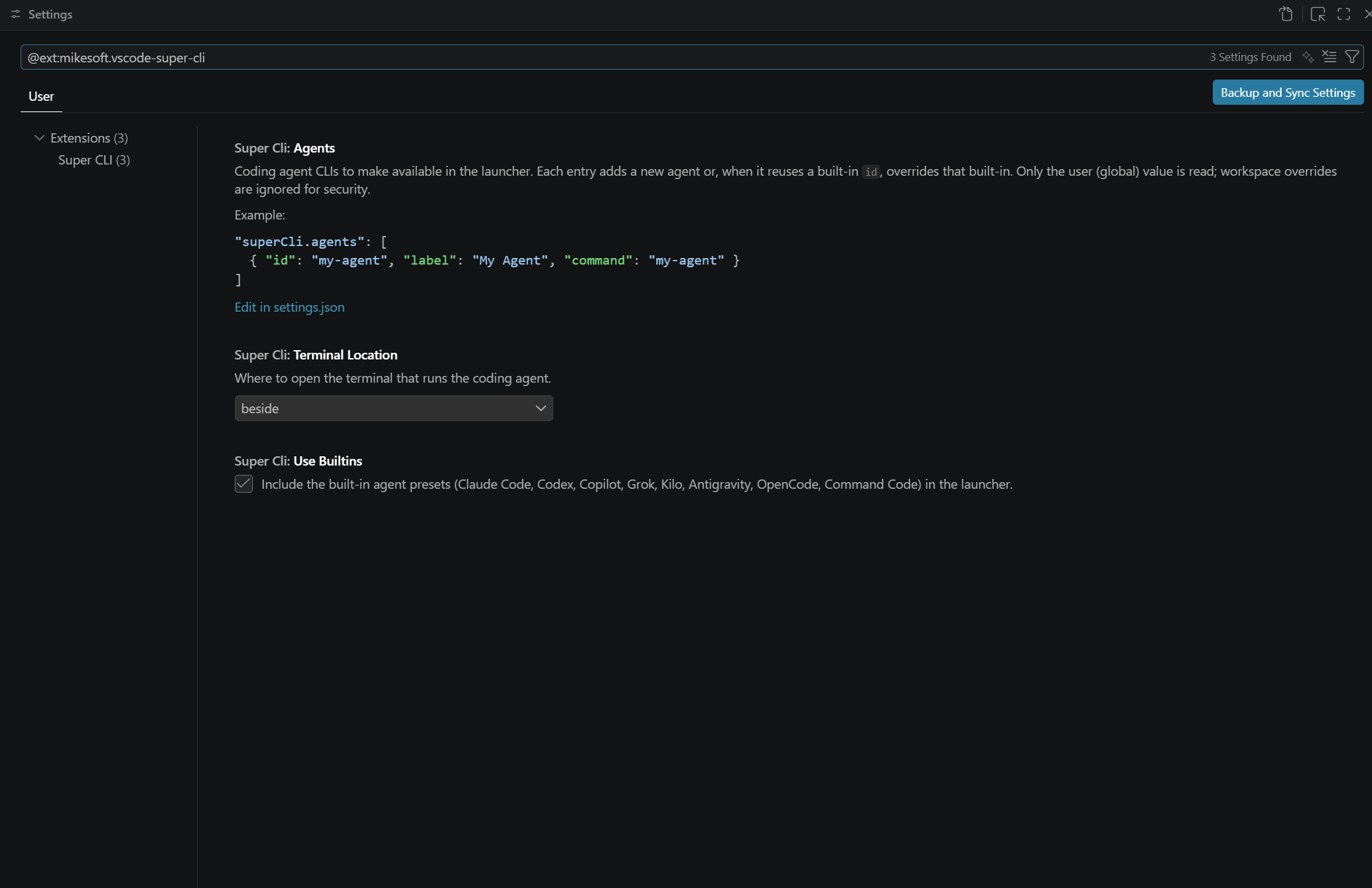
Add agents through the superCli.agents setting. Each entry creates a new agent, or — when it
reuses a built-in id — overrides that built-in (for example to point at a custom binary path).
"superCli.agents": [
  {
    "id": "my-agent",
    "label": "My Agent",
    "command": "my-agent",
    "icon": "rocket",
    "installCommand": "npm install -g my-agent",
    "autoInstall": false
  },
  {
    "id": "claude",
    "label": "Claude Code",
    "command": "\"C:\\Tools\\claude\\claude.exe\""
  }
]
id— unique identifier; reuse a built-in id to override it.label— name shown in the sidebar and quick pick.command— the command that starts the CLI. On Windows, quote executable paths that contain spaces.icon— optional ThemeIcon id, e.g.sparkleorrocket.installCommand/autoInstall— optional.installCommandis either a cross-platform string (e.g. an npm command) or an object withunixandwindowskeys for OS-specific installers. When the command is missing andautoInstallistrue, the launcher offers a guided install after explicit confirmation.ensureConfig— optional; ensure a JSON config file contains certain keys before launch (added only when missing, existing keys untouched). For example, opt out of a CLI's companion editor-extension auto-install via its own config:{ "file": "~/.commandcode/config.json", "defaults": { "autoInstallExtension": false } }.env— optional environment variables set for the agent's terminal, e.g. to opt out of a CLI's IDE-extension auto-install via its own variable:{ "CLAUDE_CODE_IDE_SKIP_AUTO_INSTALL": "1" }.updateCommand— optional command to update the CLI (its officialupdate/upgradecommand, or an npm reinstall). Adds an update button next to the agent in the sidebar. LikeinstallCommand, it can be a string or an object withunix/windowskeys.
Only the user (global) value of superCli.agents is used; workspace overrides are ignored so that
an untrusted repository cannot inject commands.
Configuration
| Setting | Default | Description |
|---|---|---|
superCli.agents | [] | Your agents (added to or overriding the built-ins). |
superCli.useBuiltins | true | Include the built-in agent presets. |
superCli.favoriteAgent | "" | Id of the agent launched by Ctrl+Alt+A. Set it with the ★ button in the sidebar rather than by hand. |
superCli.terminalLocation | beside | Open the terminal beside the editor or in the panel. |
superCli.useWsl | false | On Windows, open agents in a WSL terminal instead of the default shell. Ignored on macOS/Linux. |
Run Super CLI: Open Settings from the sidebar or the command palette to jump straight to these settings.
Troubleshooting
- "… could not be started." The configured
commandwas not found. Install the CLI, or fix the command in settings. The launcher uses the active editor's workspace folder as the working directory. - Nothing happens on launch. Make sure the workspace is trusted — the launcher is disabled in untrusted workspaces because it runs terminal commands.
- "Not installed" looks wrong. The indicator is a best-effort check of your
PATHand doesn't spawn the CLI. It isn't shown whensuperCli.useWslis on, because the WindowsPATHdoesn't reflect what's installed inside WSL. Use Refresh Agents after installing a CLI. - Companion editor extensions (Command Code, Claude Code). Super CLI keeps your editor free of
per-CLI companion extensions. It launches Command Code with
autoInstallExtension: falsein~/.commandcode/config.json, and Claude Code with theCLAUDE_CODE_IDE_SKIP_AUTO_INSTALL=1environment variable — both official opt-outs — so they stop auto-installing their editor extensions. Install those extensions yourself if you want them (for Command Code set the value back totrue).
FAQ
How do I run Claude Code (or Codex, Copilot, Cursor, …) in VS Code? Install Super CLI, open the Super CLI view in the activity bar, and click the agent — it opens in a terminal beside your editor. The toolbar button and the Super CLI: Launch Coding Agent command do the same. It also works in Cursor, Antigravity, and Windsurf.
Which AI coding agents are supported?
Claude Code, Codex, GitHub Copilot CLI, Grok, Kilo, Antigravity, OpenCode, Command Code, Cursor,
Droid, Crush, Hermes, and MiMo Code out of the box — plus any CLI you add in settings.json.
Does it work on Windows, macOS, and Linux?
Yes. On Windows you can also launch agents inside WSL with superCli.useWsl.
Is it free? Does it collect data? Free and open-source (MIT), with no telemetry. It only runs the commands you configure, in your own integrated terminal.
Support
If Super CLI is useful to you, consider sponsoring its development. Bug reports, feature requests, and contributions are welcome on GitHub.
Privacy
This extension does not collect telemetry, analytics, or personal data. It only runs the commands you configure, in your own integrated terminal.
Building
npm install
npm run check     # compile + unit tests + VS Code integration smoke test
npm run package   # produce the .vsix