
claude-governance
tenuo-ai/claude-governance
Governance for Claude Code: audit and constrain which tools and arguments Claude Code can use, with cryptographic Tenuo warrants enforced on every call.
Instalação
npx convez-ai tenuo-ai/claude-governance1 comando no terminal: detecta o formato do repositório (marketplace ou plugin avulso) e instala via Claude Code. Requer Node 18+ e o Claude Code instalado.
Métricas
README
A tradução para o português deste README ainda está na fila.
Tenuo for Claude Code




Claude Code can read files, run shell commands, fetch URLs, and call MCP tools.
Tenuo lets you write a tenuo.yaml policy for which of those calls are allowed,
then checks every model-invoked tool call before it runs.
That policy is compiled into a signed, expiring credential called a warrant. A local authorizer checks each tool call against it and logs the decision. The same policy is applied no matter why the model tried the call: prompt injection, hallucination, poisoned tool output, or an unsafe request.
Start with the local quickstart below. Optional Cloud control-plane setup is in Cloud mode.
Quickstart
Requires Python 3.10+. Uses Docker if it's running; otherwise a native authorizer binary, installed automatically.
pip install tenuo-claude-code
mkdir my-project && cd my-project
tenuo-claude bootstrap
bootstrap writes a starter tenuo.yaml, starts the authorizer, and runs a self-test (verify). The starter policy is deliberately strict:
name: my-project
sandbox: ./workspace
mode: enforce
enforce:
  Read: "subpath:{sandbox}"          # Read only files under ./workspace
  Bash: "shlex:ls,pwd,echo,date"     # Bash only these commands
default: deny                        # every other tool call is denied
Now open Claude Code in my-project/:
claude
The agent is governed: Read ./workspace/notes.txt is allowed; Read /etc/passwd, Bash(curl …), or any tool not listed is denied and logged. After Claude runs a few tools, run tenuo-claude audit to see the decisions. Edit tenuo.yaml to fit your project (see Policy), then tenuo-claude refresh.
For an example with MCP and subagents, see the reference demo.
| Next | Go to |
|---|---|
| Write the policy | Policy |
| Day-to-day commands | Commands |
| Org root, receipts, approvals, revocation | Cloud mode |
| Security model and limits | Security |
| Something broke | Troubleshooting · deep dive docs/DETAILS.md |
Policy
tenuo.yaml is the whole configuration — it drives the warrant, the authorizer, the hooks, and the MCP proxy. You list tools under enforce: and give each a constraint on its key argument.
name: acme-backend
sandbox: ./workspace        # a directory; {sandbox} expands to its absolute path
mode: enforce               # block out-of-scope calls. 'audit' = log only, don't block

enforce:
  Read:  "subpath:{sandbox}"
  Write: "subpath:{sandbox}"
  Bash:  "shlex:ls,pwd,echo,cat,grep"
  WebFetch:
    domains: ["api.github.com", "*.githubusercontent.com"]

default: deny               # anything not listed above is denied

subagents:                  # optional: each role runs under a narrower warrant
  analyst:
    tools: [Read, Grep, Glob]

mcp:                        # optional: govern a downstream MCP server's tools
  downstream: ./your_mcp_server.py
  enforce:
    read_file: "subpath:{sandbox}"
Constraints
Each constraint checks one argument of the tool call:
| Constraint | Applies to | What it checks |
|---|---|---|
subpath:DIR | path tools (Read, Write, Edit, Glob, Grep) | the path argument must resolve to a location inside DIR. Symlinks are resolved first, so a link planted in the directory can't point outside it. |
shlex:a,b,c | Bash | the command's executable must be one of a,b,c, and the command must be a single simple command — pipes, &&/; chaining, subshells, and shell expansion are rejected. (This allowlists the verb, not file paths: cat /etc/passwd passes if cat is allowed. Use Read/Write to scope files; drop Bash for a hard lock.) |
domains / cidrs | WebFetch | the URL's host must match an allowed domain (* matches one label) or CIDR range, and pass SSRF hygiene — https-only by default, with loopback, cloud-metadata IPs, encoded-IP tricks, and spoofed hosts (api.github.com.evil.com) blocked. |
oneof:a,b · exact:v · pattern:glob · regex:re | any tool argument | the value must be in the set / equal / glob-match / regex-match. |
{sandbox} is a convenience variable for the directory in sandbox:; you can point subpath: at any path. Tools you don't list aren't governed individually — they're caught by default.
mode: enforceblocks denied calls.mode: auditcomputes and logs the same decisions but blocks nothing — use it to dry-run a policy, then switch toenforce.default: denydenies any tool not listed (recommended).default: auditlogs-and-allows unknown tools instead.subagents:declares roles; spawning is gated to those roles, and each runs under the session warrant attenuated to itstools(it can only ever do less than the session). Details.
Ready-made policies: examples/policies/. After any edit, run tenuo-claude refresh.
Commands
Day to day, you mostly need up (start), audit (review), and refresh (after editing policy).
| Command | What it does |
|---|---|
onboard | Start here. Interactive first-run setup (--local / --cloud); scaffolds an example policy if you don't have one. |
bootstrap | Non-interactive first run: scaffold starter policy (if none) → init → up → verify. --cloud for Cloud. |
init | Compile an existing tenuo.yaml: mint the warrant, wire the PreToolUse hook and MCP proxy. Pass --scaffold to write an example if none exists (it no longer does so automatically). |
up / down | Start / stop the authorizer (auto-selects Docker or native; --native to force). |
refresh | Recompile after editing tenuo.yaml (restarts the authorizer if running). In Cloud mode, warns if capability rules drifted from the last tenuo-admin setup. |
verify [--deep] | Self-test the live policy against the authorizer — no Claude session needed. --deep adds an SSRF / encoded-IP matrix, extra Bash deny cases, and a live PreToolUse exit-code harness — a reproducible artifact for security review. |
audit [--tail N] | Show the decision log (.state/receipts.jsonl). |
check | Preflight: dependencies, wiring, audit-sink health, leaked admin keys, and (Cloud) control-plane bindings. |
status | Warrant, mode, audit-sink health, and Cloud summary. |
install-authorizer | Install the native authorizer to ~/.tenuo/bin (no Docker, no Cargo). |
bench [--json] | Measure per-call overhead on your machine (PoP sign, authorizer round-trip, full hook path). |
revoke | Revoke the current session warrant. |
The warrant is short-lived (~1h TTL); up refreshes it. The authorizer listens on 127.0.0.1:9090 — change it with TENUO_AUTHORIZER_PORT before bootstrap. Generated files (don't commit): .state/ (keys, warrant, credentials), .claude/settings.json (hooks), .mcp.json (MCP wiring).
Working from a git clone instead of PyPI? See Build from source.
How enforcement works
init compiles tenuo.yaml into a signed warrant and wires two interception points; both check the same warrant against the same local authorizer:
- Native tools (Read, Bash, WebFetch, …) → a Claude Code PreToolUse hook intercepts the call, signs a proof-of-possession with the session key, and asks the authorizer.
- MCP tools → Claude is pointed at a proxy that stands in for the downstream MCP server; the proxy authorizes, then forwards only if allowed.
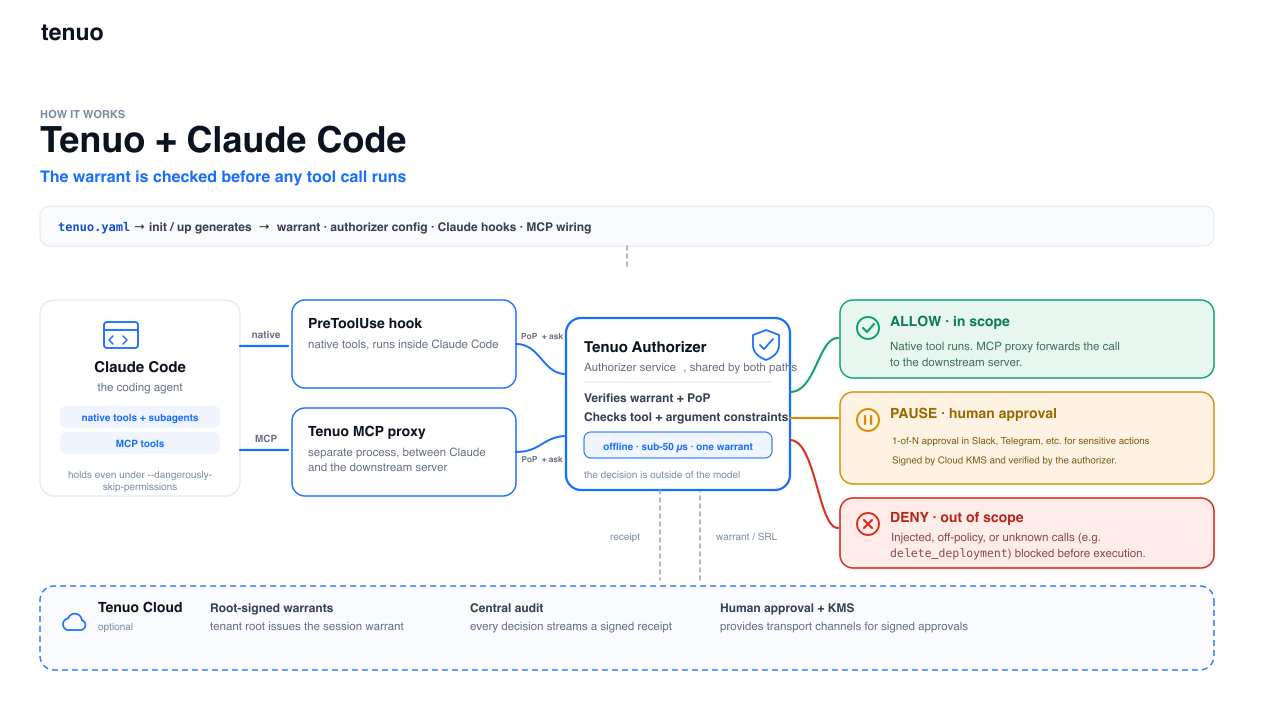
The authorizer (a small local service, ~1–3 ms/call) verifies the warrant's signature, proof-of-possession, and expiry, then checks the call's arguments against the warrant's constraints → allow, deny, or (Cloud) approval-required. Full detail in docs/DETAILS.md.
Cloud mode
Local mode is enough to evaluate Tenuo on one project. Connect cloud.tenuo.ai for organization-scale governance:
- Tenant-root warrants — sessions chain to your org root, not a key on the laptop.
- Signed receipts — one verifiable allow/deny/approval audit stream (Ed25519 over CBOR).
- Fleet revocation — revoke a warrant id; authorizers pick it up within ~30s.
- Human approval gates — specific calls pause for a person instead of allow/deny (below).
- Managed rollout — push hook/MCP wiring through Claude Code managed settings instead of per-project local settings.
Setup
Two keys, kept apart — the runtime never sees the admin key:
| Key | From | Goes in | Used by |
|---|---|---|---|
Runtime (tenuo_ct_…) | cloud.tenuo.ai → Agents → Quick Connect → Authorizer Only | .state/cloud.env | tenuo-claude up, hooks |
Tenant-admin (tc_…) | Settings → API Keys → Create (admin role) | ~/.tenuo/admin.env | tenuo-admin setup (once) |
mkdir my-project && cd my-project
tenuo-claude bootstrap --cloud      # wizard prompts for the runtime token, then sets up + verifies
Every session after that:
tenuo-claude check && tenuo-claude up
If check reports a cloud bindings failure, run tenuo-admin setup and retry.
tenuo-claude uprefuses to start if a tenant-admin key is in the environment — keep it only in~/.tenuo/admin.env. And once a project is on Cloud, don't re-run plainbootstrap: it reverts the project to local mode and moves your Cloud files aside. Usecheck && up.
CI / non-interactive and manual step-by-step setup: docs/DETAILS.md § Tenuo Cloud. After changing enforce/mcp/subagents/approvals on Cloud, re-run tenuo-admin setup; for mode-only changes, refresh suffices.
Human approval (Cloud)
A gated capability returns a third outcome — approval-required — instead of allow/deny. The hook opens a Cloud approval request, waits for an approver on their notification channel, then re-authorizes with their signed approval. The repo ships two worked examples (off-allowlist WebFetch, and delete_deployment with target=production). Setup and policy shape: docs/DETAILS.md § Human approval.
Security
Tenuo runs alongside Claude Code permissions; it doesn't replace managed settings. The difference is where and how policy is enforced:
| Claude Code permissions | Tenuo warrant | |
|---|---|---|
| Form | Allow/ask/deny rules in settings | Signed, expiring capability token; Cloud chains to your org root |
| Enforcement point | Claude's permission UI | PreToolUse hook + MCP proxy, checked by the authorizer |
--dangerously-skip-permissions | Skips the prompts | Does not disable installed Tenuo hook/proxy checks |
| Expiry | Until edited | ~1h session TTL; up refreshes |
| Revocation | Edit rules (live sessions may keep allowances) | Revoke warrant id → ~30s fleet sync (Cloud) |
| Evidence | Optional hook logs | Local JSONL; signed receipt stream in Cloud |
| Org deployment | Per-user settings, locally editable | Managed-settings hooks + shared policy |
Admins can also block the bypass flag entirely in managed settings (disableBypassPermissionsMode).
What's in scope. Tenuo governs model-invoked tool calls — Read, Bash, WebFetch, MCP tools, subagent spawns — on the PreToolUse path, including the agent's own Bash. The TUI ! shell (a command the operator types) is not a tool call and is out of scope; the model can't invoke it. (details)
Fail-closed. A missing or broken tenuo.yaml denies every governed call until it's restored. Keys under .state/ must be owner-only (0600).
Receipts. Every governed call carries a proof-of-possession signature the authorizer verifies. Locally, the hook appends a JSON line to .state/receipts.jsonl (read with tenuo-claude audit; in mode: audit, denials show as WOULD-DENY):
{"phase":"pre","decision":"deny","claude_tool":"Read","governed":true,
 "args":{"file_path":"/etc/passwd"},"reason":"Constraint not satisfied"}
Connected to Cloud, the authorizer also emits signed receipts to your tenant — the verifiable record for compliance and fleet audit.
Rolling out to a team. Keep tenuo.yaml in version control, push the hook/MCP wiring through Claude Code managed settings (not per-developer settings.local.json), and use Cloud for org-root warrants, central audit, and revocation. Start in mode: audit, review the WOULD-DENY rows, then switch to enforce. Talk to us about managed-settings rollout. Report issues: SECURITY.md.
Build from source
For development, running the demo from a checkout, or using ./bin/tenuo-claude:
git clone https://github.com/tenuo-ai/claude-governance.git
cd claude-governance
uv venv && uv sync && source .venv/bin/activate     # Windows: .venv\Scripts\activate
chmod +x bin/tenuo-claude
uv run tenuo-claude install-authorizer              # only if you don't use Docker
Run via ./bin/tenuo-claude --help, uv run tenuo-claude --help, or pip install -e .. Re-run tenuo-claude init (or refresh) after moving the repo or reinstalling — the hooks pin the launcher path at wiring time. Contributors: CONTRIBUTING.md.
Performance
Authorization is ~1–3 ms per call; the command hook adds ~100–200 ms (mostly process startup). Measure on your machine with tenuo-claude bench after up.
This repo
GitHub: tenuo-ai/claude-governance · PyPI: tenuo-claude-code
| Path | Contents |
|---|---|
src/tenuo_claude_code/ | Package source |
templates/ | Starter tenuo.yaml and credential examples |
examples/policies/ | Ready-made policy templates |
demo/ | Reference project and scripted tour |
docs/ | Implementation details · Troubleshooting |