
Editorial GRC — Sistema de Design
tech-irame/design-sys
Design system GRC premium com 18 seções, componentes prontos e RBAC integrado
Ver no GitHubSistema de design completo para plataforma SaaS de governança, risco e conformidade (GRC), empacotado como skill do Claude Code. Inclui especificação de 18 seções cobrindo tema, tipografia, componentes, padrões cross-cutting, superfícies de IA e acessibilidade, eliminando deriva de estilo entre desenvolvedores.
Instalação
npx convez-ai tech-irame/design-sys1 comando no terminal: detecta o formato do repositório (marketplace ou plugin avulso) e instala via Claude Code. Requer Node 18+ e o Claude Code instalado.
Métricas
Casos de uso
- Gerar UI consistente para plataforma GRC sem memorizar estilos
- Implementar componentes acessíveis com semântica HTML e ARIA
- Compor superfícies de IA, painéis de chat e workflows visuais
Veredito

Sistema de design robusto e bem documentado para domínio GRC, com cobertura rara de acessibilidade, data-viz e padrões cross-cutting. Instalação simples como skill do Claude Code, ideal para times que precisam de consistência visual sem overhead de policiamento em PR.
README
A tradução para o português deste README ainda está na fila.
design-sys — Editorial GRC
The official design system for our GRC (governance, risk, compliance) SaaS platform, packaged as a Claude Code Skill. Clone it once, and every developer on your machine generates UI that matches the system — no memorizing, no drift, no style policing in PR.
What's in this repo
design-sys/
├── SKILL.md                       ← Claude Code skill entry (activates on UI/GRC requests)
├── DESIGN.md                      ← canonical 16-section spec (the source of truth)
├── preview.html                   ← light-mode visual reference (open in a browser)
├── preview-dark.html              ← dark-mode visual reference
├── assets/dashboard-preview.png   ← screenshot of the app-shell composition
└── README.md                      ← you are here
DESIGN.md covers: §1 theme · §2 color · §3 typography · §4 components
· §5 layout · §6 elevation · §7 do/don't · §8 responsive · §9 agent
prompts · §10 per-component state matrices (incl. Skeleton §10.14)
· §11 cross-cutting patterns (⌘K, workspace, share, filter bar,
notifications, comments, audit trail, RBAC) · §12 AI / IRA surfaces
(three-panel chat, artifact panel, clarification chips, assumptions,
progressive loader, workflow builder canvas) · §13 domain surfaces
(Home, Governance, Execution, Workflows, Intelligence, System — the
24-page IA) · §14 roles & personas (7 personas with RBAC tailoring)
· §15 composition recipes (EntityChip, KPI tile, empty states,
destructive modal, slide-over editor, status banner) · §16 content
voice · §17 accessibility, semantics, performance (semantic HTML,
ARIA matrix, keyboard contract, shadcn Form + RHF + Zod, skeletons,
font-display, virtualization, z-index scale, prefers-contrast,
forced-colors, i18n readiness) · §18 data-viz accessibility
(four-channel rule, <table> fallback, pattern overlays for
high-contrast mode).
The design language in one line:
Editorial premium in a domain that's been corporate for too long.
Dark #26064A sidebar anchors every screen, cool #FCFAFD canvas
carries the working app, warm #FAF7F2 paper is reserved for long-form
reports. Source Serif 4 display as character, #6A12CD purple as
signature. 8pt grid, flat pills, Claude/Anthropic tone.
Install as a Claude Code skill
Skills can be installed user-scoped (applies to every project on the developer's machine) or project-scoped (versioned with a specific consumer repo). User-scoped is the common case.
User-scoped — recommended for most devs
# Clone the repo contents into ~/.claude/skills/editorial-grc/
mkdir -p ~/.claude/skills
git clone https://github.com/1-fish-chapaak/design-sys \
  ~/.claude/skills/editorial-grc
Updates:
git -C ~/.claude/skills/editorial-grc pull
Project-scoped — for a specific product repo
From the root of your product repo:
mkdir -p .claude/skills
git submodule add https://github.com/1-fish-chapaak/design-sys \
  .claude/skills/editorial-grc
git commit -m "chore: add editorial-grc design-system skill"
Updates:
git submodule update --remote .claude/skills/editorial-grc
git commit -am "chore: bump editorial-grc skill"
Non-GitHub option — Google Cloud Storage
For regulated environments without GitHub access, publish the repo as a tarball to a GCS bucket, and have devs download:
# Publish once (by an owner)
cd /Users/panda/Desktop/design-sys
tar -czf design-sys.tar.gz --exclude=.git --transform='s,^,editorial-grc/,' *
BUCKET=your-design-system-bucket
gcloud storage cp design-sys.tar.gz \
  gs://$BUCKET/skills/editorial-grc/v1.0.0.tar.gz
gcloud storage cp design-sys.tar.gz \
  gs://$BUCKET/skills/editorial-grc/latest.tar.gz

# Developers install
mkdir -p ~/.claude/skills
curl -fsSL "https://storage.googleapis.com/your-design-system-bucket/skills/editorial-grc/latest.tar.gz" \
  | tar -xz -C ~/.claude/skills/
Verify installation
claude --version
ls ~/.claude/skills/editorial-grc  # should list SKILL.md, DESIGN.md, …
In a Claude Code session on any project, say:
"Build me a risk summary card with a serif score and four severity pills."
Claude Code matches the request against the skill's description field,
loads SKILL.md, and generates UI using brand-600, Source Serif 4,
flat pills, 8pt grid — without being re-taught the system.
App shell at a glance
Open preview.html for the live light-mode reference
(and preview-dark.html for dark). The first
section of each preview is a full app-shell demo — dark sidebar,
cool/deep canvas, page header, and KPI cards rendered from the same
tokens your code will consume.
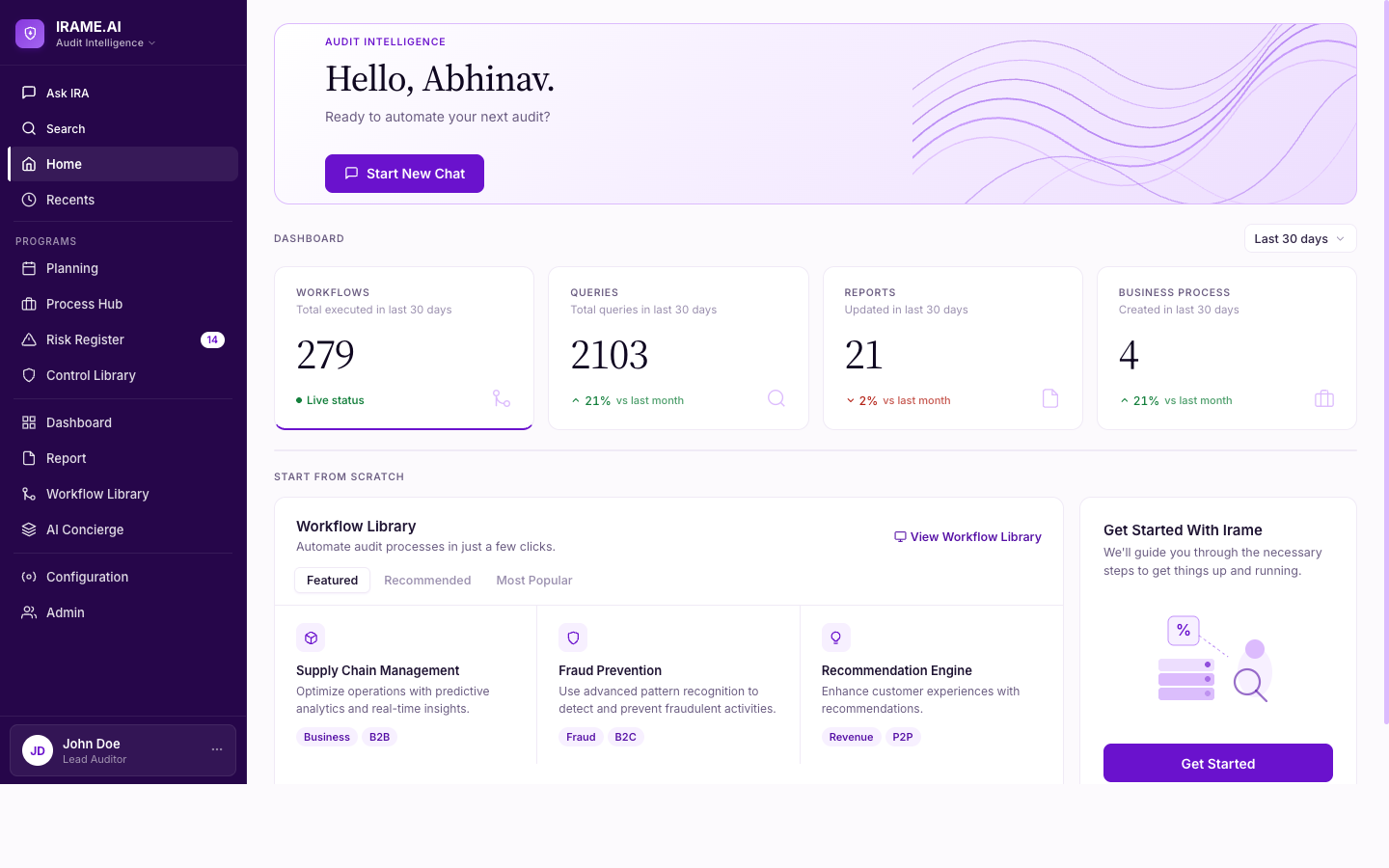
What you see:
| Surface | Spec |
|---|---|
| Sidebar | Dark brand-900 (#26064A), 256px, white-opacity text scale (0.85 / 0.55 / 0.45) |
| Hover vs. active nav | Hover = 8% white bg; active = 12% white bg (distinct signal) + 3px white left bar + weight-600 |
| Canvas | #FCFAFD — brand-600 at ~2% over white, 32px page padding (8pt grid) |
| Page header (no topbar) | Breadcrumb → Source Serif 4 title → context chips → right-aligned actions |
| KPI cards | Source Serif 4 tabular numerics, brand-600 bottom border on active card |
| Cards | canvas-elevated (white), canvas-border #F0EAF6 border, 12px radius |
| Pills | Flat — brand-50 bg, brand-700 text, no border, no icon |
| Typography | Inter for UI (13px/520), Source Serif 4 for display (34-44px) |
Sidebar structure
IRAME.AI (logo + "Audit Intelligence" dropdown)
├── Ask IRA
├── Search
├── Home ← (active: white left bar + white text)
├── Recents
├── ── PROGRAMS ──
│   ├── Planning
│   ├── Process Hub
│   ├── Risk Register [14]
│   └── Control Library
├── Dashboard
├── Report
├── Workflow Library
├── AI Concierge
├── ──────────────
├── Configuration
├── Admin
└── John Doe / Lead Auditor (profile card)
Browse the design visually
# Clone once, then
open preview.html           # light mode
open preview-dark.html      # dark mode
The previews are self-contained HTML (Google-hosted fonts, no build step) showing the full token palette, type scale, elevation, primitives, and signature composed surfaces (dashboard card, AI response, data table, report reader).
Pin a version
# Inside the skill folder
git checkout v1.0.0
Semver: major bumps on breaking changes (token retirement, prop renames, aesthetic shifts). Minor bumps on additive component/token work. Patches on spec clarifications.
Keep the skill in sync with your product
If your product repo has its own DESIGN.md (e.g. in a monorepo with
packages), set up a CI job that either:
- Publishes this repo on every change to the upstream
DESIGN.md, or - Validates both
DESIGN.mdfiles byte-match at PR time.
Drift between product DESIGN.md and skill DESIGN.md is the #1 way a
design system stops being consistent. Automate away the copy step.
Uninstall
rm -rf ~/.claude/skills/editorial-grc
For submodule installs: git submodule deinit -f .claude/skills/editorial-grc
then rm -rf .claude/skills/editorial-grc.
Contributing
- Open an issue for any design question the spec doesn't resolve.
DESIGN.mdis the source of truth. Update it first; then mirror any refinements intoSKILL.md's quick-reference section.- The
description:field inSKILL.md's frontmatter controls when Claude Code activates the skill. Keep it broad enough to cover UI work in GRC projects, narrow enough not to trigger on unrelated tasks.
License
Proprietary — internal use within the GRC platform organization. Distribution to external teams requires explicit permission.
Reference consumer
This spec is tuned to a real GRC product — the
Auditify platform by
IRAME.AI (IRA — Intelligent Risk Auditor). Sections 11–16 codify the
patterns that emerged while building that product: the three-panel
chat, the seven-persona RBAC, the one-click audit flow, the
centralized findings tracker, the on-paper reports, the AI concierge
tools. When in doubt about a GRC surface, consult Auditify's PRDs as
the canonical "what does this screen actually need to do" reference,
then return to DESIGN.md for how it should look.
Last refined: 2026-04-23 · dark sidebar + cool canvas shell · §§11–16 expanded from Auditify reference · maintainer: @1-fish-chapaak