
tinta-md
tamingtech/tinta-md
Tinta Markdown Publisher — Document-style Markdown authoring for VS Code. Page layout controls (paper size, margins, typography), print-ready preview, Mermaid/PlantUML diagrams, KaTeX math, multi-column layouts, callout blocks. Export to PDF, DOCX, ODT. AI skill files for Copilot, Claude, opencode, Cursor.
Instalação
npx convez-ai tamingtech/tinta-md1 comando no terminal: detecta o formato do repositório (marketplace ou plugin avulso) e instala via Claude Code. Requer Node 18+ e o Claude Code instalado.
Métricas
README
A tradução para o português deste README ainda está na fila.
Tinta Markdown Publisher
Document-style Markdown authoring for VS Code — live preview, visual style controls, diagrams, math, multi-column layouts, and export to PDF / DOCX / ODT.
The Motivation
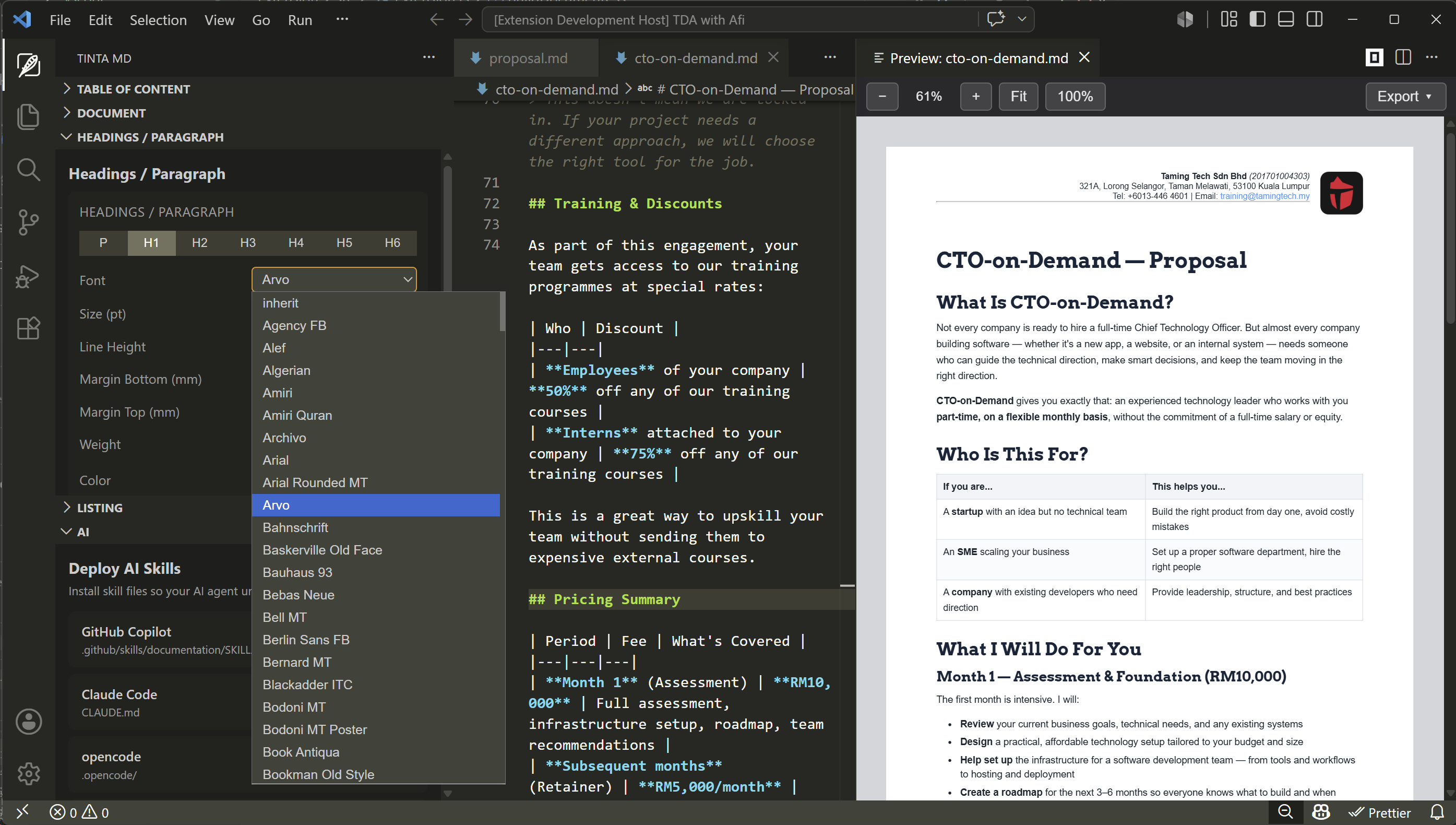
I use AI in my VS Code to write with Markdown. We write documents, proposals, training notes, tutorials, and more. But they are never ready for print or PDF. I want to be able to style Markdown document, ready enough for print and PDF.
So here it is.
- Write your Markdown
- Apply styling (page margin, font, sizes, spacing, header, footer, etc)
- Export to PDF
And I added a few other Markdown syntax too for :
- text alignment
- image wrap
- light and dark theme
- columns
- styled text boxes
- and more...
Features
| Live Preview | Paper-like split preview with zoom (fit width, 100%, custom scale) |
| Style Controls | Paper size (A4/Letter/Legal/custom), margins, typography, heading styles, list spacing |
| Mermaid Diagrams | Render flowcharts, sequence diagrams, and more — in preview and exports |
| PlantUML Diagrams | UML diagrams with local SVG caching for repeat renders |
| KaTeX Math | Inline $...$ and block $$...$$ math rendering, no server required |
| Multi-Column Layout | ::: columns 2 / ::: columns 3 blocks with --- column separators |
| Callout Blocks | ::: note, ::: success and ::: warning container blocks |
| Theme Classes | .theme-light / .theme-dark on code fences, tables, and blockquotes |
| Code Features | Syntax highlighting, .line-numbers, .stripe-rows |
| Text Alignment | .text-left, .text-center, .text-right, .text-justify on any block |
| Image Utilities | Width classes (.w-50, .w-25, etc.) and layout (.wrap-left, .block-center) |
| Header / Footer | Markdown-based with {{page_number}} / {{total_pages}} placeholders |
| Table of Contents | Auto-generated from headings, with click-to-scroll |
| Export PDF | via Puppeteer (Chromium) — vector or legacy-compatible raster mode |
| Export DOCX / ODT | via Pandoc — preserved fonts, margins, and diagram images |
| AI Skills | Deploy project context files for GitHub Copilot, Claude Code, opencode, and Cursor |
Quick Start
- Install the extension from the VS Code Marketplace.
- Open any
.mdfile. - Click the Tinta MD icon in the activity bar to open the preview and style panels.
- Start writing — the preview updates in real time.
Extended Markdown Syntax
Tinta MD extends standard Markdown with attribute-based formatting:
Text Alignment
## Centered Title {.text-center}
Image with Width and Wrap
{.w-50 .wrap-right}
Mermaid
PlantUML
Katex
$$ \int_{-\infty}^{\infty} e^{-x^2} dx = \sqrt{\pi} $$
Columns
::: columns 2
Left column

---

Right column
:::
Note Block
::: note
This is a callout note.
:::
Export
| Format | Engine | Requirements |
|---|---|---|
| Puppeteer (Chromium) | Bundled | |
| DOCX | Pandoc | Pandoc must be installed separately |
| ODT | Pandoc | Pandoc must be installed separately |
DOCX and ODT are meant for users who want to further customise styles using external software such as Microsoft Word or LibreOffice Writer. Fonts, spacing, colours, and images from your Tinta MD document are preserved, and you can open the exported file to adjust formatting directly.
About the Creator
Tinta Markdown Publisher was created by Iszuddin Ismail — a Malaysian web developer with extensive experience in building and publishing cross-platform software. Iszuddin is passionate about developer tooling, document automation, and creating tools that bridge the gap between plain-text authoring and polished, print-ready output. He publishes under the TamingTech brand on the VS Code Marketplace.
License
All Rights Reserved. See LICENSE for details.