
Codex Claude Statusline
T-crypto8/codex-claude-statusline
Cockpit visual para custos, limites e sessões do Claude Code + Codex CLI
Ver no GitHubPlugin que transforma a barra de status do terminal em um cockpit visual para monitorar Claude Code e Codex CLI. Exibe em tempo real limites de taxa, custos de sessão, uso de contexto e sessões paralelas ativas — tudo com zero dependências externas.
Instalação
npx convez-ai T-crypto8/codex-claude-statusline1 comando no terminal: detecta o formato do repositório (marketplace ou plugin avulso) e instala via Claude Code. Requer Node 18+ e o Claude Code instalado.
Métricas
Casos de uso
- Monitorar custos de API em tempo real durante desenvolvimento com IA
- Rastrear uso de contexto e limites de taxa para otimizar prompts
- Gerenciar múltiplas sessões paralelas do Claude Code visualmente
- Manter visibilidade de quota restante sem sair do terminal
Veredito

Ferramenta especializada e bem executada para quem trabalha com Claude Code + Codex em paralelo. Essencial se você quer controle fino sobre custos e sessões; dispensável para uso casual. Documentação clara e setup simples com suporte a agentes IA.
README
A tradução para o português deste README ainda está na fila.
codex-claude-statusline

A multi-line status line for Claude Code and Codex CLI that turns the bottom of your terminal into a cockpit:
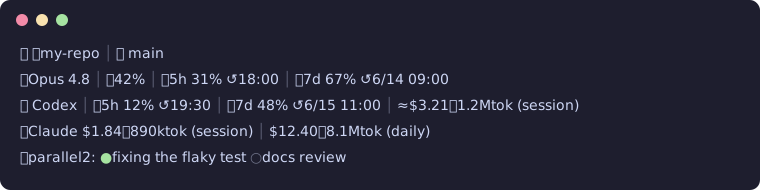
🐶 📁my-repo │ 🌿 main
🤖Opus 4.8 │ 📈42% │ 🕐5h 31% ↺18:00 │ 📅7d 67% ↺6/14 09:00
🐾 Codex │ 🕐5h 12% ↺19:30 │ 📅7d 48% ↺6/15 11:00 │ ≈$3.21・1.2Mtok (session)
💰Claude $1.84・890ktok (session) │ $12.40・8.1Mtok (daily)
🤝parallel2: ●fixing the flaky test ○docs review
| Line | What it shows | Source |
|---|---|---|
| 1 | cwd + git branch | statusLine payload + git |
| 2 | model, context %, 5h / 7d rate limits with reset times | statusLine payload |
| 3 | Codex CLI remaining quota + rough session cost | ~/.codex/sessions rollout files |
| 4 | Claude session cost + daily total across all sessions | statusLine payload + local transcripts |
| 5 | other live Claude Code sessions and what they're doing | ~/.claude/sessions registry |
Costs are estimates at API list prices — on a subscription plan they are a relative gauge, not a bill. Unknown models are priced at the most expensive tier on purpose (estimates err high, never silently low).
Who is this for
Maintainers and power users who run Codex CLI and Claude Code side by side on AI-assisted development: cost visibility, context usage, remaining quota, and parallel agent sessions directly affect how you plan review, triage, and release work. This cockpit keeps all of it in one glance, locally, with zero dependencies.
AI agent quickstart
Working with Claude Code or Codex CLI? Paste this block and the agent does the rest:
Install codex-claude-statusline for me:
1. git clone https://github.com/T-crypto8/codex-claude-statusline.git ~/.claude-statusline
2. Merge {"statusLine": {"type": "command", "command": "python3 ~/.claude-statusline/statusline.py"}}
   into ~/.claude/settings.json, preserving all existing keys.
3. mkdir -p ~/.config/claude-statusline and copy config.example.json there as config.json
4. Ask me which strings to put in mask_patterns (my name, company, client names),
   then set them in the config.
5. Verify: `echo '{}' | python3 ~/.claude-statusline/statusline.py` must print 5 lines
   without errors. If I use Codex only, set lines.cost to false and show me the
   standalone `watch` command instead of editing settings.json.
Install
Requires Python 3.10+. No third-party packages.
git clone https://github.com/T-crypto8/codex-claude-statusline.git ~/.claude-statusline
Add to ~/.claude/settings.json:
{
  "statusLine": {
    "type": "command",
    "command": "python3 ~/.claude-statusline/statusline.py"
  }
}
Configure
Copy the example and edit — every emoji, label, and line is yours to change:
mkdir -p ~/.config/claude-statusline
cp ~/.claude-statusline/config.example.json ~/.config/claude-statusline/config.json
- Change the mascot: set
icons.prefixto anything ("🐱","🦊","❯", your initials…). Every other icon is configurable too. - Hide lines you don't need:
lines.codex / cost / parallel→false. No Codex CLI installed? Line 3 just shows—(or turn it off). - Currency:
currency.code"USD"shows raw dollars. Set e.g.{"code": "JPY", "symbol": "¥", "fallback_rate": 155}to convert via the free frankfurter.app API (cached 12h, falls back gracefully offline). - Screenshot safety: put any strings you never want rendered (your name, company, client names) in
mask_patterns— they are replaced withmask_replacementin the final output, whatever line they appear on. Useful because line 5 echoes prompts from your other sessions. - Config path override:
CLAUDE_STATUSLINE_CONFIG=/path/to/config.json. - Pricing override: drop a
pricing.jsonnext to the scripts (same shape asDEFAULT_PRICINGinusage_estimate.py) or setCLAUDE_STATUSLINE_PRICING.
Quota forecast — it learns your pace
The statusline predicts when your 5h / 7d limits will run dry — on the Claude line and the Codex line:
🕐5h 83%⚠️~14:10— at/above 80% (or when depletion is projected inside the window at 50%+ usage), a warning with the estimated depletion time appears.- The Codex 5h/7d blocks get the same forecast (window length comes from the
rollout's own
window_minutes). While Codex sits idle its rollout data goes stale, so those snapshots are skipped — an idle afternoon never teaches the profile a fake 0%/h burn rate. - Quiet by default: nothing extra is rendered in the normal range, so a badge
showing up means something. Set
forecast.modeto"always"to render a→~HH:MMETA whenever one can be computed, or"off"to disable. - It learns. Usage snapshots (timestamps and percentages only — no prompts,
no file paths, nothing readable) accumulate locally in
~/.local/state/claude-statusline/quota_snapshots.jsonl. After ~2 hours of active use, predictions switch from linear extrapolation to your personal hour-of-day burn profile — pure local statistics, no LLM calls, no network, nothing leaves your machine. - Bonus badges:
Δnnext to the branch (uncommitted tracked changes) and⚠️on the context gauge at 80% (auto-compact approaching). Both configurable.
Using with Codex CLI (no Claude Code needed)
Line 3 already tracks Codex CLI quota and session cost from ~/.codex/sessions. If you live in Codex (or anything else), run the cockpit standalone — it detects the missing payload and renders what it can:
python3 ~/.claude-statusline/statusline.py        # one-shot
watch -n 30 python3 ~/.claude-statusline/statusline.py   # live, e.g. in a tmux pane
Tip for Codex-only users: set lines.cost to false (Claude transcript scan) and keep codex + parallel.
Standalone usage report
The daily-cost engine also works as a CLI:
python3 usage_estimate.py --today          # today's sessions
python3 usage_estimate.py --days 7         # last week, by date/project/model
python3 usage_estimate.py --days 30 --json # machine-readable
Notes
- Heavy work is cached under the system temp dir (
claude-statusline/): daily cost 60s, Codex scan 120s, FX 12h. The status line itself stays fast. - Everything fails soft: no network, no Codex, no session registry →
—, never a crash. - Line 5 liveness uses
kill -0on registered pids; sessions older than 24h are ignored even if the pid was recycled.
License
MIT