
Life Kanban
suzyeth/life-kanban
Kanban HTML single-file para NOW/WEEK/NEXT com IA e zero dependências
Ver no GitHubUm quadro kanban pessoal em arquivo HTML único para gestão de vida e projetos, focado em responder "o que devo fazer agora?". Integra-se com Claude Code para edições em linguagem natural, suporta temas claro/escuro e funciona offline via localStorage, sem dependências externas.
Instalação
npx convez-ai suzyeth/life-kanban1 comando no terminal: detecta o formato do repositório (marketplace ou plugin avulso) e instala via Claude Code. Requer Node 18+ e o Claude Code instalado.
Métricas
Casos de uso
- Gestão pessoal de tarefas e projetos com visão clara do hoje vs. próximas semanas
- Automação de edições do kanban através de conversas em linguagem natural com Claude
- Rastreamento de metas e análise de tarefas atrasadas via skill de IA
Veredito

Ferramenta prática e bem-pensada para produtividade pessoal, com arquitetura elegante (dados em bloco JSON único, motor genérico reutilizável). A integração com Claude Code via skill eleva a experiência acima de um kanban estático, tornando-a especialmente valiosa para quem trabalha com fluxos conversacionais.
README
A tradução para o português deste README ainda está na fila.
📋 life-kanban


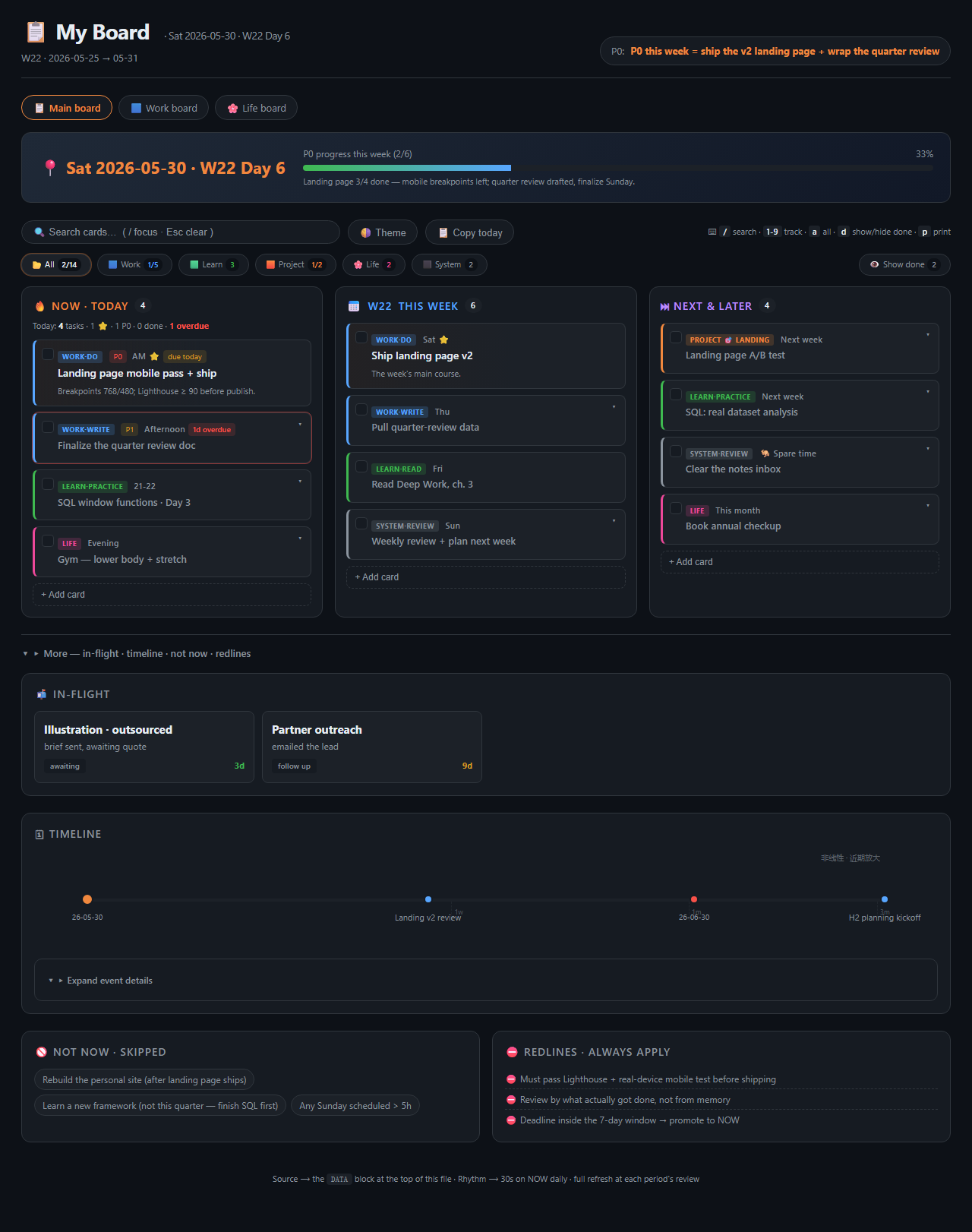
A single‑file HTML kanban for your life + projects — the board you glance at to answer "what should I be doing right now?" Drive it by talking to Claude, or just open the file.
One HTML file. A DATA = {…} block at the top is the single source of truth; the generic engine
(lk-engine.js, shared verbatim by every board) below it never changes. You tick / drag / add cards in
the browser (saved to a localStorage overlay), and a Claude Code
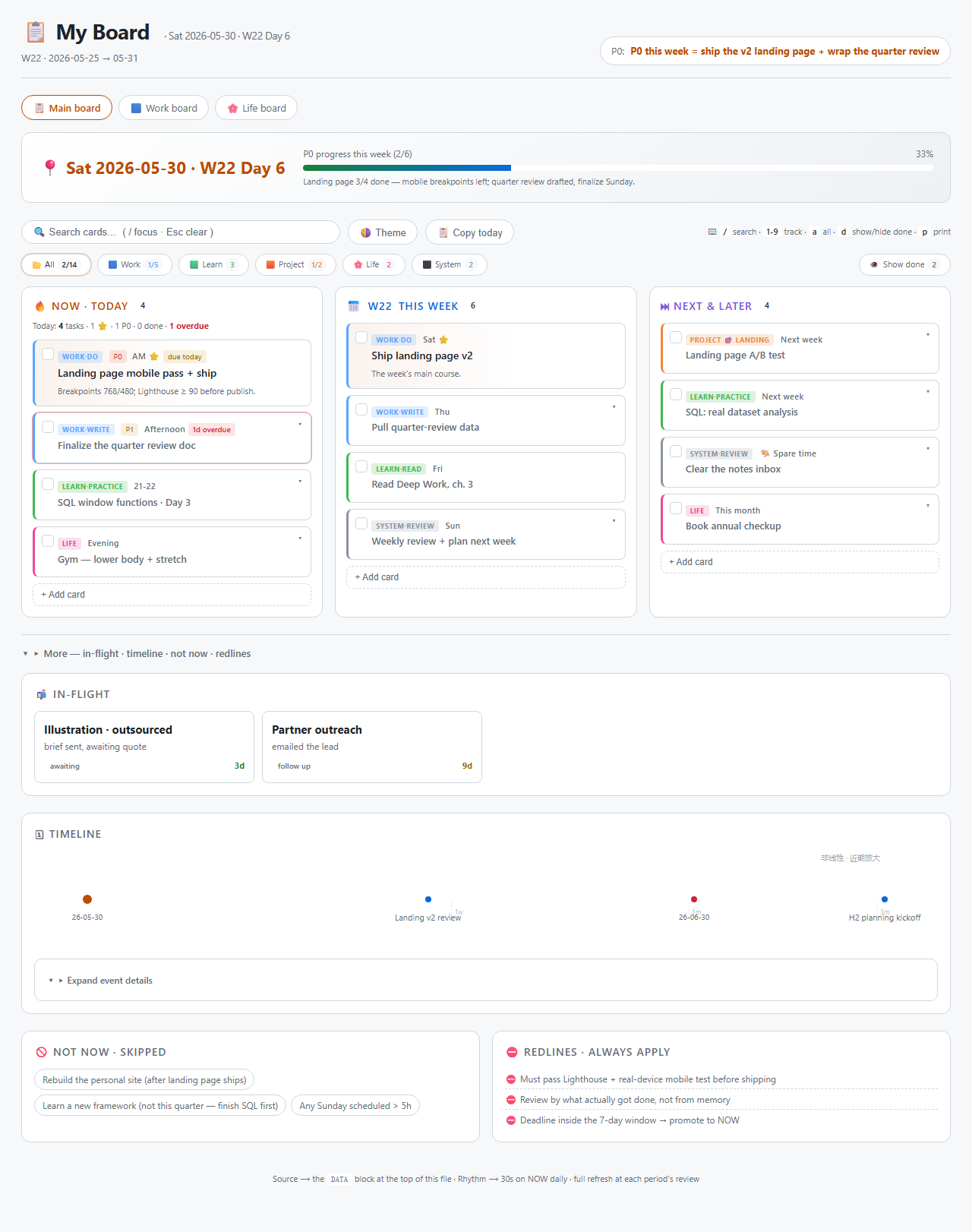
skill maintains the file in plain language. Dark + light theme, zero dependencies, opens by double‑click.
Light theme (🌗 toggle, persisted per browser):
Why
- One screen, one question. NOW · This week · NEXT, with the daily stuff up top and everything else folded away — the 30‑second glance lands on today, not a wall of backlog.
- The file is the truth. Everything lives in one diff‑able
DATAblock you can git‑version. Browser edits are an ephemeral overlay you sync back with one click — no database, no lock‑in. - Maintained in plain language. "add a task", "weekly review", "what's slipping" — the skill makes the precise edits so you don't hand‑edit JSON.
- Zero dependencies. No build, no server, no account. Double‑click the HTML.
Install & use
A. As a Claude Code skill (recommended)
git clone https://github.com/suzyeth/life-kanban ~/.claude/skills/life-kanban
Then just talk to Claude Code:
"make a life kanban" → it asks a few quick questions and scaffolds your board "add 'ship landing page' to today" · "check off the SQL task" · "weekly review" · "what's slipping?"
It also activates on the Chinese equivalents (做个看板 / 加一项 / 复盘 / 汇总 …).
B. Standalone (no AI)
cp assets/kanban-template.html board.html
cp assets/dashboard.css assets/dashboard-utils.js assets/lk-engine.js .
Edit the DATA block at the top of board.html (schema → references/data-schema.md),
then double‑click it. Everything works without Claude — the skill is just a nicer way to edit the file.
The four modes
| Mode | Say… | What happens |
|---|---|---|
| Create | "make a board" | A short intake (areas / cadence / focus / what you're not doing) → a board seeded with your real priorities. |
| Edit | "add a task" · "check it off" · "move to today" · "delete" | Small precise edits to the DATA block. |
| Refresh | "weekly review" · "start a new week" | Full‑page reset for the next period — rolls columns, advances the timeline, rewrites focus. |
| Analyze | "where am I?" · "what's slipping?" | Reads the board → per‑track counts, NOW load, slips, nearest deadline. |
What's on the board
Glance & structure
- 3 columns — 🔥 NOW·Today / 📅 This week / ⏭ NEXT&LATER
- Data‑driven color tracks — define your categories in
DATA.tracks; colors + legend filters generate themselves - 🎯 Goals —
DATA.goalslink tasks to a "why"; a goals strip shows auto‑progress and filters to a goal's cards - Recurring tasks —
repeaton a card (weekly / Mon,Wed,Fri / monthly) regenerates it each Refresh instead of dropping it - Today summary line (
4 tasks · 1 ⭐ · 1 P0 · 0 done · 1 overdue) + auto progress bar - Due dates → overdue cards get a red outline + chip
- Non‑linear (log‑scale) long‑range timeline (filter by event type — deadline / milestone / visa), NOT‑NOW + redlines rails
- Backlog stays calm — the NEXT column folds past
DATA.nextFoldAfter(default 8) behind a "▸ show N more" toggle, auto‑expanding while you search/filter - 📒 Review log — each weekly Refresh archives the closing period (completion‑rate trend bar + a one‑line retro + a "neglected track" flag), so the board has a memory, not just a snapshot
- ⚡ Attention strip — on open, surfaces nudges: "Nd since last refresh", "deadline in 3d", "N overdue in NOW"
- First‑screen focus — in‑flight / timeline / not‑now / redlines fold away by default · responsive on mobile
Daily use — all in the browser, no file edit
- ☑ check off · ✎ edit inline (title · details · tag · track · due date · ⭐) · ➕ + Add card with quick-capture tokens (
周三 投简历 #求职 P0 !→ day + track + tag + star, rest is the title) · ↩︎ undo any of it withCtrl/⌘+Z - move a card three ways: 🖱️ drag · ⌨️ focus its ⠿ handle → ← → change column, ↑ ↓ reorder · 👆 tap ⠿ then tap a column (touch‑friendly)
- 🔍 instant search · ⌨️ shortcuts (
/1‑9adpEsc·Ctrl/⌘+Zundo) · 📋 Copy today · 🖨️ print to clean PDF · 🌗 theme - ♿ a11y & mobile — every card is a keyboard‑operable group with an
aria-labelcarrying its track + state (done / overdue / starred); columns stack and tap targets grow on small / touch screens
Source of truth & sync
- The
DATAblock stays canonical; browser edits are a localStorage overlay - A sync banner offers 📤 Copy latest DATA (paste back = commit) and ↺ Reset
- Multi‑board —
DATA.navlinks several boards (work / life / …) that share the same CSS + JS
Workflow loop
A weekly big loop (the skill refreshes the file) wraps a daily micro‑loop (you tick/drag in the
browser); mid‑week edits and deadline promotion feed the file. The DATA block is canonical; browser
edits live in an overlay until synced back.
flowchart TD
R["🗓️ Weekly review · Refresh mode<br/>say "weekly review" → agent reads real progress<br/>full-page refresh DATA · advance timeline · rewrite focus"]
R --> NEW["📄 File DATA = the week's source of truth<br/>(git push to back up)"]
NEW --> G["☀️ Daily 30s · scan NOW → start working"]
G --> T["☑ Check off / 🖱️ drag / ➕ add cards<br/>in the browser, saved to a localStorage overlay<br/>(file untouched)"]
T --> B["📝 Sync banner: N local changes not yet committed"]
B --> G
IN1["💬 Mid-week: "add task X / change Y / delete"<br/>Edit mode → agent edits DATA precisely"] --> NEW
IN2["⏰ deadline enters the 7-day window<br/>→ promoted to NOW"] --> NEW
B -->|"to commit · or at review time"| S["📤 Copy latest DATA → paste over the file<br/>↺ reset overlay → file is canonical again"]
S --> R
One engine, many boards
Every board — the template and any real board — loads the same lk-engine.js (and dashboard.css
/ dashboard-utils.js). A board is just: those three files copied in + a DATA block + two optional
hooks. Fix a bug once in the engine, re-copy, every board benefits.
- Localization — the engine is language‑neutral; all user‑facing strings default to English and are
overridden by a
window.LK_I18N = { … }object (plain strings or(args)=>stringfunctions). Define it in a<script>beforelk-engine.js. It lives outsideDATA, so the "📤 Copy latest DATA" round‑trip never touches it. - Plugins — bespoke sections a particular board needs (e.g. a weight tracker, an applications table)
are functions on
window.LK_PLUGINS = [fn, …], each run once after first paint with a context{ DATA, M, STR, todayDate, toLocalDate, dayMs, repaint, effDone, bucket, esc }. They render into their own DOM nodes; the engine owns the columns / legend / goals / timeline / ledger. - Goals, two ways — a goal with
track:"x"derives progress from that track (click → filter the track); a goal with no track derives from cards that link viagoal:"<id>"(click → filter those).
<script>const DATA = { /* … */ };</script>
<script>
  window.LK_I18N = { all: "📂 全部", showDone: "显示已完成", summary: o => `今天: ${o.n} 项…` /* … */ };
  window.LK_PLUGINS = [ function renderHealth(ctx){ /* read ctx.DATA.health → render */ } ];
</script>
<script src="dashboard-utils.js"></script>
<script src="lk-engine.js"></script>
Layout
life-kanban/
├── SKILL.md                     # the skill workflow: detect mode → Create/Edit/Refresh/Analyze → verify
├── assets/
│   ├── kanban-template.html     # the board markup + DATA block (copy, edit DATA)
│   ├── lk-engine.js             # the shared, language-neutral render/overlay/drag/sync engine
│   ├── dashboard.css            # dark + light theme base
│   ├── dashboard-utils.js       # esc / date helpers / stale-date banner
│   └── kanban-template.md       # optional terminal-readable mirror
├── references/                  # data-schema · maintenance-rhythm · customization · self-test
├── tests/                       # Playwright headless tests (board.spec.mjs + serve.mjs)
└── .github/workflows/ci.yml     # runs the tests on every push / PR
Tests
Headless Playwright specs cover render, dynamic track color, search, keyboard shortcuts, check‑off + overlay + sync banner, drag‑to‑column, add card, due/overdue summary, theme, and reset — green on every push via GitHub Actions.
npm install
npx playwright install chromium   # first run only
npm test
Design principles
Fits on one screen · reality‑calibrated (refresh from real files, not memory) · deadlines first ·
dare to mark NOT NOW · slip honestly. See references/maintenance-rhythm.md.
License
MIT © Ziwei Su