
LiveAgent
sunprema/live_agent
MCP server que conecta Claude Code ao contexto live do seu Phoenix LiveView
Ver no GitHubServidor MCP para Phoenix LiveView que expõe assigns de socket e contexto do navegador para ferramentas de IA como Claude Code. Funciona como um painel de debug integrado na aplicação, permitindo que Claude acesse em tempo real o estado da interface, elementos selecionados e histórico de eventos.
Instalação
npx convez-ai sunprema/live_agent1 comando no terminal: detecta o formato do repositório (marketplace ou plugin avulso) e instala via Claude Code. Requer Node 18+ e o Claude Code instalado.
Métricas
Casos de uso
- Debugar e inspecionar estado de LiveViews com Claude Code
- Compartilhar contexto visual e de dados com assistentes de IA para pair programming
- Monitorar assigns, eventos e timeline de mudanças de estado em tempo real
- Visualizar modelo de dados e relacionamentos com diagramas Mermaid
Veredito

Solução inovadora que reduz fricção entre debugging manual e pair programming com IA. Bem pensada para workflows Elixir/Phoenix, mas requer familiaridade com MCP e add-on no navegador para máximo proveito.
README
A tradução para o português deste README ainda está na fila.
LiveAgent
An MCP (Model Context Protocol) server plug for Phoenix LiveView that exposes your socket assigns and browser context to AI coding tools like Claude Code.
Think of it as live_debugger but as an MCP server — giving Claude Code live read access to what's currently rendered on your screen, including a built-in browser panel for picking elements and sharing context.
Screenshots
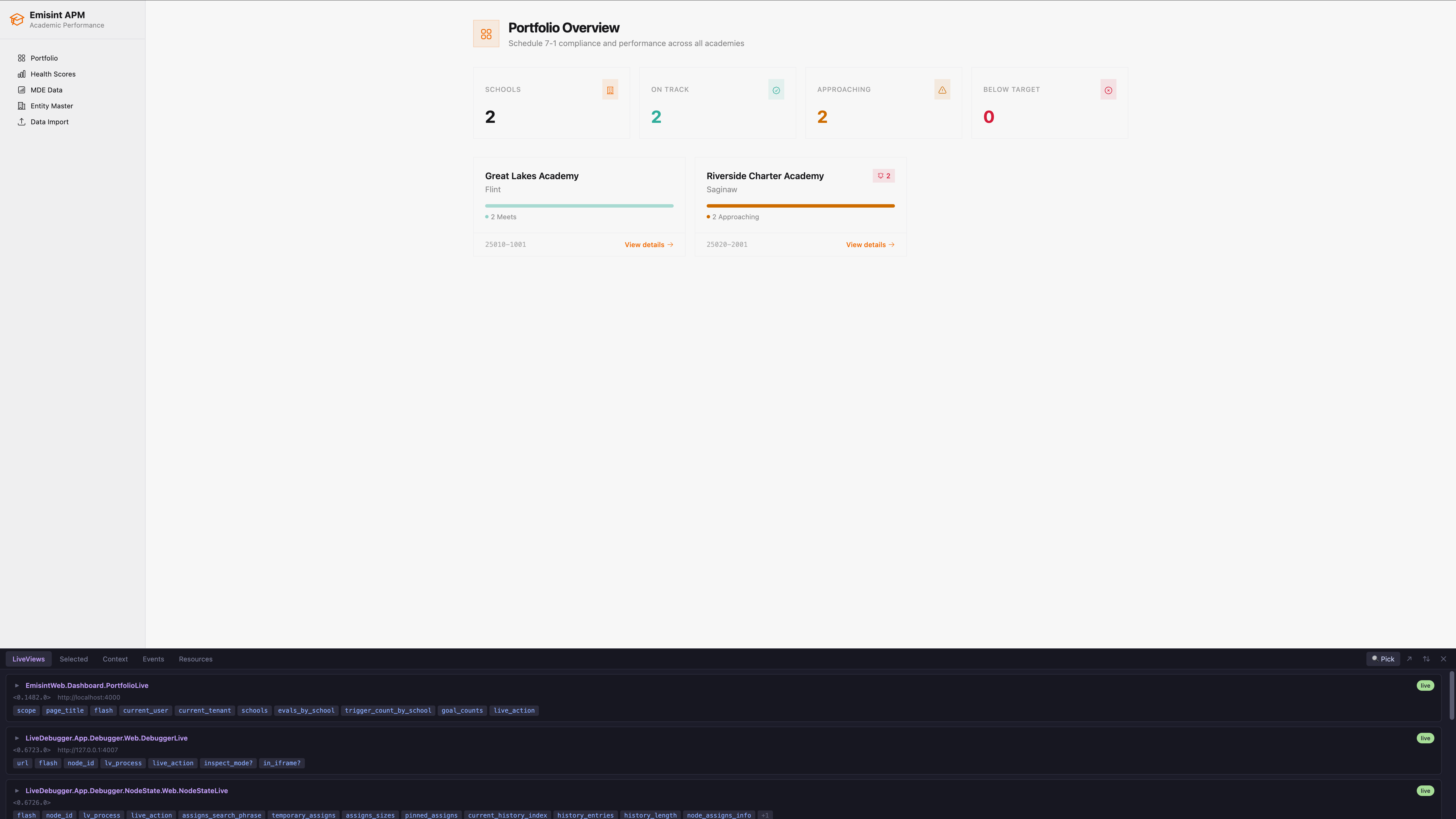
Inline panel — docked to the bottom of your app, showing active LiveViews and their assigns:
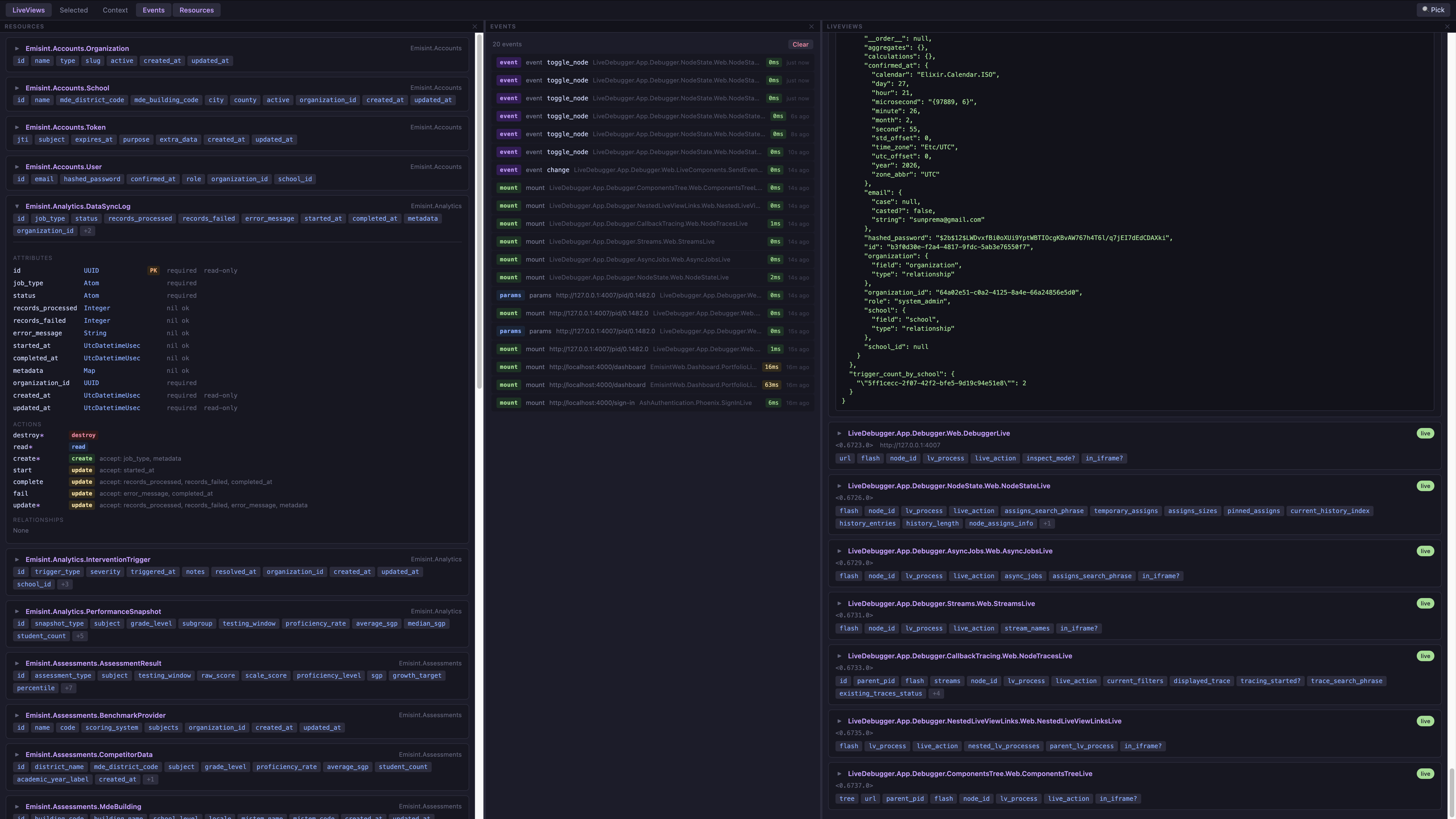
Standalone view — open in a new tab with multiple panels visible at once (LiveViews, Resources, and Events side by side):
What it does
In-browser panel
LiveAgent auto-injects a bottom panel into every page of your app (dev only). Click the ⚡ LA button in the bottom-right corner to open it.
The panel has eight panels, each toggled independently from the launcher bar — open as many as you want side by side:
| Panel | What it shows |
|---|---|
| LiveViews | All active LiveView processes — click ▶ to expand assigns inline |
| Selected | The DOM element you picked with the element picker, with component resolution |
| Context | Elements you've pinned for Claude, numbered 📌1, 📌2 … — each pin shows a badge overlay on the element in the page and has a Note for Claude textbox where you can type an optional message for the coding agent |
| Events | Live log of handle_event, mount, handle_params, and handle_info calls |
| Timeline | Ordered list of assigns transitions per LiveView — trigger, diff counts, click to expand |
| Async | In-flight start_async / assign_async tasks with live elapsed time, plus a completion history per LiveView |
| Resources | All Ash resources — click ▶ to expand attributes, actions, and relationships. A Diagram sub-tab renders a Mermaid class/ER diagram of your data model. |
| Screenshots | Thumbnails of recent take_screenshot captures — click to open full-size in a new tab, or Download as PNG |
Click any panel button in the top bar to open or close it. Drag the divider between open panels to resize them. Click ↗ to open the whole panel in a new tab.
The top-right of the bar also has the Drive toggle and the agent control status dot — when an open panel is connected, Claude can highlight elements and (with Drive on) click, fill, submit, and navigate. See the Agent controls section below.
Statusbar checkbox — next to Drive. Collapses the panel to just the toolbar strip (~36px tall), hiding the panes below and giving that vertical space back to the host app. The checked state is remembered per browser (localStorage). Clicking any panel button or the resize (↕) button automatically unchecks it so the panes can render again.
Element picker — click 🔍 Pick, then click any element on the page. LiveAgent captures its HTML, CSS classes, and Phoenix attributes (phx-click, data-phx-component, etc.). If the element belongs to a LiveComponent, the Selected panel automatically shows the component module, its id, and its current assign keys — resolved directly from the running BEAM process. Click 📋 Pin to Claude Context to pin the element — you can pin multiple elements (📌1, 📌2, …) and each gets a numbered badge overlaid on it in the page. All pinned elements are available to Claude via get_pinned_context at once, so you can pin a "source" element and a "target" element and ask Claude to mirror a change from one to the other. Each pinned card in the Context panel has a Note for Claude textbox — type an optional message (e.g. "this button should be disabled while saving") and it's saved on blur (or ⌘/Ctrl+Enter) and delivered to Claude alongside the element data.
Resources tab — lists every Ash resource loaded in the running app. Click ▶ on any resource to expand a full breakdown: attributes with types and constraints, actions with their accepted fields and arguments, relationships with destination resources, and any calculations or aggregates. Loaded once when the tab is first opened. Requires Ash to be installed — the tab is still shown but displays a message if Ash is not available.
The Resources tab has two sub-views, toggled at the top: Resources (the list above) and Diagram. The Diagram view renders a Mermaid diagram of your Ash data model — switch between a Class diagram (resources with their attributes and actions) and an ER diagram (entities and relationships), and scope it to a single domain or All domains. The diagram text is generated server-side via Ash's own Ash.Domain.Info.Diagram (the same engine behind mix ash.generate_resource_diagrams), then rendered in-browser with mermaid.js loaded on demand from a CDN — no Mermaid CLI or generated files needed. Use Copy source to grab the Mermaid text or Open in mermaid.live ↗ to edit it externally; the raw source is also available under the Mermaid source disclosure.
Events tab — shows a scrolling log of LiveView telemetry events as they happen. Each row displays the event type, event name (for handle_event), the LiveView or LiveComponent that handled it, duration, and how long ago it occurred. Click any row to expand the params or error details. Duration is color-coded: green under 10ms, amber 10–100ms, red over 100ms. Exceptions are highlighted in red. The log holds the last 200 events and can be cleared with the Clear button.
Timeline tab — groups recent assigns transitions by LiveView, newest first. Each row shows the trigger (mount / handle_event / handle_params / live_component_event / handle_async / unknown), the diff counts (N changed, M added, K removed), and the duration. Click any row to expand the full diff with before/after values. Unknown rows mean a render happened without a matching callback telemetry — almost always a handle_info (PubSub, send_after, etc.) since Phoenix doesn't emit telemetry for handle_info. (handle_async entries also start as "unknown" and are relabelled by the Async inspector when it sees the matching task exit.) Up to 50 entries per LiveView are kept in memory; processes that exit are dropped after a 60s grace period.
Screenshots tab — every call to take_screenshot (whether you triggered it from Claude or anywhere else) is captured into this pane as a thumbnail. Click a thumbnail or the Open button to view full-size in a new tab; Download saves a PNG locally. The same image is also written to /tmp/live_agent_screenshot_<timestamp>.png server-side. The panel keeps the most recent 12 captures in memory — older ones are dropped when the limit is reached. Clear wipes the in-memory list (does not delete the /tmp files).
Async tab — per LiveView, three sections:
- In flight — tasks currently running, with the registry kind (
start/assign/stream), task pid, and a live-updating elapsed time. - AsyncResult assigns — every assign holding a
%Phoenix.LiveView.AsyncResult{}, with itsloading/ok?/failedstate. - History — completed tasks newest first, with duration, success/exit status, and a
→ timeline #Nlink to the corresponding entry in the Timeline pane.
Up to 25 history entries per LiveView are kept; the inspector polls socket.private[:live_async] every 250ms while the tab is open, so tasks that finish in under one tick may not appear in history (we still catch them in AsyncResult assigns if they were launched with assign_async).
MCP tools
Claude Code can call these tools while you work:
| Tool | Description |
|---|---|
list_live_views | Lists all active LiveView processes (PID, view module, assign keys). Marks the connected root — the live view on screen — and sorts it first, so follow-up tools (incl. after an act_as reload) target the right PID. With multiple tabs open, also marks the Drive target (the tab whose URL matches the one with Drive ON) and names its URL in the header, so you can see which tab the browser-driving tools will act on. |
get_assigns | Returns the full assigns map for a LiveView — the live data on screen |
get_assign | Returns a single assign value by key |
get_socket_info | Returns full socket metadata (view, IDs, transport, assigns) |
get_scope | Returns the security scope bound to a LiveView — actor (current user), tenant/organization, and Ash scope context. Call before any project_eval/SQL on tenant-scoped data so the query reproduces the user's exact authorization boundary. |
get_state_history | Recent assigns transitions for a LiveView — trigger, diff, duration, exception. Answers "why did X change?" without re-running the flow. |
get_state_event | Full diff for one timeline entry by id (drill into get_state_history results) |
list_async_tasks | "What's loading right now" for a LiveView — pending start_async/assign_async tasks and any %AsyncResult{} values in assigns |
get_async_history | Recent completed async tasks for a LiveView with duration, result, and a cross-link to the state timeline |
get_async_event | Single async history entry by id |
watch_assigns | Snapshot assigns at this moment (call repeatedly to track changes) |
reset_watch | Clears the stored watch_assigns baseline for a PID so the next diff-mode call starts fresh |
get_selected_element | Returns the element most recently picked in the browser panel |
get_pinned_context | Returns all elements the user pinned for Claude, each with an optional user-written note |
get_panel_status | Reports panel readiness — ready, last_seen_age_ms, document_ready, live_socket_connected, root_lv_present, generation, url, reason. Browser-bound tools auto-wait for readiness; call this when a command timed out to see why. |
get_component_tree | LiveComponent tree for the current page — modules, ids, assign keys, events, forms (id + phx-submit/phx-change), named inputs, and buttons with their text and phx-click. Use this before calling click/fill/submit to pick the right target. |
list_ash_resources | Lists all Ash resources with attributes, actions, and relationships (Ash only) |
get_ash_resource_info | Full introspection of a single Ash resource — types, constraints, actions, etc. |
highlight_element | Draws a Chrome DevTools-style overlay on an element in the user's browser (by cid / CSS selector / visible text). Requires the panel to be open. |
clear_highlight | Removes any active highlight overlay |
click | Clicks an element in the user's browser (by cid / selector / text). Requires the panel open and the Drive toggle ON. Returns URL/view/flash and a server-side assigns diff. |
navigate | Navigates the browser to a path. Modes: auto (default — resolves via the host router: patch for same-LV with handle_params/3, navigate for cross-LV or LVs without handle_params/3, href for non-LV routes), patch, navigate, href. Requires Drive ON. |
fill | Sets a form input's value and dispatches input+change (so phx-change fires). Handles text/select/textarea, checkboxes, radios, and contenteditable. Requires Drive ON. |
submit | Submits a form via form.requestSubmit() (triggers phx-submit + HTML5 validation). Target can be the form or any element inside it. Requires Drive ON. |
send_event | Fires a named handle_event on a LiveView server-side by injecting the same "event" message the JS client sends — no browser, panel, or Drive needed, and it works on plain LiveViews. Use it for events not bound to a clickable element (custom params, keyboard events). Returns the before/after assigns diff. |
act_as | Logs the browser session in as a chosen user/persona so the driving tools then run as that actor — the one-call alternative to the login dance, built for testing org isolation. Returns the reconnected scope. Dev/test only; requires a :act_as closure + :session_options config and Drive ON. |
wait_for | Blocks until a condition is met. Modes: {assign: {pid, key, equals?}} polls a LiveView assign server-side (panel not required); {selector} / {text} use a browser MutationObserver. Default timeout_ms 5000. |
take_screenshot | Captures the browser to a PNG in /tmp. Optionally clip to one element by selector / cid / text; the result reports the captured rect. The panel UI is excluded. |
screenshot_baseline | Captures now and saves it as a named baseline under screenshots/baselines/<name>.png — the "before" for a visual diff. Honors the same element-clip args. |
screenshot_diff | Compares the current screen to a named baseline and returns changed_ratio, merged changed_boxes, dims_match?, and an overlay_path (baseline with changed pixels tinted red) instead of two full images. AA-aware; tune via threshold / include_aa. |
expect_assign | Assertion sibling of get_assign: returns {pass, path, expected, actual, waited_ms} for an assign (dot-path supported) via equals or matches, instead of dumping state to eyeball. timeout_ms > 0 polls until it passes (async settle); a failure is pass: false, not an error. |
expect_no_errors | Assertion gate over the error log — pass only if no errors recorded (optionally since a since_id). Pattern: clear_errors → act → expect_no_errors. Returns {pass, count, errors}. |
get_errors | Returns JS and server errors collected since the server started — uncaught exceptions, unhandled Promise rejections, and LiveView callback exceptions. Each error has a source ("js" or "server"), message, stacktrace, and timestamp. Pass since_id to fetch only new errors. |
clear_errors | Clears the error buffer. Use before reproducing an issue so expect_no_errors only sees new errors. |
inject_css | Injects a CSS rule block directly into the user's browser page without touching source files. Use to prototype style fixes visually, then write the confirmed fix to the actual stylesheet. Pass an id to label injections so you can revert by name. Requires the panel open. |
revert_css | Removes previously injected CSS. Pass id to remove a specific injection or omit to remove all. Requires the panel open. |
scroll_to | Scrolls the browser page to bring an element into view by CSS selector. Useful before take_screenshot to capture below-the-fold content. Requires the panel open. |
get_computed_styles | Returns the browser's resolved computed CSS for an element — final values after all stylesheets, inheritance, and cascade. Also returns the element's bounding rect. Pass a properties list to fetch only specific CSS properties. Requires the panel open. |
get_browser_logs | Returns a tail of console.{log,info,warn,error,debug} output captured from the host page. Useful when a browser command fails silently. Filterable by levels and since_id. Ring buffer of last 500 entries; LiveAgent's own calls are excluded. |
clear_browser_logs | Clears the browser console log buffer. |
list_lv_routes | Lists every Phoenix LiveView route in every router loaded in the running VM — path, LiveView module, live_action, live_session, and parent router. Filter by router substring or path prefix. Use before navigate to find the right path. |
scratchpad_save | Saves the current assigns of a LiveView as a named snapshot. Pass a note to document why and what comparison is planned — the note is stored with the snapshot and shown on retrieval. Snapshots survive LiveView PID changes (code reloads). |
scratchpad_list | Lists all saved scratchpad snapshots with name, note, view, url, saved_at, and assign key summaries. |
scratchpad_get | Returns the full assigns map of a named snapshot along with its note. |
scratchpad_compare | Diffs a snapshot against live assigns (pass pid) or another snapshot (pass other_snapshot_name). Returns changed/added/removed keys — the core "before my change vs now" tool. |
scratchpad_delete | Removes a named snapshot. |
Optional tools (enabled per plug option — see Options):
| Tool | Description |
|---|---|
list_oban_jobs | Lists rows from the host app's oban_jobs table. Filter by state, queue, worker, or limit. Enabled by oban_tools: true. |
get_oban_job | Fetches full details for one Oban job by id, including its error history. Enabled by oban_tools: true. |
retry_oban_job | Moves an Oban job back to available so it's picked up on the next queue poll. Wraps Oban.retry_job/1. Enabled by oban_tools: true. |
list_pubsub_topics | Lists every Phoenix.PubSub topic that currently has at least one local subscriber, with subscriber counts. Enabled by pubsub_tools: true or pubsub_tools: MyApp.PubSub. |
tail_pubsub_topic | Subscribes to a PubSub topic and returns up to max_n messages received within wait_ms. Useful for verifying realtime fan-out — call this, trigger an action (e.g. via click), and get back the captured broadcast. Enabled by pubsub_tools: .... |
Agent controls
LiveAgent lets Claude reach into the browser to highlight elements and
drive the app — clicking buttons, filling forms, navigating, and waiting on
state changes. Everything goes through the real DOM, so phx-click, JS hooks,
HTML5 form validation, and live navigation all behave exactly as they would for
a human user.
The browser-side tools require the LiveAgent panel to be open in a tab — that tab is the agent's hands. There is no headless mode; this is by design so you can see and stop anything Claude does.
Tools (already listed in the MCP tools table above):
- Read-only:
highlight_element,clear_highlight - Drive:
click,navigate,fill,submit,wait_for - Drive (impersonation, dev-only):
act_as— see Acting as a user
Status dot — top-right of the panel bar:
| Color | Meaning |
|---|---|
| Gray | Panel closed / agent control idle |
| Green | Connected and long-polling for the next command |
| Yellow | Currently executing a command from Claude |
| Red | Connection error — retrying every 2s |
Drive toggle — next to the status dot. highlight_element works regardless
(read-only), but click, navigate, fill, and submit refuse to run unless
Drive is ON. The toggle's state is remembered per browser (localStorage), so
turning it off is a hard stop you can leave in place. The initial default for
new browsers can be set with the drive_default: true plug option (see
Options) — localStorage still wins once you flip the toggle.
Drive also selects the target tab. When you have the app open in several
tabs or browsers, each runs its own command poll — so the server needs to know
which one Claude should act on. The tab with Drive ON is that target: the
server routes every browser-bound command (clicks, screenshots, highlights,
navigation, …) to it, instead of whichever tab happens to poll first. Flip Drive
on in the tab you want Claude driving; flipping it on elsewhere immediately moves
the target there (the panel beacons the change so you don't wait for the current
long-poll to cycle). If no tab has Drive on, commands fall back to any
connected tab — fine for a single tab, ambiguous with several, so keep Drive on
in exactly one tab when multiple are open. list_live_views marks the matching
LiveView "← Drive target" (and names the target URL in its header), so Claude can
confirm which tab it's about to act on — and, for inspection tools that take an
explicit pid, pick the LiveView you mean.
Panel readiness
Every browser-bound MCP tool (click, navigate, fill, submit,
take_screenshot, highlight_element, inject_css, …) routes through a
readiness gate. Before a command is enqueued, the server checks
LiveAgent.PanelStatus and waits briefly (default ~3s, screenshot 6s) for
the panel to report all of:
- the panel JS has reported in recently (it piggybacks on each command poll
and fires a
POST /api/helloon boot) document.readyState === "complete"liveSocket.isConnected()(or the page has no LiveView at all)
This bridges the gap during a Phoenix hot-reload, first page load, or
cross-page navigation — calls that previously raced and returned
"No LiveAgent panel responded" now wait until the panel is back and then
proceed. If the gate times out, the command is still enqueued (the
regular per-command timeout takes over), and the error message includes
last_seen_age_ms plus a short reason so callers know whether to retry.
Call get_panel_status any time to read the current snapshot.
Demo scripts
A few prompts you can hand Claude once the panel is open:
"Show me what
submit_paymentrefers to — highlight it."
Claude calls get_component_tree to find the phx-click="submit_payment"
button, then highlight_element with that selector. A DevTools-style overlay
appears for 3 seconds.
"Add the blue t-shirt to the cart and tell me what happened to the
cartassign."
Claude calls get_component_tree to find the right button, clicks it with
selector [phx-click='add_to_cart'][data-product-id='42'], then reads the
server-side assigns diff in the response (which already includes the change to
cart). No second tool call needed.
"Demo the checkout flow: go to /cart, click 'Checkout', fill the email with test@example.com, and submit. Stop at any error."
Claude chains navigate → click → fill → submit, with wait_for in
between when needed. Each step returns URL/flash/assigns-diff so Claude can
notice and report a validation error or unexpected redirect.
Acting as a user (act_as)
act_as lands the panel's browser session authenticated as a chosen
user/persona in one call, so the driving tools then exercise the app as that
actor — instead of filling a login form by hand every session. Its headline
use is testing multi-tenant org isolation.
"Make sure an org B admin can't see org A's patient. Act as
orgb-admin@example.com, then open/patients/<orgA-id>."
Claude calls act_as("orgb-admin@example.com") (the page reloads and reconnects
authenticated; the tool returns the new actor/tenant scope so it confirms who it
became), then navigates to org A's record and reads the expected forbidden / 404. act_as("orga-admin@example.com") → same URL → the record renders.
This is privileged and dev-only. Four independent locks, none present in a prod build:
- Build: depend on live_agent with
only: :devand the route/tool don't even compile in prod. - Env gate:
act_asruns only in:dev/:test. - App-supplied closure: live-agent never mints sessions itself — you must
provide an
:act_asfunction that signs a user in. Absent it,act_asreturns a precise error. - Drive toggle: like
click/fill,act_asrefuses unless Drive is ON.
Configuration (dev only). act_as needs two config keys — the sign-in
closure and a verbatim copy of your endpoint's session options:
# config/dev.exs
config :live_agent,
  # ⚠ Copy :session_options VERBATIM from your endpoint's @session_options
  # (same key + signing_salt + same_site). A salt mismatch does NOT error — it
  # silently fails to authenticate after the reload, because the reconnecting
  # LiveSocket can't decode a cookie signed with a different salt.
  session_options: [store: :cookie, key: "_my_app_key", signing_salt: "...", same_site: "Lax"],
  act_as: &MyAppWeb.DevActAs.sign_in/2
# lib/my_app_web/dev_act_as.ex — keep the privileged code greppable, in lib/.
defmodule MyAppWeb.DevActAs do
  @moduledoc "Dev-only: mint a real session for an arbitrary user so live-agent can drive as them."
  import AshAuthentication.Phoenix.Plug, only: [store_in_session: 2]

  # `identifier` is whatever you passed to act_as, verbatim (here: an email).
  def sign_in(conn, identifier) do
    user = Ash.get!(MyApp.Accounts.User, %{email: identifier}, action: :get_by_email, authorize?: false)
    store_in_session(conn, user)   # exactly what your AuthController does after a real login
  end
end
Notes:
- The closure just calls your app's existing sign-in primitive on the
connand returns it — nofetch_session/session plumbing. live-agent sets the session up from:session_optionsbefore calling you (becauseplug LiveAgentmounts beforePlug.Session, the/live_agent/act_asrequest would otherwise arrive with no session), soput_session/store_in_sessionwork verbatim and the cookie is written back. - Resolve the user with
authorize?: false— there's no actor yet (that's the point), so a normal scoped read would refuse. Same posture as a seed script. - Don't thread the tenant through the closure. The closure mints the
actor; your app's own
on_mount/scope-resolution derives the tenant when the socket reconnects. That's why org isolation needs no extra wiring. - A closure that raises (e.g. user not found) returns a clean error — never a half-authenticated state.
Installation
Add to your Phoenix app's deps in mix.exs:
defp deps do
  [
    {:live_agent, "~> 0.2", only: :dev}
  ]
end
Then fetch deps:
mix deps.get
Setup
1. Add the plug to your endpoint
In lib/my_app_web/endpoint.ex, add plug LiveAgent before the if code_reloading? block:
if Code.ensure_loaded?(LiveAgent) do
  plug LiveAgent
end

if code_reloading? do
  plug Phoenix.CodeReloader
  # ...
end
2. Configure Claude Code
Add LiveAgent as an MCP server in your project's .mcp.json. If you're also using Tidewave, add it alongside:
{
  "mcpServers": {
    "tidewave": {
      "type": "http",
      "url": "http://localhost:4000/tidewave/mcp"
    },
    "live-agent": {
      "type": "http",
      "url": "http://localhost:4000/live_agent/mcp"
    }
  }
}
3. Start your Phoenix app
mix phx.server
Claude Code will connect to LiveAgent over HTTP while your app is running. No separate process needed.
How it works
LiveAgent is a Plug that:
- Mounts an MCP server at
/live_agent/mcpfor Claude Code to connect to - Auto-injects the browser panel into every HTML response (dev only)
- Exposes a small JSON API at
/live_agent/api/*for the panel to call - Runs a
BrowserStateStoreGenServer to hold the current selected element and pinned context - Runs an
EventStoreGenServer that subscribes to Phoenix's built-in telemetry events and keeps a ring buffer of the last 200 - Runs a
StateTimelineGenServer that records assigns transitions per LiveView pid (up to 50 entries each), keyed off the same telemetry events - Runs a
ScratchpadStoreGenServer that holds named assigns snapshots (up to 50), keyed by name rather than PID so they survive code reloads
State Timeline
The timeline subscribes to LiveView's built-in :telemetry events
(mount, handle_params, handle_event, live_component handle_event, and
render). On each callback :stop, it stashes the trigger metadata
(event name, params, uri, component); on render :stop it diffs the new
socket assigns against the previously captured snapshot and emits a timeline
entry. Empty diffs are skipped. Exceptions are recorded directly from the
:exception telemetry variant.
Caveat: handle_info and handle_async are not instrumented by core
LiveView, so transitions caused by them are initially recorded with
trigger.kind = "unknown". The Async inspector relabels "unknown" entries
to "handle_async" after the fact when it sees the matching task exit
within ~150ms. True handle_info work (PubSub messages, send_after)
stays "unknown" — the diff is still accurate, only the attribution is.
Async / Task inspector
Phoenix LiveView 1.1.x does not emit telemetry for handle_async, so
the inspector cannot subscribe to events. Instead it runs a single 250ms
Process.send_after poll loop that:
- Lists live LV channel pids
- Reads
socket.private[:live_async]on each — the per-LV registry that LV itself populates (async.ex:423–430, shapekey => {ref, pid, kind}) - For every new key/pid pair, stamps
started_atand callsProcess.monitor/1on the task pid - When the monitor's
:DOWNmessage arrives, records a completion entry (name, kind, duration,:okor:exit) into a per-LV ring buffer of 25
For assign_async completions it also reads the LV's assigns and captures
the resulting %AsyncResult{} into the entry. For start_async (no auto
assign) the callback's raw return value isn't exposed to us — Claude reaches
the resulting assigns diff via the state_timeline_id cross-link recorded
on every entry.
The poll loop pauses automatically when nothing has read from the inspector in 30s (no panel pane open, no MCP call), so the cost is zero when nothing is watching.
For assigns inspection it uses the same technique as live_debugger:
- Scans all BEAM processes for those started by
Phoenix.LiveView.Channel - Uses
:sys.get_state/1to read the GenServer state from the channel process - Extracts the
%Phoenix.LiveView.Socket{}and itsassignsmap - Sanitizes assigns to be JSON-encodable (handles PIDs, structs, atoms, etc.)
For component resolution (element picker and get_component_tree), LiveAgent reads the channel's internal components map (a {cid_to_component, id_to_cid, uuids} tuple) to look up a component integer CID and return the module name, id, and assign keys.
For the component tree, the HTML response flowing through the Plug is regex-scanned in the same register_before_send pass used for panel injection. Each data-phx-component="N" element is captured with its DOM id and all phx-* event bindings, then stored in ComponentTreeStore keyed by view_id (phx-FgX2...).
No instrumentation required in your LiveViews — it works with any existing Phoenix app.
Usage with Claude Code
Via the browser panel (recommended)
- Open your app in the browser
- Click ⚡ LA (bottom-right) to open the panel
- Click 🔍 Pick and select any element on the page
- Click 📋 Pin to Claude Context — a numbered badge (📌1) appears on the element
- Pick and pin more elements if needed (📌2, 📌3, …)
- Optionally type a message in the pin's Note for Claude textbox in the Context panel — e.g. "align this with the header"
- Ask Claude: "Add a Status column to this table" or "Make the sidebar match the card style I pinned"
Claude calls get_pinned_context, gets all pinned elements' HTML, Phoenix metadata, and your notes, finds the .heex templates, and makes the change.
Via the Events tab
The Events tab is useful when you can't figure out why state isn't updating as expected:
- Open the panel and switch to Events
- Interact with the page — click a button, submit a form, navigate
- Watch the event log to confirm your
handle_eventis firing, check params, and see duration - If an event shows red, click it to expand the exception details
- Ask Claude: "The save-form event is firing but the user isn't being updated — here's the event log"
No instrumentation needed — LiveAgent hooks into the telemetry events Phoenix already emits.
The following event types are captured:
| Badge | Telemetry event |
|---|---|
event | handle_event on LiveView and LiveComponent |
mount | mount on LiveView |
params | handle_params on LiveView |
info | handle_info on LiveView |
error | Any of the above that raises an exception |
With Ash Framework
If your app uses Ash, LiveAgent gives Claude direct access to your data model without it having to read source files.
In the panel — open the Resources tab to visually browse all your resources. Each resource expands to show:
| Section | Details |
|---|---|
| Attributes | Name, type, PK badge, required/nil-ok, read-only flag |
| Actions | Name, type (color-coded), accepted attributes, arguments. Primary actions marked with * |
| Relationships | Name, type (belongs_to, has_many, etc.), destination resource |
| Calculations | Names listed as chips |
| Aggregates | Name and kind listed as chips |
Via MCP — Claude can call these tools before writing any Ash code:
- "What actions does MyApp.Accounts.User have?" →
list_ash_resources - "Add a
:suspendaction to the User resource" → Claude callsget_ash_resource_infofirst to understand the existing structure, then makes the change - "What attributes does MyApp.Blog.Post accept on create?" →
get_ash_resource_info
No configuration needed — LiveAgent scans all loaded BEAM modules at runtime to find Ash resources automatically.
Via the component tree
get_component_tree gives Claude a structural map of the current page without reading source files:
- "What LiveComponents are on this page?" →
get_component_tree - "Add a
:loadingassign to the FormComponent" → Claude callsget_component_treeto find the module and its current assigns, then makes the change - "Why isn't my save-form event firing?" →
get_component_treeshows which component handles that event and its current assign keys
The tree is parsed from the last HTML response LiveAgent intercepted. Navigate to the page you want to inspect first.
Via visual regression (screenshot diffs)
The design-system loop — screenshot, eyeball, tweak CSS, screenshot again — gets a real comparison primitive instead of asking Claude to diff two full-page PNGs by eye:
-
Mark a baseline. "Snapshot the cart card as
cart." → Claude callsscreenshot_baseline(name: "cart", selector: ".cart"). The capture is saved toscreenshots/baselines/cart.png. -
Make the change. Edit the CSS / markup (or have Claude
inject_css). -
Diff it. "Did that touch only the cart?" → Claude calls
screenshot_diff(name: "cart", selector: ".cart")and gets back:{ "changed_ratio": 0.037, "changed_boxes": [{ "x": 12, "y": 80, "w": 220, "h": 64 }], "dims_match?": true, "overlay_path": "screenshots/diffs/cart.png", "baseline_path": "screenshots/baselines/cart.png" }The overlay at
overlay_pathis the baseline with changed pixels tinted red — Read it to see the change.changed_boxesare the merged dirty regions, so Claude can tell at a glance whether the change stayed inside the card.
Element clipping — pass selector / cid / text to take_screenshot,
screenshot_baseline, and screenshot_diff to capture just one component, so the
relevant 400×200 region isn't buried in a 1440×3000 full-page shot. Use the same
clip for the baseline and the diff so their dimensions line up — if the page
reflowed and the sizes differ, screenshot_diff returns dims_match?: false with
both sizes rather than a bogus ratio.
Anti-aliasing — diffing uses pixelmatch
(vendored into the panel JS, so it works offline), which detects and ignores
sub-pixel rendering noise by default, so changed_ratio reflects real changes. Tune
sensitivity with threshold (0–1 colour distance, default 0.1) or count AA pixels
with include_aa: true.
Baselines and diffs are written under screenshots/ in your project root (where
mix phx.server runs), so they survive across MCP calls and panel reconnects.
Re-using a baseline name overwrites it.
Via assigns inspection
Ask Claude things like:
- "What are the current assigns for the UserDashboardLive view?"
- "The user list on screen — what data is driving it?"
- "Watch the
:formassign while I fill out this form" - "What's the value of the
:current_userassign?"
Claude calls list_live_views to find the right process, then get_assigns to read the data.
Via the scope inspector
In a multi-tenant Ash app, the most error-prone part of evaluating a query by
hand is reconstructing who the user is — their actor, tenant, and scope —
so the call returns what they actually see. get_scope hands Claude that
context straight from the live socket:
- "Who is the user on this LiveView, and what org are they scoped to?" →
Claude calls
get_scopeand reports the sanitizedactor/tenant/contextinstead of grepping the assigns dump. - "Would this read leak across orgs? Run it as the logged-in user." →
Claude calls
get_scope, binds the returned actor + tenant into itsproject_eval, and reproduces the user's exact authorization boundary — rather thanauthorize?: falseor a hand-built scope that doesn't match.
Resolution is heuristic (current_scope, current_user + __tenant__,
current_organization, …); point it at a custom key with the
scope_assign_keys plug option. A result with raw_present: false means the
LiveView simply has no scope assign — not that the lookup failed.
Via assertions (pass / fail, not just state)
expect_assign and expect_no_errors turn "read the state and judge it" into an
explicit verdict — tighter verify loops, and a real assertion for the verify
skill to hang on:
-
"Confirm the alert flipped to red." →
expect_assign(pid, key: "alert.level", equals: "emergency")returns{ "pass": true, ... }, or{ "pass": false, "actual": "yellow", "expected": { "equals": "emergency" } }— no 350k-char dump to scan.keyis a dot-path, so nested maps/structs work. -
"Wait for the async load to finish, then check it." → add
timeout_ms: 3000andexpect_assignpolls until it passes or the time elapses (same bound aswait_for), so an assign that hasn't settled yet doesn't read as a spurious failure. -
"Did that click break anything?" → the gate pattern:
clear_errors → click "Save" → expect_no_errorsexpect_no_errorsreturns{ "pass": true }, or the captured browser/server errors with a count. Pass asince_idfrom an earlierget_errorsinstead ofclear_errorsif you'd rather not reset the log.
equals does a typed compare for scalars (with a stringified fallback, so
equals: "5" also matches the integer 5); matches tests a regex — or a plain
substring — against the stringified value.
Via the state timeline
The timeline is the fastest way to debug "why did X change" without re-running the user's flow:
- "Why did
cart.totalflip to nil after I clicked Apply?" → Claude callsget_state_history, finds thehandle_evententry that produced the diff, reports the triggering event + params. - "Walk me through what happened after I submitted the form." → Claude returns the ordered list of transitions with diffs and durations.
- "Something in this list is changing on its own — find it." → Claude looks
for
trigger.kind = "unknown"entries (those arehandle_info-driven) and reports the diff.
Each call to get_assigns also appends a Last change: footer pointing at
the most recent timeline entry, so Claude has a built-in breadcrumb without
needing a second tool call.
Via the async inspector
For "what's loading right now" and "what async work just finished":
- "The spinner on the dashboard is still up — what's still loading?" →
Claude calls
list_async_tasksand reports whichstart_async/assign_asynctasks are still in flight and how long they've been running. - "That
:load_usertask just failed — what was the reason?" → Claude callsget_async_history, finds the most recent:exitentry for:load_user, and returns the truncated reason. - "The dashboard shows the wrong user. When did
current_userget set?" → Claude finds thehandle_asyncentry in the state timeline (via the async history'sstate_timeline_idcross-link) and shows the diff.
Via the scratchpad (before/after snapshots)
The state timeline answers "what just changed"; the scratchpad answers "is the state different from how it was before I touched the code." It captures a named snapshot of a LiveView's assigns that survives code reloads — because snapshots are keyed by name, not PID, the "before" you saved is still there after Phoenix restarts the process.
- Capture the baseline. "Snapshot the dashboard assigns as
before_refactor— I'm about to change how the cart total is computed." → Claude callsscratchpad_save(pid, name: "before_refactor", note: "..."). Thenoterecords the intent and comes back on retrieval. - Make the change. Edit the LiveView / component (which reloads the process).
- Diff it. "Did anything other than
cart.totalchange?" →scratchpad_compare(snapshot_name: "before_refactor", pid: "<new pid>")returnschanged/added/removedkeys against the live assigns.
You can also diff two saved snapshots (scratchpad_compare(snapshot_name: "a", other_snapshot_name: "b")) to compare two captured points in time.
scratchpad_list shows every snapshot with its note and assign-key summary,
scratchpad_get dumps a snapshot's full assigns, and scratchpad_delete
removes one. Up to 50 snapshots are kept (oldest dropped); re-using a name
overwrites it.
Options
plug LiveAgent accepts the following options:
| Option | Default | Description |
|---|---|---|
allow_remote_access | false | Allow connections from non-localhost IPs. Leave false in dev. |
drive_default | false | Default for the Drive toggle on first visit (no localStorage entry yet). Once the user flips the toggle, their stored preference wins. |
open_default | false | If true, the panel auto-opens on page load instead of starting collapsed behind the floating ⚡ LA button. Persisted per browser — once the user closes the panel, that choice is remembered. |
scope_assign_keys | [] | Extra assign keys (atoms) that get_scope should treat as the security scope, tried before the built-in heuristics. Use when your app stores scope under a custom key, e.g. scope_assign_keys: [:current_membership]. |
oban_tools | false | Set to true to enable the Oban MCP tools (list_oban_jobs, get_oban_job, retry_oban_job). Requires Oban to be installed and running. |
pubsub_tools | false | Set to true to auto-discover the host app's PubSub, or pass the PubSub module directly (e.g. pubsub_tools: MyApp.PubSub). Enables list_pubsub_topics and tail_pubsub_topic. |
plug LiveAgent, allow_remote_access: false, drive_default: true, open_default: true
plug LiveAgent, oban_tools: true, pubsub_tools: MyApp.PubSub
Security
LiveAgent is dev-only. It gives read access to all socket assigns, which may include sensitive data (user IDs, session tokens, etc.). Do not add it to your production endpoint.
The plug is guarded by a localhost check by default — it will return 403 for any request not coming from 127.0.0.1 or ::1.
License
MIT