
BundlerMCP
subelsky/bundler_mcp
Acesso a metadados e código-fonte de gems Ruby para agentes de IA
Ver no GitHubServidor MCP que permite agentes de IA consultar informações sobre dependências Ruby em um projeto, incluindo versões, descrições, caminhos de instalação e localização de documentação. Funciona como bridge entre Claude/Cursor e o Bundler, facilitando análise de gems e código-fonte.
Instalação
npx convez-ai subelsky/bundler_mcp1 comando no terminal: detecta o formato do repositório (marketplace ou plugin avulso) e instala via Claude Code. Requer Node 18+ e o Claude Code instalado.
Métricas
Casos de uso
- Analisar dependências de um projeto Ruby antes de refatoração
- Investigar detalhes de gems instaladas durante pair programming com IA
- Localizar documentação e código-fonte de bibliotecas para depuração
Veredito

Ferramenta especializada e bem executada para desenvolvedores Ruby que usam Claude/Cursor. Preenche gap real na integração entre agentes de IA e análise de dependências, com instalação direta via gem e configuração limpa.
README
A tradução para o português deste README ainda está na fila.
BundlerMCP
A Model Context Protocol (MCP) server enabling AI agents to query information about dependencies in a Ruby project's Gemfile. Built with fast-mcp.


Installation
Install the gem and add to the application's Gemfile by executing:
bundle add bundler_mcp --group=development
Usage
- Generate the binstub:
bundle binstubs bundler_mcp
- Configure your client to execute the binstub. Here are examples that work for Claude and Cursor:
Basic Example (mcp.json)
{
  "mcpServers": {
    "bundler-mcp": {
      "command": "/Users/mike/my_project/bin/bundler_mcp"
    }
  }
}
Example with logging and explicit Gemfile
{
  "mcpServers": {
    "bundler-mcp": {
      "command": "/Users/mike/my_project/bin/bundler_mcp",

      "env": {
        "BUNDLER_MCP_LOG_FILE": "/Users/mike/my_project/log/mcp.log",
        "BUNDLE_GEMFILE": "/Users/mike/my_project/subdir/Gemfile"
      }
    }
  }
}
Documentation
Available Tools
The server provides two tools for AI agents:
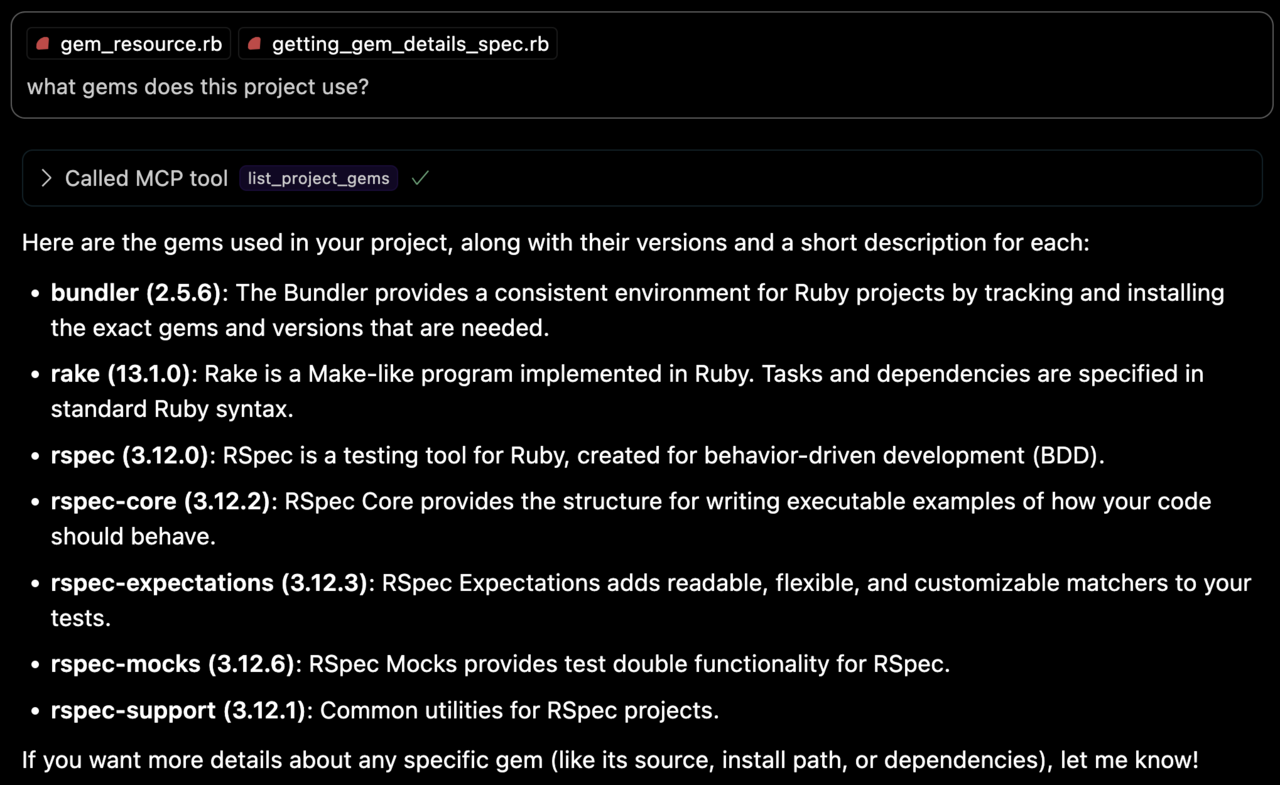
list_project_gems
Lists all bundled Ruby gems with their:
- Versions
- Descriptions
- Installation paths
- Top-level documentation locations (e.g.
READMEandCHANGELOG)
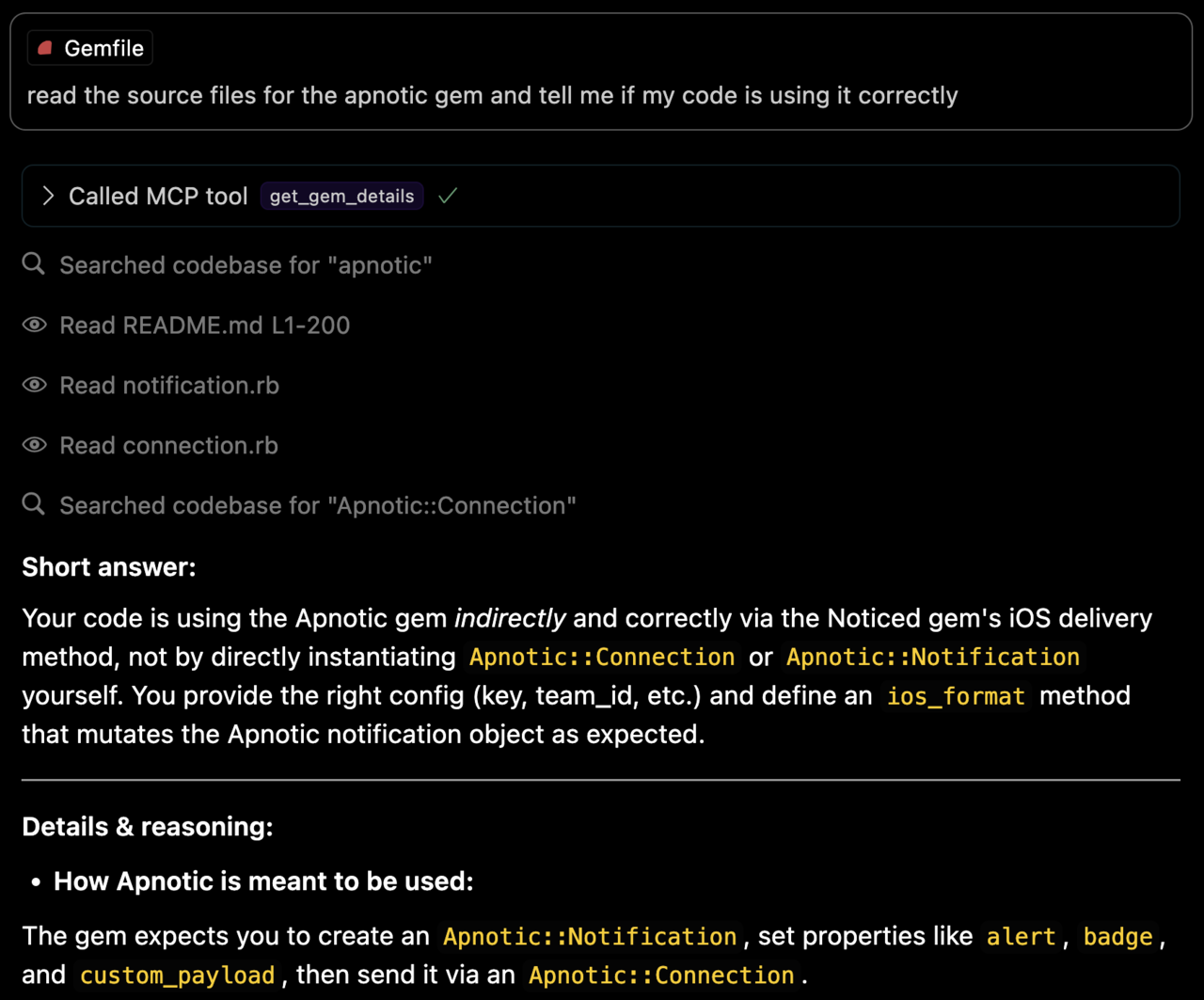
get_gem_details
Retrieves detailed information about a specific gem, including:
- Version
- Description
- Installation path
- Top-level documentation locations
- Source code file locations
Environment Variables
BUNDLE_GEMFILE: Used by Bundler to locate your Gemfile. If you use the binstub method described in the Usage section, this is usually not needed.BUNDLER_MCP_LOG_FILE: Path to log file. Useful for troubleshooting (defaults to no logging)
Development
After checking out the repo, run bin/setup to install dependencies and bundle exec rspec to run the tests. You can also run bin/console for an interactive prompt that will allow you to experiment.
Testing with the MCP Inspector
You can test the server directly using the MCP inspector:
# Basic usage
npx @modelcontextprotocol/inspector ./bin/bundler_mcp

# With logging enabled
BUNDLER_MCP_LOG_FILE=/tmp/log/mcp.log npx @modelcontextprotocol/inspector ./bin/bundler_mcp

# With custom Gemfile
BUNDLE_GEMFILE=./other/Gemfile npx @modelcontextprotocol/inspector ./bin/bundler_mcp
Release Process
To install this gem onto your local machine, run bundle exec rake install. To release a new version:
- Update the version number in
version.rb - Run
bundle exec rake release
This will:
- Create a git tag for the version
- Push git commits and the created tag
- Push the
.gemfile to rubygems.org
Contributing
Bug reports and pull requests are welcome on GitHub at https://github.com/subelsky/bundler_mcp.
License
Open source under the terms of the MIT License.