
Zotero Fulltext MCP
statzhero/zotero-fulltext
Busca inteligente em sua biblioteca Zotero direto no Claude
Ver no GitHubServidor MCP que conecta sua biblioteca Zotero ao Claude e Codex, oferecendo busca e acesso a textos completos sob demanda. Integra-se diretamente à API local do Zotero 8+ com otimização de tokens, permitindo pesquisa em metadados e conteúdo fulltext de artigos.
Instalação
npx convez-ai statzhero/zotero-fulltext1 comando no terminal: detecta o formato do repositório (marketplace ou plugin avulso) e instala via Claude Code. Requer Node 18+ e o Claude Code instalado.
Métricas
Casos de uso
- Pesquisa acadêmica assistida por IA com referências da sua biblioteca
- Busca de citações e metadados sem sair do editor
- Leitura e análise de textos completos com sumarização por IA
Veredito

Solução bem-construída e leve para integrar Zotero com Claude. Ideal para pesquisadores que querem IA analisando suas próprias referências sem copiar tudo para o contexto. Instalação direta no Claude Desktop ou como plugin Codex/Claude Code.
README
A tradução para o português deste README ainda está na fila.


Access your Zotero library with your favorite AI tool.
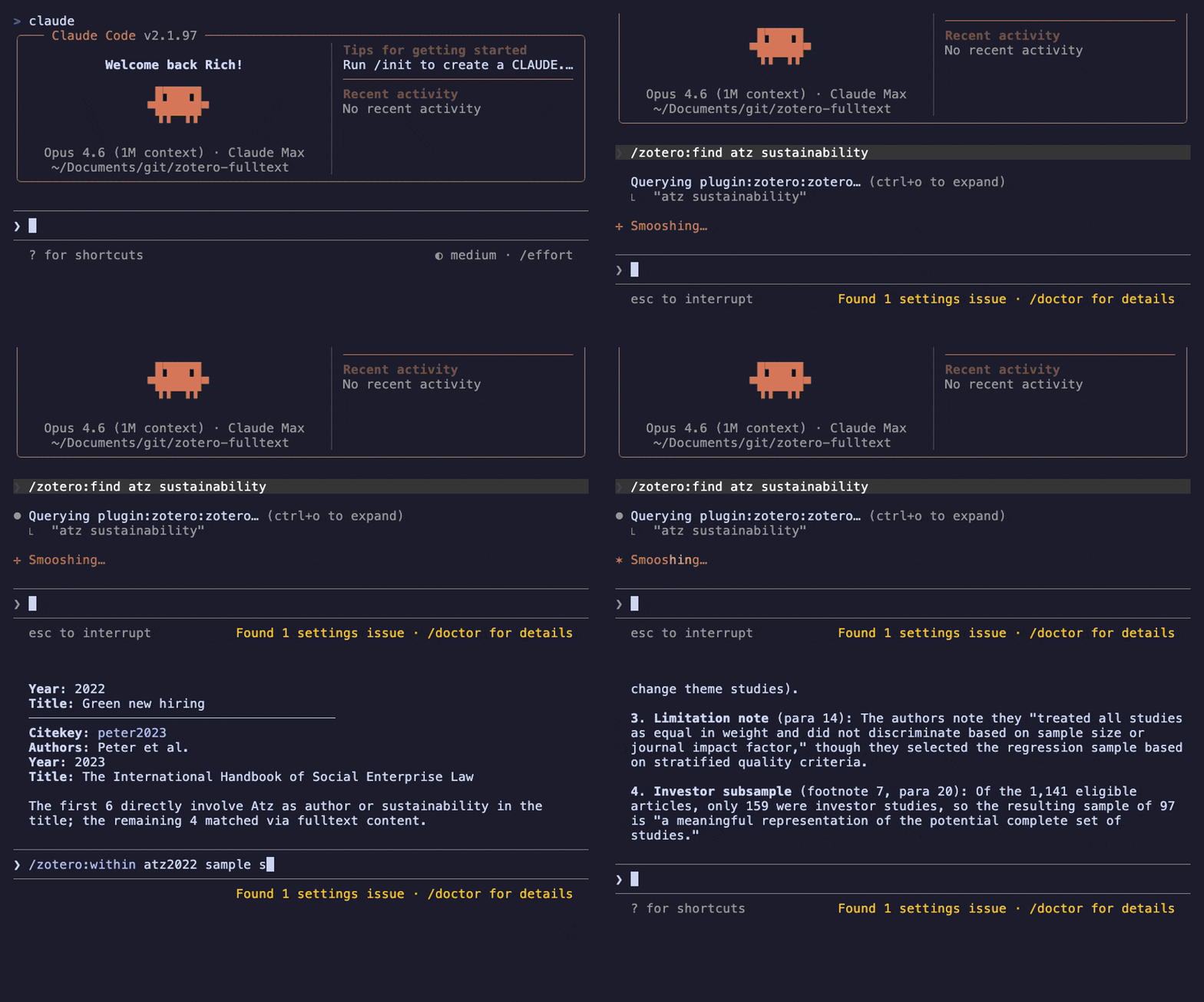
This MCP server for Zotero 8+ gives Claude and Codex access to your library via search and citekeys. It talks directly to Zotero's local API and aims to keep token usage low. Fulltext is fetched only on demand.
Quick Start
- Make sure Zotero 8+ is running with the local API enabled (Settings → Advanced → "Allow other applications on this computer to communicate with Zotero").
- Install the Claude Code plugin:
/plugin marketplace add statzhero/zotero-fulltext
/plugin install zotero@zotero-fulltext
- Run
/mcpto confirm the server is connected, then try a slash command:
/zotero:find sustainability reporting
Also works with Claude Desktop, Codex, and as a standalone MCP server without slash commands.
Commands
The Claude Code plugin provides four slash commands:
| Command | What it does |
|---|---|
/zotero:find <query> | Search the whole library |
/zotero:lookup <citekey> | Exact citekey metadata lookup |
/zotero:read <citekey> | Numbered fulltext paragraphs |
/zotero:within <citekey> <query> | Search inside one paper's fulltext |
find searches the whole library. lookup is lightweight metadata confirmation. read returns the actual paper text. within searches only one item's indexed fulltext.
Without the plugin, all the same functionality is available through the MCP tools directly (see Tools).
Installation
Claude Code (plugin with slash commands)
/plugin marketplace add statzhero/zotero-fulltext
/plugin install zotero@zotero-fulltext
This installs the MCP server and slash commands. Run /mcp to confirm the server is connected.
Claude Code does not auto-update third-party marketplaces by default. To get new versions automatically, run /plugin, open the Marketplaces tab, select zotero-fulltext, and choose Enable auto-update. Updates install in the background and load in your next session.
Claude Desktop
Requires uv (install with brew install uv or curl -LsSf https://astral.sh/uv/install.sh | sh).
Open Claude Desktop → Settings → Developer → Edit Config, and add:
{
  "mcpServers": {
    "zotero": {
      "type": "stdio",
      "command": "uvx",
      "args": ["zotero-fulltext"]
    }
  }
}
Save the file, then fully quit and reopen Claude Desktop (closing the window is not enough). Open a new chat and confirm the server is available.
Codex (plugin with skills)
Note: The Codex plugin marketplace is still rolling out. The install flow below may change.
codex plugin marketplace add statzhero/zotero-fulltext
codex plugin add zotero@zotero-fulltext
This installs the MCP server and four skills (find, lookup, read, within).
Codex (manual MCP only)
Requires uv (install with brew install uv or curl -LsSf https://astral.sh/uv/install.sh | sh).
Add to ~/.codex/config.toml:
[mcp_servers.zotero]
command = "uvx"
args = ["zotero-fulltext"]
Restart Codex, then run codex mcp list to verify the server appears.
Design
The server is intentionally simple and read-only. It relies on Zotero's own search index rather than building a second one.
- Startup builds a metadata index mapping citekeys to items and attachments.
- Library changes are tracked with Zotero version headers and incremental sync.
- Fulltext is fetched only on demand and cached in memory (TTL/LRU).
- All outputs are bounded by default: 10 search hits, 80 paragraphs with a character budget, 20 fulltext matches.
- Item results include
item_uriandfulltext_uriso clients can attach standardzotero://...resources directly. - Creator roles (author, editor, translator, etc.) are preserved and grouped in results.
- If a lookup finds no citekey, it returns
found=falsewithcandidates, near keys to try. If a search finds nothing, it returnsresults=[]. There is no web fallback.
Tools
The server exposes five MCP tools. The slash commands above are convenience wrappers.
lookup(citekey)
Exact citekey lookup. Citekeys are resolved in order:
- Native Zotero 8
citationKey - Legacy Better BibTeX
Citation Key:line inExtra - Deterministic generated fallback
If an item later gains a real citekey, the generated key is kept as an alias.
A miss returns found=false and candidates, near citekeys with the same surname and a year within one.
search(query, collection?, tag?, limit?)
Matches creator surnames, title words, and year first, ignoring case and diacritics, then fills the remaining slots with Zotero's quick search (qmode=everything). Each result carries a match_source: citekey, metadata, or attachment. To check whether a paper is in the library, search by author surnames and year.
collections()
Lists collections in the current library.
fulltext(citekey, offset?, limit?)
Fetches indexed attachment fulltext, splits it into numbered paragraphs, and returns a bounded slice (default: 80 paragraphs). Large extracted paragraphs are split into smaller chunks, and each response has a soft character budget. If the response includes truncated=true, request the same citekey again with offset=next_offset to continue reading.
Fulltext responses include paging metadata:
| Field | Meaning |
|---|---|
paragraph_count | Total available paragraph chunks for the item |
returned_count | Number of paragraph chunks in this response |
returned_chars | Approximate text characters returned |
max_chars | Character budget used for this response |
truncated | Whether more paragraph chunks remain |
next_offset | Offset to pass into the next fulltext call, or null when complete |
partial_index | true when Zotero indexed only part of the file (it stops at 100 pages by default); the response then adds indexed_pages and total_pages |
fulltext_search(citekey, query, before?, after?, limit?)
Searches within a single item's paragraphized fulltext and returns matching paragraphs with surrounding context. Matching ignores case and diacritics, and finds words broken across lines. The response carries the same partial_index and page-count fields as fulltext.
Environment Variables
By default the server connects to a local personal library with no authentication. Set these variables to change that:
| Variable | Default | Description |
|---|---|---|
ZOTERO_LIBRARY_TYPE | user | user for personal libraries, group for group libraries |
ZOTERO_LIBRARY_ID | 0 | Zotero user or group ID (required for group libraries) |
ZOTERO_API_KEY | — | API key for authenticated or remote access |
ZOTERO_API_BASE_URL | http://127.0.0.1:23119/api | Base URL for the Zotero API |
ZOTERO_MAX_PARAGRAPH_CHARS | 1800 | Maximum characters per returned fulltext chunk |
ZOTERO_MAX_FULLTEXT_CHARS | 60000 | Soft character budget for each fulltext response; continue with next_offset |
ZOTERO_CACHE_DIR | ~/.cache/zotero-fulltext | Directory for the persistent metadata index |
ZOTERO_STARTUP_SYNC | true | Sync the library index once at startup |
ZOTERO_INDEX_REFRESH_MIN_INTERVAL_SEC | 15 | Minimum seconds between incremental index refreshes |
ZOTERO_PARAGRAPH_CACHE_TTL_SEC | 7200 | Time-to-live for cached fulltext paragraphs |
ZOTERO_PARAGRAPH_CACHE_SIZE | 128 | Maximum number of documents kept in the paragraph cache |
ZOTERO_DEFAULT_SEARCH_LIMIT | 10 | Default number of search results |
ZOTERO_DEFAULT_FULLTEXT_LIMIT | 80 | Default number of paragraphs per fulltext response |
ZOTERO_DEFAULT_FULLTEXT_CONTEXT | 1 | Default paragraphs of context around each fulltext_search match |
ZOTERO_USER_ID is accepted as an alias for ZOTERO_LIBRARY_ID. The ZOTERO_LIBRARY_ID default of 0 applies to user libraries; group libraries require an explicit ID.
Example for a group library in Claude Code:
{
  "mcpServers": {
    "zotero": {
      "type": "stdio",
      "command": "zotero-fulltext",
      "env": {
        "ZOTERO_LIBRARY_TYPE": "group",
        "ZOTERO_LIBRARY_ID": "12345"
      }
    }
  }
}
Related Projects
Other MCP servers for Zotero, with different design goals:
- 54yyyu/zotero-mcp — Feature-rich: read-write operations, optional semantic search via ChromaDB, Web API support. Heavier dependencies.
- kujenga/zotero-mcp — Minimal read-only server with Web API support via pyzotero. No citekey resolution or in-document search.
- kaliaboi/mcp-zotero — Cloud-only (Zotero Web API). Metadata browsing, no fulltext.
To remove an existing Zotero MCP server before switching:
claude mcp remove zotero
Or delete the zotero entry from .mcp.json / claude_desktop_config.json / ~/.codex/config.toml manually.
Requirements
- Zotero 8+ with the local API enabled
- Python 3.11+
- Better BibTeX (optional but recommended)
License
MIT • Ulrich Atz (ulrichatz)