
Coder Studio
spencerkit/coder-studio
Workbench unificado para agentes de IA com supervisionamento e sincronização cross-device
Ver no GitHubWorkspace auto-hospedado em navegador para agentes de codificação IA, integrando Claude Code, Codex e outras ferramentas CLI. Permite supervisionar tarefas longas, revisar diffs de Git, e acessar o mesmo workspace em desktop, tablet ou phone.
Instalação
npx convez-ai spencerkit/coder-studio1 comando no terminal: detecta o formato do repositório (marketplace ou plugin avulso) e instala via Claude Code. Requer Node 18+ e o Claude Code instalado.
Métricas
Casos de uso
- Supervisionar e revisar saídas de agentes de codificação IA
- Revisar diffs e mudanças de arquivo antes de aceitar edições
- Executar tarefas longas de codificação com monitoramento em tempo real
- Acessar o mesmo workspace de múltiplos dispositivos (desktop, tablet, phone)
Veredito

Solução robusta para quem trabalha regularmente com agentes de codificação IA e precisa supervisionar, revisar e aceitar mudanças antes de mergear. Diferencia-se por ser auto-hospedado e multi-dispositivo, resolvendo fragmentação real do fluxo de trabalho com IA.
README
A tradução para o português deste README ainda está na fila.
Coder Studio
Self-hosted browser workspace for AI coding agents.
Coder Studio brings Claude Code, Codex, terminals, files, Git diff review, Supervisor loops, Work Analysis, and Skills into one browser workspace you run on your own machine.
Use it when raw terminal-only AI coding starts to feel scattered: start an agent task on desktop, review the changed files and diff beside the session, monitor long-running work, and reopen the same workspace from a tablet or phone.
Works with popular coding agents including Claude Code, Codex, Gemini CLI, Cursor Agent, OpenCode, and Aider-style CLI agents.


Watch Demo · Quick Start · English Docs · Star on GitHub
中文说明 | Security & Privacy | Known Limitations

What You Can Try In 5 Minutes
- Install with
npm install -g @spencer-kit/coder-studio. - Launch with
coder-studio open. - Open one local repository.
- Start an agent session. For a first trial, Claude or Codex is the recommended path.
- Ask the agent for a small change, then review the Git diff beside the session.
- Reopen the same workspace from a tablet or phone to check progress.
Coder Studio is not a cloud IDE, not a VS Code replacement, and not an AI model provider. It is a self-hosted workbench around the AI coding agents and local tools you already use.
Why Coder Studio?
Vibe coding feels fast until the agent output turns into real project work: you still need to run agents, inspect edits, manage Git, monitor long tasks, and improve the next run. Coder Studio keeps that loop in one programming workbench.
| Feature | Pain It Solves | What Coder Studio Provides |
|---|---|---|
| Agent Sessions | Prompts, terminals, and histories scatter across tools. | Launch Claude Code, Codex, Gemini CLI, Cursor Agent, OpenCode, and CLI-style agents from one workspace. |
| Editor, Terminal, and Git | Understanding one task means jumping between editor, shell tabs, Git tools, and diff viewers. | Keep code editing, terminal output, Git status, changed files, and diffs together. |
| Reviewable AI Changes | The agent says it is done, but you still need to know what is safe to keep. | Inspect changed files and diffs beside the agent session before adjusting, rejecting, or accepting edits. |
| Supervisor Loops | Long tasks stall, drift, or require repeated manual follow-up. | Evaluate progress and continue follow-up steps around the objective. |
| Status and Notifications | You keep checking terminal output just to know whether work finished or needs attention. | Surface session state changes and completion notices in the workspace. |
| Cross-Device Workspace | SSH, remote desktop, or another machine breaks the task context. | Reopen the same workspace from desktop, tablet, or phone to check progress and review changes. |
| Work Analysis | Logs and diffs do not make it easy to understand what happened over time. | Review activity, agent usage, bottlenecks, repeated patterns, and skill candidates. |
| Skills Management | The same instructions and workflows get repeated across agent runs. | Install and mount reusable Skills so agents start with stronger context and need fewer reminders. |
Quick Start
# Install globally
npm install -g @spencer-kit/coder-studio

# Launch the workspace
coder-studio open
Your browser opens automatically. Select your project folder and start an AI coding agent session.
No AI coding agent CLI installed yet? You can still browse files and use the terminal. Install your preferred agent CLI later when needed.
💡 Use Cases
Cross-Device Development
- Start an Agent task at the office, check progress on your phone during commute
- Review code changes on a tablet without opening your laptop
- Reopen the same workspace from another device without rebuilding session context
Long-Running AI Workflows
- Let Supervisor push multi-step tasks toward an objective without constant babysitting
- Check evaluation cycles and follow-up actions from your phone instead of watching terminal output
- Use completion notices and status updates to know when agent work needs attention
AI-Assisted Coding
- Run Claude Code, Codex, Gemini CLI, Cursor Agent, OpenCode, or Aider-style CLI agent sessions
- Keep terminal, editor, Git, and supervisor state in one unified interface
- Resume active AI work from another device without rebuilding context
Work Review and Skills
- Use Work Analysis to review agent sessions, activity patterns, bottlenecks, and follow-up ideas
- Manage Skills from the workspace so agents can reuse the right workflow knowledge
- Turn repeated review findings into better future agent runs
📱 Cross-Device Experience
| Device | Best For |
|---|---|
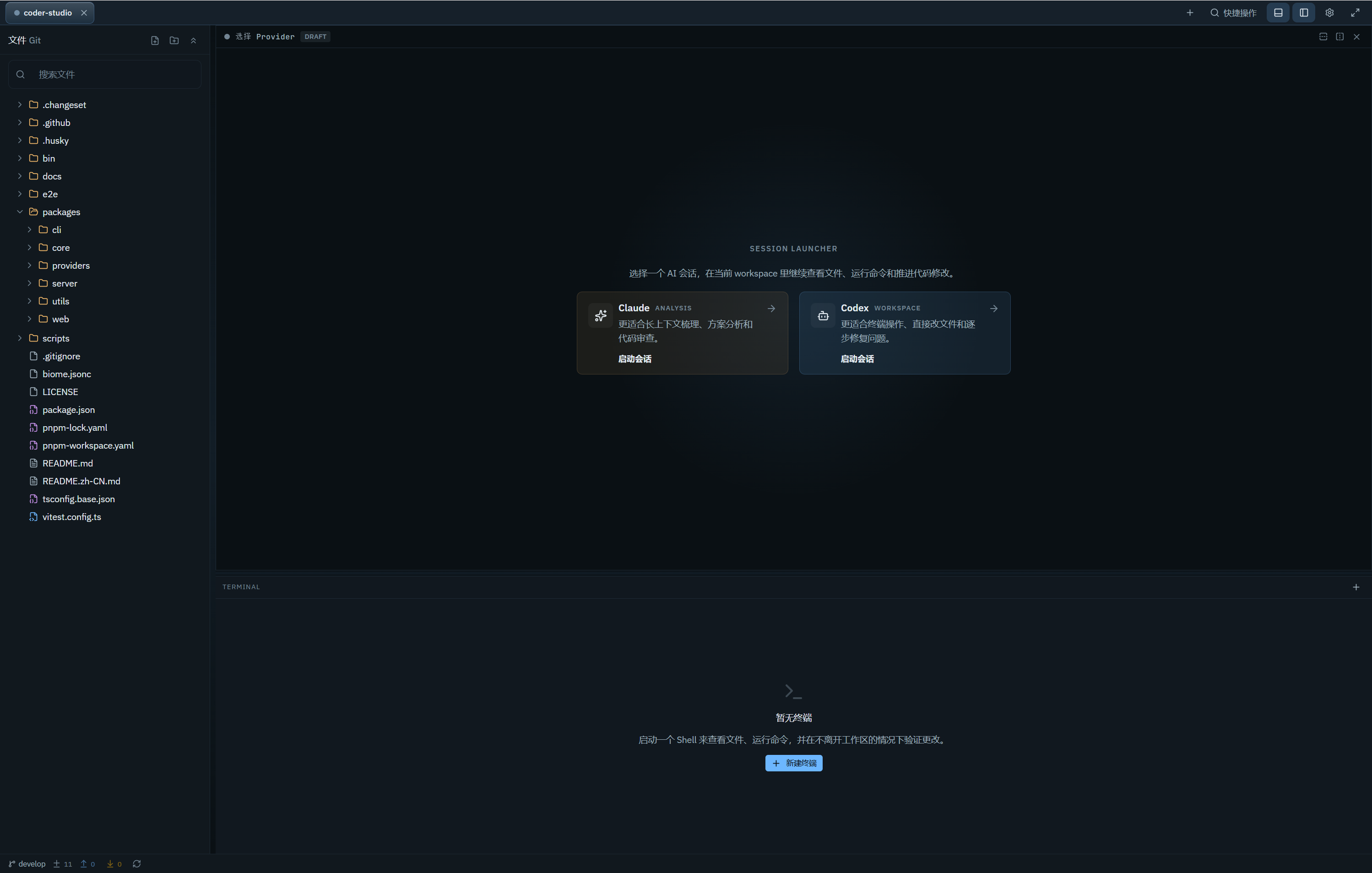
| 🖥️ Desktop | Full coding sessions, file editing, diff review, panel management |
| 📱 Tablet | Code review, Agent progress tracking, file browsing |
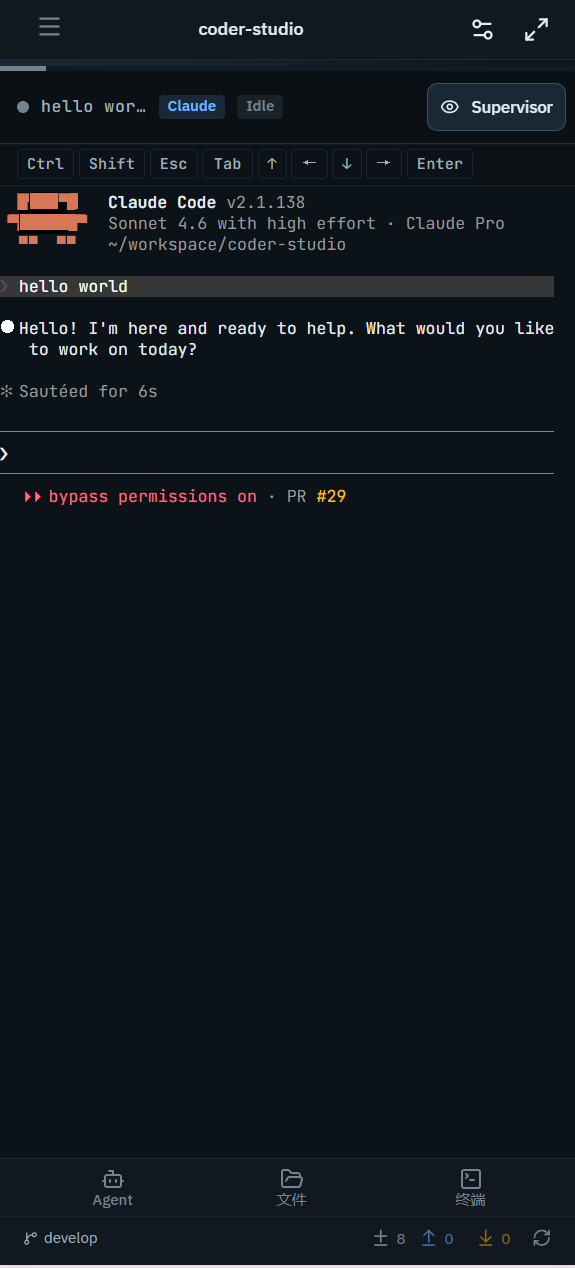
| 📲 Phone | Quick status checks, terminal output monitoring, session viewing |
The same workspace URL works across all devices — interface adapts automatically.
Desktop Interface
Mobile Interface
🛠️ Feature Overview
| Feature | Description |
|---|---|
| One-Stop Programming Workbench | Combine code editing, PTY terminals, Git status, diffs, agent sessions, and review in one browser UI |
| Cross-Device Workspace | Reopen the same coding environment from desktop, tablet, or phone without rebuilding context |
| Supervisor Loops | Run objective-driven evaluation and follow-up cycles for long AI tasks with less manual babysitting |
| Popular Coding Agents | Run Claude Code, Codex, Gemini CLI, Cursor Agent, OpenCode, and CLI-style agents from one workspace |
| Notifications and Status Updates | Surface errors, state changes, and session completion notices without leaving the workspace |
| Work Analysis | Recap workspace activity, agent sessions, patterns, bottlenecks, and possible skill opportunities |
| Skills Management | Search, install, mount, repair, and review Skills that help agents follow reusable workflows |
| Reviewable AI Work | Inspect changed files and diffs beside the session before trusting the result |
| Responsive Workspace UI | Use layouts tuned for desktop, tablet, and mobile instead of a desktop-only interface squeezed onto small screens |
| Session Continuity | Resume active sessions and keep AI work visible across device switches |
📋 Requirements
| Dependency | Version | Notes |
|---|---|---|
| Node.js | ≥ 24.0.0 | Required for running Coder Studio |
| AI coding agent CLI | Latest | Optional — install the CLI for each agent you want to run |
📚 Documentation
| Resource | Description |
|---|---|
| Quick Start | Install, launch, and open your first workspace |
| First Agent Run | Run a recommended first provider, inspect output, and review Git diff |
| Agent Providers | Install and verify coding agent CLIs |
| Mobile and Remote Access | LAN, Tailscale, ngrok, Cloudflare Tunnel, and phone/tablet usage |
| Security and Privacy | Local-first model, provider boundaries, and remote access risks |
| Known Limitations | Current requirements and product boundaries |
| Troubleshooting | First-run problems, Provider CLI issues, and service recovery |
| Chinese Help Center | 中文帮助中心 |
👥 Who Should Use Coder Studio
- Developers Running Coding Agents — Want terminals, files, Git, sessions, and review in one place
- Vibe Coding Users — Want an agentic workspace instead of scattered terminal-only workflows
- Multi-Device Developers — Switch between office, home, and mobile devices frequently
- Developers Running Long AI Tasks — Want Supervisor to keep multi-step work moving without constant babysitting
🔮 Roadmap
- Web-based terminal streaming optimization
- Session replay and history navigation
- Multi-workspace management
- Workspace preference sync
🤝 Contributing
We welcome contributions! See Contributing Guide for details.
Development Setup
git clone https://github.com/spencerkit/coder-studio.git
pnpm install
pnpm dev
Tech Stack
| Layer | Technology |
|---|---|
| Frontend | React, Vite, Jotai |
| Backend | Fastify, WebSocket |
| Terminal | xterm.js, node-pty |
| Editor | Monaco Editor |
| Storage | SQLite (node:sqlite) |
Development Docs
📄 License
MIT License — see LICENSE for details.
🔍 Keywords
vibe coding agentic coding ai coding agent coding agent workspace browser ide claude code codex gemini cli cursor agent opencode aider cross-device coding ai agent workspace mobile coding tablet coding developer tools terminal in browser git web interface monaco editor websocket terminal ai pair programming supervisor loops