
Claude on Kindle
smashbeat/claude-on-kindle
Terminal Claude via Kindle e-ink — sem WebSocket, só HTML + tmux.
Ver no GitHubPlugin que permite controlar uma sessão Claude Code (ou qualquer terminal) via tmux desde um Kindle antigo ou navegador básico, sem WebSocket ou dependências. Funciona em dispositivos e-ink lançados até 2009, oferecendo leitura legível ao sol e bateria de semanas.
Instalação
npx convez-ai smashbeat/claude-on-kindle1 comando no terminal: detecta o formato do repositório (marketplace ou plugin avulso) e instala via Claude Code. Requer Node 18+ e o Claude Code instalado.
Métricas
Casos de uso
- Monitorar e controlar sessões Claude Code remotamente em dispositivos e-ink
- Acessar terminal de baixa latência em ambientes de alta luminosidade (praia, exterior)
- Estender autonomia de bateria em operações de longa duração sem recarga
Veredito

Projeto criativo que resolve um problema real (compatibilidade com hardware antigo) com engenharia minimalista — 90 linhas, sem dependências, só stdlib. Excelente para casos de uso específicos (e-ink + CLI), mas requer cuidado rigoroso com segurança (sempre atrás de proxy autenticado, CSRF-token, sem exposição na internet).
README
A tradução para o português deste README ainda está na fila.
Claude on Kindle
Drive a live Claude Code session — or any terminal — from a 2010 Kindle, or honestly any browser back to ~2009. No WebSocket, no JS framework, no canvas. Just HTML, forms, and tmux.
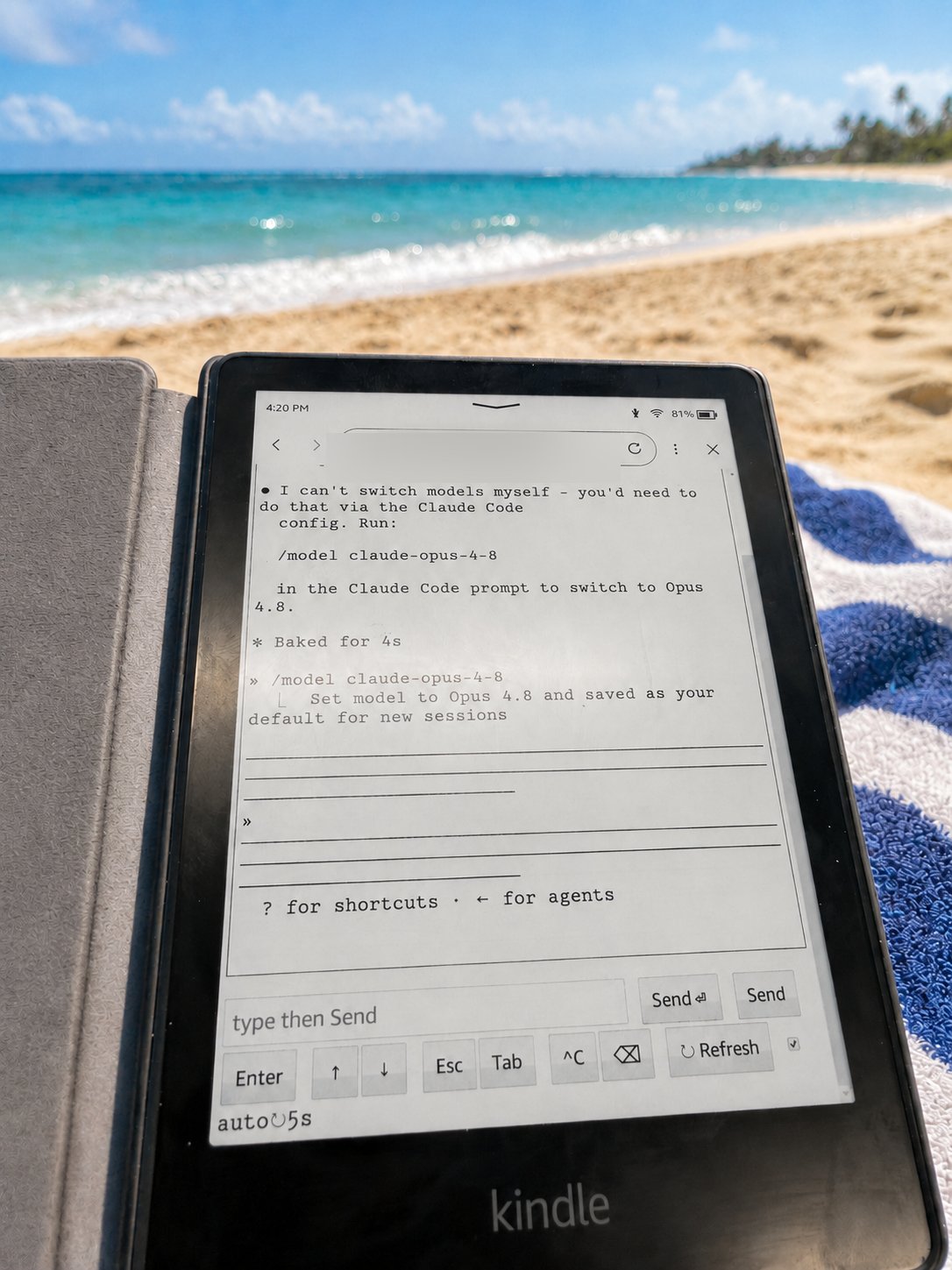
Built because the Kindle 3 e-ink browser (
AppleWebKit/531, 2010) renders HTML and runs basic JS, but has no WebGL and no working WebSocket — so every modern web terminal (ttyd, Blit, wetty, gotty) shows a blank page. This one is dumb on purpose and just works.
Why a Kindle?
Because of where you can use it. E-ink shines exactly where phones and laptops fail:
- Readable in direct sunlight. E-ink is reflective like paper — the brighter the sun, the better it looks, while a phone or laptop screen washes out to glare. Read your terminal on the beach at noon.
- Battery measured in weeks. An e-reader only draws power when the screen actually changes, so it barely sips. Keep a long Claude Code run going all afternoon — or all weekend — with no charger in sight.
Keep a Claude Code session running on a box at home, then check in on it (or drive it) from a Kindle out in the sun, on a battery that won't quit. No glare, no dead laptop in the sand.
How it works
your browser ─▶ [auth: Cloudflare Access / reverse proxy] ─▶ [cloudflared tunnel]
             ─▶ app.py (127.0.0.1:8882) ─▶ tmux session ─▶ your shell / Claude Code
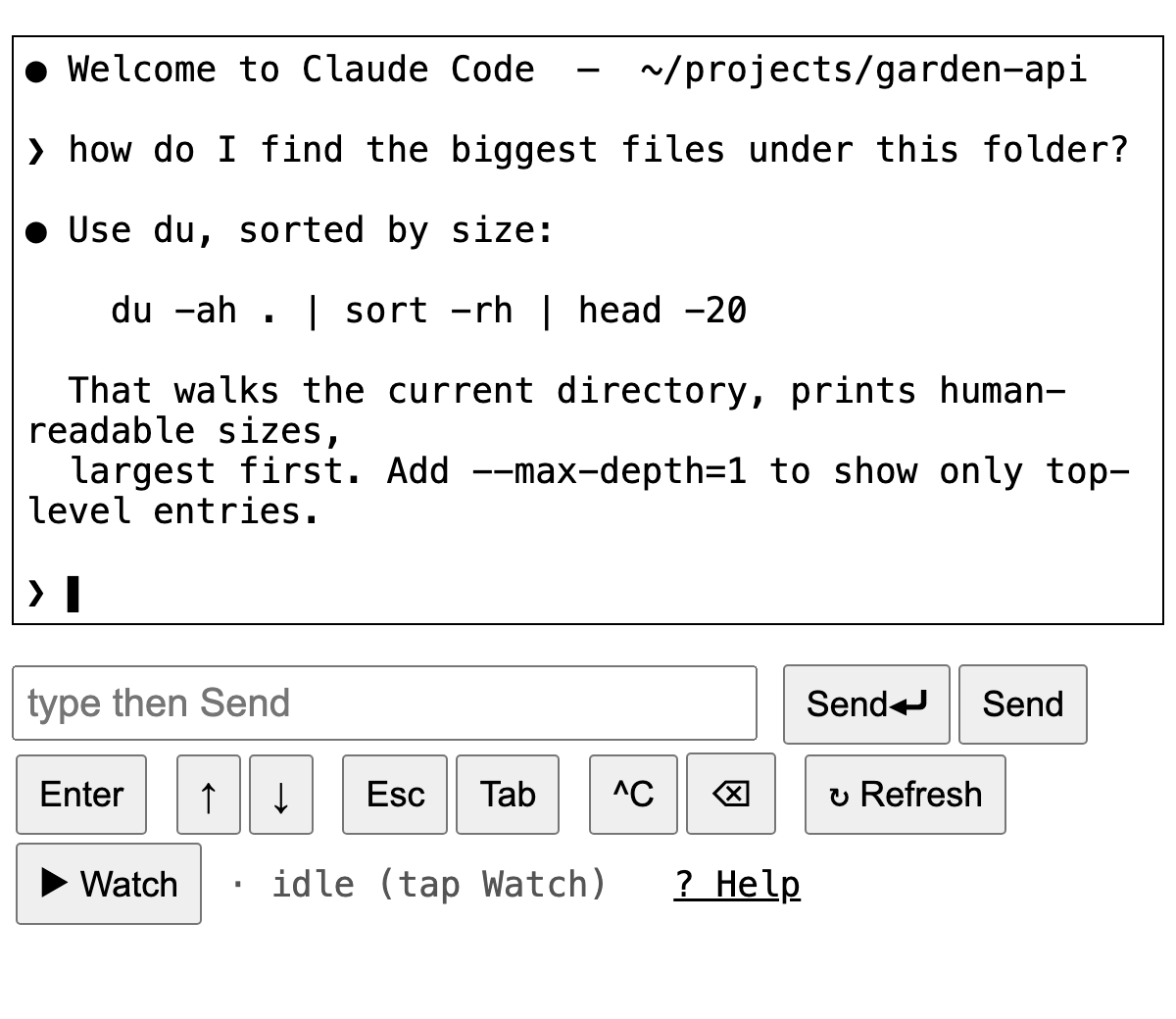
app.pyreads the visibletmuxpane withtmux capture-paneand renders it inside a<pre>.- Buttons POST keystrokes, which are injected with
tmux send-keys. - A content-hash auto-refresh keeps reloading while the screen is changing (so you watch output stream in) and auto-stops once it goes still — friendly to e-ink, which hates constant redraws.
- ~90 lines, Python standard library only, zero dependencies.
⚠️ Security — read this
This serves a writable terminal, i.e. remote code execution for anyone who can reach it.
- Keep it bound to
127.0.0.1(the default). - Always put authentication in front — Cloudflare Access, an authenticated reverse proxy, or a VPN. Never expose it raw to the internet.
- The POST endpoints are CSRF-protected (double-submit token: a cookie + a hidden form field that must match), so a cross-origin page can't drive your terminal using your authenticated session. Note that auth alone does not stop CSRF — the browser attaches your auth cookie automatically — which is why the token is built in. The cookie is
HttpOnly; SameSite=Strict, andSecurewhen you setKT_SECURE=1(do that behind HTTPS). 127.0.0.1is not a boundary against co-located processes. Anything else on the host that can reach loopback — another local service, or a--network=hostDocker container (bridge-networked containers can't, by default) — can POST to the port directly, bypassing your auth proxy entirely. CSRF can't help there: such an attacker crafts the whole request. If the host also runs internet-facing services (a media server, cloud storage, …), treat a compromise of those as a path to this terminal. Mitigate (any of): run it where nothing untrusted shares the host; ensure no container is--network=host; restrict the port with a host firewall that allows only your proxy's process (match by uid or cgroup) and drops other local connections; have the app listen on a0600Unix socket your proxy connects to (a filesystem boundary even host-networked containers can't cross); and/or require a proxy-injected secret header (below).- Run it as a non-root user (see the
systemd/examples). Otherwise a bug — or the path above — is a root shell, not a contained account. - Optional: require a proxy-injected secret header. Set
KT_AUTH_HEADER+KT_AUTH_SECRET; the app then 403s any request missing that header, so a process reaching the port directly (not through your proxy) is rejected. Have your trusted proxy inject the header server-side — the browser never sees it, so it stays ancient-browser-compatible:- nginx:
proxy_set_header X-KT-Auth your-secret; - Caddy:
header_up X-KT-Auth your-secret - Traefik: a
headersmiddleware withcustomRequestHeaders. - Cloudflare: injecting a request header needs Transform Rules or Snippets, which are paid (Pro+); on the Free plan use an OS-level option above (host firewall / Unix socket) instead.
- nginx:
Quick start (local)
tmux new-session -d -s claude          # or any session name
python3 app.py                         # serves http://127.0.0.1:8882
# open http://127.0.0.1:8882 in a browser on the same machine
Config via env vars (defaults shown): KT_SESSION=claude, KT_HOST=127.0.0.1, KT_PORT=8882, KT_TITLE=<session>.
Remote access (the Kindle use case)
- Run
app.pybound to localhost — seesystemd/kindle-term.service.example. - Expose it with a Cloudflare Tunnel: install
cloudflared, create a named tunnel, add a Public Hostname →http://localhost:8882. The token goes in an env file (.env.example,systemd/cloudflared.service.example). No inbound ports are opened. - Gate it with Cloudflare Access: add a self-hosted application for your hostname with a policy (Google SSO, one-time PIN, your IdP, …). Now only you can reach it.
For a tmux session that survives reboots, see systemd/claude-session.service.example.
Controls
| Button | Does |
|---|---|
| Send⏎ | send your typed text + Enter (submit) |
| Send | send your text without Enter |
| Enter / ↑ / ↓ / Esc / Tab / ^C / ⌫ | send that single key (history, menus, interrupt, …) |
| ↻ Refresh | re-read the screen once |
| ▶ Watch | auto-refresh while the screen changes, auto-stop when idle |
A full in-app guide lives at /help.
Bonus: Claude account switcher (optional)
If you drive Claude Code and keep two accounts (e.g. work + personal) and don't want to mix them, bin/claude-acct snapshots and swaps the Claude login (~/.claude/.credentials.json) cleanly — leaving your MCP/plugin logins untouched — and bin/cwork / bin/cpers switch + relaunch. Claude-specific; skip it if you're driving a plain shell. Setup is in the header of bin/claude-acct.
Why "dumb on purpose"
Capability probe on a Kindle 3 (AppleWebKit/531, 2010): HTML ✓, basic JS ✓, WebGL ✗, WebSocket ✗. Modern web terminals stream over a WebSocket; this one never opens one — it's plain page loads and tmux. That's the whole trick.
License
MIT © Alessandro Grassi