
Dotfiles Declarativos com Chezmoi + Nix
signalridge/dotfiles
Workstation declarativa multiplataforma com chezmoi, Nix e integração IA
Ver no GitHubAmbiente de desenvolvimento reproduzível para macOS e Linux usando chezmoi para orquestração de dotfiles, Nix para gerenciamento declarativo de pacotes, e integração automática com ferramentas de IA (Claude Code, Codex CLI). Implementa sincronização de MCP, perfis multi-contexto e pipeline idempotente de bootstrap.
Instalação
npx convez-ai signalridge/dotfiles1 comando no terminal: detecta o formato do repositório (marketplace ou plugin avulso) e instala via Claude Code. Requer Node 18+ e o Claude Code instalado.
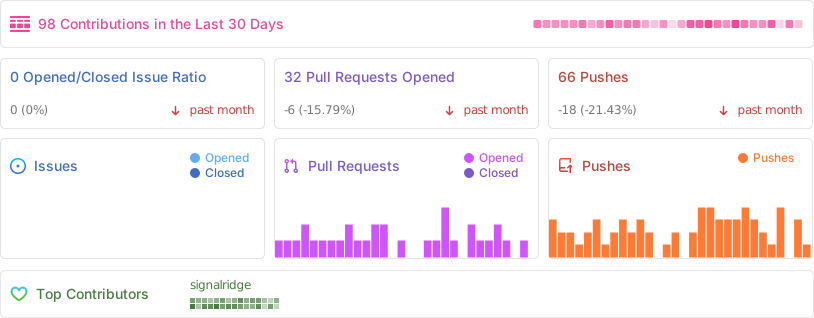
Métricas
Casos de uso
- Sincronizar ambiente de desenvolvimento entre máquinas macOS/Linux
- Automatizar setup inicial e manutenção de dependências via GitHub Actions
- Gerenciar múltiplos perfis de trabalho (pessoal, corporativo, privado) com templating
Veredito

Solução madura e battle-tested para quem precisa de IaC no nível de workstation pessoal. Curva de aprendizado alta (chezmoi + Nix), mas entrega reprodutibilidade real e integração nativa com ecossistema IA modern.
README
A tradução para o português deste README ainda está na fila.
What This Repo Is
A reproducible personal workstation setup built around:
chezmoifor dotfiles, templating, and bootstrap orchestrationNixfor declarative packages (nix-darwinon macOS +flakey-profileon macOS/Linux)aqua+misefor CLI/runtime pinning outside Nix where practical- Shared AI tooling for
Claude CodeandCodex CLI
This is a real daily-driver setup, not a demo template. The README focuses on what is actually implemented in this repository today.
Highlights
- Unified bootstrap pipeline (
.chezmoiscripts/00..12) with idempotent post-apply maintenance - Cross-platform package strategy:
- Nix user packages on macOS/Linux
- nix-darwin system config on macOS
- Homebrew/MAS integration on macOS
- Shared AI skills marketplace sync to
~/.harnesses/skillsoutside Codex auto-discovery - Multi-provider account switching for managed wrappers:
claude-manage/claude-withcodex-manage/codex-with
- Auto MCP sync for Claude on every
chezmoi apply - Automated dependency upkeep via GitHub Actions (versions, flake locks, aqua packages)
Why This Repo
- Profiles everywhere:
.chezmoidata/drivesshared/work/privatepackages across Nix, Homebrew, and MAS - End-to-end bootstrap: staged scripts from
00to11keep setup deterministic and composable - macOS polish: nix-darwin system defaults, Homebrew + MAS integration, post-apply maintenance scripts
- Workflow guardrails: pre-commit checks + Claude hooks to reduce risky edits and command misuse
- DX automation: Justfile routines, fzf navigation helpers, AI-assisted commit flows
- CI parity: template rendering and
nix flake checkon macOS + Linux matrix - Dual AI stack: Claude Code and Codex CLI are managed declaratively in one repo
Motivation
Setting up a new development machine is tedious: dozens of packages to install, many tools to configure, and years of shell/runtime tweaks to remember.
This repository solves that with a declarative baseline and practical bootstrap pipeline, so one repo can recreate a working environment across machines with predictable outcomes.
Core principles:
- Reproducibility: same setup logic, same versioned data, repeatable outcomes
- Declarative first: package and tool configuration lives in tracked YAML/templates
- Modular profiles: work/private/headless behavior is data-driven, not hardcoded forks
- AI-augmented workflows: managed prompts, hooks, skills, and provider switching
- Security layering: separate mechanisms for dotfile secrets, password store, and key backups
Table of Contents
- Quick Start
- First Run Prompts
- Architecture
- Repository Map
- Bootstrap Flow (What Actually Runs)
- Daily Operations
- Claude Code Integration
- AI Tooling (Claude + Codex)
- Tool Chains
- Shell Functions
- Package Management
- Multi-Profile Configuration
- Security & Secrets
- CI and Automation
- Additional Docs
- Acknowledgements
- Stats
- License
Architecture
This repository combines chezmoi templating with Nix-based package management and AI tooling overlays:
chezmoi: source-of-truth orchestration for scripts/templatesnix-darwin(macOS): system-level configurationflakey-profile(macOS/Linux): user package profileaqua+mise: CLI/runtime tooling layer outside Nix where neededdot_claude+dot_codex: tool-specific global guidance and configuration
| Component | macOS | Linux |
|---|---|---|
| Dotfiles | chezmoi | chezmoi |
| System Config | nix-darwin | N/A |
| User Packages | flakey-profile | flakey-profile |
| GUI Apps | Homebrew/MAS | N/A |
Repository Map
.
├── .chezmoidata/
│   ├── nix.yaml                # Nix package sets (shared/work/private)
│   ├── homebrew.yaml           # Homebrew taps/brews/casks/MAS apps
│   ├── claude.yaml             # Claude provider + account model settings
│   ├── versions.yaml           # Pinned tool/plugin revisions
│   ├── aerospace.yaml          # Aerospace WM data
│   └── hammerspoon.yaml        # Hammerspoon data
├── .chezmoiscripts/            # Bootstrap + maintenance pipeline (00..12)
├── nix-config/
│   ├── flake.nix.tmpl
│   └── modules/
│       ├── system.nix.tmpl     # nix-darwin system config
│       ├── apps.nix.tmpl       # Homebrew + MAS wiring
│       ├── profile.nix.tmpl    # flakey-profile package profile
│       └── host-users.nix
├── dot_local/bin/              # CLI wrappers (Claude/Codex/keys/MCP)
├── dot_claude/                 # Claude global instructions/hooks/templates
├── dot_codex/                  # Codex global instructions/config/prompts
├── private_dot_config/         # Tool configs (tmux, mise, aqua, gopass, ...)
├── docs/                       # Focused guides
└── tests/                      # Bootstrap/script regression tests
Bootstrap Flow (What Actually Runs)
The chezmoi script chain is staged and numbered:
00install Nix (Determinate installer with arch/mirror detection)01optionally restore encrypted keys-manage files (useEncryption=true)02macOS: apply nix-darwin system configuration03switch flakey-profile package profile04install pinned aqua installer/version05install tools fromprivate_dot_config/aquaproj-aqua/aqua.yaml(includingmise)06bootstrap gopass store (interactive clone)07install runtimes/tools via aqua-managedmise08install pinned nix-index database09macOS: install/update Paperlib10periodic Homebrew update/upgrade (7-day interval)11sync Claude MCP servers (add/update only when needed)
Quick Start
[!WARNING] This repository modifies shell, package managers, and system settings. Fork and review before running on a machine you care about.
Option 1: Download init.sh then run interactively
curl -fsSL https://raw.githubusercontent.com/signalridge/dotfiles/main/init.sh -o /tmp/init.sh
sh /tmp/init.sh
Why not
curl … | sh?chezmoi initprompts for hostname, GitHub username, email, etc. Piping intoshdetaches stdin from your terminal, so those prompts have nothing to read from and the install bails out (or worse, would silently write placeholder values). Download first, then run —sh /tmp/init.shkeeps your TTY attached.
Option 2: Pin to a tag/branch and review first
REF="<tag-or-branch>"
curl -fsSLo init.sh "https://raw.githubusercontent.com/signalridge/dotfiles/${REF}/init.sh"
shasum -a 256 init.sh || sha256sum init.sh
sh init.sh --ref "${REF}"
Option 3: Clone and run locally (best auditability)
git clone https://github.com/signalridge/dotfiles.git
cd dotfiles
git checkout <tag-or-commit>
./init.sh
Useful init.sh flags
./init.sh --repo signalridge/dotfiles
./init.sh --ref v1.2.3
./init.sh --depth 1
DOTFILES_USE_ENCRYPTION=false ./init.sh
First Run Prompts
chezmoi data prompts include:
work(work machine switch)headless(container/server without full desktop assumptions)useEncryption(enable encrypted key restore flow)installMasApps(macOS App Store apps)claudeProviderAccount/codexProviderAccount
For most first-time users of this repo: keep useEncryption = false unless you have your own keys-manage backup repo and key material.
First-run is interactive. Identity prompts (
hostname,gitUsername,useremail,gitEmail) have no safe default and will hard-fail if there's no TTY — use Option 1's download-then-run pattern, not pipe-to-sh. On a re-apply where~/.config/chezmoi/chezmoi.tomlalready has these values, prompts are skipped;DOTFILES_USE_ENCRYPTION=true|falselets you override the encryption flag from the environment in that case.
Daily Operations
The generated global Justfile lives at ~/.config/just/.justfile.
Chezmoi
just apply
just diff
just update
just re-add
Nix
just up
just upp nixpkgs
just gc
just verify
just optimize
macOS (nix-darwin)
just darwin
just darwin-check
just darwin-build
Tests
bash tests/run.sh
pre-commit run --all-files
Claude Code Integration
Plugin System
Skills are synced via .chezmoiexternal.toml.tmpl from:
- broad engineering packs such as wshobson/agents, anthropics/skills, and openai/skills
- platform/vendor packs from Hugging Face, Cloudflare, Vercel, Supabase, Expo, Microsoft, and selected community repos
- language suites for Go, Rust, Swift, TypeScript/JavaScript, and Zig
- social, writing, and media skills including
xurl,x-create,daily.dev, Reddit, Remotion, and Humanizer variants (humanizer-en,qu-ai-wei,humanizer-ja)
They are normalized into ~/.harnesses/skills as a shared library; use skill-activate from a project directory to curate active symlinks in ./.claude/skills and ./.codex/skills. skill-activate --category typescript activates a whole category for the current directory, skill-activate --sync repairs existing Claude-only/Codex-only partial pairs, and Ctrl-A toggles the highlighted category in the picker.
Quality Protocols
The managed instruction stack includes explicit quality discipline patterns (for example: pre-implementation confidence checks and evidence-first verification after implementation), primarily delivered via shared skills and project-level guardrails.
Provider Management
claude-manage, claude-with, and claude-token provide account switching and provider/account-scoped model routing from .chezmoidata/claude.yaml + gopass-backed keys.
See: docs/claude-provider.md.
Hooks
Claude hooks in dot_claude/hooks/ provide workflow guardrails and formatting automation, including:
block-git-rewrites.shblock-main-edits.shformat-code.shformat-python.sh
AI Tooling (Claude + Codex)
Shared Skill Distribution
chezmoi external syncs selected skills from:
- broad engineering packs (
wshobson/agents,anthropics/skills,openai/skills) - platform/vendor packs (Hugging Face, Cloudflare, Vercel, Supabase, Expo, Microsoft, and selected community repos)
- language suites for Go, Rust, Swift, TypeScript/JavaScript, and Zig
- social, writing, and media skills including
xurl,x-create,daily.dev, Reddit, Remotion, and Humanizer variants (humanizer-en,qu-ai-wei,humanizer-ja)
They are normalized into ~/.harnesses/skills as a shared library; use skill-activate from a project directory to curate active symlinks in ./.claude/skills and ./.codex/skills. skill-activate --category typescript activates a whole category for the current directory, skill-activate --sync repairs existing Claude-only/Codex-only partial pairs, and Ctrl-A toggles the highlighted category in the picker.
Account + Provider Control
# Claude
claude-manage
claude-manage list
claude-manage switch anthropic
claude-with kimi@private -- --resume

# Codex
codex-manage
codex-manage list
codex-manage switch openai
codex-with deepseek@private "explain this file"
Token Helpers
claude-token --check kimi@private
codex-token --check deepseek@private
MCP Integration
- Claude MCP entries are reconciled by
.chezmoiscripts/run_after_11_sync-claude-mcp.sh.tmpl. - Wrapper commands provided in this repo:
~/.local/bin/mcp-context7~/.local/bin/mcp-tavily~/.local/bin/mcp-postgres
Task -> MCP Routing
| Task type | Primary MCP | Fallback |
|---|---|---|
| Library/framework/API docs | Context7 | Tavily -> built-in web search |
| Web/news/general research | Tavily | built-in web search |
| Symbolic code navigation | Serena | repo grep/codesearch + LSP |
Tool Chains
Classic Unix tools get aliased modern replacements; on top sits a domain-organized set of power-user CLIs. Everything is version-pinned via aqua.
Drop-in Replacements
| Classic | Modern | Why |
|---|---|---|
ls | eza | Git-aware listing, icons, tree views |
cat | bat | Syntax highlighting, git integration |
grep | ripgrep | Lightning-fast regex search |
find | fd | Intuitive syntax, respects .gitignore |
cd | zoxide | Frecency-based directory jumping |
du | dust | Readable disk-usage tree |
man | tlrc | Fast Rust tldr client |
Shell & Prompt
| Tool | Role |
|---|---|
| starship | Minimal, blazing-fast prompt |
| sheldon | Fast zsh plugin manager |
| atuin | Shell history with fuzzy search |
| direnv | Per-directory environment variables |
| fzf | Fuzzy finder for files, history, and more |
| carapace | Cross-shell completions for many CLIs |
| vivid | LS_COLORS theme generator |
Editor, Files & Git
| Tool | Role |
|---|---|
| mise | Polyglot runtime manager (Node/Python/Go/Rust) |
| yazi | Fast terminal file manager |
| tmux | Terminal multiplexer |
| lazygit / lazydocker | Terminal UIs for git / Docker |
| jj | Jujutsu VCS (git-compatible) |
| git-cliff | Changelog generator |
| delta / difftastic | Syntax-aware diffs |
Domain-Specific CLIs
| Domain | Tools |
|---|---|
| Code & search | ast-grep, watchexec, typos, ruff, ty, prek |
| HTTP & API | xh, Posting, Slumber, oha |
| Containers & K8s | k9s, kubectl, Helm, stern, kubecolor, kubectx, krew |
| Security & SBOM | zizmor, Gitleaks, Trivy, Syft, Grype |
| System & network | bottom, procs, lnav, hexyl, doggo, hyperfine |
| Archive & media | ouch, gum, vhs |
| AI usage | ccusage, @ccusage/codex |
Shell Functions
Project Navigation
dev                 # FZF-powered project selector (with ghq)
mkcd <dir>          # Create directory and cd into it
dotcd               # Jump to chezmoi source
Git Workflow
fgc                 # Fuzzy git checkout (branches)
fgl                 # Fuzzy git log viewer
fga                 # Fuzzy git add (select files)
aicommit            # Generate commit message with AI
Environment Setup
create_direnv_venv  # Create Python venv with direnv
create_direnv_nix   # Create Nix flake with direnv
create_py_project   # Quick Python project setup with uv
Package Management
| Source | Platform | Description |
|---|---|---|
| Nix packages | macOS, Linux | Reproducible, rollback-able |
| Homebrew casks | macOS only | GUI applications |
| Mac App Store | macOS only | App Store exclusives |
Package lists live in .chezmoidata/ and support shared / work / private segmentation.
Multi-Profile Configuration
# For work machines
chezmoi init --apply --promptBool work=true signalridge

# For personal machines (default)
chezmoi init --apply signalridge

# For headless servers (no GUI configs)
chezmoi init --apply --promptBool headless=true signalridge
Security & Secrets
This repo uses multiple layers with different purposes:
chezmoisecret decryption viaagecommand wrapper and~/.ssh/maingopassconfigured withagebackend for API key/password storagekeys-manageencrypted backup repo using OpenSSL PBKDF2 (AES-256-CBC)- Claude hook guardrails to block risky git/history-rewrite flows
See:
docs/keys-manage-guide.mddocs/gopass-new-device-setup.mddocs/claude-provider.md
CI and Automation
Validation
-
.github/workflows/ci.yml- pre-commit checks
- template render validation
nix flake check(macOS + Linux matrix)
-
.github/workflows/tests.yml- manual bootstrap/script test suite (
bash tests/run.sh)
- manual bootstrap/script test suite (
Automated Upkeep
.github/workflows/scheduler.yml(twice weekly trigger).github/workflows/update-versions.yml.github/workflows/update-flake-lock.yml.github/workflows/update-aqua-packages.yml
Additional Docs
docs/claude-provider.mddocs/keys-manage-guide.mddocs/gopass-new-device-setup.mddocs/tmux.md
Acknowledgements
- chezmoi - Dotfiles manager
- nix-darwin - Declarative macOS configuration
- flakey-profile - Cross-platform Nix profile management
- wshobson/agents - Claude Code plugins marketplace
- anthropics/skills - Official Claude Code skills
- Dracula Theme - Theme palette for terminal and fzf styling
Stats
License
MIT