
AgentOast
shuntaka9576/agentoast
Notificações toast para agentes de IA no menu bar do macOS com tmux
Ver no GitHubApp de menu bar para macOS que notifica quando agentes de IA (Claude Code, Codex, Copilot CLI) terminam tarefas ou precisam de entrada. Integra-se com tmux para permitir pular diretamente para o pane relevante com um clique, sem perder o momento crítico.
Instalação
npx convez-ai shuntaka9576/agentoast1 comando no terminal: detecta o formato do repositório (marketplace ou plugin avulso) e instala via Claude Code. Requer Node 18+ e o Claude Code instalado.
Métricas
Casos de uso
- Monitorar conclusão de tarefas longas de agentes de IA enquanto trabalha em outra janela
- Receber alertas quando agentes pedem permissão ou input do usuário
- Alternar rapidamente para o pane tmux correto ao ser notificado de um evento de agente
Veredito

Ferramenta especializada e bem executada para desenvolvedores que usam agentes de IA com tmux no macOS. Resolve um problema real: não perder notificações críticas enquanto alterna entre janelas. Implementação em Rust garante performance, mas uso é restrito ao ecossistema específico (macOS + tmux + agentes suportados).
README
A tradução para o português deste README ainda está na fila.
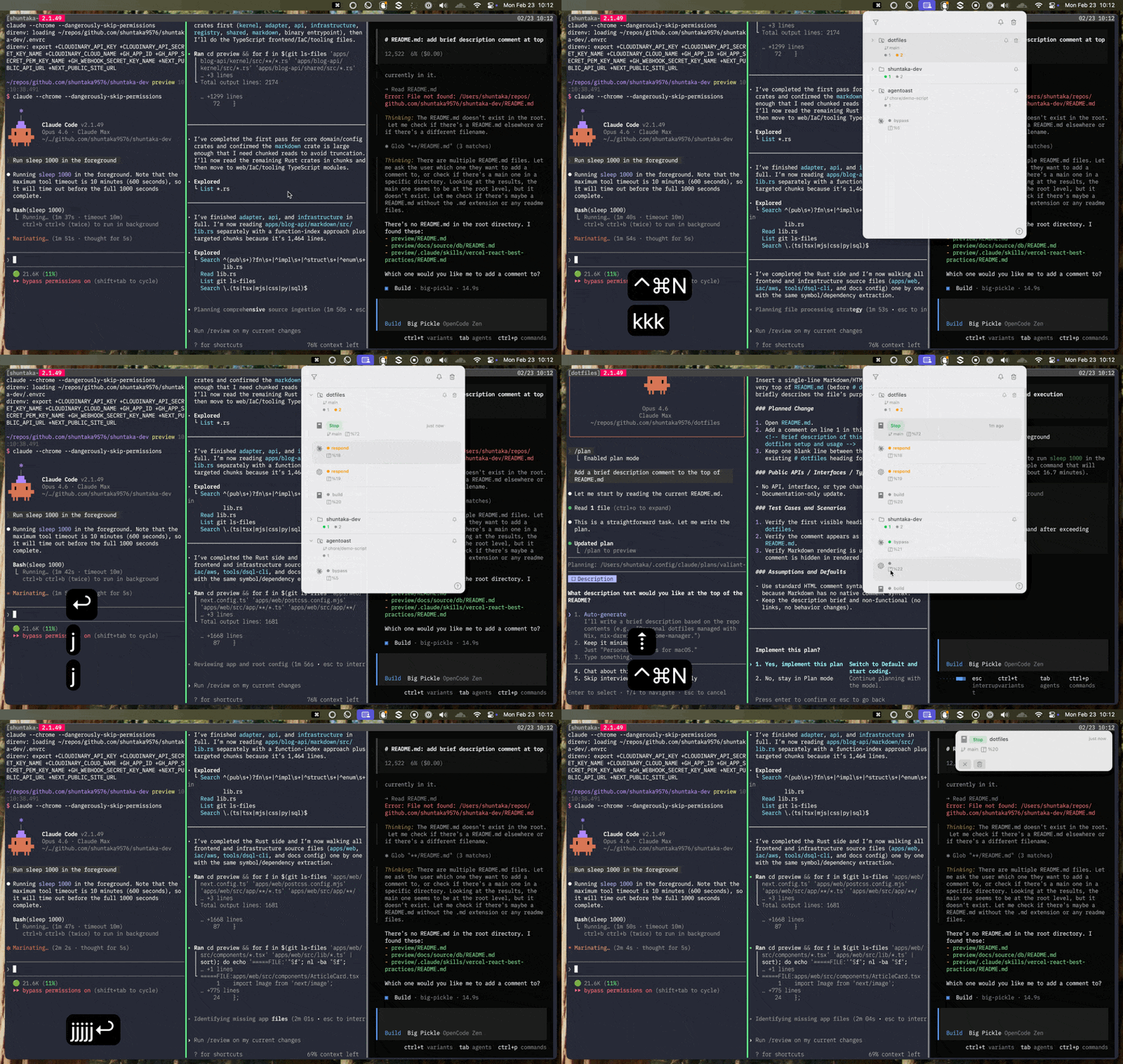
A macOS menu bar app for tmux users. Get a toast notification whenever an AI coding agent (Claude Code, Codex, Copilot CLI, opencode) finishes or needs your input — click it to jump right back to the tmux pane it came from.
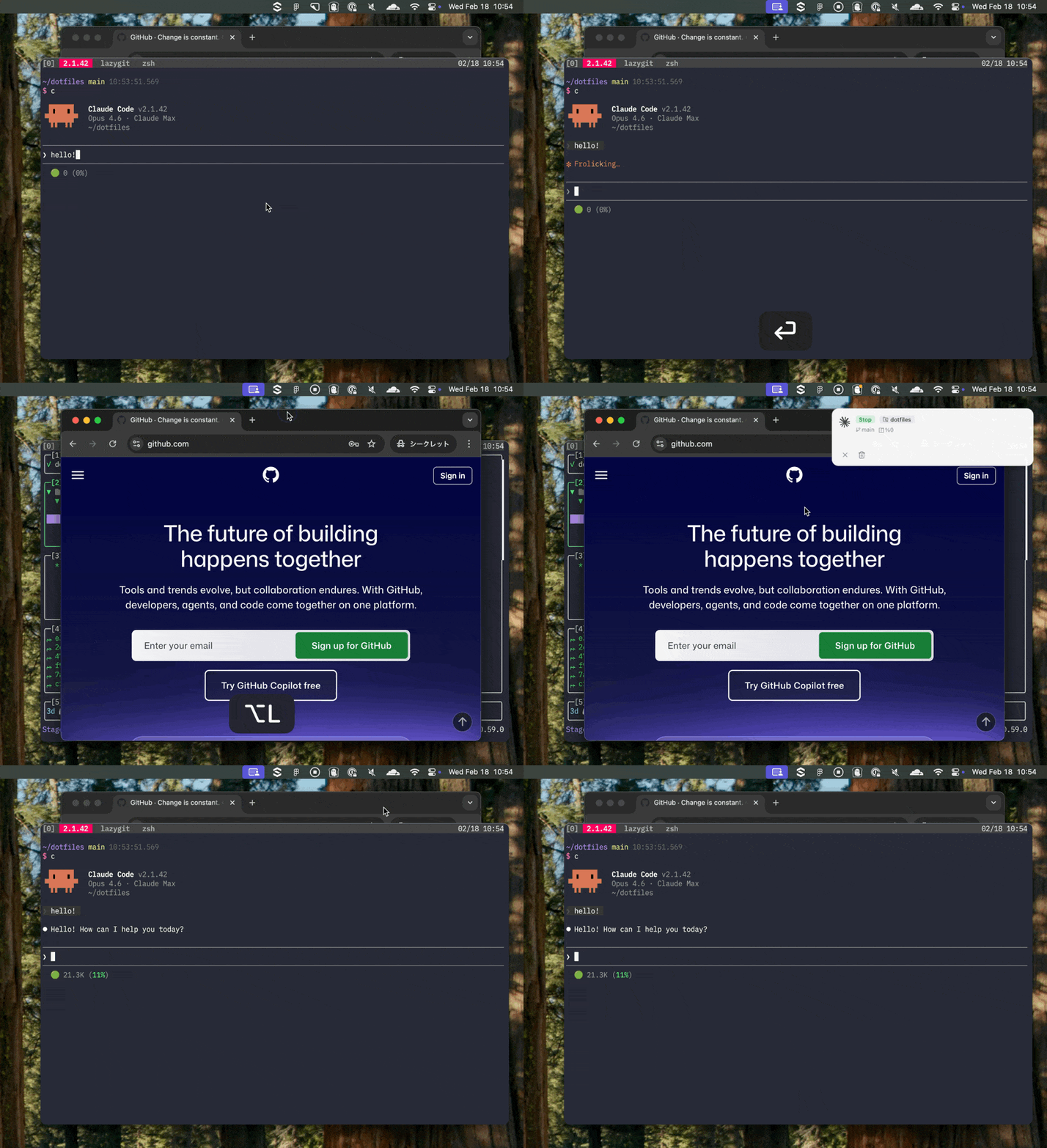
You kick off a long-running agent task, switch over to a browser or another window, and completely miss the moment it wraps up or asks for permission. agentoast makes sure you never miss it.
Add a hook to your agent's config. All notifications are grouped by repository in the menu bar — clicking one takes you straight to its tmux pane.
A toast pops up whenever an agent completes or needs attention — click it to jump right back to the tmux pane.
Requirements
| Command | Purpose | Required |
|---|---|---|
tmux | Session/pane management, agent status | Yes |
Repository and branch info is read directly from .git metadata, and the process tree is read via native macOS APIs — neither the git binary nor ps is required.
agentoast auto-detects the tmux binary path by searching well-known locations (Homebrew, system, Nix). If the Sessions panel is empty, see the [system] config to set the path manually.
Installation
brew install --cask shuntaka9576/tap/agentoast
This installs the menu bar app and the agentoast CLI in one step.
Or download the DMG from Releases.
To uninstall:
brew uninstall --cask shuntaka9576/tap/agentoast
Usage
Works With
| Agent | Hook Config | Events | Status Detection |
|---|---|---|---|
| Claude Code | ~/.claude/settings.json | Stop, Permission, Auth, Elicitation | Running / Idle / Waiting / Agent Teams |
| Codex | ~/.codex/config.toml | Turn Complete | Running / Idle / Waiting |
| Copilot CLI | .github/hooks/*.json | Agent Stop, Error | Running / Idle / Waiting |
| opencode | Plugin (~/.config/opencode/plugins/) | Session Idle, Error, Permission | Running / Idle / Waiting |
| 🚧 Kiro CLI | — | — | — |
All agents utilize the built-in CLI (agentoast hook <agent>). See the Integration section for setup details. If you'd like to see support for other agents, please feel free to open an issue.
Config
Opens ~/.config/agentoast/config.toml in your editor, creating a default one if it doesn't exist yet.
agentoast config
Editor resolution priority is config.toml editor field → $EDITOR → vim
For the most common options (toast duration, global shortcut, auto-update, editor), you can also right-click the menu bar icon and choose Settings… to open a GUI editor. Changes are written back to config.toml; most take effect after a restart, and a banner with a Quit & Relaunch button is shown when needed.
# agentoast configuration

# Editor to open when running `agentoast config`
# Falls back to $EDITOR environment variable, then vim
# editor = "vim"

# Toast popup notification
[toast]
# Display duration in milliseconds (default: 4000)
# duration_ms = 4000

# Keep toast visible until clicked (default: false)
# persistent = false

# Notification settings
[notification]
# Mute all notifications (default: false)
# muted = false

# Show only groups with notifications (default: false)
# filter_notified_only = false

# Show tmux panes without an AI coding agent (default: false)
# show_non_agent_panes = false

# Claude Code agent settings
[notification.agents.claude_code]
# Events that trigger notifications
# Available: Stop, permission_prompt, idle_prompt, auth_success, elicitation_dialog, TeammateIdle, TaskCompleted
# idle_prompt, TeammateIdle, TaskCompleted are excluded by default
# events = ["Stop", "permission_prompt", "auth_success", "elicitation_dialog"]

# Events that auto-focus the terminal (default: none)
# These events set force_focus=true, causing silent terminal focus without toast (when not muted)
# focus_events = []

# Include last-assistant-message as notification body (default: true, truncated to 200 chars)
# include_body = true

# Codex agent settings
[notification.agents.codex]
# Events that trigger notifications
# Available: agent-turn-complete
# events = ["agent-turn-complete"]

# Events that auto-focus the terminal (default: none)
# focus_events = []

# Include last-assistant-message as notification body (default: true, truncated to 200 chars)
# include_body = true

# OpenCode agent settings
[notification.agents.opencode]
# Events that trigger notifications
# Available: session.status (idle only), session.error, permission.asked
# events = ["session.status", "session.error", "permission.asked"]

# Events that auto-focus the terminal (default: none)
# focus_events = []

# Copilot CLI agent settings
[notification.agents.copilot_cli]
# Events that trigger notifications
# Available: agentStop, subagentStop, errorOccurred
# events = ["agentStop"]

# Events that auto-focus the terminal (default: none)
# focus_events = []

# Include error message as notification body (default: true, truncated to 200 chars)
# include_body = true

# Keyboard shortcuts
[keybinding]
# Shortcut to toggle the notification panel (default: super+ctrl+n)
# Format: modifier+key (modifiers: ctrl, shift, alt/option, super/cmd)
# Set to "" to disable
# toggle_panel = "super+ctrl+n"

# System settings
# Override the auto-detected tmux binary path (useful when auto-detection fails)
# [system]
# tmux = "/custom/path/to/tmux"
System Binary Paths
agentoast auto-detects tmux by searching in this order.
- Well-known paths — Homebrew (Apple Silicon / Intel), system (
/usr/bin) - Nix paths — Home Manager (
/etc/profiles/per-user/$USER/bin/), single-user (/nix/var/nix/profiles/default/bin/) $PATHfallback — scans$PATHentries (mise, asdf, etc.)
Note: The
$PATHfallback only works when the app is launched from a terminal. Finder / Dock / Spotlight launches do not inherit the shell$PATH.
If auto-detection fails (Sessions panel is empty), override the path in config.toml.
[system]
tmux = "/your/custom/path/to/tmux"
Keyboard Shortcuts
Panel shortcuts (press ? in the panel to see this list).
| Key | Action |
|---|---|
j / k | Next / Previous |
Enter | Open / Fold |
d | Delete notif |
D | Delete all notifs |
C / E | Collapse all / Expand all |
F | Filter notified |
Tab / Shift+Tab | Jump to next / prev notified pane |
Esc | Close |
? | Help |
The global shortcut to toggle the panel is Cmd+Ctrl+N (configurable in config.toml).
Notification
Integration
Ready-to-use integration scripts are provided for each agent. All agents use built-in CLI subcommands (agentoast hook claude / agentoast hook codex / agentoast hook opencode). opencode uses its plugin system to receive events, then delegates to the CLI subcommand. See examples/notify/ for source code.
Claude Code
~/.claude/settings.json
{
  "hooks": {
    "Stop": [
      {
        "matcher": "",
        "hooks": [
          {
            "type": "command",
            "command": "agentoast hook claude"
          }
        ]
      }
    ],
    "Notification": [
      {
        "matcher": "",
        "hooks": [
          {
            "type": "command",
            "command": "agentoast hook claude"
          }
        ]
      }
    ]
  }
}
No Deno dependency required. The CLI reads hook data from stdin and writes directly to the notification database. See examples/notify/claude.ts for a Deno-based alternative.
Codex
~/.codex/config.toml
notify = [
  "agentoast",
  "hook",
  "codex",
]
No Deno dependency required. The CLI reads hook data from the last command-line argument and writes directly to the notification database. See examples/notify/codex.ts for a Deno-based alternative.
opencode
Drop the plugin file into ~/.config/opencode/plugins/ and it gets picked up automatically. The plugin forwards all events to agentoast hook opencode. Event filtering and notification mapping are configured in config.toml [notification.agents.opencode].
mkdir -p ~/.config/opencode/plugins
cp examples/notify/opencode.ts ~/.config/opencode/plugins/
Note: Earlier versions of
examples/notify/opencode.tsincluded development-time debug logging that wrote every opencode event to/tmp/opencode-notify-debug.log, growing without bound. If you installed the plugin before this was fixed, re-copy the plugin and remove the stale log:cp examples/notify/opencode.ts ~/.config/opencode/plugins/ rm -f /tmp/opencode-notify-debug.log
Supported events
| Event | Notification |
|---|---|
session.status (idle) | Stop (green) |
session.error | Error (red) |
permission.asked | Permission (blue) |
Copilot CLI
~/.copilot/config.json (global) or .github/hooks/*.json (per-repo):
{
  "hooks": {
    "agentStop": [
      {
        "type": "command",
        "bash": "agentoast hook copilot --event agentStop",
        "timeoutSec": 10
      }
    ],
    "errorOccurred": [
      {
        "type": "command",
        "bash": "agentoast hook copilot --event errorOccurred",
        "timeoutSec": 10
      }
    ]
  }
}
Unlike other agents, Copilot CLI configures separate hook entries per event. The --event flag tells agentoast which event triggered the hook. The notification body is extracted from the session transcript (events.jsonl).
Supported events
| Event | Notification |
|---|---|
agentStop | Stop (green) |
subagentStop | Stop (green) |
errorOccurred | Error (red) |
Send Notification
agentoast send \
  --badge "Stop" \
  --body "Task Completed" \
  --badge-color green \
  --icon claude-code \
  --repo my-repo \
  --tmux-pane %0 \
  --meta branch=main
| Option | Short | Required | Default | Description |
|---|---|---|---|---|
--badge | -B | No | "" | Badge text displayed on notification card |
--body | -b | No | "" | Notification body text |
--badge-color | -c | No | gray | Badge color (green, blue, red, gray) |
--icon | -i | No | agentoast | Icon preset (agentoast / claude-code / codex / copilot-cli / opencode) |
--repo | -r | No | auto | Repository name for grouping notifications. Auto-detected from git remote or directory name if omitted |
--tmux-pane | -t | No | "" | tmux pane ID. Used for focus-on-click and batch dismiss (e.g. %0) |
--bundle-id | — | No | auto | Terminal bundle ID for focus-on-click (e.g. com.github.wez.wezterm). Auto-detected from __CFBundleIdentifier env var if not specified |
--focus | -f | No | false | Focus terminal automatically when notification is sent. A toast is shown with "Focused: no history" label, but the notification does not appear in the notification history |
--meta | -m | No | - | Display metadata as key=value pairs (can be specified multiple times). Shown on notification cards |
Clicking a notification dismisses it and brings you back to the terminal. With --tmux-pane, all notifications sharing the same --tmux-pane are dismissed at once. Sending a new notification with the same --tmux-pane replaces the previous one, so only the latest notification per pane is kept.
When a terminal is focused and the notification's originating tmux pane is the active pane, notifications are automatically suppressed — since you're already looking at it.
For a quick test, you can fire off notifications straight from the CLI.
Claude Code
agentoast send \
  --badge "Stop" \
  --badge-color green \
  --icon claude-code \
  --repo your-repo \
  --tmux-pane %0 \
  --meta branch=your-branch
Codex (OpenAI)
agentoast send \
  --badge "Notification" \
  --badge-color blue \
  --icon codex \
  --repo your-repo \
  --meta branch=your-branch
opencode
agentoast send \
  --badge "Stop" \
  --badge-color green \
  --icon opencode \
  --repo your-repo \
  --tmux-pane %0 \
  --meta branch=your-branch
Cross-Agent Messaging (Experimental)
Experimental: This feature and its skill packaging are still evolving and may change or be removed without notice.
agentoast send-keys injects a message straight into another agent's prompt running in a different tmux pane, addressed only by its pane id (e.g. %72) — no team, login, or registration. Your own pane ($TMUX_PANE) is appended as a reply address, so the receiving agent can answer back into your pane.
agentoast send-keys --pane %72 "Please review the diff on this branch"
| Option | Short | Default | Description |
|---|---|---|---|
--pane | -t | (required) | Target tmux pane id (e.g. %72) |
--from | — | $TMUX_PANE | Sender pane id embedded as the reply address |
--raw | — | false | Inject the raw message only, without the reply hint |
--no-enter | — | false | Type the text without submitting (no trailing Enter) |
--force | — | false | Send even when the target pane runs no detected agent |
By default send-keys refuses a target pane that has no detected AI agent (a plain shell), since the message would just be typed into the shell prompt — usually a sign you picked the wrong pane. Pass --force when you are sure an agent is running there but the detector doesn't recognize it.
To let an agent drive this on its own (delegate a task, hand off, or reply to incoming messages), install the bundled agentoast-send skill with apm.
apm install shuntaka9576/agentoast -t claude
This deploys the skill to .claude/skills/. Once installed, asking your agent to "ask the agent in pane %72 to review this" routes through send-keys automatically.
Tips
Set up a shell alias for command completion notifications. With --tmux-pane, clicking the notification jumps back to the pane.
alias an='agentoast send --badge Done --badge-color green --tmux-pane "$TMUX_PANE"'
sleep 10; an -b "body"