
Octomux
ShreyPaharia/octomux
Orquestre agentes Claude Code em paralelo com dashboard local e auto-merge de PRs
Ver no GitHubDashboard web local para orquestrar agentes autônomos Claude Code em paralelo. Dispache tarefas, monitore agentes em tempo real com terminais live, revise diffs e gere PRs automaticamente. Construído com React 19, Express, tmux e git worktrees — sem cloud, tudo na sua máquina.
Instalação
npx convez-ai ShreyPaharia/octomux1 comando no terminal: detecta o formato do repositório (marketplace ou plugin avulso) e instala via Claude Code. Requer Node 18+ e o Claude Code instalado.
Métricas
Casos de uso
- Disparar múltiplos agentes Claude Code trabalhando em branches paralelos
- Monitorar progresso de agentes em tempo real com saída de terminal ao vivo
- Revisar diffs e fazer merge automático de PRs no mesmo dashboard
- Gerenciar filas de permissões e prompts de agentes em uma única inbox
Veredito

Octomux resolve um problema real: gerenciar múltiplos agentes Code trabalhando em paralelo sem caos de abas e terminais. A interface unificada (dispatch → monitor → review → ship) é bem pensada e o fato de tudo rodar localmente sem telemetria é um diferencial. Recomendado para equipes que já usam Claude Code/Cursor em workflows de desenvolvimento.
README
A tradução para o português deste README ainda está na fila.


octomux
Coding got faster. Managing agents didn't.
A local web app to dispatch, watch, and review parallel Claude Code and Cursor agents from one place. Kanban for fleet status. One inbox for every "allow this tool?" prompt. In-app diff review with Ship. No cloud. MIT.
npm install -g octomux && octomux init && cd your-repo && octomux start
Open http://localhost:7777 — describe a task in the composer, pick Claude Code or Cursor, and watch agents work in place.
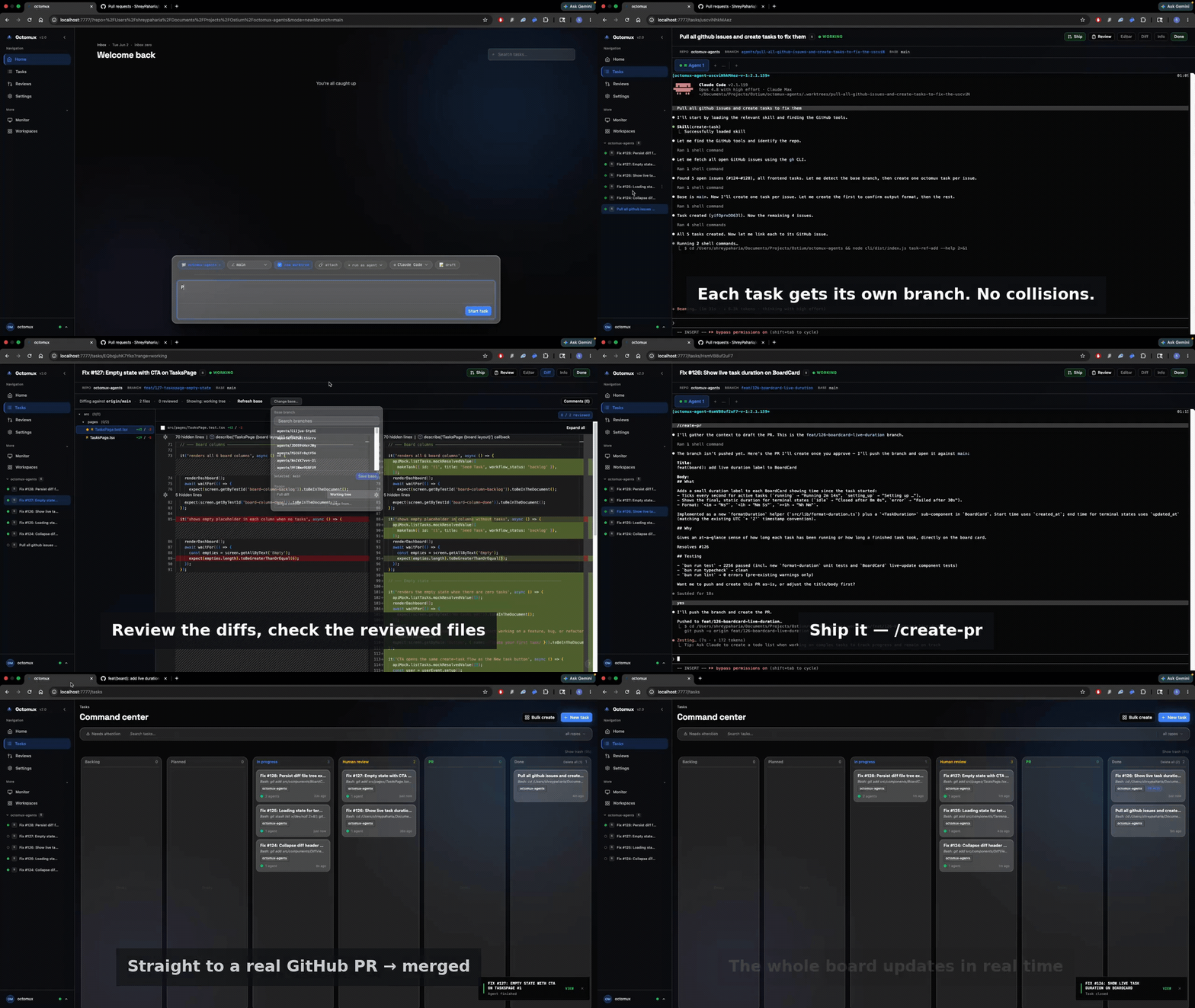
From prompt to merged PR
Three phases, one window:
- 01 — Dispatch. Type a task. Pick Claude Code or Cursor. Hit go. The composer takes plain English, Jira links, or GitHub issue URLs. Drop a second agent on the same branch with one click — or paste a whole list and bulk-create a worktree, branch, and agent for each.
- 02 — Watch. See every agent work, live. Each task streams its own view — files the agent is editing, the diff as it grows, terminal output as it runs. The Monitor view tiles every running agent into one grid so you can scan the whole fleet at a glance. When an agent needs permission, the prompt lands in your inbox so you don't have to babysit every pane.
- 03 — Review & Ship. Diff review in the same window. File tree, per-file reviewed state, inline comments. Hit Ship and the PR auto-links to the task — closes itself when the PR merges.
Code never leaves your laptop. No telemetry, no cloud sync. Crash, reboot, close the lid — octomux start restores every task, branch, and session.
Screenshots
| Home inbox + composer — permission prompts, recent activity, dispatch bar | 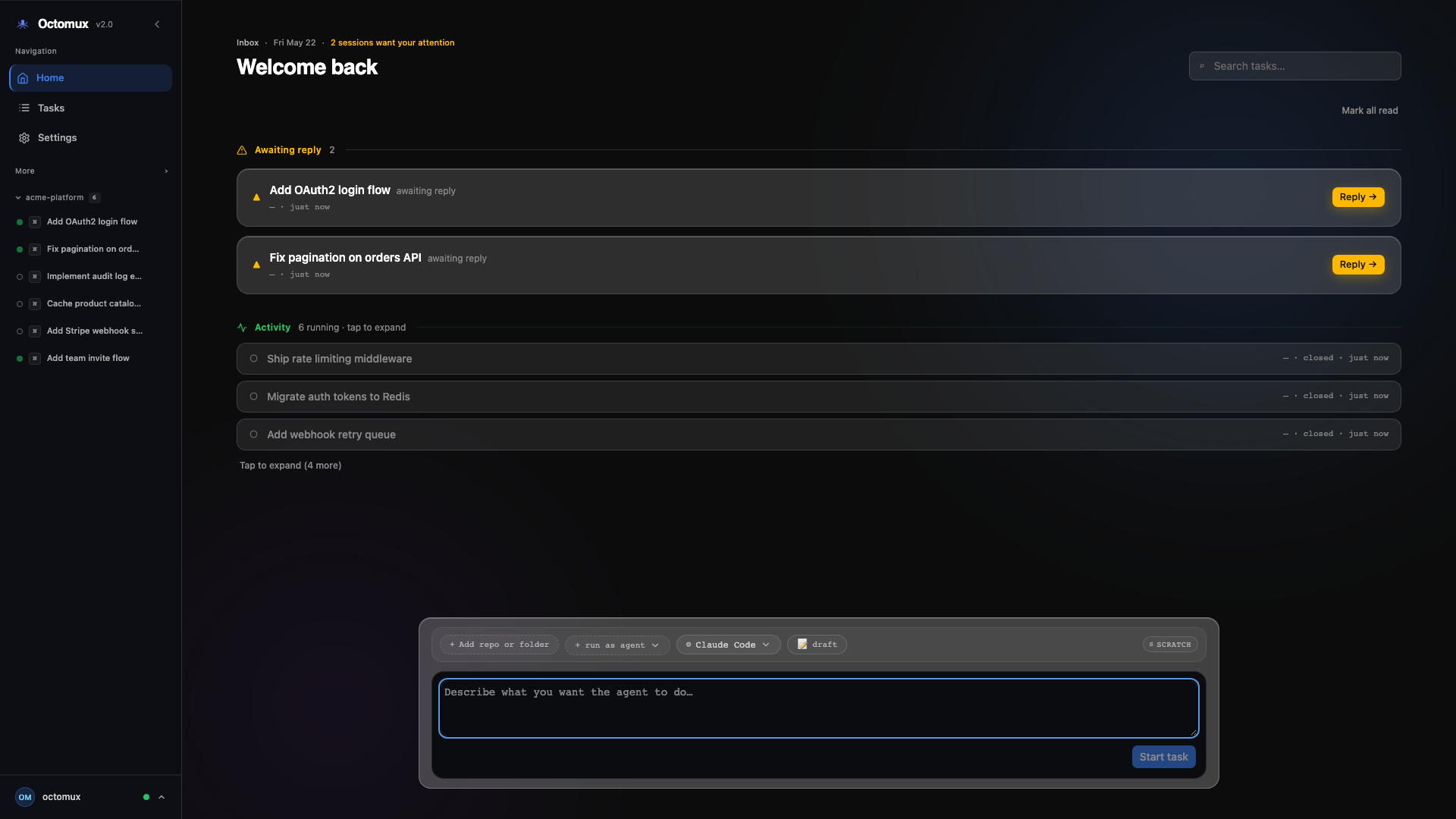 |
| Command center — kanban from backlog → done | 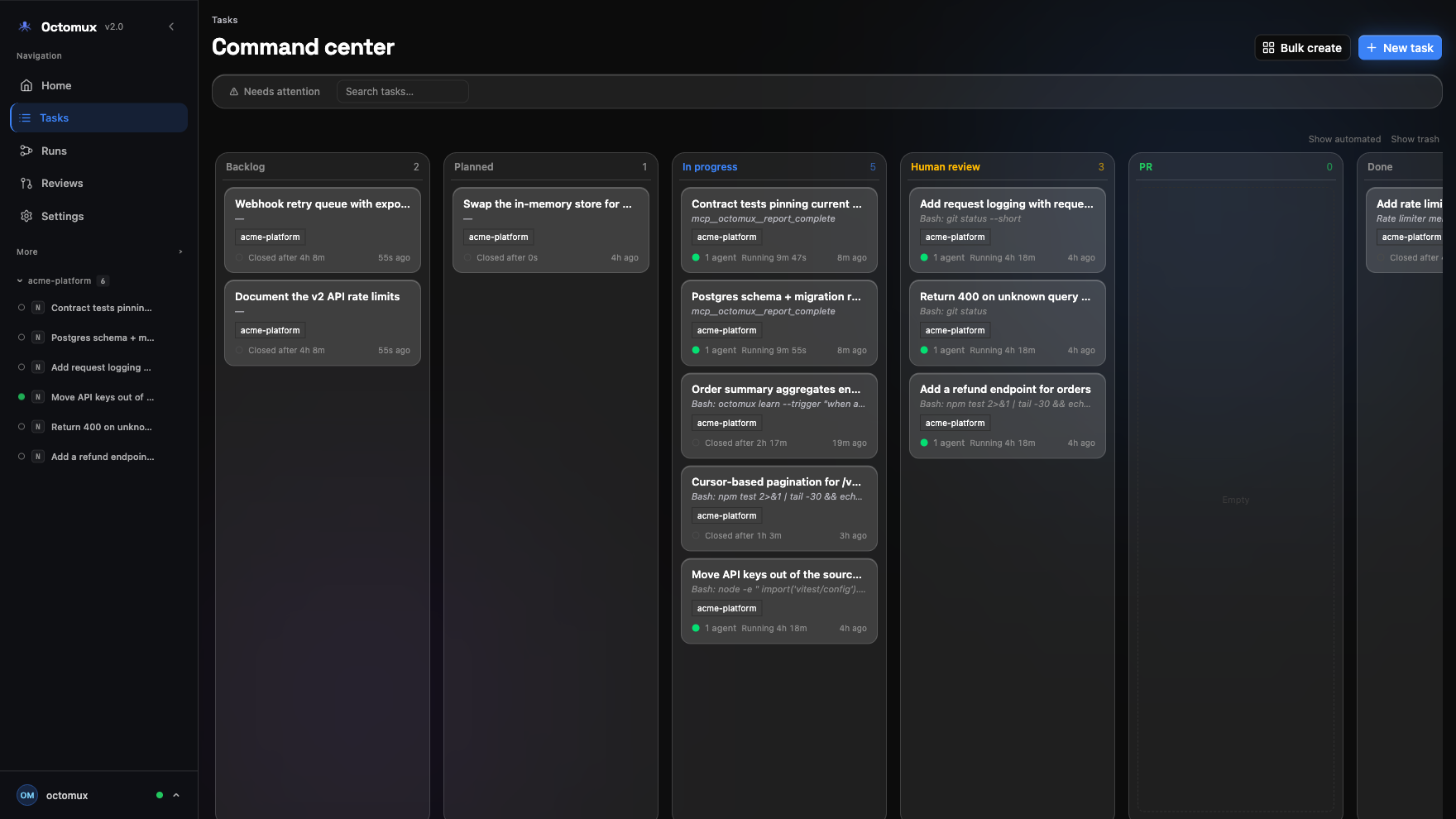 |
Settings — default harness, Cursor model & --force | 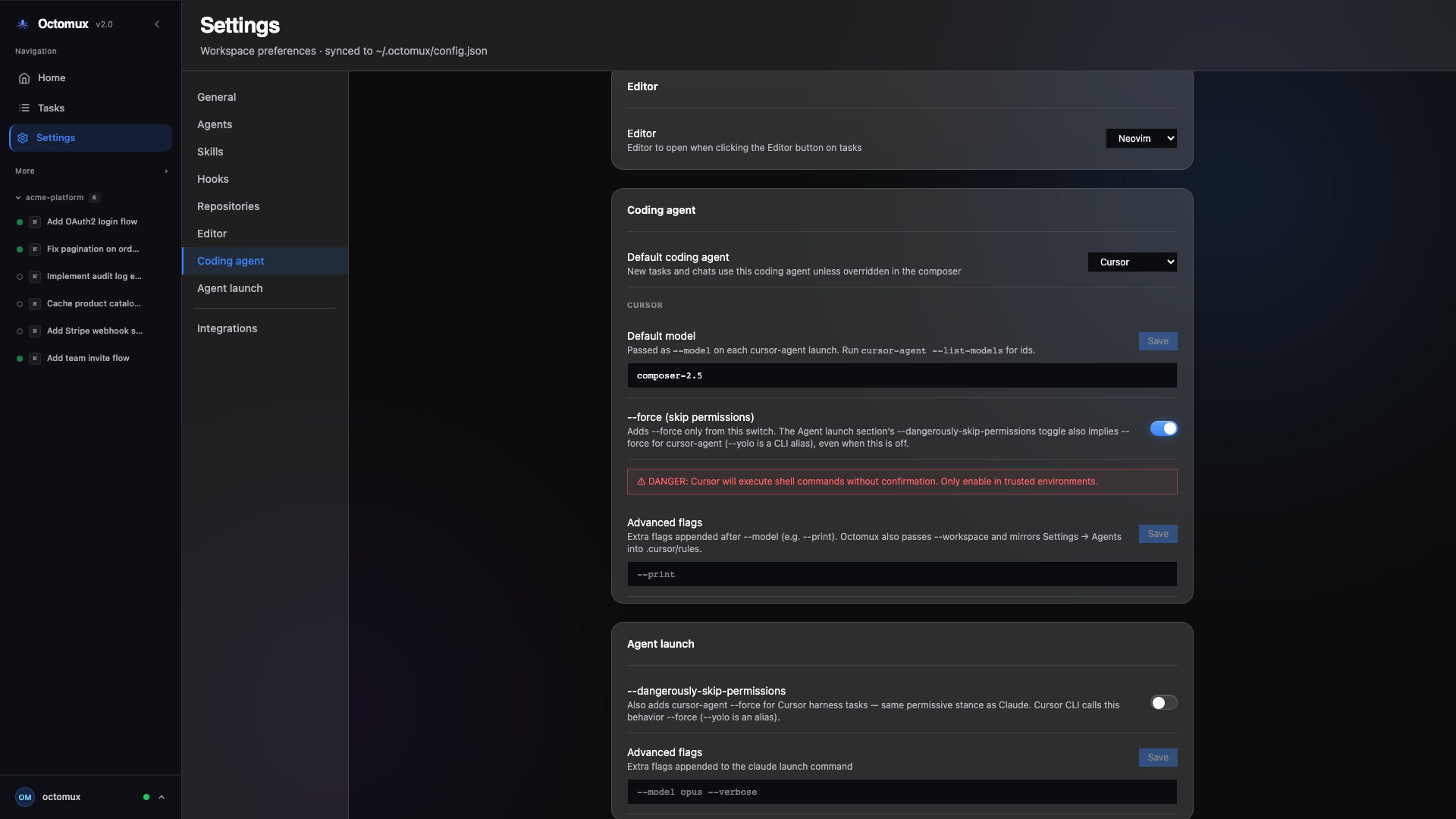 |
| Task cockpit — agent tabs, live Claude session, Ship, Done | 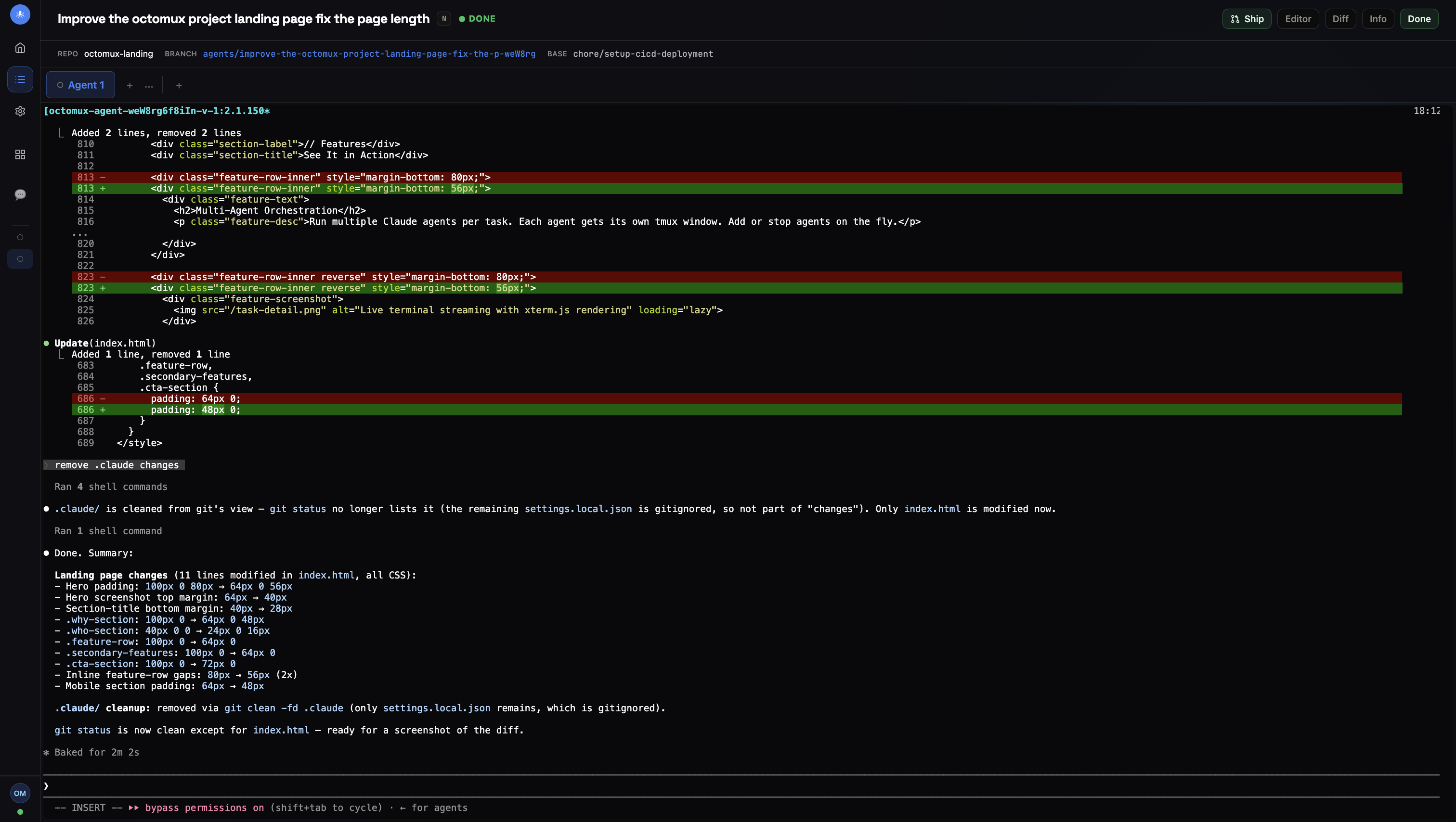 |
| Diff review — file tree, reviewed state, inline comments | 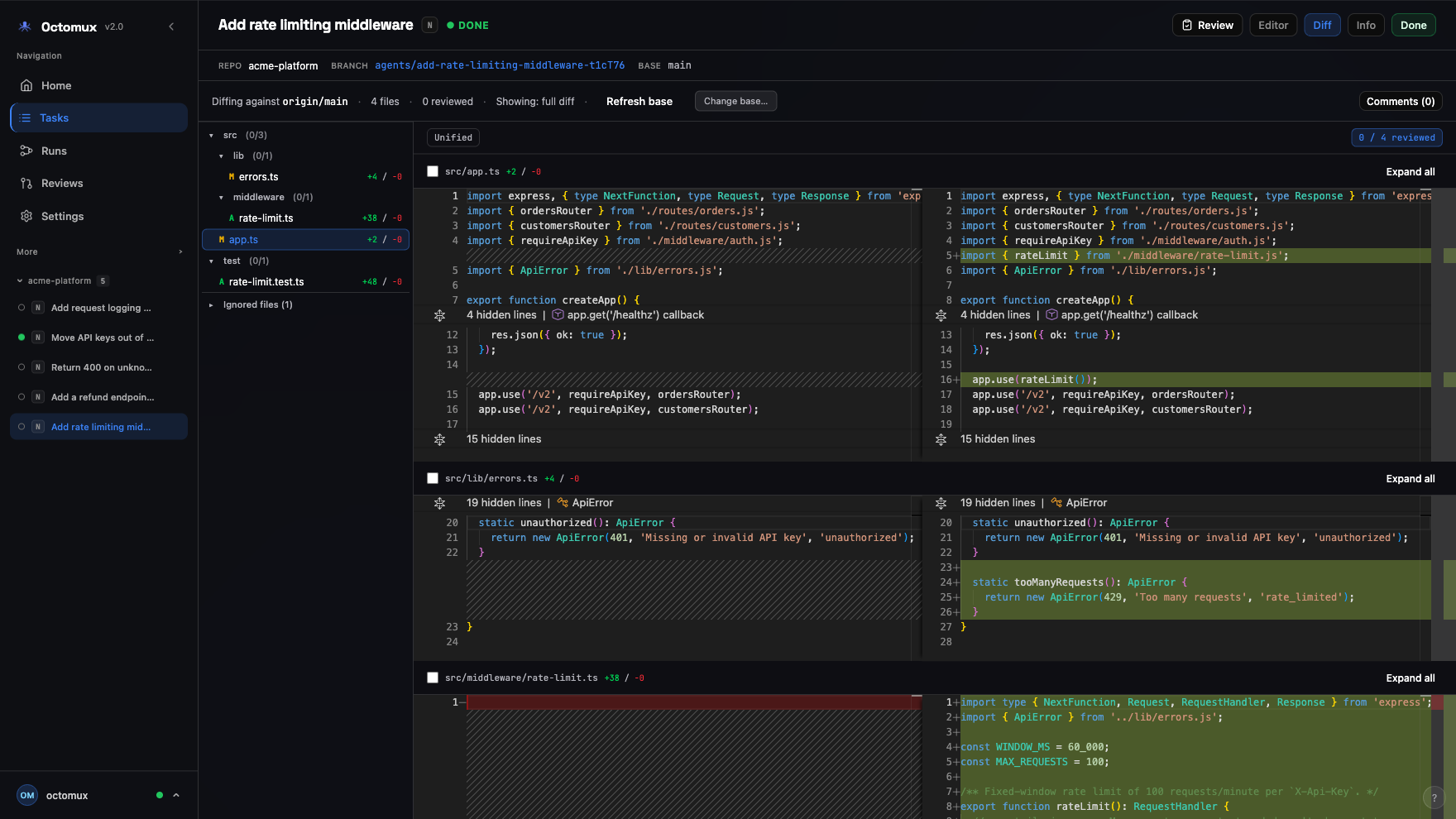 |
Features
- Sessions inbox — every permission prompt and question lands in one place; reply once, agents keep going. Tab title shows
(N) octomuxwhen something needs you. - Command center — kanban for backlog → done; drag status, archive, workflow from draft → ship. Empty board? A first-run guide shows you where to start.
- Monitor grid — every running agent tiled into one auto-sized grid; scan the whole fleet's activity (active / idle / waiting) without opening each task.
- Bulk dispatch — paste a list of prompts or a GitHub issue list and spin up one task — worktree, branch, agent — per line in a single shot.
- In-app diff review — compare to
main, mark files reviewed, queue inline comments, open lazygit in-editor. - Dual harnesses — run Claude Code (
claude) or Cursor (cursor-agent) per task; mix agents on one task via Add agent. - Worktrees keep agents off each other — each task gets its own git worktree and
agents/<task-id>branch; five agents can editauth.tsat the same time without conflicts on your main tree. - Live task view — see every agent work in real time: files edited, diff growing, terminal output streaming via xterm.js. Attach the same session from the CLI if you prefer.
- Agents that dispatch agents —
/create-task,/list-tasks,/send-agent-messageskills work inside any Claude Code window; recursive dispatch from inside an agent. - Integrations — Jira wiring plus orchestrator skills for GitHub / auto-review intake.
- CLI ↔ dashboard parity —
octomux create-task,send-message,resume-task— same tasks the UI shows. - Reboot-proof — WAL SQLite + preserved worktrees across restarts.
- Local-only — no telemetry, no cloud sync, no analytics. Your
.envstays on the host.
Patterns
Three workflows octomux makes one-click:
Verifier — two agents, two opinions
Claude wrote it. Drop Cursor on the same branch for a second pass. Same-model self-review is just self-confirmation — a different model reads the diff without inheriting the first agent's assumptions. Catches missing nonce checks, off-by-one TTLs, and the kind of mistakes that pass type-checking but break in prod.
Finish a task with Claude → hit Add agent → pick Cursor → reviews land as inline comments → you arbitrate, Ship.
Sweep — five PRs by lunch
Paste a Jira filter or GitHub issue list into the composer. Each ticket gets its own worktree, branch, and agent. Mix Claude and Cursor across the batch so the model best at each kind of task ends up on it. Come back from standup to a kanban of ready-to-review PRs.
Operator — one prompt becomes an epic
Give an agent the orchestrator skills. It plans the work, breaks down the spec, and dispatches subtasks — each one gets its own worktree, mergeable independently. Inside a Claude Code window, the agent itself becomes the user of octomux. You supervise from the dashboard.
/create-task,/list-tasks,/send-agent-messageskills inside any Claude Code window. Recursive dispatch.
Quick start
brew install tmux git
npm install -g @anthropic-ai/claude-code    # and/or Cursor CLI
npm install -g octomux
octomux init
cd your-project
octomux start
octomux create-task -t "Add OAuth login" -r .
octomux create-task -t "Spike with Cursor" -r . --harness cursor
Step-by-step setup, Jira, and orchestrator skills: ONBOARDING.md
How it works
DISPATCH → BRANCH → CODE → INBOX → REVIEW → MERGE
| Phase | What happens |
|---|---|
| Dispatch | Composer, CLI, orchestrator skills, or Jira/GitHub drafts |
| Branch | Automatic git worktree + agents/<task-id> branch |
| Code | tmux session per task; harness launches claude or cursor-agent |
| Inbox | Every permission prompt or question collects in one place |
| Review | Diff tab, lazygit terminal, mark files reviewed, Ship / Done |
| Merge | PR poller links branches; tasks close when their PRs merge |
| Recovery | DB + worktrees survive reboot — octomux start picks up where you left off |
CLI
| Command | Description |
|---|---|
octomux start | Dashboard at :7777 |
octomux init | Defaults wizard (Jira, base branch, harness prefs) |
octomux create-task | New task (--harness cursor optional) |
octomux list-tasks / get-task | Inspect tasks |
octomux close-task / delete-task | Stop or fully remove |
octomux resume-task | Resume a closed task |
octomux add-agent | Another agent window |
octomux send-message | Message a running agent — course-correct without restart |
Architecture
flowchart LR
  subgraph intake [Intake]
    C[Composer]
    CLI[CLI / skills]
  end
  subgraph core [octomux]
    API[API + SQLite]
    IN[Inbox]
    BC[Command center]
  end
  subgraph run [Per task]
    WT[Worktree]
    TM[tmux]
    H[Claude or Cursor]
  end
  C --> API
  CLI --> API
  API --> WT
  API --> TM
  TM --> H
  H -->|hooks| API
  API --> IN
  API --> BC
  WT --> DIFF[Diff review]
  H --> GH[GitHub PR]
  GH -->|poller| API
Requirements
- macOS (ARM64 or x64), Node.js 20+ (24 LTS recommended)
tmux,git- At least one harness: Claude Code (
claude) and/or Cursor CLI (cursor-agent) - Recommended:
lazygit,neovim
First run flags only the deps you're actually missing — install what the setup banner asks for and you're good. Jira and other integrations are configured later from the in-app Integrations page.
Configuration
| Variable / flag | Purpose |
|---|---|
OCTOMUX_PORT / --port | Dashboard port (default 7777) |
OCTOMUX_URL | CLI → API base URL |
OCTOMUX_DB_PATH | Override task DB path |
OCTOMUX_GITHUB_LOGIN | Reviewer-request polling account |
Remote access over Tailscale
octomux binds to 127.0.0.1 by default — reachable only from the host machine. To view
and control sessions from your other devices (phone, second laptop), put them on a
Tailscale tailnet and enable remote mode:
- Install Tailscale on the host and each device; run
tailscale upon each. Enable MagicDNS so the host is reachable by name. - Start octomux in remote mode:
On first start a random access token is generated and its file path is logged (octomux start --bind 0.0.0.0 # or: OCTOMUX_BIND=0.0.0.0 octomux start~/.octomux/data/remote-token). Override it withOCTOMUX_REMOTE_TOKEN=<secret>. - (Optional) Restrict the accepted
Hostheader to your tailnet name:OCTOMUX_ALLOWED_HOSTS=mybox.your-tailnet.ts.net. The100.64.0.0/10tailnet IP range is accepted automatically. - From a device on the tailnet, open
http://<host-magicdns-name>:7777and sign in once with the token. Local (loopback) access never requires the token.
Security notes: only devices on your tailnet can reach the port; the token is a second
factor so a single compromised tailnet device cannot silently drive your agents. Binding
0.0.0.0 also exposes the port on any other LAN the host is on — the token gates those out,
and you can add a host firewall rule limiting port 7777 to the 100.64.0.0/10 range for
belt-and-suspenders. For HTTPS, front octomux with tailscale serve.
FAQ
What's the difference between octomux and just running tmux + Claude Code? octomux adds the kanban, the inbox, and diff review on top. tmux is just plumbing underneath.
Does it work with Cursor? Yes. Pick Claude Code or Cursor per task. Mix them on the same task with Add agent.
What happens if two agents touch the same file?
They can't — each task runs in its own git worktree on its own branch. Five agents can edit auth.ts at the same time without conflicts on your main tree.
What if my laptop reboots or crashes?
Run octomux start. Tasks, branches, terminals, and review state all come back.
How do I track what each agent is costing me? Each agent's tmux session has its own session log; Claude Code and Cursor both emit token usage there. A first-class cost view in the dashboard is on the roadmap.
Links
- GitHub · npm · octomux.dev
Issues and PRs welcome.