
Vibe Typing
semtexfromua/vibe-typing
Aprenda digitando seu próprio código com guia interativo
Ver no GitHubPlugin Claude Code que transforma seu próprio codebase em aulas de digitação interativas. Você redigita código real do projeto com explicações passo-a-passo na sua língua nativa, enquanto a árvore do projeto cresce visualmente conforme avança.
Instalação
npx convez-ai semtexfromua/vibe-typing1 comando no terminal: detecta o formato do repositório (marketplace ou plugin avulso) e instala via Claude Code. Requer Node 18+ e o Claude Code instalado.
Métricas
Casos de uso
- Aprender nova codebase praticando digitação real
- Onboarding de desenvolvedores em projetos existentes
- Entender integração de tecnologias no projeto
Veredito

Ferramenta criativa que gamifica o aprendizado de código existente. Funciona bem para teams que precisam documentar e ensinar sua arquitetura, mas requer projetos já formados e interface em inglês.
README
A tradução para o português deste README ainda está na fila.
Vibe Typing
A Claude Code plugin: a learning typing trainer built on your own code. Self-contained HTML lessons — you retype real project code with plain-words explanations and a step-by-step guide for every block.
Lesson content (explanations, notes, course plans) is generated in your native language — the language you talk to Claude in. The lesson page UI is English.
Commands
/vibe-typing:practicum— a lesson from the current checkpoint diff/vibe-typing:how-to— a course for an existing project: "how to write it from scratch", step by step/vibe-typing:technology [name]— a course on one technology: with no argument — a stack inventory; if the technology is used in the project — a course on "how it is integrated"; if absent — a real integration in a separate branch (with your explicit consent) and a course from its diff
Install
claude plugin marketplace add semtexfromua/vibe-typing
claude plugin install vibe-typing@vibe-typing
From a local clone (for development):
claude plugin marketplace add /path/to/vibe-typing
claude plugin install vibe-typing@vibe-typing
Usage
/vibe-typing:practicum— uncommitted changes or the last commit;/vibe-typing:practicum HEAD~3..— a commit range./vibe-typing:how-to— the first call analyzes the project, shows the course plan and findings; after confirmation it writes.practicum/course.mdand generates lesson 01; every next call — the next lesson./vibe-typing:how-to src/api— course for one subsystem only./vibe-typing:technology redis— a course on how Redis is integrated in this project (state:.practicum/course-redis.md).
Lessons land in .practicum/lessons/*.html of the current project.
The lesson page
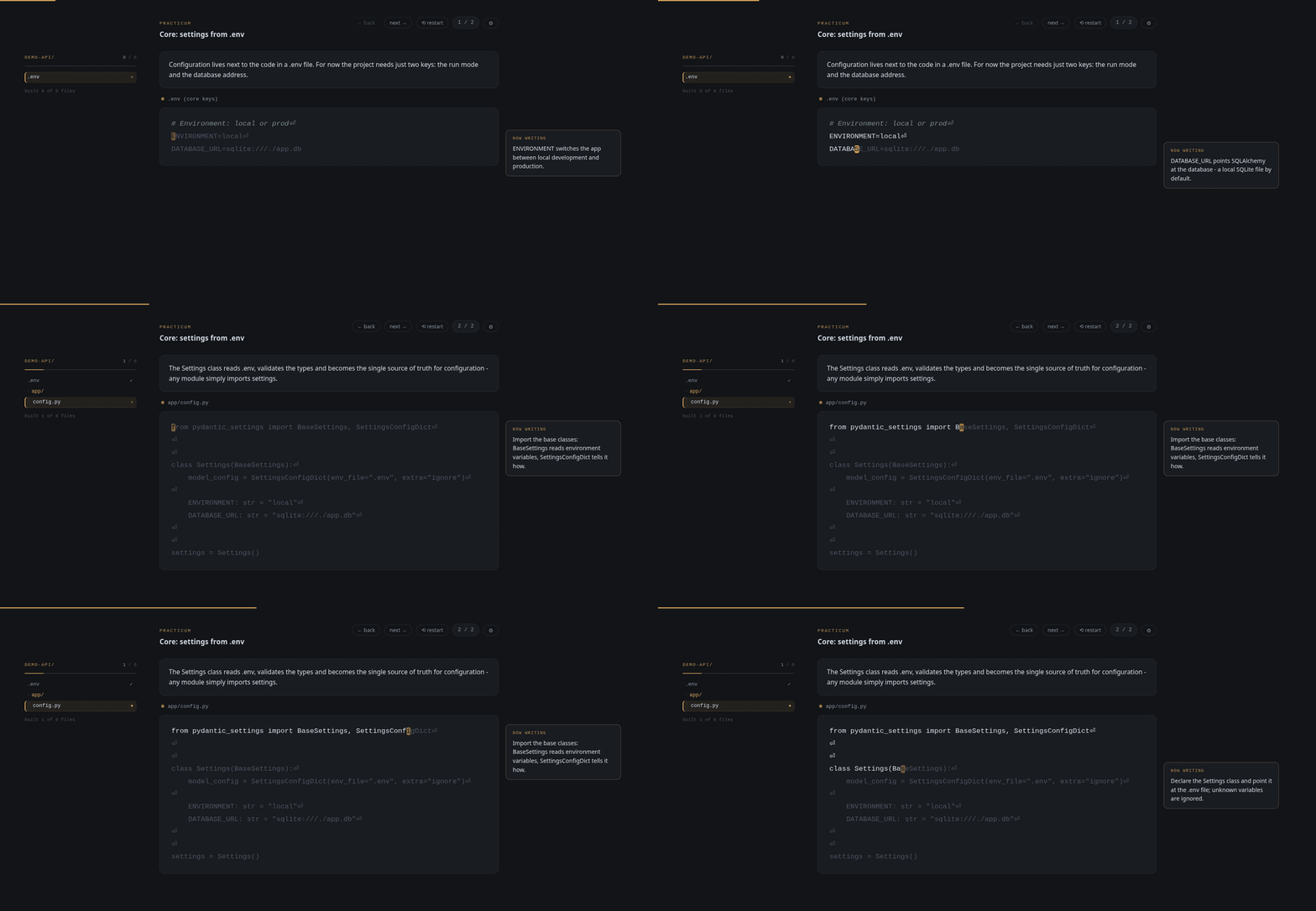
- Type the code character by character; indentation, comments and docstrings are auto-skipped (shown, not typed).
- A "now writing" note follows the cursor and explains the current block.
- The project tree on the left grows as you type — files appear, new folders are announced, progress is counted across the whole course.
← back/next →navigate fragments;⟲ restartresets the lesson; unfinished progress resumes automatically.- After finishing —
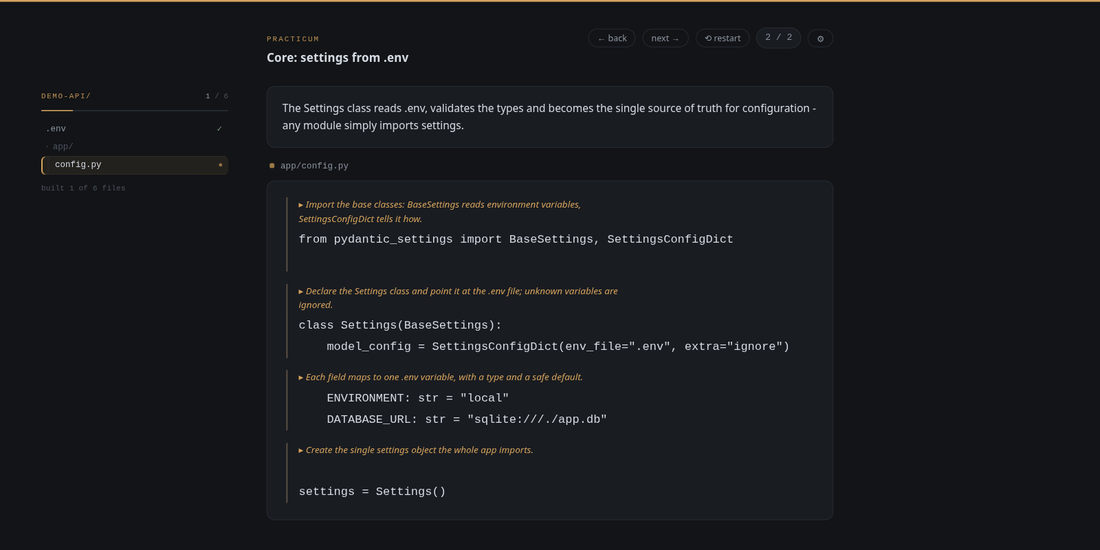
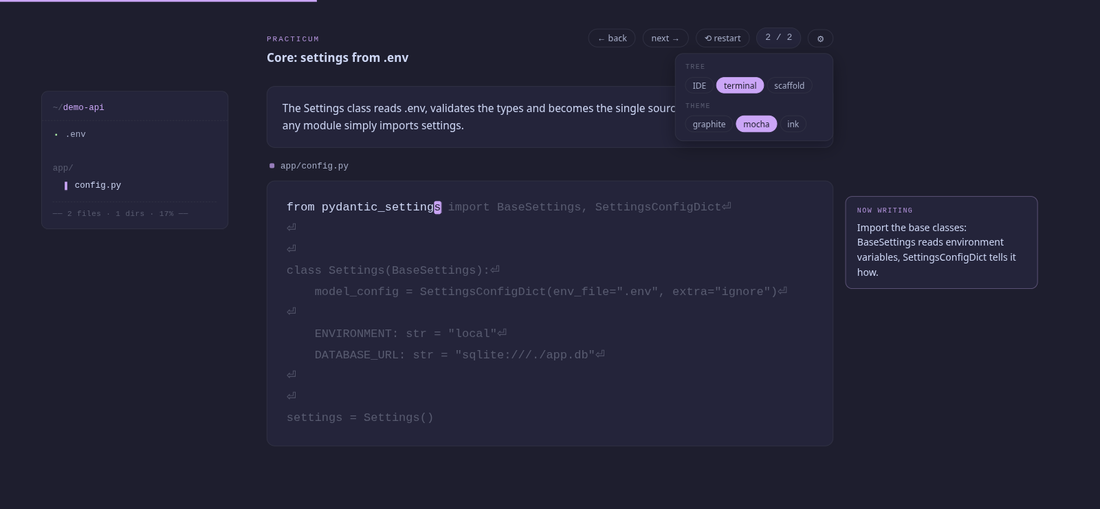
↺ review lesson: re-read every fragment with all notes visible as bright comments above their code blocks. ⚙— appearance settings: tree panel style (IDE / terminal / scaffold) and theme (graphite / mocha / ink). Choices persist in localStorage.
Review mode:
Themes and tree styles:
Development
Build a test lesson from the golden file:
python3 - <<'EOF'
from pathlib import Path
tpl = Path('skills/practicum/template.html').read_text()
lesson = Path('sample-lesson.json').read_text()
Path('/tmp/practicum-test.html').write_text(tpl.replace('__LESSON_JSON__', lesson.replace('</', '<\\/')))
EOF
xdg-open /tmp/practicum-test.html
Installation copies the plugin into a cache — edits in the repo are NOT
picked up live. After changes: bump version in
.claude-plugin/plugin.json (updates apply only on a version change) and
run:
claude plugin update vibe-typing@vibe-typing-local
Specs: docs/superpowers/specs/