
nexel
SeasonTemple/nexel
Kernel universal para distribuir skills de IA em qualquer agent CLI
Ver no GitHubKernel agnóstico de produtos para gerenciar skills, agentes e regras de IA em múltiplos CLIs de agentes (Claude Code, Codex, OpenCode). Consolida instalação, validação, versionamento e detecção de drift em um único pipeline, eliminando reimplementação por alvo.
Instalação
npx convez-ai SeasonTemple/nexel1 comando no terminal: detecta o formato do repositório (marketplace ou plugin avulso) e instala via Claude Code. Requer Node 18+ e o Claude Code instalado.
Métricas
Casos de uso
- Distribuir um pacote de skills em múltiplos agentes CLIs simultaneamente
- Gerenciar validação, instalação e atualização centralizada de agent skills
- Rastrear estado e detectar drift de skills em diferentes produtos sem re-implementação
Veredito

Solução de infraestrutura sólida para times que distribuem skills de IA em múltiplos agentes CLIs. Reduz significativamente complexidade operacional através de um kernel centralizado com adaptadores plugáveis — apropriada para arquiteturas em escala, não para uso casual.
README
A tradução para o português deste README ainda está na fila.
nexel
A product-agnostic kernel for installing one agent-skill pack across any agent CLI, through a pluggable adapter SPI. Claude Code, Codex, and OpenCode ship built-in.




English · 中文 · Why · Getting started · Core model · Reference · Agent contract · Examples
Why nexel
Shipping a single pack of agent skills, subagents, and rules across multiple agent CLIs normally requires one install path per tool. Each target stores assets in a different location and expects a different frontmatter shape, so install logic, state tracking, and drift detection are re-implemented — and separately debugged — per target:
                  ┌─ agent CLI #1 ─ install · state · drift   (path 1)
  one skill pack ─┼─ agent CLI #2 ─ install · state · drift   (path 2)
                  └─ agent CLI #N ─ install · state · drift   (path N)

    N targets  ⇒  N re-implemented, separately-debugged paths
nexel consolidates that into one kernel. A consuming product supplies a
single ProductConfig and a single manifest; the kernel owns validation,
planning, install / uninstall / update, state tracking, and drift detection,
and fans out to each target through a pluggable adapter at the edge:
  ProductConfig ┐                            ┌─ Claude Code  ┐
                ├─► nexel kernel ─dispatch─► ┼─ Codex         │ built-in
  manifest ─────┘   validate · plan ·        ├─ OpenCode      ┘
                    install/uninstall/       └─ any CLI ── via adapter SPI
                    update · state · drift
The kernel carries no product knowledge — bin name, skill-id prefix,
agent-name prefix, manifest filename, and env namespace are all injected
through ProductConfig. Supporting an additional CLI is an adapter, not a
rewrite.
Agents driving a nexel-derived bin, rather than authoring one, should refer to the Agent CLI contract: the behavioral contract is specified separately and is stable kernel surface.
Getting started
Install
Not on npm. Consume via a pinned git tag — clone, a git dependency, or vendoring:
# git dependency (package.json), pinned to a release tag
npm install "git+https://github.com/<owner>/nexel.git#v0.6.0"
# or clone + pin
git clone https://github.com/<owner>/nexel.git && cd nexel && git checkout v0.6.0
Requires Node ≥ 22.22.2 (bumped in v0.7.0 to satisfy runtime-dep engines.node floors — see docs/release-notes/v0.7.0.md). ESM only. Per-tag release notes live in
docs/release-notes/.
Local release artifacts can be produced without publishing to npm:
npm run release:preflight
npm run dist
dist writes nexel-<version>.tgz plus a .sha256 checksum. Remote release
publishing remains a consuming product decision.
For humans — run or build a product
A complete, runnable example lives under
examples/sample-product/:
examples/sample-product/
├── agent-skills.config.mjs    # ProductConfig (the only product-identity surface)
├── sample.install.json        # Manifest
├── skills/  agents/  rules/   # Content
├── bin.mjs                    # Wraps createCli with the config above
└── sample-bin.test.mjs        # End-to-end spawnSync tests
To see the full visual install flow without touching a real agent home, run:
node scripts/install-skills.mjs
# or
npm run demo:install
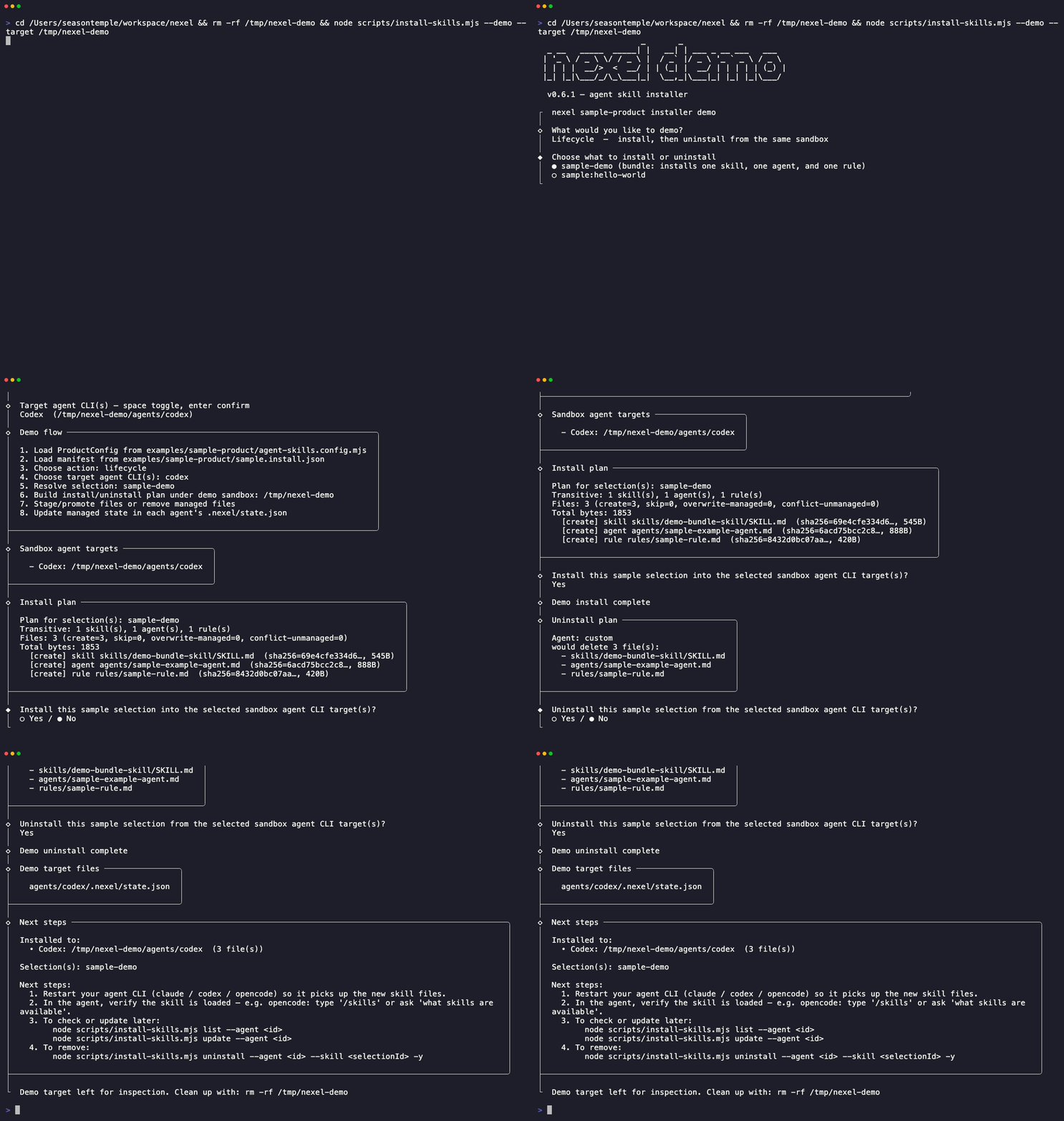
The GIF is recorded from the real command above via npm run demo:gif. The
demo uses examples/sample-product and walks through the same shape a real
product installer should expose: choose install / uninstall / lifecycle, choose
one or more target agent CLIs (Claude Code, Codex, OpenCode), choose a manifest
bundle or skill, preview the plan, then write or remove managed files. It writes
only into a temporary sandbox such as /tmp/nexel-demo/agents/codex, not to
~/.codex, ~/.claude, or OpenCode config directories.
The visual flow shows these stages:
1. Load ProductConfig from examples/sample-product/agent-skills.config.mjs
2. Load manifest from examples/sample-product/sample.install.json
3. Choose action: install / uninstall / lifecycle
4. Choose target agent CLI(s): claude-code / codex / opencode
5. Resolve selection
6. Build install/uninstall plan for the sandbox target(s)
7. Stage/promote files or remove managed files
8. Write managed state to each agent target's .nexel/state.json
To inspect the demo output on disk:
rm -rf /tmp/nexel-demo
node scripts/install-skills.mjs --demo --yes --target /tmp/nexel-demo --agent codex
find /tmp/nexel-demo -maxdepth 4 -type f -print
To exercise state tracking and repair:
rm -rf /tmp/nexel-demo
node examples/sample-product/bin.mjs install --agent codex --target /tmp/nexel-demo --bundle sample-demo --yes --allow-no-cli
printf '\nlocal edit\n' >> /tmp/nexel-demo/skills/demo-bundle-skill/SKILL.md
node examples/sample-product/bin.mjs doctor --agent codex --target /tmp/nexel-demo
node examples/sample-product/bin.mjs repair --agent codex --target /tmp/nexel-demo
node examples/sample-product/bin.mjs repair --agent codex --target /tmp/nexel-demo --apply --accept-modified skills/demo-bundle-skill/SKILL.md
To demo install and uninstall in one safe run:
rm -rf /tmp/nexel-demo
node scripts/install-skills.mjs --demo --action lifecycle --agent codex --target /tmp/nexel-demo
Cleanup commands:
rm -rf /tmp/nexel-demo
find "${TMPDIR:-/tmp}" -maxdepth 1 -type d -name 'nexel-demo-*' -prune -exec rm -rf {} +
rm -f nexel-*.tgz nexel-*.tgz.sha256
For automated verification with cleanup:
node scripts/install-skills.mjs --demo --yes --json --cleanup --action lifecycle --agent codex
The same sample product can also be driven directly as a normal product bin:
node examples/sample-product/bin.mjs help
node examples/sample-product/bin.mjs list --json
node examples/sample-product/bin.mjs plan --agent codex --skill sample:hello-world
The bin is branded by productConfig.binName; nexel does not appear in
user-facing text once a product is wired up. To build a product, see
ProductConfig.
For downstream products — reference implementation
Use examples/sample-product/ as the template:
- Copy the directory shape:
agent-skills.config.mjs,install.json,skills/,agents/,rules/, and a thin productbin.mjs. - Set
ProductConfigidentity:productName,skillIdPrefix,agentNamePrefix,defaultManifestFile, andbinName. - Register every installable skill / agent / rule in the Manifest. Files that are not in the Manifest are intentionally invisible to the Kernel.
- Build the bin with
createCli({ adapters, productConfig, version }). - Add product tests that spawn the bin against a temp target and assert
list,plan,install,doctor, andrepairbehavior. - For OpenCode runtime instructions, keep
opencode-instructionsinSKILL.mdfrontmatter and wire a product plugin throughconfigureOpenCode.
Minimum smoke commands for a downstream product:
<bin> list --json
<bin> plan --agent codex --target /tmp/product-demo --bundle <bundle-id>
<bin> install --agent codex --target /tmp/product-demo --bundle <bundle-id> --yes --allow-no-cli
<bin> doctor --agent codex --target /tmp/product-demo --json
<bin> repair --agent codex --target /tmp/product-demo --json
For AI agents — drive a bin
Any nexel-derived bin is non-interactive and machine-driveable: every verb
accepts --json (a structured stdout envelope), --yes skips prompts, and
the exit-code contract is stable. The full product-agnostic behavioral
contract is docs/AGENT-CLI-CONTRACT.md,
detailed in the Agent CLI contract section.
Human-facing output can be pinned with --lang en|zh, NEXEL_LANG, or a
product-specific locale env var. JSON keys and error codes do not localize.
Core model
Five terms underpin everything below.
| Term | What it is |
|---|---|
| Kernel | The product-agnostic library in scripts/installer/. Owns install / uninstall / update / state / drift / plan. Knows nothing about any product's content. |
| ProductConfig | The frozen per-product identity a consuming product passes in (productName, skillIdPrefix, …). The kernel is inert without one. |
| Adapter | A pluggable per-CLI integration implementing the adapter SPI. Decides where assets land and how their content is transformed. Claude Code, Codex, and OpenCode ship built-in; any other CLI is reachable by supplying an adapter. |
| Asset | A unit the kernel installs — exactly one of skill, agent, or rule. Not a generic file. |
| Manifest | install.json — the single source of truth. An asset is visible to the kernel iff it has a manifest entry. |
Relationships:
  ProductConfig ──configures──► Kernel ──dispatch──► Adapter ──► target CLI
                                  ▲                      ▲
                                  │ reads                │ maps + transforms
                               Manifest ──declares──► Asset
                                                    (skill | agent | rule)
ProductConfig
defineProductConfig({...}) is the only product-identity surface. Required
fields fail loud at construction time:
import { defineProductConfig } from "nexel";

export default defineProductConfig({
  productName: "my-skills",
  skillIdPrefix: "my", // skill ids must start with "my:"
  agentNamePrefix: "my-", // agent installedName must start with "my-"
  defaultManifestFile: "my.install.json",
  binName: "my-skills",

  // Optional (kernel defaults shown):
  defaultSkillsDir: "skills",
  defaultAgentsDir: "agents",
  defaultRulesDir: "rules",
  targetPathLayout: { skills: "skills", agents: "agents" },
  envProfile: "MY_SKILLS_PROFILE", // for sandbox/profile isolation
  envBannerTitle: "MY_SKILLS_BANNER_TITLE",
});
Rules: skillIdPrefix may not contain :; agentNamePrefix must end with
-.
Design principles
Why the kernel is shaped this way. Each of these is enforced or recorded, not aspirational.
-
Product-agnostic kernel. Zero product knowledge; inert without a
ProductConfig, which throws atdefineProductConfig— not at first use — when misconfigured. (ADR-0001) -
Manifest is the only source of truth. No manifest entry → the kernel cannot see the asset. There is no implicit filesystem discovery.
-
Z three-layer, enforced by test.
index.mjsis the only public entry; the layer-direction guard isarchitecture.test.mjs, not convention. (ADR-0001)scripts/installer/ ├── core/ # pure logic; never imports adapters/ or cli/ ├── adapters/ # platform integrations; never imports cli/ └── cli/ # surface; may import core/ and adapters/ -
Idempotent, state-tracked, drift-aware.
install/update/repairhave defined semantics over recorded on-disk state;repairre-installs only what drifted from the manifest. (ADR-0008) -
Decoupling discipline. npm publication and the public-API contract clock are deliberately decoupled from the name decision and sequenced later — pre-publish internal API churn is cleanup, not a contract break. (ADR-0007)
-
ADR-recorded trade-offs. Hard-to-reverse, surprising decisions are each recorded as one file in
docs/adr/.
Reference
Lookup material — not required reading; consult for a specific export, verb, or flag.
Public API
scripts/installer/index.mjs re-exports the v1 stability contract. Adding new
exports is backward-compatible; removing or renaming is a breaking change.
| Category | Exports |
|---|---|
| Factories | createCli, createAdapterRegistry, defineProductConfig |
| CLI primitives | parseArgs, printHelp, renderHelp, handleError, formatSkipNote, dispatchVerb, KERNEL_HANDLERS, strings |
| Verb handlers | runList, runAgents, runValidate, runExport, runImport, runRepair, runDoctor, runPlan, runInstall, runUninstall, runUpdate, resolveSelections |
| Manifest pipeline | loadManifest, validateManifest, defaultManifestPath, defaultPaths, detectDrift, exitCodeFor, formatFindings, SCHEMA_VERSION, PROFILES, CATEGORIES, HOSTS |
| Adapter SPI | SPI_REQUIRED, SPI_DEFAULTS, validateAdapter, applyAdapterDefaults, ADAPTERS, getAdapter, listAdapterStatus, assertSupportsDirect, assertCliPresent |
| Asset model | assetTypes, getAssetType, defaultTargetMapping, whichSync |
| Plan-time utilities | buildInstallPlan, resolveSelection, transitiveAssets, formatPlanText |
| Kernel commands | install, installMulti, uninstall, uninstallMulti, update, updateMulti, repair, exportCommand, importCommand, listCommand, agentsCommand, doctorCommand, planCommandText, planSelection |
| Errors | CommandError, AdapterError, ProductConfigError, StateError, FsError, PlanError, CancelledError, all ERR_* codes |
Adapter SPI
Three built-in adapters ship out of the box: Claude Code, Codex, OpenCode.
Downstream products supply additional adapters via
createCli({ adapters: [...] }). Each adapter exports the SPI v1 contract:
| Field | Required | Type / signature |
|---|---|---|
id | yes | string — unique identifier |
displayName | yes | string — user-visible name |
detectTargetRoot | yes | ({ override, env }) => string |
detectStatus | yes | ({ override, env }) => StatusObject |
mapTargetPath | no | (asset, manifest, productConfig) => relPath |
supportedAssetTypes | no | Array<"skill" | "agent" | "rule"> |
pluginInstallInstructions | no | () => string |
supportsDirect | no | boolean |
cliBinary | no | string ("" skips CLI presence check) |
cliInstallUrl | no | string |
doctorProbes | no | ({ targetRoot, env, productConfig }) => Array<{ name, ok, detail }> |
Optional fields are filled from SPI_DEFAULTS when omitted. Canonical
contract: scripts/installer/adapters/spi.mjs.
Complete worked adapter: scripts/installer/adapters/claude.mjs.
OpenCode Direct And Plugin Mode
OpenCode has two product-agnostic integration paths:
- Direct install is handled by the OpenCode Adapter. It writes skills under
skills/, translated agents underagent/, and rule reference files at their manifest paths. It does not writeAGENTS.md. - Plugin mode is handled by an OpenCode plugin in the consuming product. A
plugin can import
configureOpenCodefromnexel/adapters/opencode-pluginand call it with its installedskillsdirectory. The helper appends that directory toconfig.skills.pathsand adds any skill frontmatteropencode-instructions: <skill-relative-path>files toconfig.instructions.
opencode-instructions is Skill Metadata, not a Manifest entry and not a new
Asset type. The referenced file must stay inside the declaring skill directory.
See examples/sample-product/.opencode/plugins/sample-product.js.
Verbs & flags
| Verb | Purpose |
|---|---|
install | Install skills / agents / rules into one or more adapter targets |
uninstall | Remove previously installed assets |
update | Re-install assets, preserving user-modified files unless --overwrite |
repair | Re-install only assets that have drifted from the manifest |
plan | Preview what install / update would do, without writing |
list | Print skills and bundles from the manifest |
agents | Print known adapter targets and their status |
validate | Lint a single SKILL.md file against frontmatter rules |
export | Archive installed state to a portable file |
import | Restore state from an exported archive |
doctor | Check adapter health and installed-asset integrity |
help | Print usage (handled in the CLI shell, not dispatched as a kernel verb) |
All verbs accept --json. The following flags apply to the state-mutating
verbs (install, uninstall, update, repair); plan also accepts the
selection subset:
| Flag | Argument | Purpose |
|---|---|---|
--agent | <id> (repeatable) | Limit to specific adapter target(s) |
--skill | <id> | Select a single skill |
--bundle | <id> | Select a bundle |
--all | — | Select every manifest entry |
--target | <path> | Override the adapter target root |
--profile | <name> | Activate a sandbox / env profile |
--dry-run | — | Preview changes without writing |
--yes | — | Skip confirmation prompts |
--overwrite | — | Overwrite user-modified files |
--force | — | Bypass safety checks |
--accept-modified | <relPath> | Mark a specific file as intentionally modified |
Full reference: node examples/sample-product/bin.mjs help, rendered
dynamically from productConfig.binName. Per-verb: <bin> <verb> --help
or <bin> help <verb>.
Agent CLI contract
The product-agnostic behavioral contract for driving a nexel-derived bin
programmatically — every verb, the exit-code contract, the --json
envelope shape, the non-interactive flags (--yes, --json), and the
help-affordance rules — is specified in
docs/AGENT-CLI-CONTRACT.md. It is stable
kernel surface, independent of any product's bin name or content.
examples/sample-product/bin.mjs is a runnable
instantiation to test against.
Project
Status
Pre-1.0. The name is resolved (nexel); npm publication and the public-API
contract clock are deliberately deferred and decoupled from the name decision
(see ADR-0007,
superseding ADR-0005).
The public surface is still iterating — pin a tag.
Roadmap
- Next — broader test coverage against the sample fixture, locale catalog plug-ins, additional adapter SPI implementations. Distribution stays git-tag / git-dependency / vendor; npm publication remains deferred.
- v1.0.0 — when the API has survived ≥ one downstream adopter in production for a full quarter.
Tests
npm test
npm run package:smoke
npm run verify:baseline
npm test runs the full suite; the test script in package.json is the
authoritative, always-current list. Coverage is layered: per-module unit
(errors, asset-types, which, plan, stage-asset, manifest
loader/validator/drift), adapter conformance (spi, opencode), CLI surface
(argv, dispatch, lint-skills, lint-release-sync), the Z-layer guard
(architecture), and examples/sample-product/ end-to-end (sample-bin,
repair-rehash).
npm run package:smoke builds the tarball, verifies required packaged files
such as the visual GIF, sample product, public adapters, and release notes, then
removes the generated tarball/checksum. CI runs this on every push and PR.
npm run verify:baseline compares stable sample-bin outputs under
examples/sample-product/.baseline/. Use npm run verify:baseline -- --update
only when a deliberate CLI text or JSON contract change has been reviewed.
License
MIT — see LICENSE.
Contributing
Issues and PRs welcome. For non-trivial changes — new adapters, new verbs, public API additions, or architectural shifts — open a GitHub issue first so the direction can be aligned before implementation. Bug fixes, documentation improvements, and additions to the sample fixture can go straight to a PR.