
Plugin MCP Docusaurus
scalvert/docusaurus-plugin-mcp-server
Exponha sua documentação Docusaurus como servidor MCP para IA
Ver no GitHubPlugin que expõe um servidor MCP em sua documentação Docusaurus, permitindo que agentes IA como Claude e Cursor façam buscas semânticas e recuperem conteúdo diretamente. Integra-se com Vercel, Netlify e Cloudflare Workers.
Instalação
npx convez-ai scalvert/docusaurus-plugin-mcp-server1 comando no terminal: detecta o formato do repositório (marketplace ou plugin avulso) e instala via Claude Code. Requer Node 18+ e o Claude Code instalado.
Métricas
Casos de uso
- Integrar documentação com Claude e outros agentes IA
- Permitir busca inteligente de docs via MCP
- Automatizar consultas técnicas em conhecimento documentado
Veredito

Solução sólida para expor docs como MCP server, reduzindo atrito na integração com IA. Requer setup em plataforma serverless, mas oferece suporte multi-cloud robusto.
README
A tradução para o português deste README ainda está na fila.
docusaurus-plugin-mcp-server


A Docusaurus plugin that exposes an MCP (Model Context Protocol) server endpoint, allowing AI agents like Claude, Cursor, and other MCP-compatible tools to search and retrieve your documentation.
Installation
npm install docusaurus-plugin-mcp-server
Quick Start
1. Add the Plugin
// docusaurus.config.js
module.exports = {
  plugins: [
    [
      'docusaurus-plugin-mcp-server',
      {
        server: {
          name: 'my-docs',
          version: '1.0.0',
        },
      },
    ],
  ],
};
2. Create the API Endpoint
Choose your deployment platform:
Create api/mcp.js:
import { createVercelHandler } from 'docusaurus-plugin-mcp-server/adapters';
import path from 'path';
import { fileURLToPath } from 'url';

const __dirname = path.dirname(fileURLToPath(import.meta.url));

export default createVercelHandler({
  docsPath: path.join(__dirname, '../build/mcp/docs.json'),
  indexPath: path.join(__dirname, '../build/mcp/search-index.json'),
  name: 'my-docs',
  baseUrl: 'https://docs.example.com',
});
Add to vercel.json:
{
  "functions": {
    "api/mcp.js": {
      "includeFiles": "build/mcp/**"
    }
  },
  "rewrites": [{ "source": "/mcp", "destination": "/api/mcp" }]
}
Create netlify/functions/mcp.js:
import { createNetlifyHandler } from 'docusaurus-plugin-mcp-server/adapters';
import path from 'path';
import { fileURLToPath } from 'url';

const __dirname = path.dirname(fileURLToPath(import.meta.url));

export const handler = createNetlifyHandler({
  docsPath: path.join(__dirname, '../../build/mcp/docs.json'),
  indexPath: path.join(__dirname, '../../build/mcp/search-index.json'),
  name: 'my-docs',
  baseUrl: 'https://docs.example.com',
});
Add to netlify.toml:
[build]
  publish = "build"

[functions]
  directory = "netlify/functions"
  included_files = ["build/mcp/**"]

[[redirects]]
  from = "/mcp"
  to = "/.netlify/functions/mcp"
  status = 200
Cloudflare Workers can't access the filesystem, so you need to import the data directly:
import { createCloudflareHandler } from 'docusaurus-plugin-mcp-server/adapters';
import docs from '../build/mcp/docs.json';
import searchIndex from '../build/mcp/search-index.json';

export default {
  fetch: createCloudflareHandler({
    docs,
    searchIndexData: searchIndex,
    name: 'my-docs',
    baseUrl: 'https://docs.example.com',
  }),
};
3. Build and Deploy
npm run build
# Deploy to your platform
4. Connect Your AI Tool
Claude Code:
claude mcp add --transport http my-docs https://docs.example.com/mcp
Cursor / VS Code:
{
  "mcpServers": {
    "my-docs": {
      "url": "https://docs.example.com/mcp"
    }
  }
}
5. Add an Install Button (Optional)
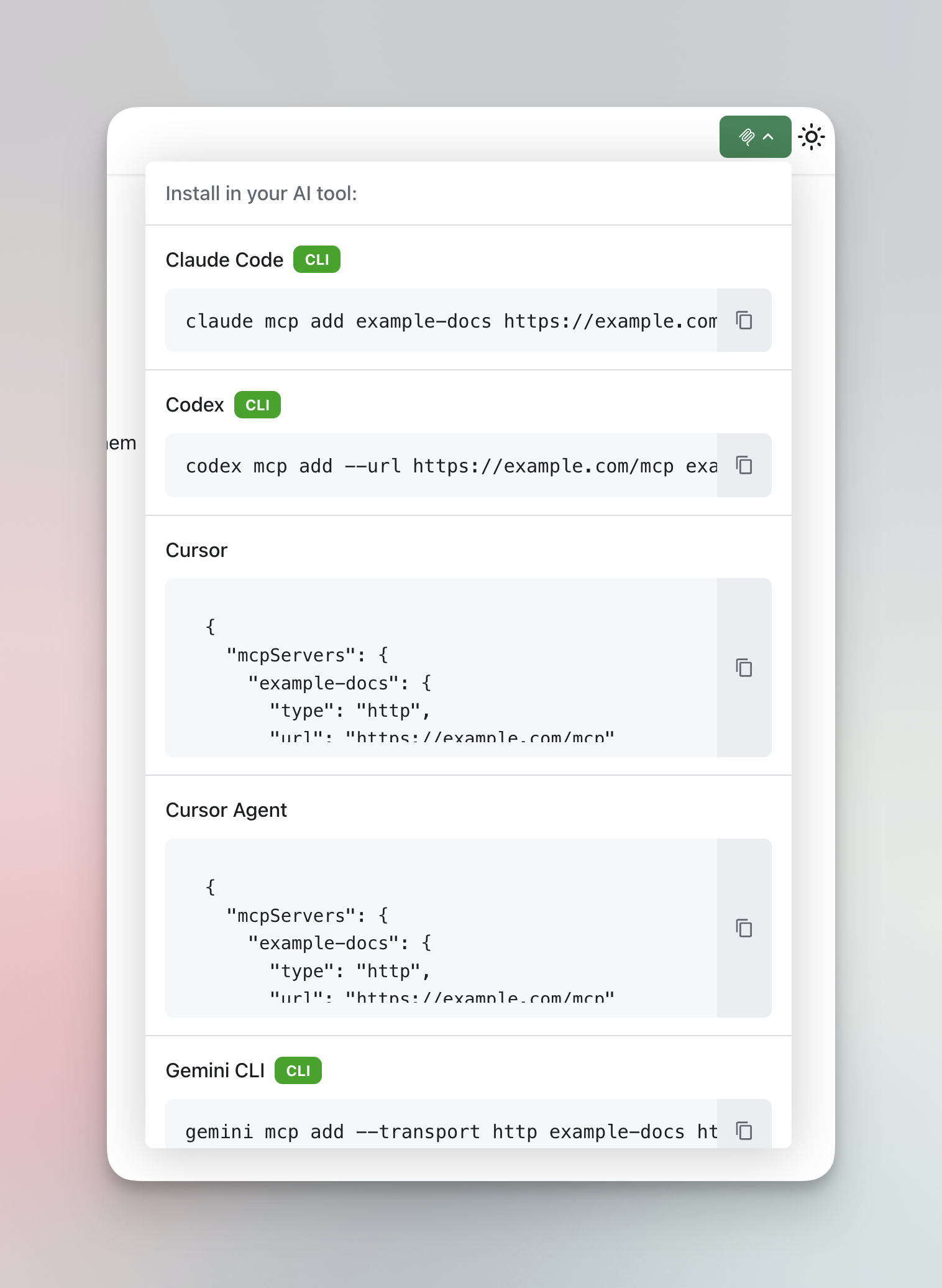
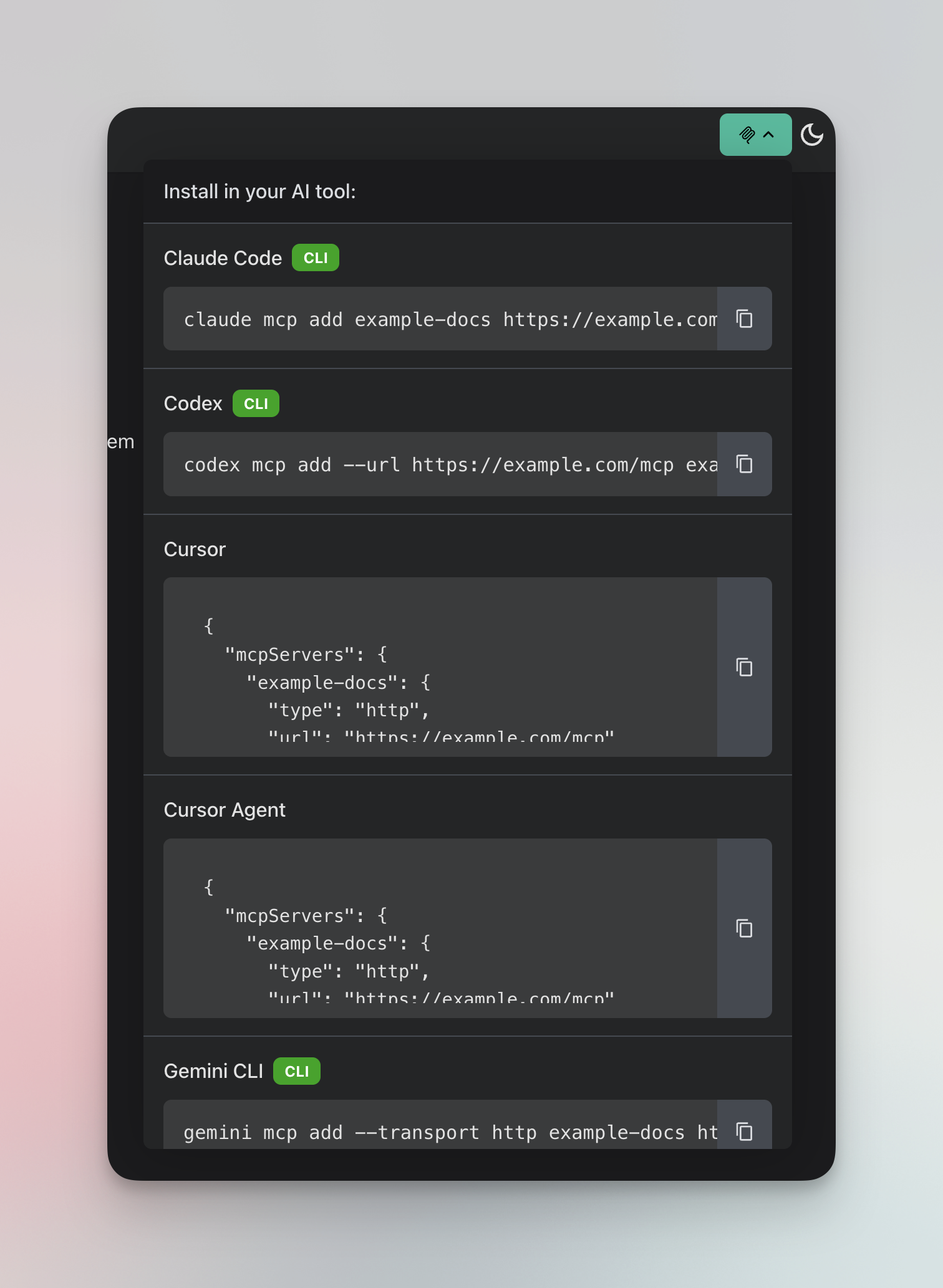
Add a dropdown button to your docs site so users can easily install the MCP server in their AI tool:
import { McpInstallButton } from 'docusaurus-plugin-mcp-server/theme';

function NavbarItems() {
  return <McpInstallButton serverUrl="https://docs.example.com/mcp" serverName="my-docs" />;
}
The button shows a dropdown with copy-to-clipboard configurations for all supported MCP clients.
| Light Mode | Dark Mode |
|---|---|
 |  |
Props:
| Prop | Type | Default | Description |
|---|---|---|---|
serverUrl | string | required | Your MCP server endpoint URL |
serverName | string | required | Name for the MCP server |
label | string | (none) | Button label. If omitted, shows only the MCP icon |
headerText | string | "Choose your AI tool:" | Text shown at the top of the dropdown |
className | string | "" | Optional CSS class |
clients | ClientId[] | All HTTP-capable | Which clients to show |
MCP Tools
The server exposes two tools for AI agents:
docs_search
Search across documentation with relevance ranking. Returns matching documents with URLs, snippets, and relevance scores.
{
  "name": "docs_search",
  "arguments": {
    "query": "authentication",
    "limit": 16
  }
}
| Parameter | Type | Default | Description |
|---|---|---|---|
query | string | required | Search query |
limit | number | 16 | Max results (1-20) |
Response includes:
- Full URL for each result (use with
docs_fetch) - Title and relevance score
- Snippet of matching content
- Matching headings
docs_fetch
Retrieve full page content as markdown. Use this after searching to get the complete content of a specific page.
{
  "name": "docs_fetch",
  "arguments": {
    "url": "https://docs.example.com/docs/authentication"
  }
}
| Parameter | Type | Description |
|---|---|---|
url | string | Full URL of the page (from search results) |
Response includes:
- Page title and description
- Table of contents with anchor links
- Full markdown content
Plugin Options
| Option | Type | Default | Description |
|---|---|---|---|
outputDir | string | 'mcp' | Output directory for MCP artifacts (relative to build dir) |
contentSelectors | string[] | ['article', 'main', ...] | CSS selectors for finding content |
excludeSelectors | string[] | ['nav', 'header', ...] | CSS selectors for elements to remove |
minContentLength | number | 50 | Minimum content length to consider a page valid |
server.name | string | 'docs-mcp-server' | Name of the MCP server |
server.version | string | '1.0.0' | Version of the MCP server |
excludeRoutes | string[] | ['/404*', '/search*'] | Routes to exclude (glob patterns) |
indexers | string[] | false | ['flexsearch'] | Indexers to run during build. Use false to disable. Supports built-in ('flexsearch'), relative paths, or npm packages. |
search | string | 'flexsearch' | Search provider module for runtime queries. Supports built-in ('flexsearch'), relative paths, or npm packages. |
Default Selectors
Content selectors (in priority order):
['article', 'main', '.main-wrapper', '[role="main"]'];
Exclude selectors:
[
  'nav',
  'header',
  'footer',
  'aside',
  '[role="navigation"]',
  '[role="banner"]',
  '[role="contentinfo"]',
];
Custom Providers
The plugin uses a two-phase provider model: indexers run at build time to process documents, and search providers handle queries at runtime. Both are pluggable.
ContentIndexer
Implement ContentIndexer to push documents to an external system during build:
import type { ContentIndexer, ProviderContext, ProcessedDoc } from 'docusaurus-plugin-mcp-server';

export default class AlgoliaIndexer implements ContentIndexer {
  readonly name = 'algolia';

  shouldRun(): boolean {
    return process.env.ALGOLIA_SYNC === 'true';
  }

  async initialize(context: ProviderContext): Promise<void> {
    console.log(`[Algolia] Initializing for ${context.baseUrl}`);
  }

  async indexDocuments(docs: ProcessedDoc[]): Promise<void> {
    // Push docs to Algolia
  }

  async finalize(): Promise<Map<string, unknown>> {
    // No local artifacts needed
    return new Map();
  }
}
SearchProvider
Implement SearchProvider to delegate runtime search to an external service:
import type {
  SearchProvider,
  ProviderContext,
  SearchOptions,
  SearchResult,
} from 'docusaurus-plugin-mcp-server';

export default class GleanSearchProvider implements SearchProvider {
  readonly name = 'glean';

  private apiEndpoint = process.env.GLEAN_API_ENDPOINT!;
  private apiToken = process.env.GLEAN_API_TOKEN!;

  async initialize(context: ProviderContext): Promise<void> {
    if (!this.apiEndpoint || !this.apiToken) {
      throw new Error('GLEAN_API_ENDPOINT and GLEAN_API_TOKEN required');
    }
  }

  isReady(): boolean {
    return !!this.apiEndpoint && !!this.apiToken;
  }

  async search(query: string, options?: SearchOptions): Promise<SearchResult[]> {
    // Call Glean Search API and transform results
    return [];
  }
}
Configuring Custom Providers
// docusaurus.config.js
module.exports = {
  plugins: [
    [
      'docusaurus-plugin-mcp-server',
      {
        // Run both the built-in FlexSearch indexer and a custom one
        indexers: ['flexsearch', './my-algolia-indexer.js'],
        // Use a custom search provider at runtime
        search: '@myorg/glean-search',
      },
    ],
  ],
};
Server Configuration
For the runtime adapters:
| Option | Type | Required | Description |
|---|---|---|---|
docsPath | string | Yes* | Path to docs.json |
indexPath | string | Yes* | Path to search-index.json |
docs | object | Yes* | Pre-loaded docs (Cloudflare) |
searchIndexData | object | Yes* | Pre-loaded search index (Cloudflare) |
name | string | Yes | Server name |
version | string | No | Server version |
baseUrl | string | No | Base URL for full page URLs in responses |
instructions | string | No | Instructions describing how to use the server, surfaced to MCP clients in the initialize response |
tools | object | No | Per-tool overrides. Supports docs_search.description and docs_fetch.description to customize tool descriptions |
*Use either file paths (Node.js) or pre-loaded data (Workers).
Example with extended configuration:
export default createVercelHandler({
  docsPath: path.join(__dirname, '../build/mcp/docs.json'),
  indexPath: path.join(__dirname, '../build/mcp/search-index.json'),
  name: 'my-docs',
  baseUrl: 'https://docs.example.com',
  instructions: 'Search the Acme product docs. Use docs_search to find pages, then docs_fetch for full content.',
  tools: {
    docs_search: { description: 'Search the Acme product documentation.' },
    docs_fetch: { description: 'Fetch the full markdown of an Acme docs page.' },
  },
});
Verifying Your Build
After running npm run build, use the included CLI to verify the MCP output:
npx docusaurus-mcp-verify
This checks that:
- All required files exist (
docs.json,search-index.json,manifest.json) - Document structure is valid
- The MCP server can initialize and load the content
You can specify a custom build directory:
npx docusaurus-mcp-verify ./custom-build
Example output:
🔍 MCP Build Verification
==================================================
Build directory: /path/to/your/project/build

📁 Checking build output...
   ✓ Found 42 documents
   ✓ All required files present
   ✓ File structure valid

🚀 Testing MCP server...
   ✓ Server initialized with 42 documents

✅ All checks passed!
Testing the Endpoint
The easiest way to test your MCP server is with the official MCP Inspector:
npx @modelcontextprotocol/inspector
This opens a visual interface where you can:
- Connect to your server URL
- Browse available tools
- Execute tool calls interactively
- View responses in a formatted display
Alternatively, test with curl:
# List available tools
curl -X POST https://docs.example.com/mcp \
  -H "Content-Type: application/json" \
  -d '{"jsonrpc":"2.0","id":1,"method":"tools/list"}'

# Search documentation
curl -X POST https://docs.example.com/mcp \
  -H "Content-Type: application/json" \
  -d '{
    "jsonrpc":"2.0",
    "id":2,
    "method":"tools/call",
    "params":{
      "name":"docs_search",
      "arguments":{"query":"getting started"}
    }
  }'
How It Works

The plugin operates in two phases:
Build Time: During docusaurus build, the plugin's postBuild hook processes all rendered HTML pages, extracts content, converts to markdown, builds a FlexSearch index, and outputs artifacts to build/mcp/.
Runtime: A serverless function loads the pre-built artifacts and handles MCP JSON-RPC requests from AI agents. The server is stateless and fast since all indexing happens at build time.
Features
- Full-text Search - FlexSearch-powered search with relevance ranking
- Page Retrieval - Get complete page content as clean markdown
- Platform Adapters - Pre-built adapters for Vercel, Netlify, and Cloudflare Workers
- CORS Support - All adapters include CORS headers for browser-based clients
- Build-time Processing - Extracts content from rendered HTML, capturing React component output
- Zero Runtime Docusaurus Dependency - The MCP server runs independently
Local Development
Run a local MCP server for testing using the built-in Node adapter:
// mcp-server.mjs
import { createNodeServer } from 'docusaurus-plugin-mcp-server/adapters';

createNodeServer({
  docsPath: './build/mcp/docs.json',
  indexPath: './build/mcp/search-index.json',
  name: 'my-docs',
  baseUrl: 'http://localhost:3000',
}).listen(3456, () => {
  console.log('MCP server at http://localhost:3456');
});
The Node adapter handles CORS, preflight requests, and health checks (GET) automatically.
Connect Claude Code:
claude mcp add --transport http my-docs http://localhost:3456
API Reference
Main Exports
import {
  // Docusaurus plugin (default export)
  mcpServerPlugin,

  // MCP Server class
  McpDocsServer,

  // Tool definitions
  docsSearchTool,
  docsFetchTool,

  // Utilities
  htmlToMarkdown,
  extractContent,
  extractHeadingsFromMarkdown,
  buildSearchIndex,

  // Provider types (for custom implementations)
  loadIndexer,
  loadSearchProvider,
  FlexSearchIndexer,
  FlexSearchProvider,

  // Default options
  DEFAULT_OPTIONS,
} from 'docusaurus-plugin-mcp-server';
Adapter Exports
import {
  createVercelHandler,
  createNetlifyHandler,
  createCloudflareHandler,
  createNodeServer,
  createNodeHandler,
  generateAdapterFiles,
} from 'docusaurus-plugin-mcp-server/adapters';
createNodeServer(options)— Creates a complete Node.js HTTP server for local development. Returns anhttp.Serverready to.listen().createNodeHandler(options)— Creates a request handler function compatible withhttp.createServer(). Use this when you need to integrate with an existing server.
Theme Exports
import {
  McpInstallButton,
  type McpInstallButtonProps,
  useMcpRegistry,
  createDocsRegistry,
  createDocsRegistryOptions,
  type McpConfig,
} from 'docusaurus-plugin-mcp-server/theme';
McpInstallButton— Dropdown button for users to install the MCP server in their AI tool.useMcpRegistry()— React hook that returns the MCP config registry from plugin global data. Returnsundefinedif the plugin is not installed.createDocsRegistry(config)— Creates a pre-configuredMCPConfigRegistryfor documentation servers.createDocsRegistryOptions(config)— Returns registry options without creating the registry.McpConfig— Type for{ serverUrl: string; serverName: string }.
Requirements
- Node.js >= 20
- Docusaurus 3.x
License
MIT