
SOC AutoPilot
Santhosh595/SOC-AutoPilot
Triagem autônoma de alertas Splunk: de 45 min para 2 min com IA
Ver no GitHubAgente autônomo de IA que investiga alertas de segurança do Splunk em menos de 2 minutos, reduzindo drasticamente o tempo de triagem manual. Integra-se nativamente ao Splunk via MCP, classifica ameaças com IA, detecta falsos positivos e gera regras de detecção automaticamente, com base de conhecimento auto-aprendente.
Instalação
npx convez-ai Santhosh595/SOC-AutoPilot1 comando no terminal: detecta o formato do repositório (marketplace ou plugin avulso) e instala via Claude Code. Requer Node 18+ e o Claude Code instalado.
Métricas
Casos de uso
- Triagem autônoma de alertas de segurança em ambientes Splunk
- Detecção e classificação de falsos positivos em SOC
- Geração automática de regras de detecção (SPL) para novos padrões de ameaça
Veredito

Ferramenta bem arquitetada para SOCs sobrecarregados, com pipeline de investigação transparente e suporte a múltiplos backends de IA. Excelente para automação de primeira linha, mas requer Splunk em produção para máximo impacto — o modo demo é adequado apenas para testes iniciais.
README
A tradução para o português deste README ainda está na fila.
SOC AutoPilot
SOC AutoPilot — Autonomous AI agent that investigates Splunk security alerts in under 2 minutes
The Problem
SOC teams are overwhelmed by alert fatigue: analysts receive an average of 2,992 alerts per day, and 42% go uninvestigated. Breaches often begin in that gap, when real threats are buried under repetitive noise, false positives, and manual triage backlogs. SOC AutoPilot helps close the gap by automating the first-pass investigation workflow.
How It Works
- Extract IOCs from the alert description, including IP addresses, usernames, and domains.
- Check the knowledge base for similar past investigations and known false-positive patterns.
- Pull live logs from Splunk using Splunk MCP-compatible REST queries.
- Classify the threat with AI using Gemini Flash and available log context.
- Generate an investigation report with findings, verdict, severity, recommended actions, and SPL.
- Save the investigation to the local knowledge base for future learning and analyst feedback.
Demo
[Demo GIF coming soon]
YouTube video: Coming soon
Features
- Autonomous 6-step investigation pipeline
- Splunk MCP Server integration for live log queries
- Gemini Flash AI for threat classification
- Self-learning knowledge base (remembers past investigations)
- False positive detection from historical patterns
- Auto-generates SPL detection rules
- Analyst feedback loop
- Supports multiple AI backends (Gemini, Groq, Ollama)
Architecture
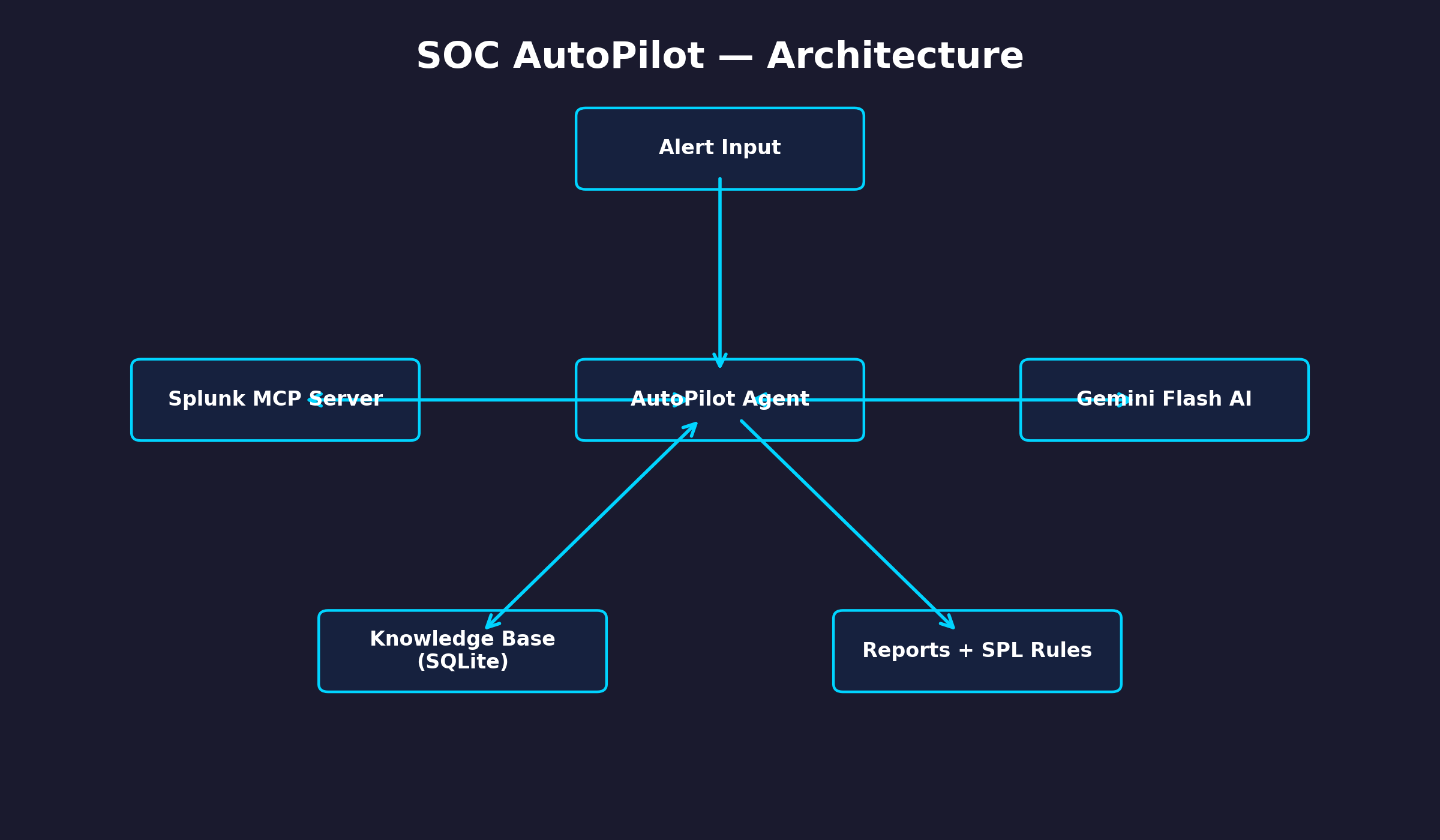
Splunk Integration
SOC AutoPilot connects to Splunk via the Splunk REST API (/services/search/jobs) using Bearer token authentication. This is compatible with the Splunk MCP Server app on Splunkbase, which exposes the same REST endpoints. The mcp Python package is included in requirements.txt for future native MCP transport support.
Setup
Prerequisites
- Python 3.10+
- Git
1. Clone Repo
git clone https://github.com/Santhosh595/SOC-AutoPilot.git
cd soc-autopilot
2. Run Installer
install.bat
3. Configure Environment
Copy .env.example to .env and fill in your credentials:
copy .env.example .env   # Windows
# or
cp .env.example .env     # macOS / Linux
GEMINI_API_KEY=your_key_here
SPLUNK_TOKEN=your_token_here
Get a free Gemini API key from Google AI Studio.
No keys? No Splunk? The repo ships with
demo_mode: trueinconfig.yaml. Runpython main.py testandpython main.py investigate "..."immediately — all Splunk calls use built-in sample data and the LLM step is skipped gracefully.
4. (Optional) Connect Splunk
Set demo_mode: false in config.yaml, install the Splunk MCP Server app from
Splunkbase, then add your Splunk token to .env.
Usage
Test Splunk connectivity:
python main.py test
Investigate an alert:
python main.py investigate "Brute force attempt from 185.220.101.45 against admin account"
View investigation history:
python main.py history
Add analyst feedback:
python main.py feedback --id 1 --verdict FALSE_POSITIVE --note "Known scanner"
AI Backends
| Backend | Status | Setup |
|---|---|---|
| Gemini | ✅ Default | Add GEMINI_API_KEY to .env, set ai.provider: gemini in config.yaml. |
| Foundation-sec-8B | ✅ Supported via Ollama | Install Ollama, run ollama pull hf.co/bartowski/Cisco-Foundation-Sec-8B-GGUF, set ai.provider: ollama in config.yaml. |
| Groq | 🔜 Planned | Add Groq API key and set ai.provider: groq in config.yaml. |
Notifications
SOC AutoPilot can automatically alert you over Slack and/or Email when a MALICIOUS threat with CRITICAL or HIGH severity is detected.
Slack (free)
- In your Slack workspace go to Settings → Manage apps → Incoming Webhooks.
- Create a new webhook, pick a channel, and copy the URL.
- Paste the URL into
config.yaml:notifications: slack_webhook: "https://hooks.slack.com/services/T.../B.../xxxx"
Email (Gmail)
- Enable 2-Step Verification on your Google account.
- Go to myaccount.google.com/apppasswords and generate an App Password for "Mail".
- Add to
.env:SMTP_PASSWORD=your_app_password_here - Fill in
config.yaml:notifications: email_to: "soc-team@company.com" email_from: "your.gmail@gmail.com" smtp_host: smtp.gmail.com smtp_port: 587
Note: Both channels are optional. If neither is configured the investigation still completes — notifications are simply skipped.
Built For
Splunk Agentic Ops Hackathon 2026 — Security Track
License
MIT